




As we proved yesterday, Unisynth is a hard synth to beat, even against the most legendary plugins in the game.
Today, we’re pushing it even further by comparing Unisynth vs Spire by Reveal Sound.
As the undefeated champ, Unisynth just can’t be touched… will that continue today?
Well, let’s see, because I’m breaking it all down and covering things like:
- Workflow layout ✓
- Sound generation ✓
- Oscillator design ✓
- Synthesis types ✓
- Waveforms ✓
- Unison controls ✓
- Glide behavior ✓
- Filter options ✓
- Routing flexibility ✓
- Modulation depth ✓
- FX section ✓
- Wavetable editing ✓
- So much more ✓
After the breakdown, you’ll be able to clearly see which synth gives you more power, more flexibility, and a much faster path to the sounds you actually want.
And, even more importantly, you’ll see why one of these plugins feels much more built for the way modern producers really work today.
Plus, you’ll get an exclusive look into what makes Unisynth the most revolutionary AI plugin to ever hit the scene.
So, if you want to create better sounds, work faster, and really understand why Unisynth is dominating right now, stay tuned, because you won’t be disappointed.
Let’s get into it…
Table of Contents
- Unisynth: The AI-Powered Synth Making MAJOR Waves
- Spire by Reveal Sound: Traditional Synth
- Unisynth vs Spire by Reveal Sound: Top Features & Functions
- Workflow Layout and What You See First
- Oscillator Architecture: Breaking it Down
- Oscillator Modes, Waveforms & Raw Timbre Range
- Filters, Filter Types, and Routing Flexibility
- Modulation Depth, Assignment, and Motion Design
- Built-In Effects, Master Processing & More
- Wavetable Editing, Sampling & Custom Sound Design
- Unisynth vs Spire by Reveal Sound: Who Is the Ultimate Champ?
Unisynth: The AI-Powered Synth Making MAJOR Waves
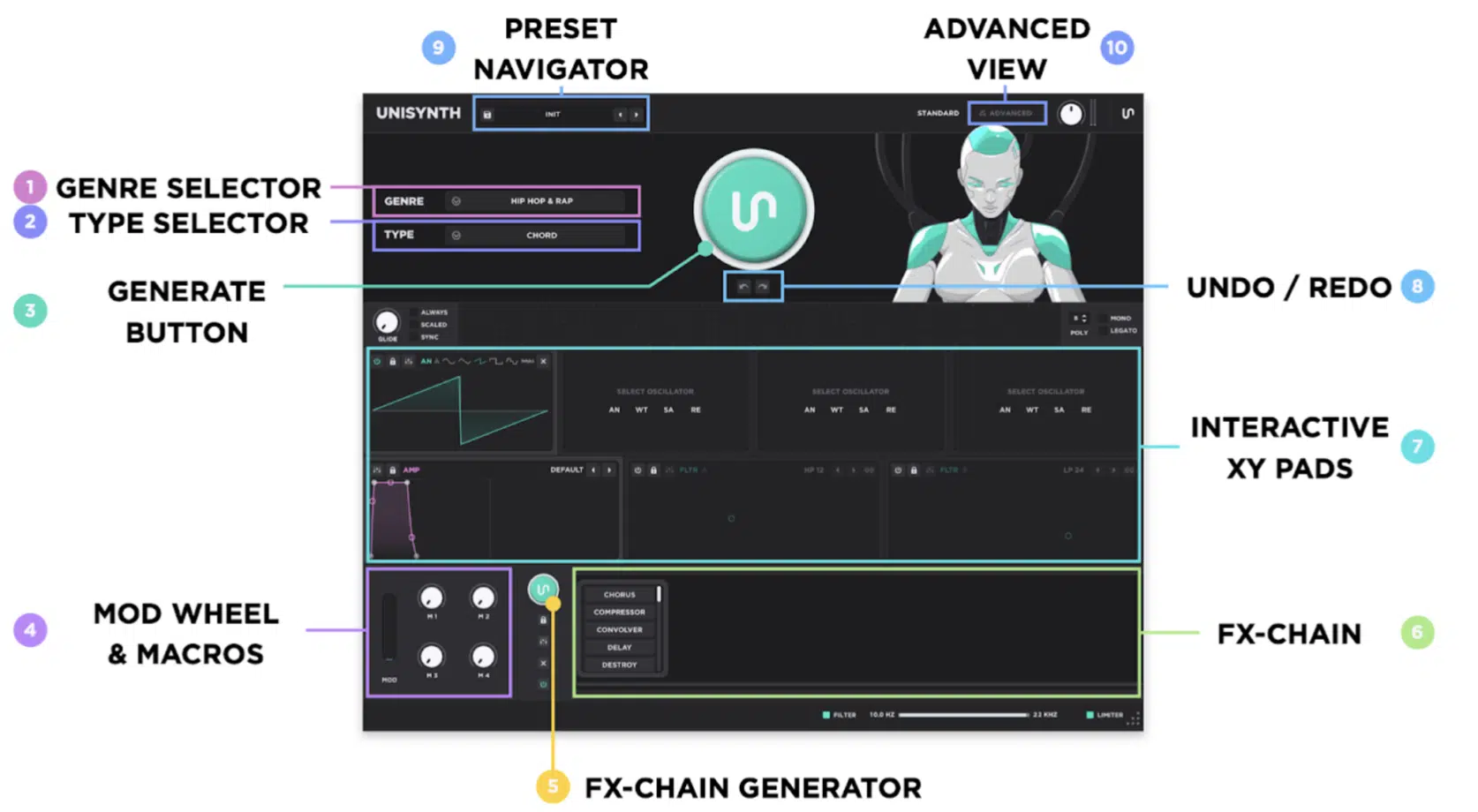
Unisynth is the new kid on the block, but it’s already being considered the #1 synth in the entire world.
It’s a revolutionary AI synth that’s not only super complex 一 but also the first and only AI, genre-specific generative synth.
Crazy when you think about how most synths still expect you to start from a blank patch or a preset browser, am I right?
You’ll get to choose from 32 genres and 6 sound types, so whether you need a trap bass, an ambient pad, or a cinematic chord sound, you got it.
From there, the main Patch Generator builds the sound itself, while the FX-Chain Generator can spin up alternate processing around it.
Meaning, you’re not only getting a patch quickly, you’re getting multiple tonal directions as well.
Then it opens up into a two-level workflow:
- Standard View gives you all the essentials
- Advanced View gives you all the deep stuff
This dynamic duo setup is why Unisynth feels smooth and simple, yet is capable of satisfying even the most advanced sound design professionals in the game.
Under the hood, it’s loaded with 4 hybrid oscillators that can each switch between Analog, Wavetable, Sampler, and Resonator.
Plus, 2 primary filters with 95 filter options, 6 routing mixers, 2 global filters, 1 master limiter, and up to 48 simultaneous modulators (talk about deep!).
It also gives you 80 generators spread throughout the entire synth.
That’s huge because you can generate a full patch in one click or get much more specific and generate only what you think needs tweaking.
Meaning, you can switch up just one oscillator, one filter, one modulator, one matrix behavior, or one effect if the rest of the sound is already sitting exactly where you want.
And don’t forget about the built-in wavetable editor, the 350+ wavetables, the 1,250+ samples, and 25 FX.
Bottom line, it’s one of the most flexible, versatile, game-changing plugins around.
Spire by Reveal Sound: Traditional Synth
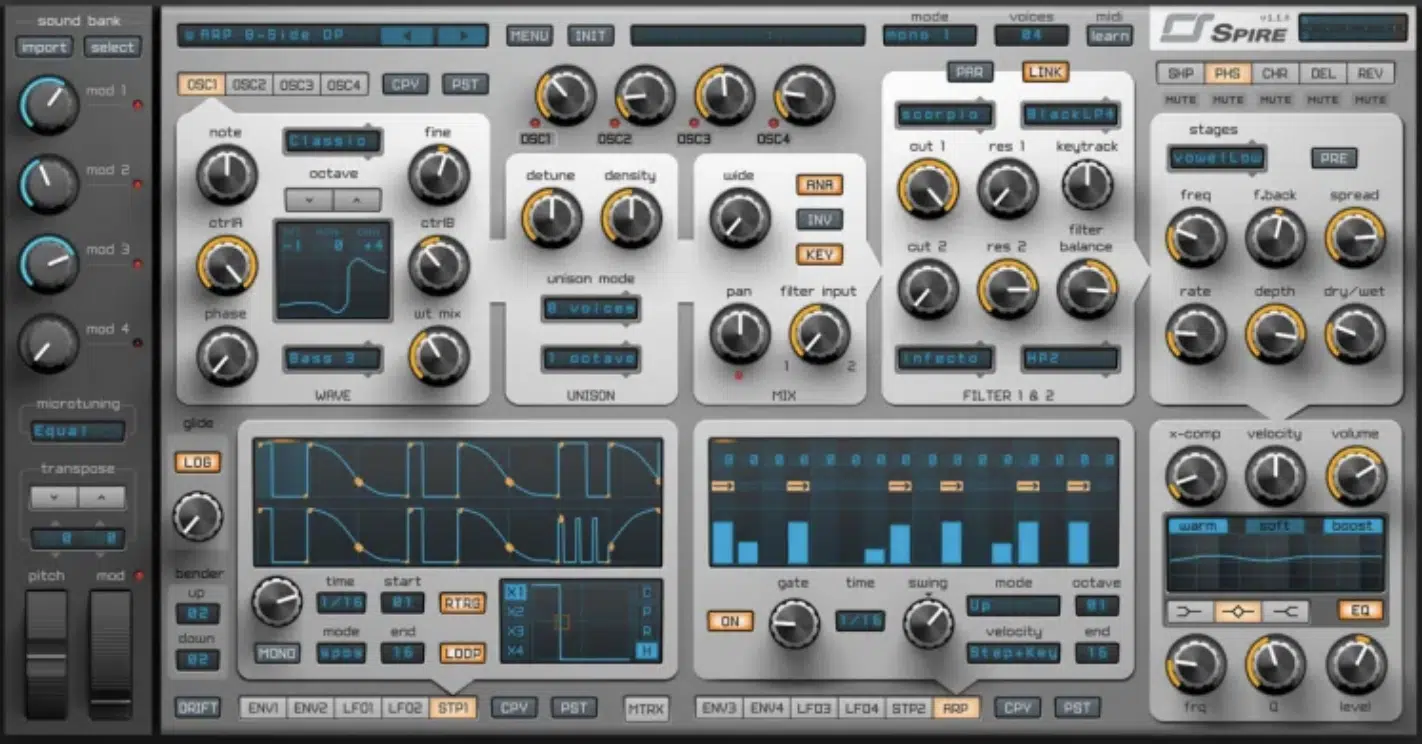
Spire is a much more traditional synth built around strong raw tone, classic synth programming, and that polished electronic sound a lot of producers already know well.
At the center you’ll find 4 multimode polymorphing oscillators 一 essentially Reveal Sound’s own proprietary wavetable-style engine.
Those oscillators use Wave + WT Mix with 49 available waveforms to shape the base tone.
Each oscillator also gets its own 9-voice unison engine, along with chord and octave spreading, which is why it’s known for those huge EDM-style chord sounds.
Then you’ve got 2 multimode filters, 4 macros, 4 envelopes, 4 LFOs with morphing shapes, and a 15-slot matrix, where each slot can hold 2 sources and 4 targets.
Spire also includes 2 steppers, an arpeggiator, onboard FX, X-Comp, a 3-band EQ, and more than 1000 factory presets.
So, really it’s just for those who enjoy working in that more manual, preset-and-programming-heavy style.
The difference, though, is that Spire still leans on you to shape the result more directly from the oscillator and filter level forward, rather than genre-specific customization.
So, while Spire is definitely still a capable synth for classic wavetable-style work, it already feels narrower in synthesis type, older in workflow, and less complete overall once you place it next to what Unisynth can do, for real.
Unisynth vs Spire by Reveal Sound: Top Features & Functions
Now that we broke down what each synth is all about on the surface, let’s dive much deeper. We’ll be covering things like Unisynth vs Spire workflow, generation system, deeper sound-design abilities, and all the little details that shape the entire beat-making experience (from start to finish). You’ll be able to see which synth feels more current, reliable, flexible, and useful overall. Let’s get into it.
Workflow Layout and What You See First
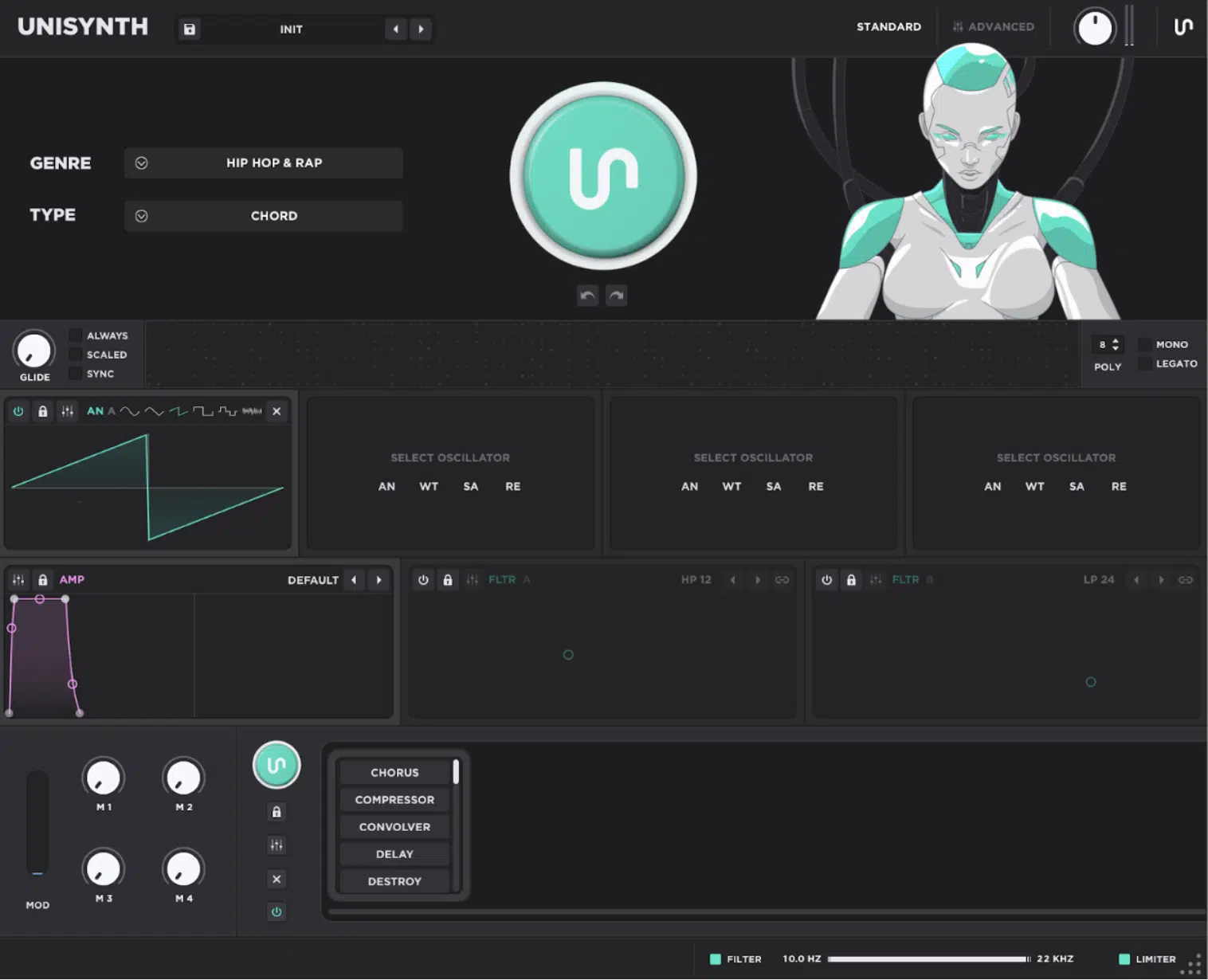
The front end of a synth tells you a LOT about how it wants you to work… Some pull you into the music right away, while others push you straight into technical setup.
With Unisynth, Standard View is split into a Generator Panel, Synth Panel, and FX Panel, so you’ve got the:
- Genre selector
- Type selector
- Big Generate button
- Undo/Redo
- 4 macros
- Mod wheel
- Global high-pass / low-pass strip
- Limiter
It’s a super smart layout because you simply open Unisynth, choose something like Hip Hop + Chord or Ambient + Pad, and hit generate.
Then boom: you can start shaping things to perfection right off rip instead of having to build the entire patch from zero.
It also really helps that the global filters and limiter are right there on the front end because if the sound is just a little too bright, too thick, or peaking too hard, you can simply rein it in without diving through extra pages.
And when you want that complex control, Advanced view opens into Engine, Effects, Matrix, and Global tabs (which we’ll break down in a minute).
Spire, on the other hand, comes at you from a more classic angle.
It drops you directly into oscillator, filter, modulation, and effects programming from the first screen instead of guiding you through a genre-and-role-first workflow.
That kind of layout can still be great if you already know exactly what you want to build, but Unisynth gets the edge here because it doesn’t just help you work faster…
It can also do a big chunk of the early sound-finding/tweaking for you to so you don’t have to be a professional programmer to get things done.
Oscillator Architecture: Breaking it Down
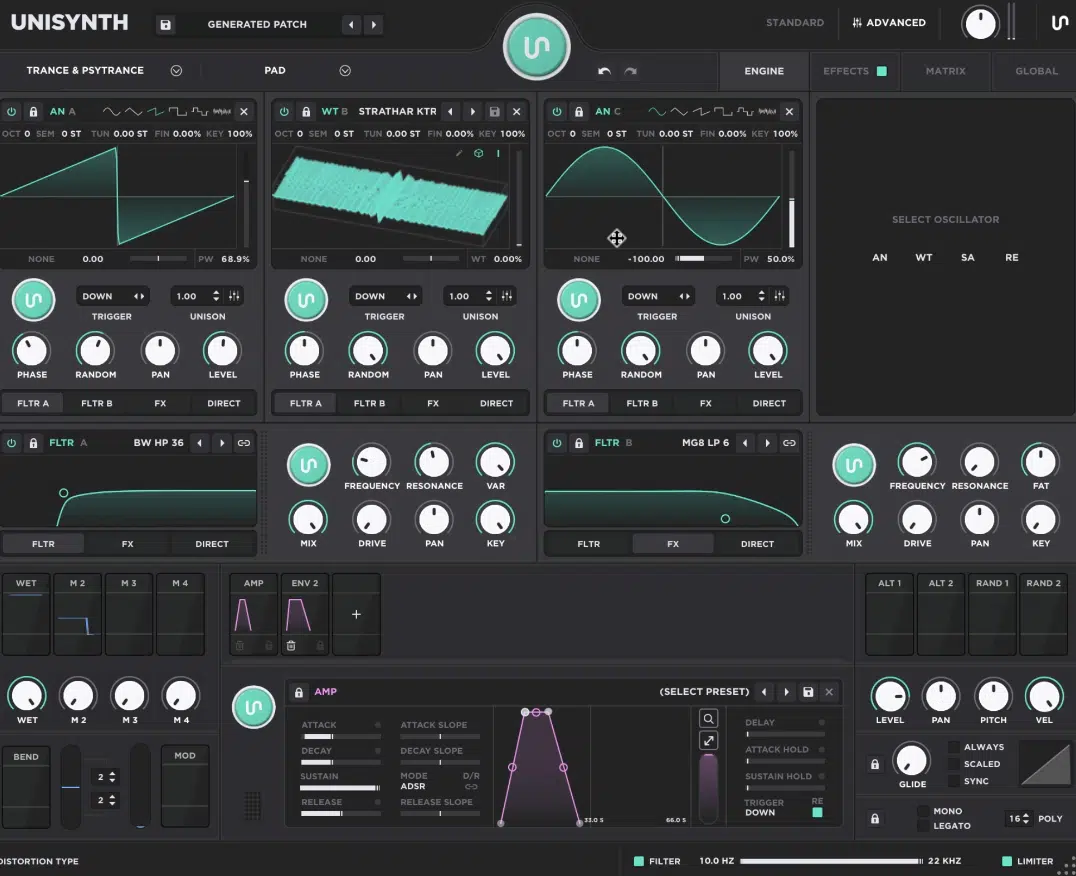
Next up, let’s talk about Unisynth vs Spire oscillator architecture and capabilities because it’s really the backbone of any synth.
It tells you exactly what kind of raw sound material you can actually build from before filters, effects, and modulation start reshaping it.
Unisynth goes much wider here because its 4 oscillators are genuinely hybrid…
This means each one can switch between:
- AN for analog-style synthesis
- WT for wavetable synthesis
- SA for sample playback
- RE for resonator-based tone creation
That gives you such a broad palette to play around with, regardless of style.
For example, one patch can combine an analog-style oscillator for body, a wavetable oscillator for movement, a sample oscillator for texture or attack, and a resonator for metallic tone, physical-style character, or extra bite.
You’re not just stacking four versions of the same basic sound source — you’re blending four different synthesis families inside one instrument.
When it comes to flexibility, there’s nothing better my friends.
Spire also gives you 4 oscillators, but they’re all built around the same multimode polymorphing concept.
Sure, it’s powerful and consistent, but it’s much closer to a proprietary wavetable engine than a true multi-synthesis setup.
So even before either synth touches its filters or effects, Unisynth is already offering more starting points, layering options, and ways to build sounds that don’t all come from the same core engine.
That wide variety is a huge reason Unisynth feels more complete and limitless overall, because it isn’t just giving you four oscillators.
It’s giving you four much more versatile sound engines to play around with.
Oscillator Modes, Waveforms & Raw Timbre Range
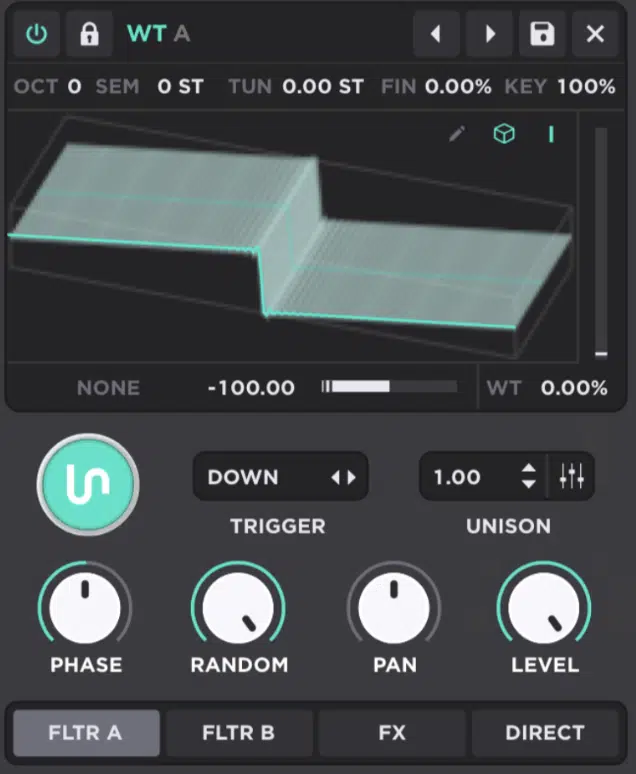
Once you get into the oscillator modes themselves, the difference between Unisynth vs Spire becomes even clearer 一 the raw timbre range really shines through.
The Analog engine in Unisynth alone is deeper than a lot of synths’ entire oscillator section, since it gives you 5 analog-modeled waveforms plus white noise.
Then, adds wave-shaping modes like sync, quantize, bend, squeeze, PWM, Asym, flip, mirror 一 plus cross-oscillator FM, PM, RM, and AM.
So, the complex harmonic behavior is unmatched, and it also adds wavetable position, interpolation, different table views, and direct access to the internal WT Editor.
The Sampler engine adds root note, reverse, normalize, loop, ping-pong, fade, and sample-rate control.
So, if you want more realistic or more experimental sample-based sounds, that’s certainly not a problem at all.
The Resonator engine then takes things somewhere else completely…
It uses another oscillator as an exciter source and gives you excitation level and brightness controls.
This is great for metallic plucks, ringing textures, and physical-style tones that don’t feel like standard wavetable sounds.
Then you have one of my favorite things, which is that Unisynth also gives you more performance control right from the oscillator displays, because each oscillator screen doubles as an XY pad, and the assigned parameters change with the engine:
- Analog gives you warp amount and pulse width
- Wavetable gives you warp amount and wavetable position
- Sampler gives you filter cutoff and fine tune
- Resonator gives you brightness and detune
I mean, you can literally grab the waveform display itself and move the sound in a musical way instead of treating every oscillator page like a static menu (sick, right?).
Spire, on the other hand, stays much more centered around its Wave + WT Mix system and the 49 waveform pool.
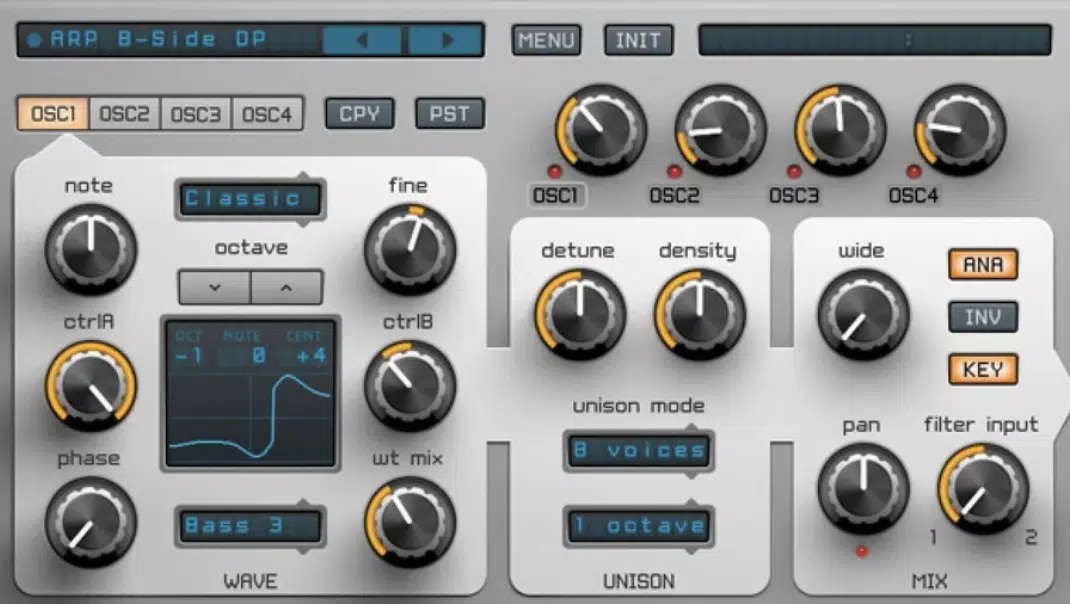
And, oscillator modes like Classic, Noise, FM, AMSync, SawPWM, HardFM, and Vowel as well, of course.
It definitely covers classic synth ground but still doesn’t branch out into the same range of source types, wave-shaping depth, or performance behavior.
So, while Spire can still deliver strong electronic tones (which is really what it’s known for), Unisynth clearly goes further here…
You get more synthesis categories, more advanced oscillator behavior, more immediate hands-on control, and a much wider timbral range inside a single synth.
Filters, Filter Types, and Routing Flexibility
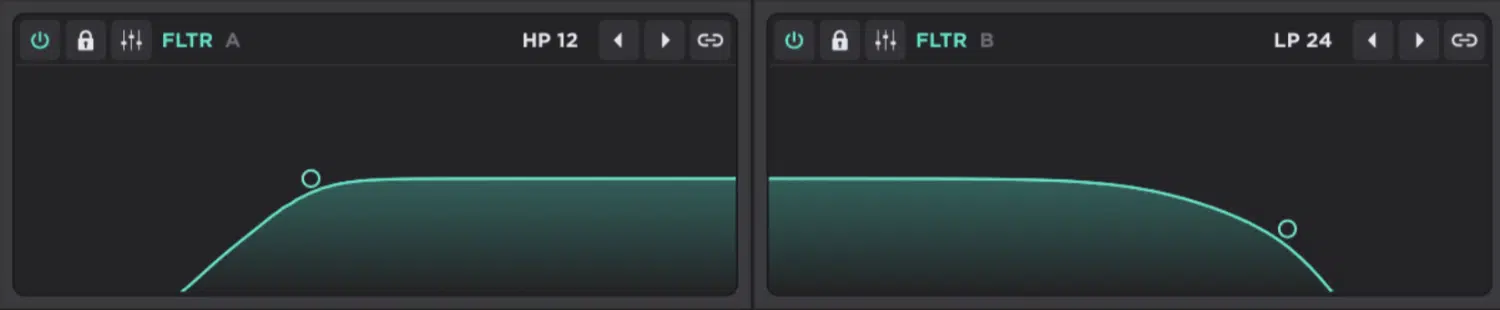
Filters decide how bright, hollow, nasal, sharp, warm, aggressive, or tucked-back the overall tone is going to feel.
And with Unisynth, you’ll get 2 primary filters and each one carries 95 filter options, so we’re not just talking a few basic low-pass, high-pass, and band-pass variations.
The front-end control is dumb fast too, because each filter has an XY display (X controls cutoff and Y controls resonance), and on top of that you can work with Var, Mix, Drive, Pan, and Key.
You’re not only shaping frequency content, you’re also deciding how much of the filtered signal you hear, how hard the filter is driven, how it sits left-to-right, and how strongly it tracks the keyboard.
And the filter families themselves are wide enough to cover a lot of different jobs:
- Comb types for hollow, resonant, metallic tones
- SVF shapes like LP, BP, HP, Notch, Peak, Bell, Low Shelf, High Shelf
- MG and MG8 styles
- Vowel and Vowel 5 for more vocal, formant-like movement
- Pass types
- Modeled analog options like Korg, Oberheim, Half Ladder, Diode Ladder, and Moog Ladder (crazy realistic, by the way)
Then there’s the routing side, which is one of Unisynth’s strongest technical advantages in my opinion…
This is because the filters can run in parallel or series, they can be linked, and the routing bars can be used like little mixers.
Meaning, an oscillator can feed Filter A, Filter B, FX, or Direct, and you can even split that signal between destinations instead of choosing just one path, which is awesome.
That opens the door to much more deliberate signal design, like sending one oscillator mostly into Filter A for body and another mostly into Filter B for a brighter layer.
Even a third straight to FX or Direct if you want it to bypass the filter stage completely, which is why that mixer-style routing gives Unisynth such an open-ended vibe.
Spire, on the flip side, gives you 2 filters with several strong families (Perfecto, Acido, Infecto, Scorpio, Combo, and Shaper) and those cover a respectable range.
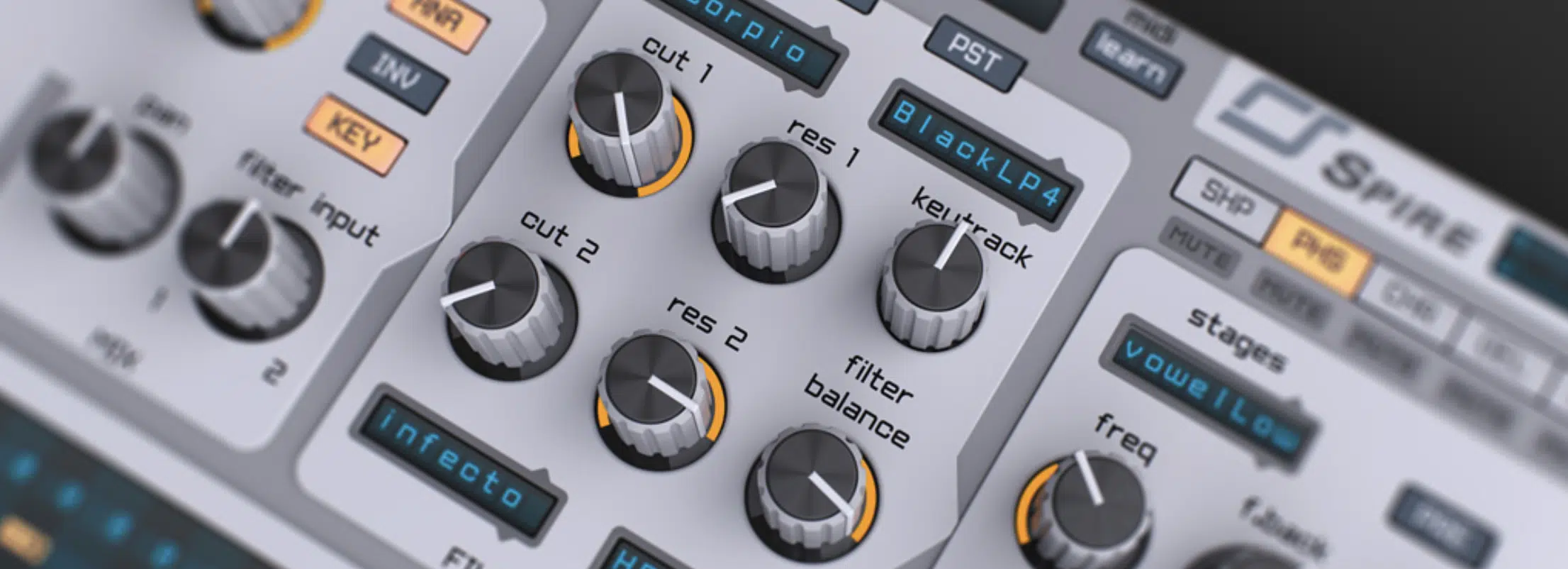
Everything from broad analog/digital hybrids to TB-303-style character, Virus TI-style filtering, comb filtering, and filter-plus-distortion behavior.
It also lets those filters run in parallel or serial, and includes Keytrack, Filter Balance, and LINK, so there’s definitely some useful routing and control there, no doubt.
Still, once you compare 95 filter types, the more flexible control set, and the mixer-style routing, Unisynth pretty clearly gives you the more epic filter playground when comparing Unisynth vs Spire.
Modulation Depth, Assignment, and Motion Design
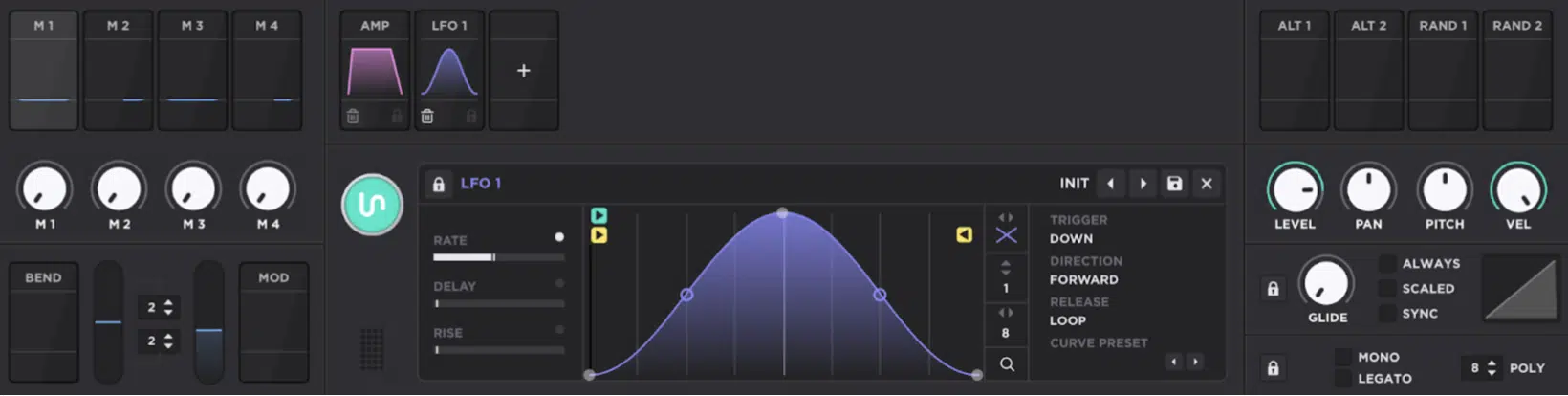
Next up let’s talk about modulation for a second because it’s what turns a static patch into something that breathes, shifts, reacts, and stays interesting over time.
Unisynth is loaded all day here, with support for up to 48 simultaneous modulators and as many as 16 modulators on a single parameter…
So, one destination can be pushed by envelopes, LFOs, macros, random sources, etc., all without the synth running out of room.
Assignment is flexible too of course, because you can use drag-and-drop, right/control-click menus on modulatable controls, floating depth handles, or the full Matrix page.
And side note, that right-click route is especially nice since it exposes extra control over things like assignment choice, curve behavior, and aux modulation.
All without forcing you to jump pages every two seconds, which is a life-saver.
That flexibility is invaluable as it means you can work fast when you want to 一 then get more surgical when you need to (no more being boxed in!).
The modulator types themselves are stacked as well:
- Envelope
- Chaos
- LFO
- Tracker
- Macros
- Bend
- Mod Wheel
- Alt ½
- Random ½
And each one goes further than a basic checkbox version of the same idea, trust me.
For example, Unisynth’s LFOs are fully drawable with gray and purple nodes, adjustable grids, brush shapes, and Forward / Backwards / PingPong / Random direction modes.
Plus, multiple Release behaviors like Loop, Oneshot, Leave, Pause, Break, Hold, and Stop, so you can build anything from simple wobble motion to very deliberate rhythmic movement, and everything in between.
Its Envelopes are also super unique and go way beyond the usual ADSR setup too, with ADSR and ADR modes, Delay, Attack Hold, Sustain Hold, D/R Link, and trigger modes like Down, Up, First, Last, and Down/Up.
Then you have the legendary Chaos, which gives you stepped or interpolated randomness and Tracker that can map note, velocity, off velocity, pitch bend, pressure, and timbre to… well, anything.
Then the Matrix ties the whole system together perfectly, like the cherry on top.
It has sortable routings, polarity, curve, amount, aux source, aux curve, and aux amount, which is exactly why it feels like a serious modulation environment rather than a simplified extra tab.
Spire is still solid here, with 4 envelopes, 4 LFOs, 2 steppers, 4 macros, a 15-slot matrix, and drag-and-drop assignment.
The matrix is no slouch either, since each slot gives you 2 sources and 4 targets.
And, its steppers are actually pretty detailed too, with waveform editing per step, Free / Sync / Spos modes, retriggering, loop start/end points, and per-step editing tools.
So, you can’t really sleep on Spire and say it doesn’t have modulation power.
However, Unisynth still wins this one because the modulation depth is wider, the assignment workflow is more flexible, and the mod types are more varied.
Plus, the whole system is perfect for both beginners and professionals alike, which is almost impossible to find; usually it’s just one or the other.
Built-In Effects, Master Processing & More
A synth’s effects section tells you everything you need to know when it comes to finalizing patch work.
Some synths give you a few nice extras while others can handle the whole tone-shaping/mix-polish side all on their own.
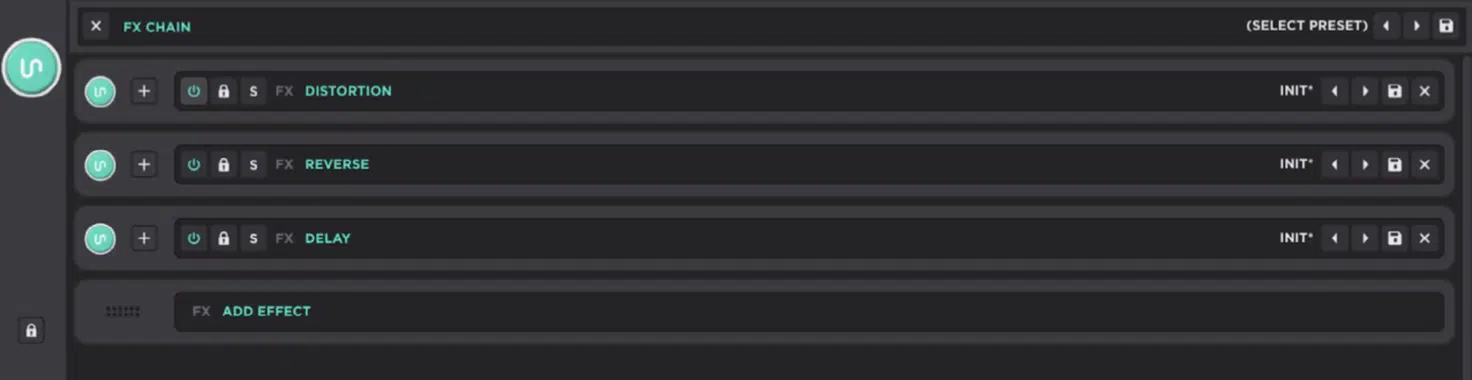
And when it comes to Unisynth’s setup, it’s truly unmatched because of its Serum-style FX rack feel with a dedicated FX-Chain Generator, drag-and-drop chain reordering, effect lock states, saved FX chain presets, and mini controls in Standard View.
Plus, the much deeper Effects tab in Advanced View where you can easily expand, collapse, solo, bypass, swap, and save individual effects all day.
I bet you’re already thinking about the possibilities, am I right?… And whatever you’re thinking, triple it!
You can see the chain clearly, move modules around quickly, generate new directions, and keep building the sound without breaking the flow.
The bigger story, though, is the crazy variety/breadth:
- Delay and Reverse for echoes and reversed repeats
- Distortion & saturation tools like Destroy, Distortion, Mangle, Preamp, Redux, and Tape
- Dynamics like Compressor and OTT
- Tone-shaping tools like the modulatable 8-band EQ and Filter
- Modulation effects like Chorus, Flanger, Phaser, Super Unison, Tremolo, and Vibrato
- Spatial effects like Convolver, Panner, Reverb, and Space
- Cleanup and stereo tools like Utility and Width
And these aren’t just filler names either — the delay has internal modulation, warmth modes, ping-pong behavior, and filtering.
Then you have the distortion section, which includes multiple drive types and pre/post filtering, OTT is fully multiband, the EQ gives you up to 8 nodes, and the reverbs include both algorithmic and convolution options.
And if we’re talking big-picture control, Unisynth doesn’t slack there either with 2 global filters that sit outside the preset structure and 1 master limiter at the end of the chain.
So, you can shape the overall output or catch peaks without leaving Unisynth at all.
On the flip side, Spire’s FX section is much smaller and more traditional.
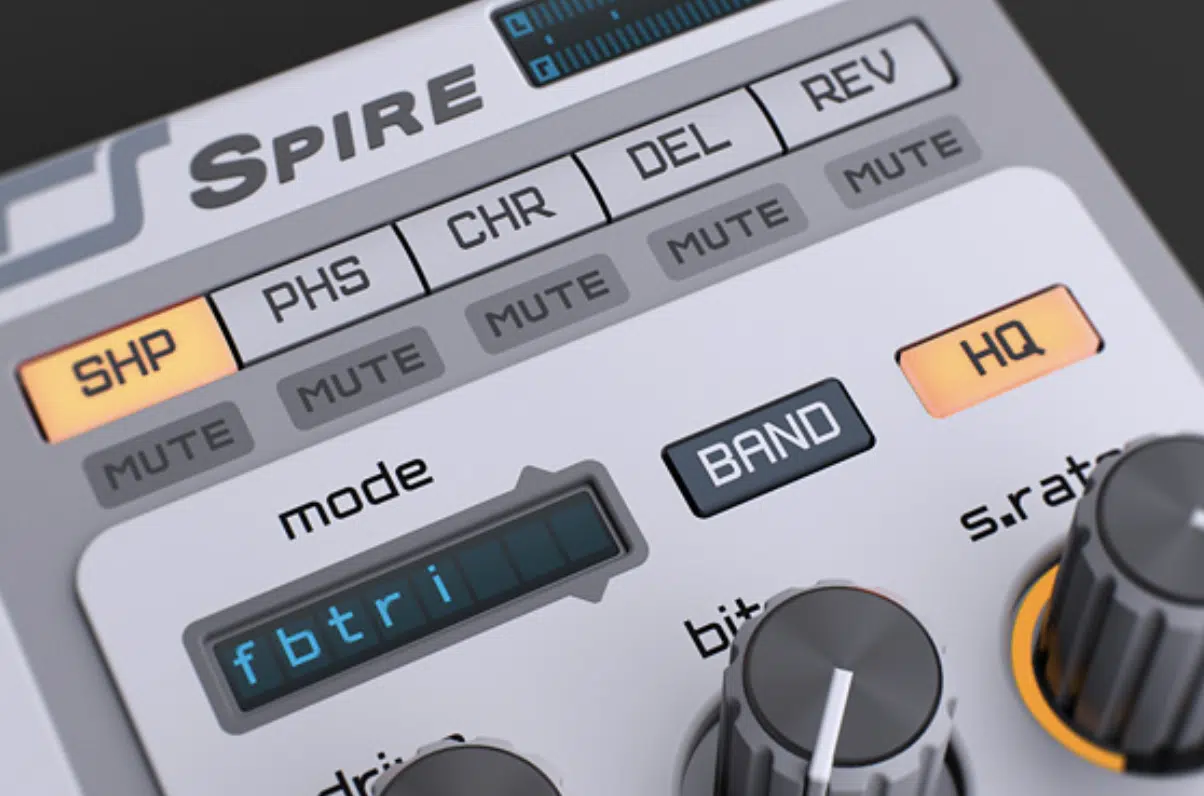
You’ll get the basics: Shaper / Decimator, Phaser / Vowel, Chorus / Flanger, Delay, and Reverb, followed by Master Out processing with X-Comp and a 3-band EQ.
And there are some strong touches there, like 8x oversampling in the Shaper, multiple chorus densities including a JP8000-style J8 mode, several reverb modes such as Plate1, Hall, and Aura, and a multiband upward / downward compressor in X-Comp.
Still, once you compare the actual effect count, the diversity of categories, the amount of modulation and editing inside each effect, and the overall rack workflow, forget it.
Spire’s effects section just can’t hang.
So if the question is which synth between Unisynth vs Spire can take a raw patch further internally, Unisynth gets the W, hands down.
Wavetable Editing, Sampling & Custom Sound Design
When you want to find out whether a synth wants you to build new timbres from the inside out or whether it mostly expects you to work with the tables and sources it already gives you, WT editing, sampling, and custom sound design is where you’ll look.
It helps you see how much control you actually have over the raw material itself, not just the finished, finalized product.
Unisynth has depth for days in this section, including a built-in wavetable editor that lets you add, remove, select, and rearrange frames.
Then, shape the harmonic content of those frames with an FFT partial editor for both amplitude and phase.
That means you’re not just browsing tables…
You can actually take an existing table and change its harmonic balance, redraw the phase relationships, smooth or roughen the transition between frames, and completely reshape the behavior of the wavetable from the inside out.
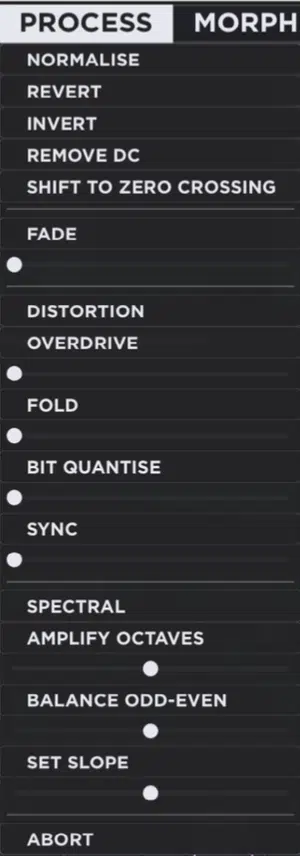
The editor’s menus make that even more serious with the core four, thanks to:
- Generate 一 Gives you Clear, Sine, Saw, Square, Noise, Triangle, and Pulse
- Process 一 Gives you Normalize, Revert, Invert, Remove DC, Shift to Zero Crossing, Fade, Overdrive, Fold, Bit Quantize, Sync, Amplify Octaves, Balance Odd-Even, and Set Slope
- Morph 一 Gives you Crossfade, Spectral, Zero-Phase Fund, and Zero-Phase All
- Sort 一 Lets you reorganize by fundamental magnitude, odd-even balance, spectrum slope, spectrum peak, spectrum average, or simply randomize / revert the table
So if you want to start with one simple single-cycle wave and turn it into a much more complex morphing table, Unisynth’s got you covered on all fronts.
That’s something only a small handful of synths even attempt to offer inside the synth itself, believe me.
It also means you’ll have the freedom to rebuild the harmonic content of a wavetable however you’d like… You’re not just tweaking it around the edges only.
This is why Unisynth is in a league of its own because that level of control is completely different from simply choosing a new table from a menu and calling it a day.
And that editor is only part of the story, because, as we touched upon, Unisynth also has a dedicated Sampler engine with root, reverse, normalize, loop, ping-pong, fade, and sample-rate control.
Plus, a separate Resonator engine that uses another oscillator as an exciter source 一 so custom sound design in Unisynth is never limited to wavetable work alone.
Spire, on the other hand, has Wave + WT Mix and a strong oscillator section, yes.
But, it really doesn’t give you this kind of built-in frame-level wavetable editing, FFT harmonic editing, sampler-engine depth, or resonator-engine depth.
That’s a huge distinction, because Spire lets you choose and shape waves, while Unisynth lets you get inside the wave itself and rebuild it.
That alone puts Unisynth on a completely different level for advanced custom sound design in this Unisynth vs Spire debate.
Unisynth vs Spire by Reveal Sound: Who Is the Ultimate Champ?
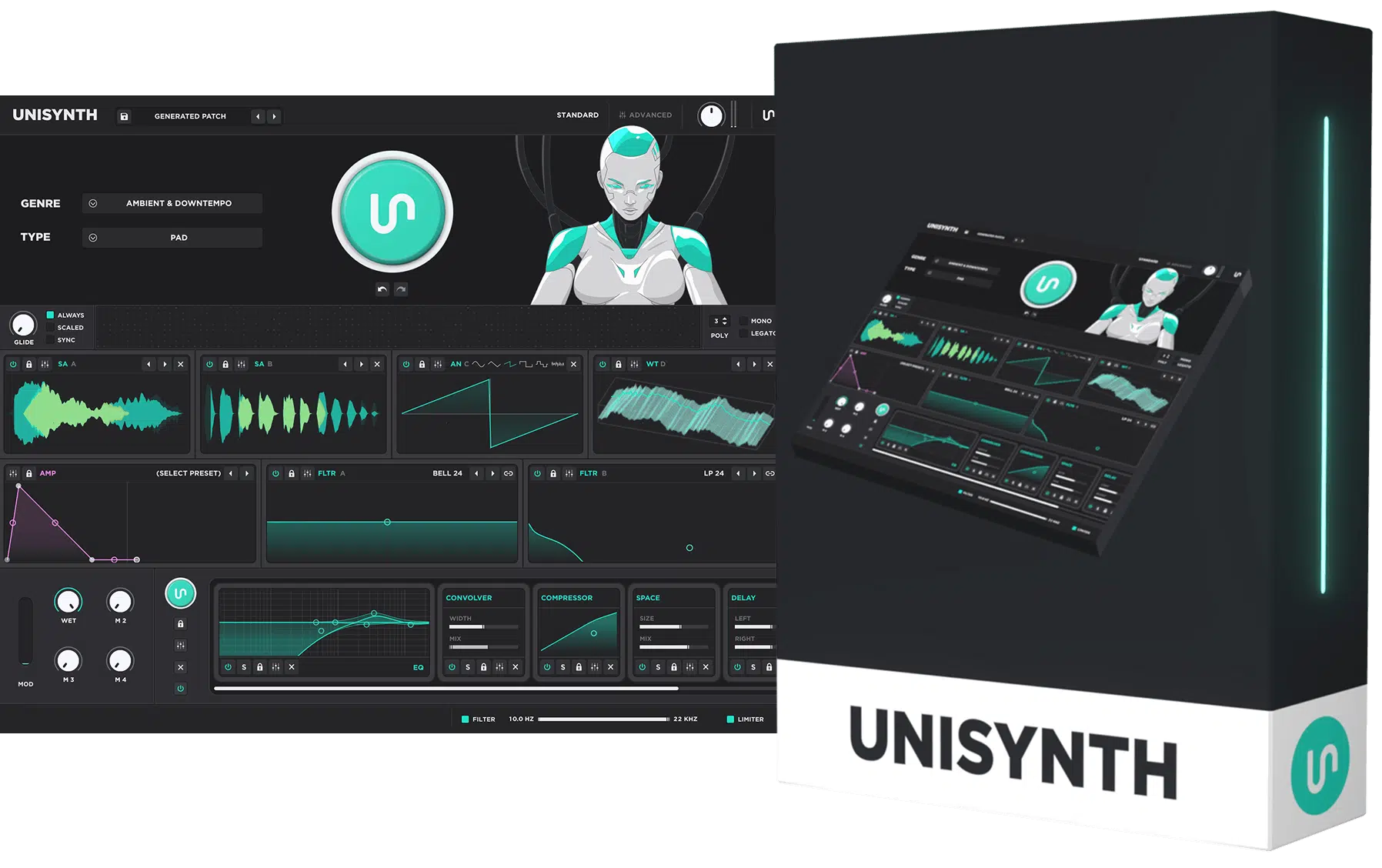
At the end of the day, Spire is no doubt a solid player in the synth game (especially if you like classic EDM-style programming)
But once you really break everything down, like the workflow, AI generation, hybrid oscillator engine, deeper routing, bigger FX environment, wavetable editor, and the genre-specific targeting, Unisynth takes the crown all day.
It simply gives you more ways to create, more ways to customize, and more ways to get where you want to go faster.
At the same time, it still gives you the insane depth to turn into a full sound-design beast when you want to get more technical with it.
That’s what makes Unisynth such a legend already.
It can help beginners easily get crazy results while still giving advanced producers more than enough room to push things as far as they want (and then some).
So, in this Unisynth vs Spire showdown, Unisynth is very clearly the ultimate champ, and if you don’t believe me 一 go download it yourself by clicking the link below!
Until next time…
Download The #1 Synth Plugin In the World




Leave a Reply
You must belogged in to post a comment.