




Most synth plugins ask you to compromise in one way or another — you either get speed and efficiency, or you get depth and complexity.
But with Unisynth, you get the best of both worlds.
It is the world’s first and only AI-powered, genre-specific generative synth, and what it’s capable of will completely blow your mind.
You can generate completely original basses, leads, chords, pads, plucks, and 808s in seconds, while still having the kind of deeper control that lets you keep shaping your sound to perfection.
Plus, with 32 genres built into the engine, that usual cycle of blank-screen syndrome, preset scrolling, and forcing the wrong sound into the wrong track is completely gone.
And I am not talking about some surface-level AI trick either, because under the hood Unisynth is built around a proprietary AI Sound Engine.
It combines thousands of custom-designed, genre-specific wavetables, samples, parameters, FX, and even full synth presets modeled after successful songs.
So needless to say, you’ll get professional results every single time.
Today, I’ll be breaking down the features, functions, and capabilities that make Unisynth feel like such a big deal, including:
- Revolutionary AI Synthesis Engine ✓
- 1-Click AI Patch Generation ✓
- 32 Genre-based Directions ✓
- 6 Sound-role Categories ✓
- 4 Hybrid Oscillators (Analog, Wavetable, Sampler & Resonator) ✓
- 95 Filter Options ✓
- Flexible Fully-Configurable Routing System ✓
- Deep Modulation Matrix✓
- 24 Built-in Effects With a Fully Customizable Signal Flow ✓
- Advanced Wavetable Editor ✓
- 80 total Individual AI Generators ✓
- Preset & Expansion Tools ✓
- Mix-ready Output Controls ✓
- So Much More ✓
So, if you are looking to instantly generate custom, world-class sounds like a true sound design beast, you’re in the right place.
You will look at synths like Serum 2 or Pigments like child’s play once you see what Unisynth comes packed with.
It will give you infinite inspiration, speed your workflow up like never before, and help you get stronger sounds in minutes.
In today’s production and sound-design world, where standing out matters more than ever, I’m sure we can all agree that is a HUGE deal.
And with Unisynth out now, you’re getting the ultimate synth with a very new kind of engine behind it, and that is exactly why so many producers are looking at it as one of the most important synth launches in the history of production and sound design.
Let’s dive right in…
Table of Contents
- Unisynth Out Now: Introducing The World’s Only AI, Genre-Specific Generative Synth Plugin
- Instant Sound Creation: Ease Meets Flexibility
- Four Hybrid Oscillators
- Unisynth’s Flagship Sound Architecture: Breaking it Down
- Deep Modulation Power
- Full FX Rack That Will Blow Your Mind
- Built-In Wavetable Editing
- Bonus: Extra Features/Functions for Beginners & Professionals
- Final Thoughts: Unisynth Out Now
Unisynth Out Now: Introducing The World’s Only AI, Genre-Specific Generative Synth Plugin
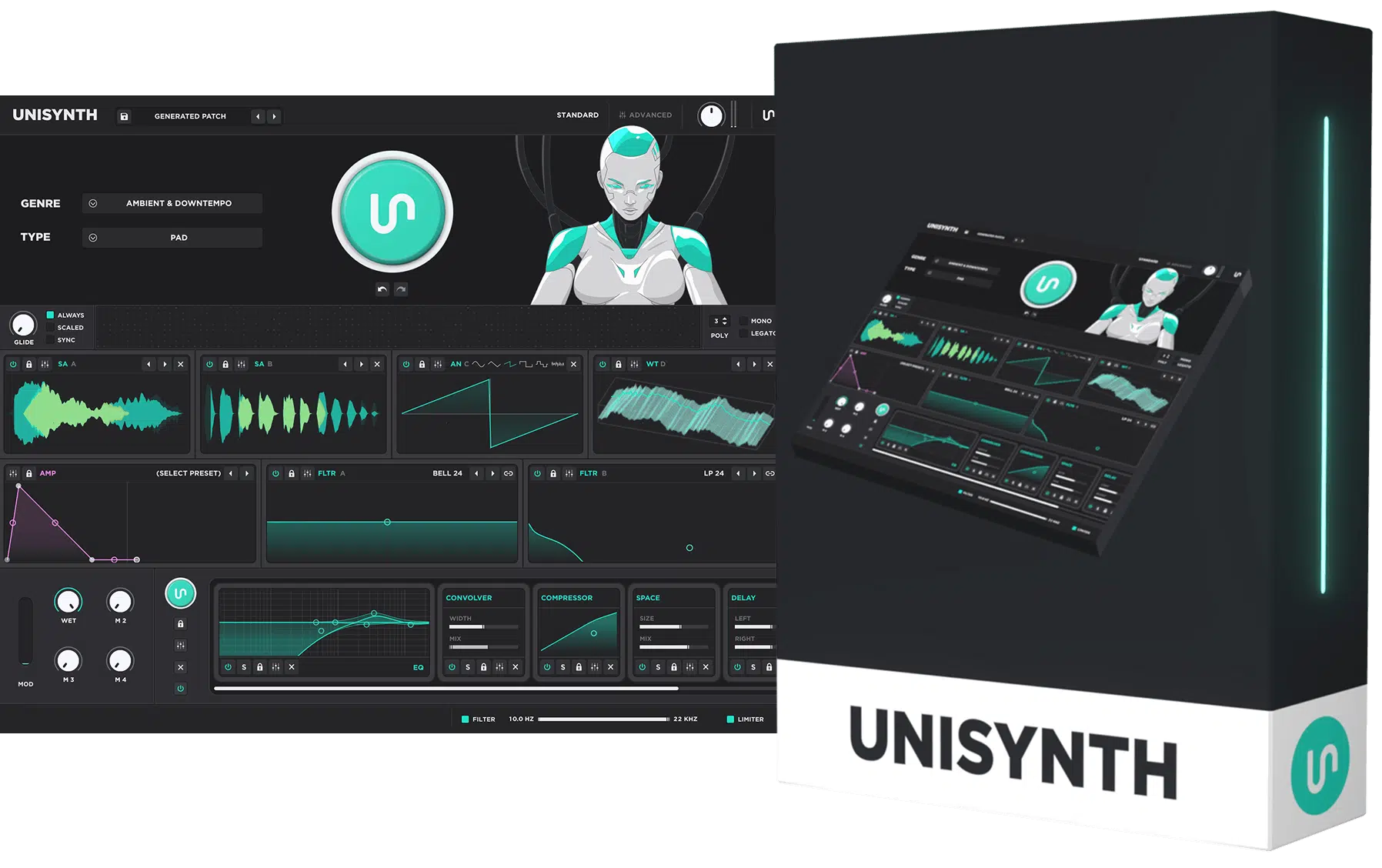
Unisynth is the rarest plugin to hit the music world in… well, forever.
Not because it is trying to look futuristic, but because it genuinely changes how you can create sounds from the ground up.
It is the world’s first and only AI-powered, genre-specific generative synth, which makes it game-changing even before you dive into how deep it can really go.
It’s not just built to pump out sounds quickly, but to generate sounds that perfectly match the genre you’re working with.
And once that first idea is locked down, Unisynth never boxes you in like a lot of “smart” tools do, because remember, under the hood is a seriously intricate synth.
You’ll have razor-sharp precision and control over each and every sound.
Between the AI engine, the genre-specific generation, the hybrid oscillator setup, the huge filter section, the deep modulation, the built-in FX rack, and the wavetable editing 一 it is very obvious it was built to go way further than the competition.
Whether you’re a producer just starting out, or a professional sound designer, you will never be disappointed.
You’ll generate fire sounds in minutes, and still have that intense power to keep tweaking, refining, and really making it your own.
And if you think it sounds way too good to be true, just stick with me as I’ll be breaking everything down throughout the article so you can see what Unisynth is really capable of.
Instant Sound Creation: Ease Meets Flexibility
So now that you have a general idea about what Unisynth can do, let’s kick things off with how it brings unmatched inspiration to the table, as opposed to making you build every single sound from an INIT patch (although you certainly can if that’s more your style).
80 Total AI Generators
If there is one feature that really shows why Unisynth is absolutely crushing the competition and ahead of the curve, it’s the 80 included AI generators.
And we’re not just talking about some small bonus features sitting off to the side either 一 they’re a huge part of the engine itself, giving you endless flexibility and inspiration.
Even on its own, Unisynth is already one of the deepest synths on the market, but once you bring AI into the mix, it becomes something much bigger, badder, and better than ever before.
You’re getting access to results that normally take decades to master and build from scratch!
Yes of course you get the main Patch Generator and the FX-Chain Generator, but it also gives you individual generators throughout the instrument for key sections like:
- Oscillators
- Filters
- Modulators
- FX units
- All Major & Minor Parts of the Synth
This means the AI is integrated into the synth itself instead of being limited to one flashy button which changes everything.
Let’s say you’re working with a patch that is close to perfection but one or two parts are just not hitting right…
Maybe the oscillator has the right tone but not enough movement, maybe the filter character feels a little flat, or maybe the modulation is too stiff and the FX chain (or individual effect) is not giving the sound enough width, depth, or attitude.
Well, instead of scrapping the whole patch and starting over, Unisynth lets you go straight to that section and generate a new direction for that specific part only.
In Advanced View, those AI generators show up exactly where you want them.
Meaning, you can stay inside the Engine tab and refresh a specific oscillator or filter, or simply jump over to the Effects tab and generate a new processing direction, all without ever even touching the rest of the sound.
For example, you generated a pad in Unisynth and the overall vibe is already there, but the top-end movement feels a little boring.
You can easily regenerate that oscillator section on its own, keep the rest of the synth intact, and hear fresh new variations in seconds.
On the same note, if the synth tone already feels on point but the FX chain still feels dry, you can leave the synth engine alone, hit the FX side, and watch Unisynth build a stronger effects chain (without losing the patch you already liked/designed).
Bottom line, when Unisynth says it has 80 AI generators, it is not just talking about quantity…
It’s talking about how deeply AI is built into the instrument from top to bottom, and how much or little your patch or synth the AI has control over.
And trust me, it doesn’t just feel like a normal synth with AI added on after the fact as a second thought, but like a revolutionary new kind of instrument that keeps helping you create mind-blowing sounds every step of the way.
32 Genres, 6 Sound Types
One of my absolute favorite things about Unisynth is that it doesn’t make you start from some lifeless blank patch.
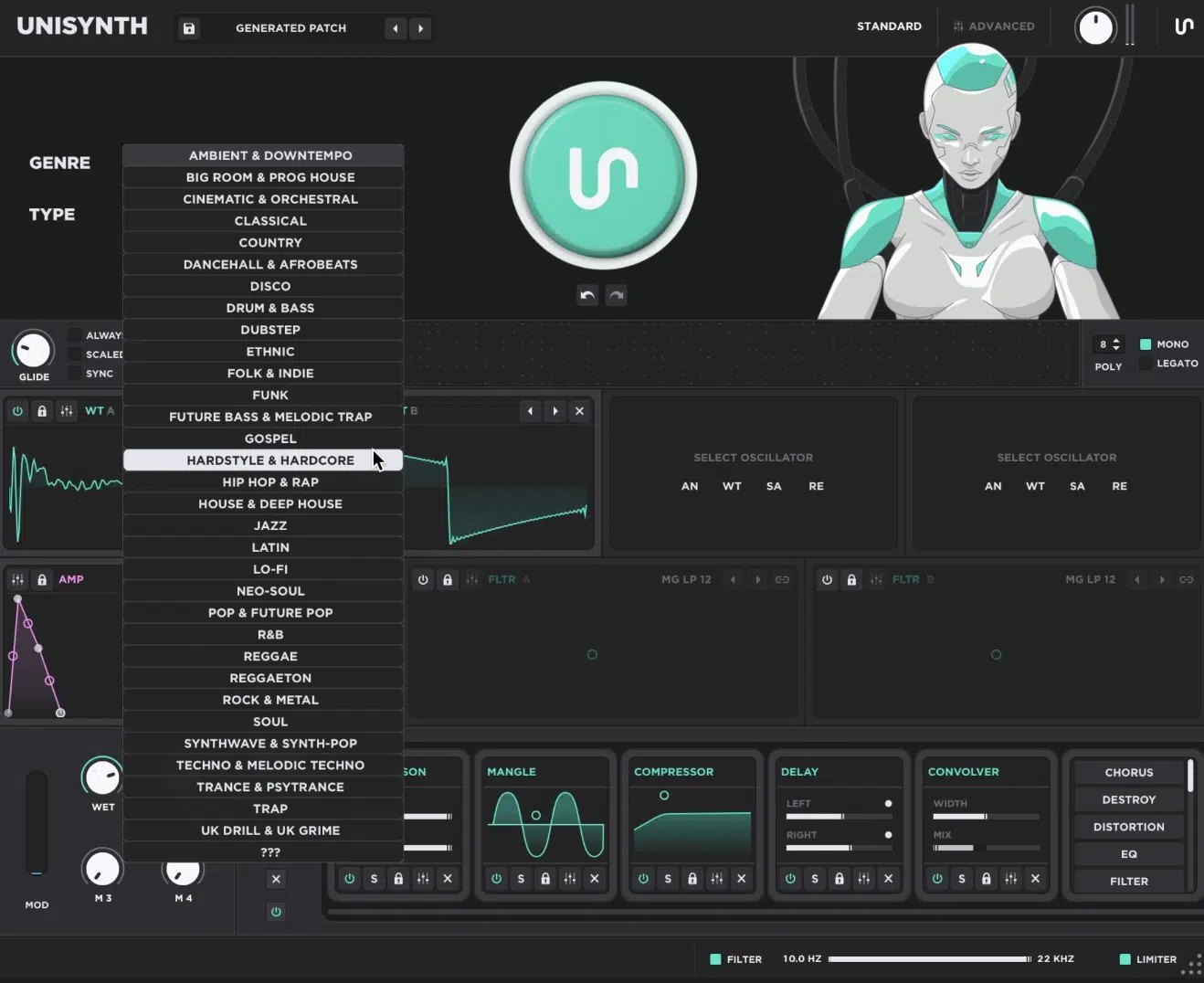
You’re able to choose from 32 popular genres, as well as 6 sound types that help you get a solid foundation before even hitting Generate.
And trust me, it’s not just working from some vague idea of what a “good” lead or 808 should sound like.
It was built from real chart-topping hits, so the results you’ll get will always feel way more polished, relevant, and on point right out of the gate.
In other words, you are not getting those generic, lifeless sounds another engine might give you if you just asked for a ‘dope lead’ or a ‘hard-hitting 808.’
And the best part is that you can still tweak everything afterward to match the exact vibe you are going for.
Then you have the Type setting, which refers to the kind of patch you want to use with the generated sound, not just a fixed timbre or preset label.
It lets you decide the role the sound is supposed to play in the track, like Bass, Chord, Lead, or Pad.
And no, it’s not just labeling a sound, but literally shaping the kind of part you are trying to design.
So, if you pick something like Pad, Unisynth will automatically think in terms of longer sustained notes and chords, which means that same choice can come out as:
- A huge washed-out texture in Ambient
- A more lush string-style layer in Cinematic
- Something more organ-leaning in Rock
That is exactly why the same Pad choice can land so differently from genre to genre, because Unisynth is treating it like a playing role first and a final tone second.
It all just depends on the unique direction you chose and what fits the vibe you’re going for best, of course.
On the flip side, if you go with Hip Hop and a Chord-style role, Unisynth will bang out some more darker, tighter material.
This is way more helpful than getting some giant bright supersaw that makes no sense for the session, am I right?
As producers and sound designers, we usually think, “I need a cold chord layer here,” or, “I need a lead that cuts here,” not, “Let me scroll through a thousand random presets/ideas and hope one works” (because that is a huge time-killer).
On top of that, if you already have a production style and genre you usually create with in mind, Unisynth can help you take things to the next level…
It’s the perfect AI synth for expanding your boundaries and thinking outside of the box.
All in all, these 32 genres + 6 sound types will help you get a much better starting point way faster and make the AI side feel musical/intentional instead of random and generic.
1-Click Patch Generation
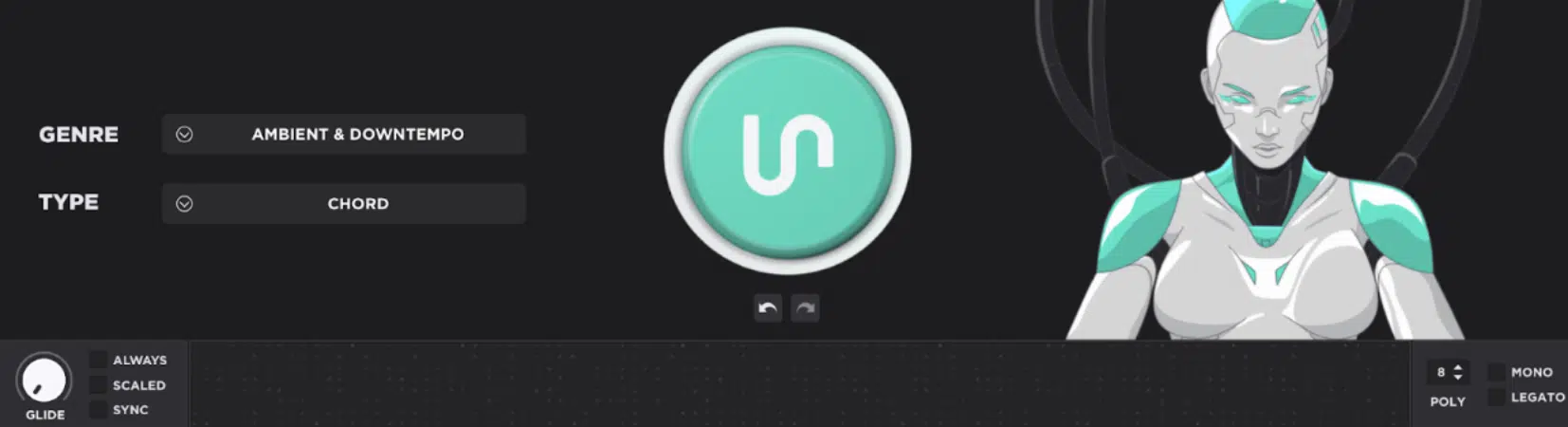
Once you have your genre and type picked, the Patch Generator (the big round button on the top) uses AI to help you generate a fresh new patch.
And remember, you’re not just clicking for random chaos, you’re getting a sound that is already aimed toward the exact style your unique track needs.
For example, if you set Hip Hop + Chord and hit Generate, Unisynth might give you a darker patch with a softer front edge, a bit of stereo width, and some extra movement.
And if you want to go a little deeper with the generation side itself, you can also Control-click the Patch Generator to open additional Generator Options.
If the first one is close but not quite there, you can simply generate again a few times and compare 3, 4, or even 5 different directions in under a minute.
And if version two had the sauce but version five drifted too far, you can always tap that Undo button right below the generator (and the Redo is always there too, of course).
This way you can jump back without losing the one that actually hit.
I also love that the generated patches in Unisynth always feel ready to interact with right away, and between the Mod Wheel, the 4 Macros, and the rest of the quick controls, you really can’t lose.
You’ll be able to start adding motion and personality right off rip instead of staring at a flat, dead sound for hours losing your mind.
So, the one-click generation in Unisynth is not just fast for the sake of being fast, but it’s actually useful.
It gets you to a playable, tweakable, track-ready starting point crazy quickly and still leaves plenty of room to shape the sound into your own thing (which is non-negotiable).
PRO TIP: This 1-click Patch Generator is just the tip of the iceberg when it comes to its generation capabilities, and should be looked at more like a macro or master control because this single button can trigger every one of Unisynth’s 80+ generators at the same exact time.
But when you want a more hands-on, individualized approach, you can also decide exactly which of those 80+ AI engines you want to use, at any point in the process.
Those generators can be found throughout both the major and more detailed parts of the synth.
So, if you already have an incredible starting point, or a dope preset you want to make more your own, you can target specific areas like modulation destinations, filter parameters, or oscillator settings 一 all without regenerating the entire patch.
It lets you micro-manage the AI side of Unisynth, which I’ll break down in much more detail later in the article.
Standard View For a Fast, Visual Workflow
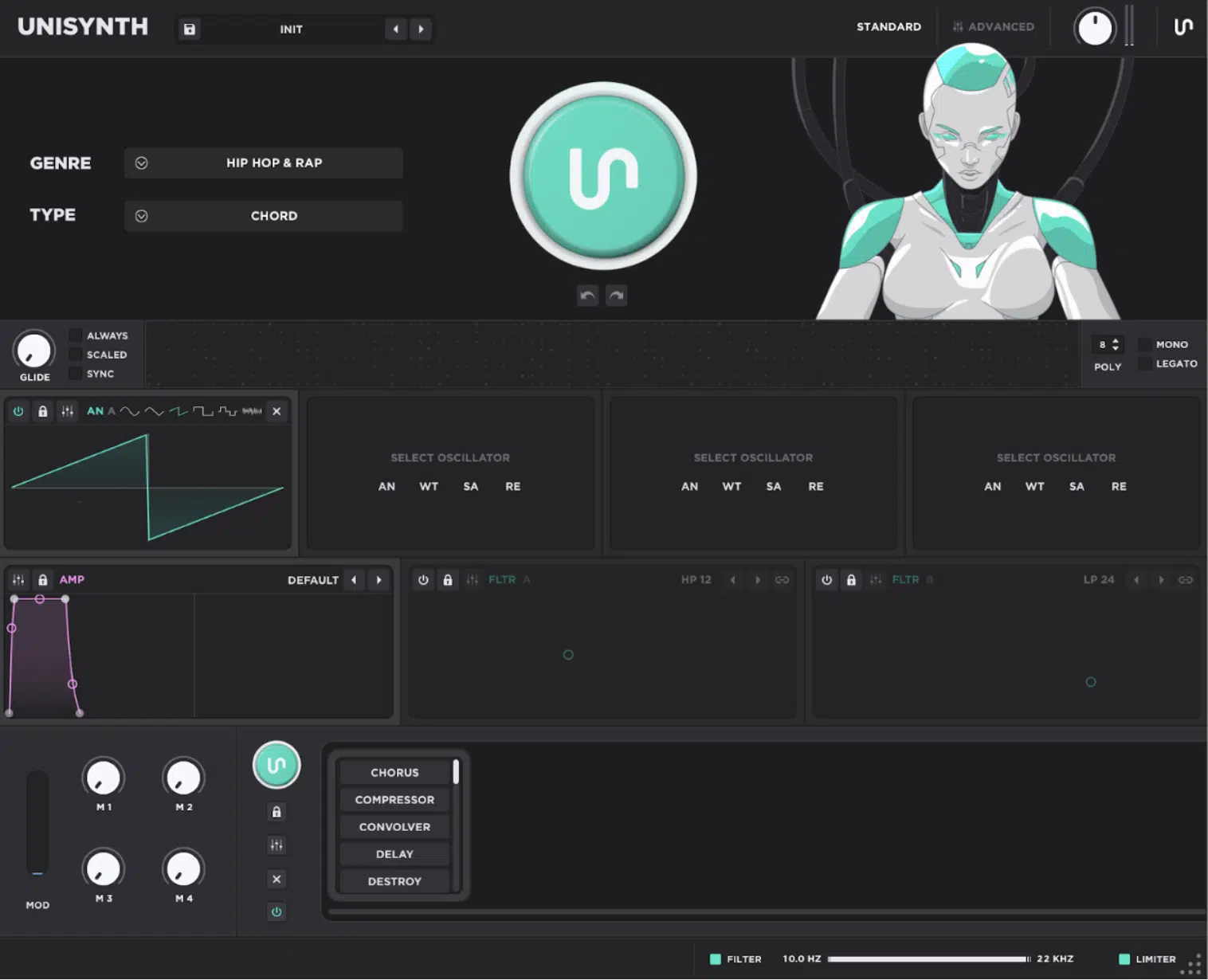
Standard View lets you generate, shape, and finish a sound without getting buried in technical stuff too early (perfect for both beginners and professionals).
The page is split into 3 main sections from top to bottom:
- The Generator Panel
- The Synth Panel
- The FX Panel
So right away you can see where the patch gets created, where the core tone gets shaped, and where the finishing touches get added.
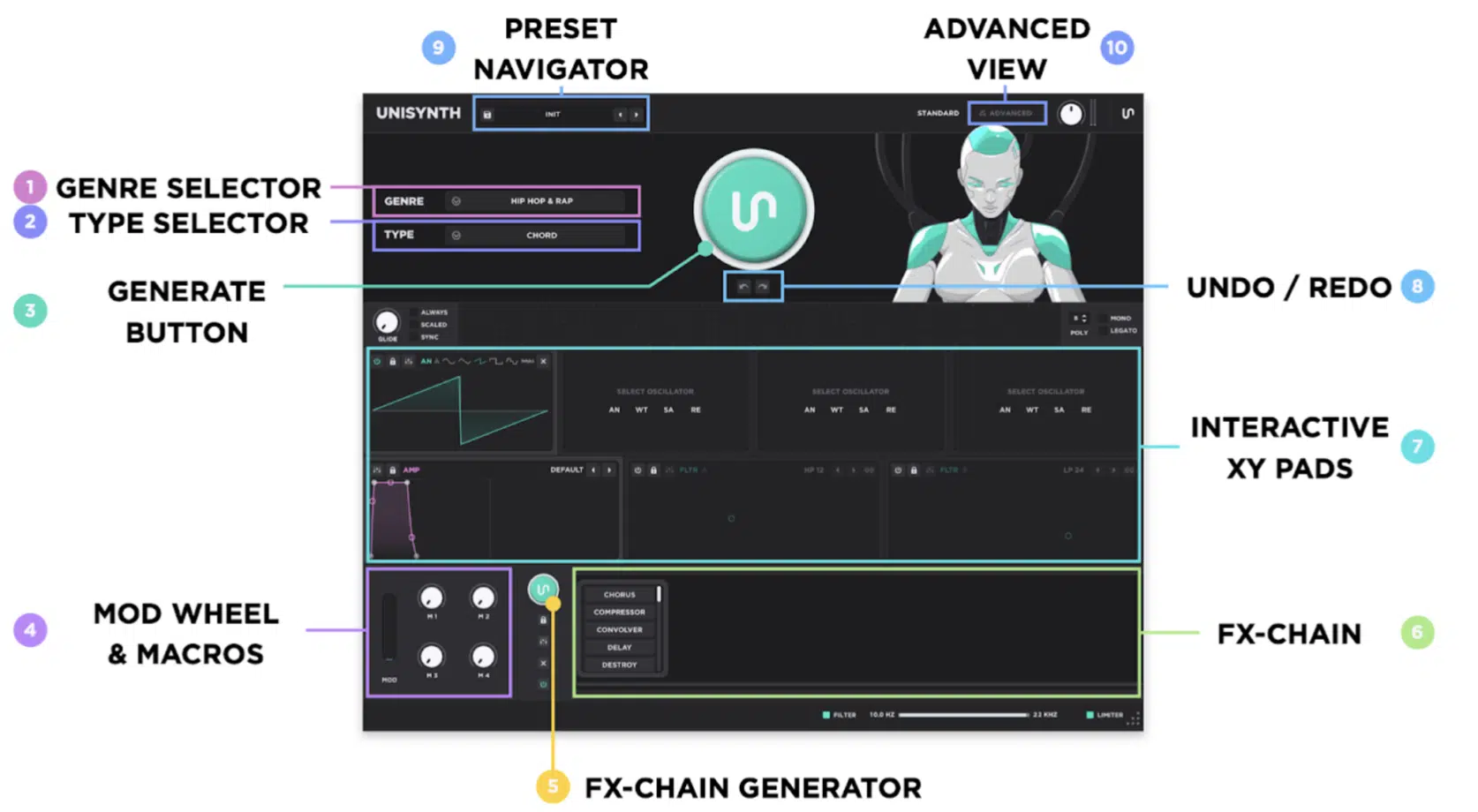
At the top, the Generator Panel gives you the Genre selector, Type selector, the big round Patch Generator, and Undo/Redo.
This means you can go from “I need a dark chord for this beat” to comparing 3, 4, or 5 generated directions in under a minute without killing the vibe.
Then the Synth Panel gives you a streamlined version of the synth itself…
The 4 oscillators, the amp envelope (the section that controls the shape of the sound), Glide, Voicing, and the 2 primary filters.
This is where you’ll make broader tone changes before getting to the deep edits.
Then you have the interactive XY pad workflow on the oscillator and filter section itself where the 4 oscillators, the amp envelope, and both main filters are all shown as click-and-drag visual controls.
Here you’ll be able to drag the visual display of each OSC to adjust the wavetable position, decrease the OSC Warp amount, and bring down the filter cutoff to get it sitting way smoother in a few seconds flat.
The FX Panel is on point as well 一 giving you the AI FX-Chain Generator, the actual FX Chain, the Mod Wheel, and 4 Macros.
This is where you can start adding width, motion, depth, and performance control right on the same page instead of bouncing around all over the plugin.
On top of that, Standard View also offers all the basic stuff too, like the Preset Selector, View Selector, and Global Output at the top, as well as the Global Filters, Master Limiter, a resize handle, and even a tooltip field at the bottom.
PRO TIP: Using the “settings” icon displayed in multiple areas on each of these sections, and more, gives you instant access to the settings found in Advanced View.
For example, if you want to refine the filter settings or envelopes beyond what you see in Standard View, it will bring you directly to those parameters in Advanced View.
You can quickly switch between views to access only what you need when you need it, and then jump right back into Standard View.
That way, you are not stuck dealing with the dreaded ‘decision paralysis’ that comes with having too many options all at once (we’ve all been there, and it sucks).
So even though Unisynth has a crazy extensive feature set and endless range of parameters, it won’t ever become your kryptonite.
Advanced View: Unlocked
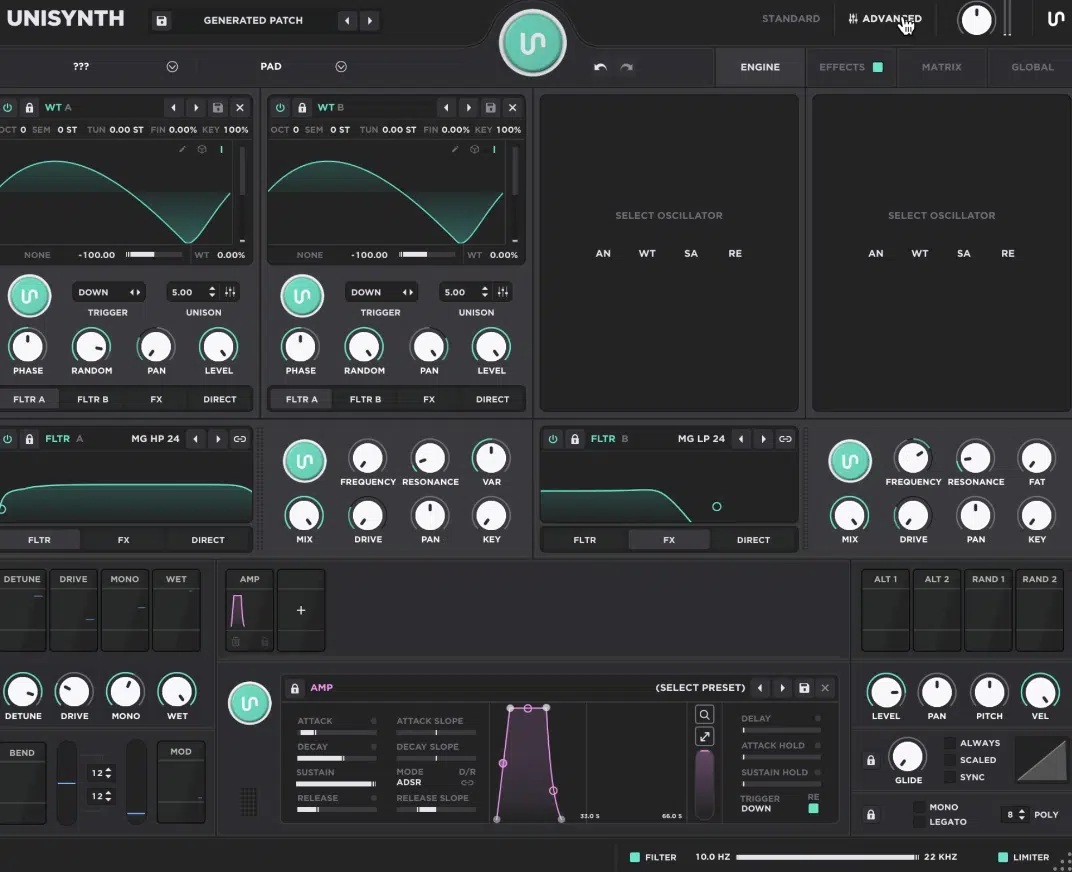
Once you click into Advanced View, you’ll see why Unisynth is considered a full-blown flagship synth that just happens to have AI built into it too.
It’s made for much deeper sound design and gives you 4 unique tabs:
- Engine
- Effects
- Matrix
- Global
They break things up in a really clean way so you can focus on the part of the patch you actually want to mess with.
The Engine tab is where the 4 oscillator slots and 2 filter slots open up with more detailed controls, more routing options, and their own mini-generators as well.
This is invaluable when the main patch is close but one part still needs a new twist.
Then you have the Effects tab that gives you the full FX Chain with deeper control over all 24 effects, so instead of only seeing the quick version, you can properly fine-tune, reorder, bypass, and really dial in each unit until the chain sounds just how you want.
And next there’s the Matrix tab which handles modulation, like an LFO opening the filter or a Macro increasing both delay mix and reverb together.
I mean, having one page that shows all of that in one place is honestly a lifesaver once the patch starts getting more complex…
Otherwise it just becomes a mission to find out why a patch is behaving in a certain way, and nobody has time for that.
PRO TIP: Using the “settings” icon displayed in multiple areas on each of these sections, and more, gives you instant access to the settings found in Advanced View.
For example, if you want to refine the filter settings or envelopes beyond what you see in Standard View, it will bring you directly to those parameters in Advanced View.
Last but not least is the Global tab, which takes care of the bigger settings side too, like preferences, behavior, and quality options.
This is where you can adjust things like reset behavior, declick options, voice stealing, polyphonic glide start, global detune range, unison level compensation, the velocity curve, and the sample-rate quality mode.
It’s also where you can handle user preferences like the default wavetable view, effect expansion behavior and removing zero-depth mods.
As well as turning off the Standard View animation, saving your settings as the default, or restoring everything back to factory settings.
Another super smart touch is that the bottom half of Advanced View always shows the Modulator Panel, while the top half changes based on the tab you are in.
There’s even a double header bar up top with a condensed version of the Generator controls so you never feel cut off from the fast AI workflow while you’re digging deeper.
So, if Standard View is what gets you from zero to a fire idea fast, Advanced View is what proves Unisynth is waaay more than just basic AI presets.
It’s where you can really get precise and in-depth with the sound and shape it into something that feels fully your own so you can blow some minds.
Download The #1 AI Synth Plugin In the World
Four Hybrid Oscillators
At the heart of Unisynth, this synth plugin gives you 4 independent oscillators. An oscillator is simply the part of the instrument that creates the raw tone before filters, modulation, and effects shape it further. And because each oscillator in Unisynth can run as Analog, Wavetable, Sampler, or Resonator, let’s break each one down so you can see exactly what you are getting.
#1. Analog
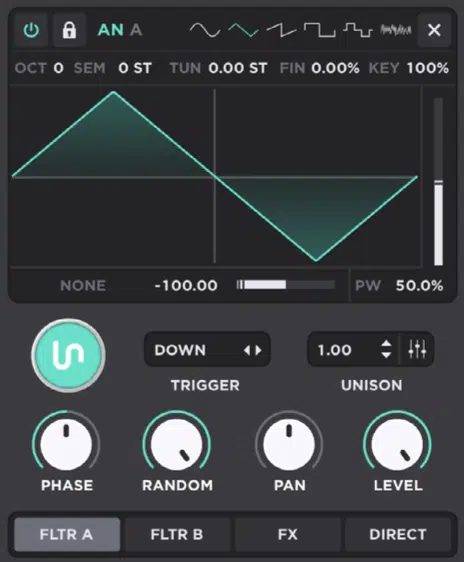
The Analog engine in Unisynth is the classic synth side (think: Moog- and Korg-style synths), so it’s where you get the more familiar analog-modelled oscillator behavior.
It starts with 6 waveform choices:
- Sine
- Triangle
- Saw
- Square
- Pulse
- White noise
It gives you everything from super clean low-end and smooth sub tones to brighter, buzzier, more aggressive starting points.
And as always, the waveform display is interactive too. In Standard View, the X axis controls Warp Amount while the Y axis controls Pulse Width.
You can drag the shape around visually instead of stopping every two seconds to tweak tiny controls.
Just keep in mind that Pulse Width changes depending on the waveform as well 一 it does nothing on sine and saw, skews a triangle toward a saw shape, creates that classic PWM-style movement on square and pulse, and even changes the noise color when you are using white noise.
Then it gets way deeper with the oscillator Distortion menu (known in some synths as ‘Warp Mode’), which is really a wave-shaping section more than a normal post-FX distortion.
It includes Off, Sync (sym), Quantize, Bend, Squeeze, Sync Hard, Sync Med, Sync Soft, Bend +, Bend -, Bend +-, PWM, Asym +, Asym -, Asym +-, Flip, and Mirror.
And honestly, this is pretty unique for an analog OSC type because these options are usually only available for wavetable OSCs.
On top of that, Analog’s Distortion Modes can also be affected by another oscillator as a source for FM, PM, RM, or AM.
You can push it into way nastier territory, but those source-based modes will not do anything until the selected source oscillator is actually turned on.
So, if you wanted a warm pad you could start with a saw, keep the shaping mild, and let the filter do the rest.
However, if you wanted something even more savage you could push Sync, Bend, or FM and get into much more modern, edgy sound-design territory without ever leaving the oscillator.
PRO TIP: Using a saw oscillator in its raw form on the Analog OSC will sound different than using the same settings and wave type on the Wavetable OSC.
So, if you want a dope, modern digital synth on top with a bubbly, beautiful analog-style low end, you can use the Analog OSC just for the low end and let the other oscillator types handle the rest of the mid and upper frequency range.
#2. Wavetable
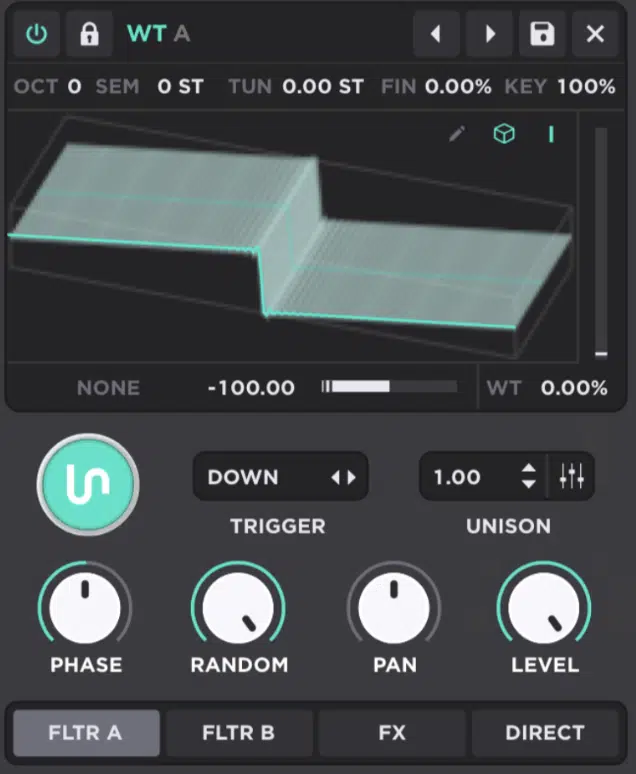
The Wavetable engine in Unisynth is the more modern digital side.
It works by scanning through a table of single-cycle waveform frames so the tone can shift over time instead of staying locked to one static shape.
You get a Table selector for choosing from the included wavetables, and you also get a dedicated, extremely advanced Wavetable Editor section.
This means you’re able to open the editor right from that oscillator and build or reshape the wavetable in order to alter the source material itself (sick, right?).
But this complex editor goes far beyond just editing existing tables and the order they are in, believe me.
It allows complete and total transformation of each wavetable with countless modes that rival not just Phase Plant, but Serum’s as well.
I know that sounds impossible, but trust me, it’s not.
The visual side is flexible too as Unisynth lets you switch the wavetable display between 2D and 3D views depending on how you like to read movement and frame shape while you are tweaking.
Then you have Interpolation Mode, which is super important when modulating the wavetable position, because:
- When it is on 一 The transitions between frames are smoothed out.
- When it is off 一 The oscillator steps through frames instead, giving you a more choppy, digital, almost glitchy feel.
The main movement control here is Wavetable Position, and that is the parameter that scans through the slices of the table.
So, for example, you can leave it still for a more stable lead or modulate it for a pad, bass, or pluck that keeps evolving while the note holds.
In Standard View, the wavetable display is interactive as well, with X controlling Warp Amount and Y controlling Wavetable Position.
This makes it super easy to hear the tone change just by dragging around the oscillator display.
NOTE: Because Wavetable shares the same oscillator Distortion section as Analog (including modes like Sync, Quantize, Bend, Squeeze, PWM, Flip, Mirror, and the source-dependent FM/PM/RM/AM options), it can go from clean and polished to seriously twisted without needing extra layers.
There is really no limits to what you can achieve with Unisynth out now.
#3. Sampler
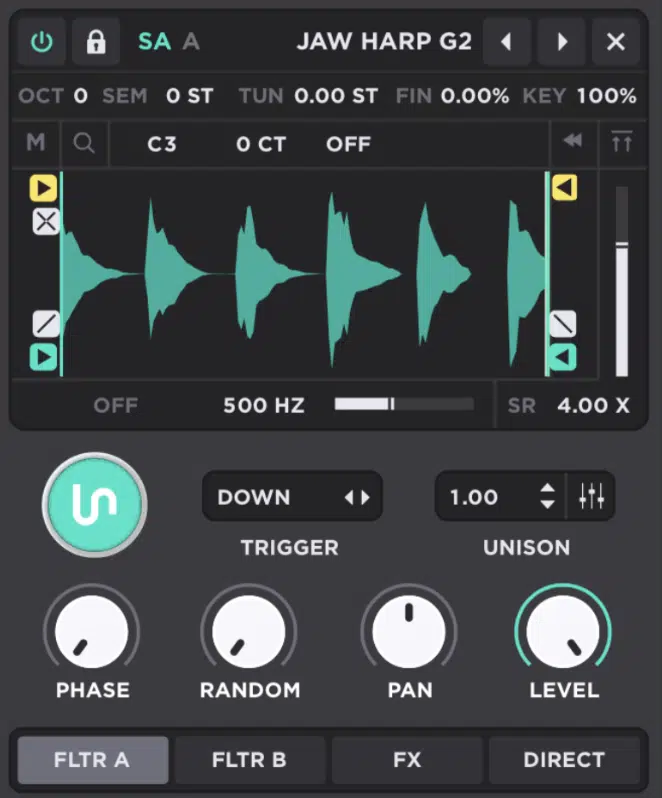
The Sampler engine in Unisynth is the one you’re going to reach for when you want to use actual audio files as the source.
It opens the door not just to sample-based synthesis, but also to:
- Realistic timbres
- Found/Foley sounds
- Custom attacks
- Vocal snippets
- Textures
- Transient layers
You’re able to use Sample Select to load one of the included samples or bring in your own, and this epic engine also gives you Mono Mode to remove stereo information.
This is perfect for when you want to use a sample as the foundation but stereoize one of the other oscillators instead.
It gets really official with playback too, letting you Normalize the sample so its loudest peak hits 0 dB.
And, side note, the teal Playback arrows set the start and end points, and the playback Fade helps smooth clicks at the front or back of the region.
Then you have Looping, which is deeper than a basic on/off switch, since Loop Mode includes 一 Off, Looping, Ping Pong, Sustain, Sustain PP, and Reverse.
There’s dedicated Loop Start, Loop End, and Loop Fade controls so you can create a sustain loop and crossfade the seam instead of hearing a nasty jump every cycle.
That is a big plus because Unisynth can use samples for realistic transients too.
And when you want those transients to sound identical on every key, simply set the oscillator’s Key control to 0%.
This stops the sample OSC from following keyboard pitch.
Then there’s Sample Rate control for upsampling or downsampling the sample itself, plus a simple per-oscillator Filter with Off, LPF, and HPF.
This makes it easier than ever to make a sample cleaner, darker, thinner, or crunchier before it even reaches the main filters or FX.
NOTE: Sampler is the odd one out visually because in Standard View its display still uses the XY features found on each oscillator, with the X position adjusting Filter Cutoff and the Y position adjusting Fine Tune.
However, in Advanced View it does not use the normal XY controller.
Instead, it gives you dedicated controls for sample start/end, loop start/end, fade in/out, and crossfade (which honestly makes way more sense for this engine anyway).
#4. Resonator
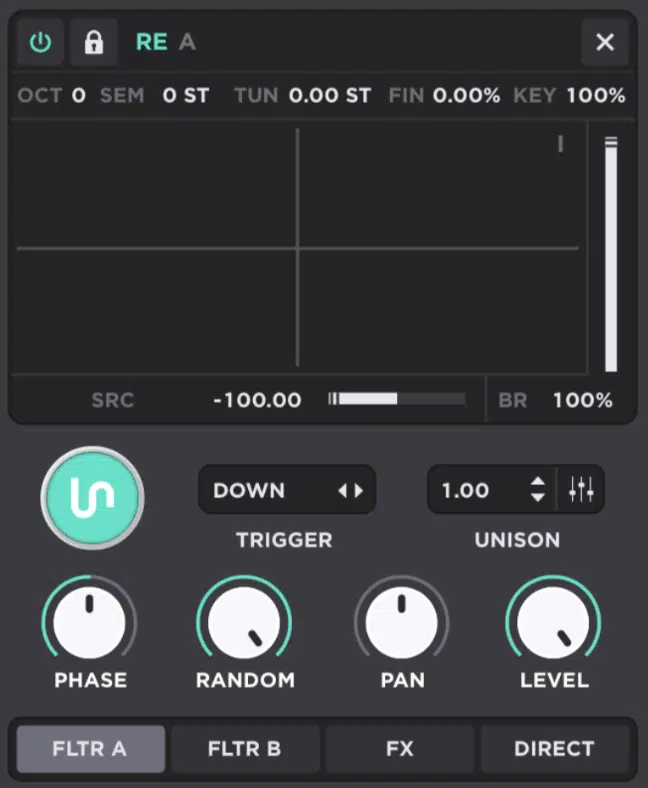
The Resonator engine in Unisynth is the most out-of-the-box of the four, hands down.
I say that because instead of acting like a normal oscillator that just spits out a waveform, it is a physical-modeling style engine that needs input from another oscillator first.
That incoming signal is chosen with the Source control, and then Unisynth specifically makes a point that it works especially well with noise or short bursts of noise.
What is happening under the hood is that the frequencies from the source oscillator excite the resonator, then the resonator produces brand-new tones from that input instead of simply replaying the source as-is.
The next big control is the Excitation Level which sets the volume of the incoming oscillator feeding the resonator.
The really cool part is that the source oscillator’s normal output level is ignored here.
Meaning, you can drive the resonator based on its own input amount instead of the source’s mixer level.
Brightness is up next, which controls the resonator’s tone and overall shine 一 taking things from darker, woodier, more muted hits to brighter, ringier, more metallic textures.
In Standard View, the display stays hands-on too, because the X axis controls Resonator Brightness and the Y axis controls Detune.
This makes it super easy to drag a sound from tighter and cleaner into something more unstable, wide, or eerie without opening a deeper panel.
NOTE: If you wanted to get weird (in a good way), you could feed noise into the Resonator, keep the excitation moderate, pull brightness down for a softer pluck, or crank it up for a sharper metallic hit.
That is exactly why this Unisynth’s engine dominates other synths, I’m telling you.
Unisynth’s Flagship Sound Architecture: Breaking it Down
Now that I’ve covered the 4 sound engines, it’s time to get into the deeper architecture that makes Unisynth feel like a real flagship synth plugin and not just a cool way to quickly generate patches. And once you see how Unisynth handles filters, routing, unison, glide, and voicing, you’ll get a much clearer picture of why it’s going to be the standard for decades to come.
95 Filter Options
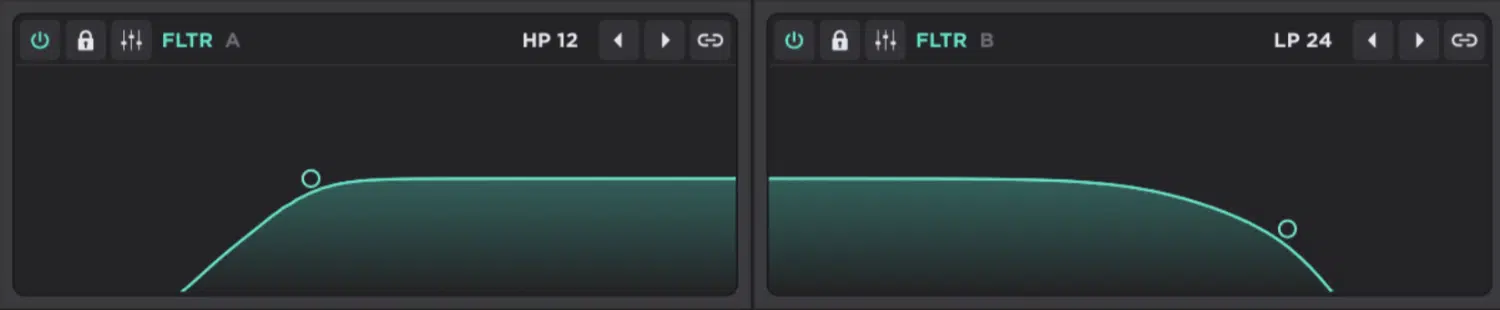
Filters are a massive part of why one patch feels warm, dark, silky, hollow, nasal, metallic, or just plain mean… and Unisynth takes things to the next level here too.
It gives you 2 main multimode filters to start, but can each be switched through a shared pool of 95 different filter options.
You’re not just getting the usual low-pass and high-pass choices, you’re getting more advanced ones, like:
- Comb (Comb, Comb LP12, Comb BP12, Comb HP12)
- SVF (LP, BP, HP, Notch, Peak, Bell, Low Shelf, High Shelf in 12 dB and 24 dB versions)
- MG, MG8, BW, Misc (including Vowel, Vowel 5, and Pass)
- Modeled VA styles (like Korg, Oberheim, Half Ladder, Diode Ladder, and Moog Ladder)
- Much More
You can go from a rounded Moog Ladder type that tucks a bass or pad in flawlessly to a Comb filter that adds metallic resonance.
Or, to a Vowel filter that gives the sound a more talky, formant-style vibe (dealer’s choice), all without leaving the main architecture, which is epic.
And, on top of that, each filter gives you a full control set too 一 Frequency, Resonance, VAR, Mix, Drive, Pan, and Key.
Frequency sets the cutoff point, Resonance boosts around that cutoff, Vari is a specialized parameter that changes a behavior that depends on the filter model.
Then there’s Mix, which blends dry and filtered signals and Drive which pushes grit into the filter itself.
As well as Pan which moves the filter in the stereo field, and Key which lets the cutoff follow the keyboard up to 100% 1:1 tracking.
The filters aren’t just there to shave off highs or lows, but to really shape the tone to perfection, which every sound designer can seriously appreciate.
You can keep one filter cleaner with a lower Drive setting, slam the other one harder, blend them differently with Mix, or even make higher notes naturally open up more with Key tracking (all depending on what you’re going for).
You’ll also get a ‘Generate’ button on each filter, which is amazing when the patch is close but the filter character still feels a little bland.
You can easily randomize that section only instead of blowing up the whole sound.
Then there is the epic Link control, which lets both filters move together while keeping their offset intact…
So, for example, if Filter A is sitting at 100 Hz and Filter B is at 200 Hz, moving one up by 50 Hz moves the other by 50 Hz as well and keeps that gap exactly where it was.
And the whole thing still feels really hands-on, because each filter in Unisynth has its own visual display where the X axis controls cutoff and the Y axis controls resonance.
NOTE: You can hold Shift to isolate cutoff frequency, Cmd/Ctrl to isolate resonance, and in Standard View even hold Option to adjust VAR on supported filter types.
So, if you’re looking for a filter section that feels way more musical so you don’t have to aimlessly stare at different knobs all day, look no further.
Flexible Routing Paths
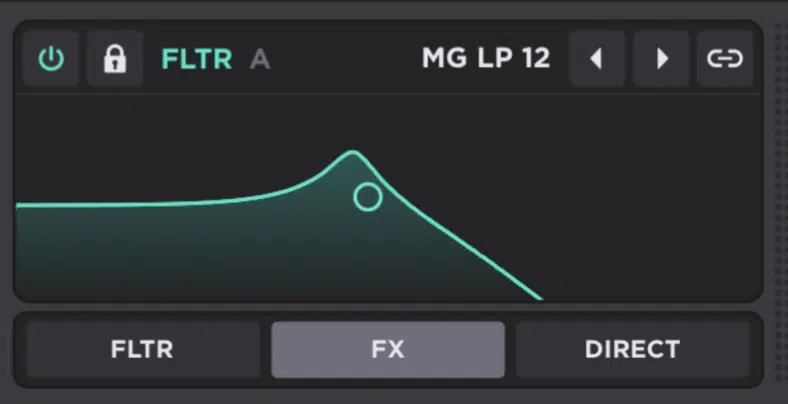
Routing is basically the internal road map of the synth, and in Unisynth it is a big reason why your patches will feel layered, polished, and way more custom every single time.
You’ll be getting serious control over where each oscillator and filter actually goes.
At the oscillator level, all 4 oscillators can be sent to Filter A, Filter B, FX, or Direct, so you can decide if that layer should be filtered first or processed first.
Or, you could skip the whole chain completely too, of course.
That Direct option bypasses both filters and all effects, so it is perfect for stuff like a sub layer you want to keep clean, centered, and untouched while the brighter or more textured layers go off and do something crazier.
And the routing keeps going at the filter stage as well, because each filter can be sent into the:
- Other filter
- FX section
- Direct
You can even run the filters in parallel for separate tone paths or in series when you want one filter to feed into the next.
There is one smart limitation built in, though, and it honestly makes sense… Only one filter can route into the other at a time.
So, if you try to send both filters into each other, Unisynth automatically flips one of them to Direct instead of letting the signal path turn into a mess.
When you add that up, Unisynth gives you 6 routing mixers overall 一 4 oscillator routing mixers + 2 filter routing mixer controls.
It’s why it feels so open-ended once you start layering different engine types inside one patch, which I’ll say again is revolutionary.
And it doesn’t stop there, because you can even Option click-and-drag a mix parameter to use it as a true routing mixer.
NOTE: If you’re a little confused by what exactly I mean, I’m just saying one oscillator or one filter does not have to pick only one destination.
It can be split across multiple destinations at different levels.
For example you could send a Sampler attack layer mostly to Direct, push a Wavetable layer into Filter A, run an Analog layer into Filter B, and still send a little bit of one oscillator straight to the FX lane too.
This is exactly the kind of layout that makes Unisynth feel like a true flagship synth and not just a one-path instrument.
Unison, Glide, Voicing
Unison, Glide, and Voicing all change the way the patch responds when you play it, and what do you know, Unisynth comes packed with all 3.
Unison is what stacks multiple copies of the same oscillator together.
In Unisynth the main Unison control sets the voice count, with even decimal values partially mixing in an extra voice instead of forcing you to jump only in whole numbers.
This is a pretty damn unique touch if you ask me.
Then, once you hit the Settings icon next to Unison, you open up the deeper controls — Detune, Detune Curve, Spread, Spread Curve, Blend, and Blend Curve.
This way you’re not just deciding how many voices there are, but how far they drift, how wide they spread, and how each extra voice is balanced against the others.
For example, a patch in Unisynth can go from tight and focused to huge and glossy in a really controlled way, because you can shape not only the amount of detune and width, but the curve of both across the stacked voices.
And when you’re not just limited to treating every voice exactly the same, there’s really no limit to how crazy things can get.
Then you have Glide, which is the time it takes for one pitch to slide into the next, and Unisynth gives you extra behavior options here too, like:
- Always: Makes notes glide whether they overlap or not.
- Scaled: Makes the glide time depend on the interval distance.
- Sync: Locks the glide time to your DAW tempo.
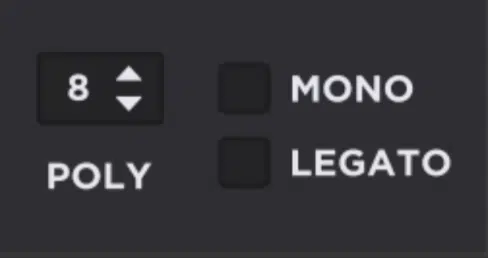
The Voicing side goes deep too, because Poly Voice # sets the maximum number of simultaneous voices and Monoforces the synth to play one note at a time.
Then you have Legato, which changes retrigger behavior when notes overlap.
In the Global area you also get Voice Stealing modes (Inner, Oldest, Newest) and Glide Start choices (First, Last, Bottom, Top) for deciding where polyphonic glide begins.
On top of that, Unisynth also gives you a global Detune Range in semitones and Unison Level Compensation so stacked voices do not just get stupid loud.
And if that wasn’t enough, there’s also a built-in Velocity Curve with 3 draggable handles for setting minimum amp velocity, maximum amp velocity, and the overall curve shape between them.
So, when you put all of that together (which is a LOT), this section helps you do way more than just make sounds wider…
You’re getting a full-blown sound-shaping machine at your fingertips.
It’s controlling how voices stack, how pitch moves, how notes connect, how dynamics respond, and how the patch actually feels.
And that’s before you even bring AI into the mix, which is insane to think about.
Enhance Your Sound Design Skills in Minutes
Deep Modulation Power
Once the tone is sitting right, it’s all about motion, control, and expression. So now let’s talk about how Unisynth handles modulation, and how it can help you bring your sound design game to the next level.
Drag-And-Drop Modulation
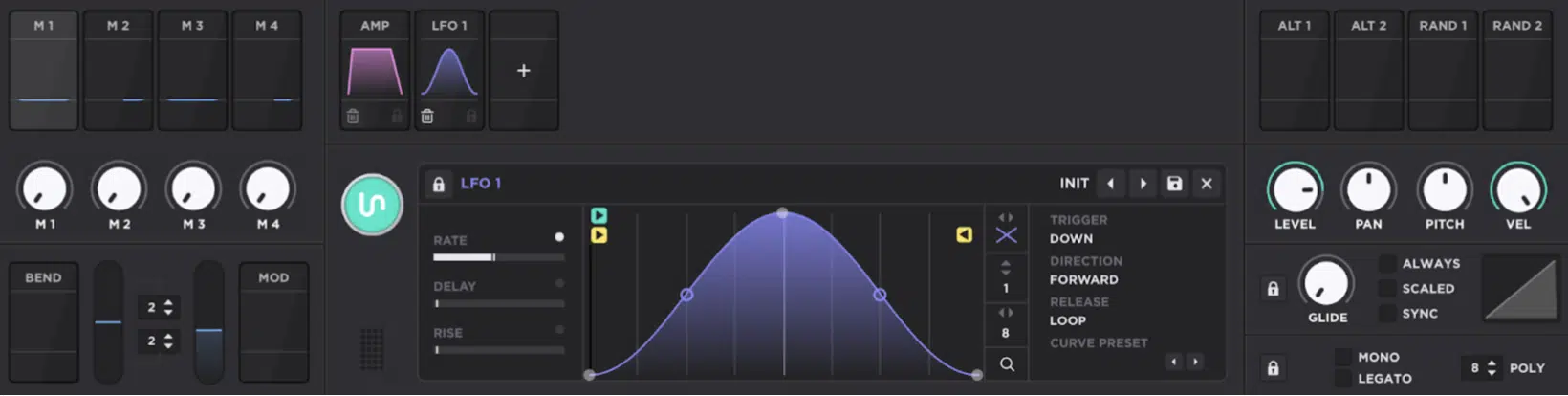
Modulation is what gives a patch motion and control instead of just leaving it frozen, and in Unisynth the whole thing is built around drag-and-drop.
No getting lost in endless menus that can destroy creativity.
On top of the dedicated MOD Matrix, not only can you set up the modulation, but fine-tune it as well using drag-and-drop individually (for each unique destination).
You can grab any modulation thumbnail, or even the surrounding box in the main modulator panel and drag it over the interface.
From there, each and every parameter that can be modulated will light up in that modulator’s specific color.
So, right away you’ll know exactly what is fair game, which is amazing.
Then, once you drop it on a control, Unisynth creates a modulation assignment with depth (the amount of movement being applied).
And by the way, that depth can also be modulated again through AUX modulation if you want one source to control how hard another source pushes.
You can even scale modulations to control whether modulation is happening to a given destination as well as how much, using a macro or any other modulation source you choose.
Plus you’ll never have to worry about being locked into just one behavior because the modulation can be set up in multiple ways, like:
- Unipolar modulation for one-direction movement
- Bipolar modulation for movement above and below the current value
- A curve control that changes the slope so the response can feel more linear, more logarithmic, or more exponential
This has massive sound design potential my friends, believe me!
If you click the “+” icon in the modulator area, you can create one of 4 main modulator types 一 Chaos, Envelope, LFO, or Tracker.
NOTE: The workflow is super slick after that too because right-clicking a modulation source shows every target it is controlling, right-clicking a destination shows what is assigned to it, and hovering an assigned modulation brings up floating, color-coded depth knobs so you can tweak the amount right there without even jumping into the Matrix tab.
So, the big win with Unisynth is that modulation never feels like some hidden technical layer, because you can assign it by dragging.
As well as fine-tuning it on the spot, bypassing it, removing it, or going deeper in the matrix when you want, which is the perfect balance of speed and control.
Modulators
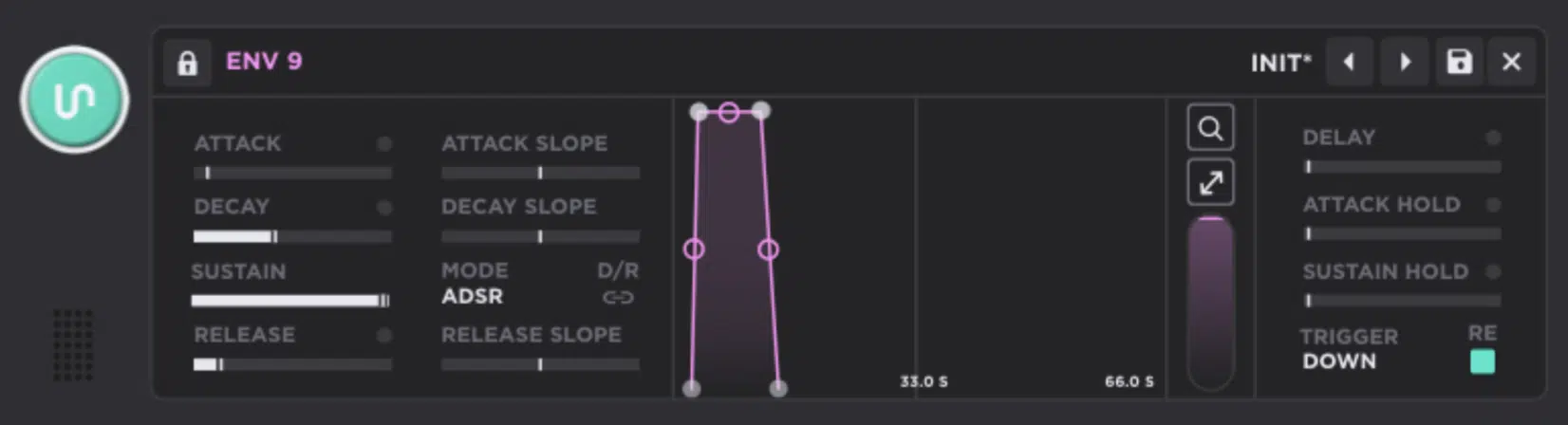
One of the craziest things about Unisynth is that it can run up to 48 modulators at the same time, and nearly every parameter in the synth can be modulated by up to 16 modulators on a single target (flagship territory all day).
The core modulator types you create manually are Envelope, Chaos, LFO, and Tracker like we just talked about.
But, on top of those you also get built-in performance and utility sources like 4 Macros, Bend, Mod Wheel, Alt 1, Alt 2, Random 1, and Random 2.
So needless to say there is a lot more going on here than just a couple of LFOs and envelopes.
One patch in Unisynth can have an LFO moving wavetable position, an Envelope triggering the filter cutoff position on note-on, Chaos adding analog-style drift to pitch or pan, a Tracker changing brightness by velocity, and a Macroopening delay, reverb, and drive all at once without the synth tapping out.
Then, once things get extra dense, the Matrix tab keeps it organized by showing every active modulation along with:
- Source
- Curve
- Amount
- Destination
- Polarity
- Aux Source
- Aux Curve
- Aux Amount
You can even sort the whole thing by source, destination, or amount so any complex patch you’re working with doesn’t get overwhelming.
Once you start stacking motion across oscillators, filters, FX, and performance controls, a lot of synths get overly complex (and messy) super quick, but not this one!
Unisynth still gives you clear visibility into what is moving what and by how much, which is a gold mine.
So, if you are the type who likes patches that evolve for 4, 8, or 16 bars (like myself) instead of just wobbling one knob over and over, Unisynth gives you more than enough modulation headroom to really cook straight fire.
Motion And Expression
Modulation systems shouldn’t just be about random movement, but rather giving the patch timing, feel, performance response, and maximum life.
Some of the best synths on the market offer a few of these advanced options, but none of them offer everything Unisynth does (AI or not).
You’ll have access to features most professional sound designers wouldn’t even think to use in a normal session, but would absolutely love to have if ever given the opportunity.
And Unisynth is giving you that opportunity for the very first time!
Whether it is your first time using this kind of functionality or your hundredth, it lets you fine-tune, experiment, and use it alongside a collaborator that understands these features/functions inside and out 一 the AI engine itself.
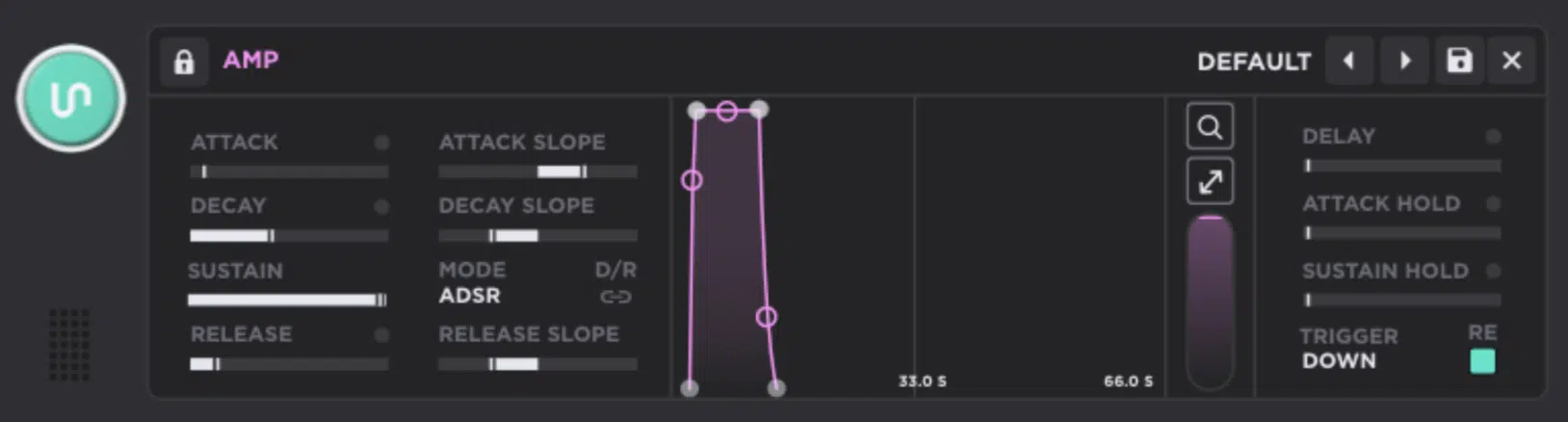
The Envelope side is deep right away, with ADSR and ADR modes, separate attack, decay, sustain, and release slopes, delay, attack hold, sustain hold, D/R Link, and zoom.
As well as trigger modes like Down, Up, First, Last, and Down/Up.
There’s even an RE option that decides whether a new note starts from zero or from the voice’s current envelope position.
The Chaos modulators, on the other hand, are perfect when you want things to feel less stiff because they can generate Step, Line, or Sine-interpolated randomness.
WIth controls for Rate, Delay, Rise, Bipolar/Unipolar, and trigger modes including Beatif you want the motion tied to the DAW instead of note events.
The LFOs get seriously detailed too, since you can easily:
- Draw your own shapes with movable nodes and curve handles
- Snap them to a grid for rhythmic patterns
- Use a brush for free-hand preset shapes
- Set Rate, Delay, Rise, Start Pos, Loop Pos, Direction
- Even choose release behaviors like Loop, Oneshot, Leave, Pause, Break, Hold, or Stop
On top of that, Trackers let you map performance data like note number, velocity, off velocity, MPE pitch bend, pressure, and timbre to almost any control.
It uses either a drawn Curve or Stepped bins, letting you use this modulator as a step-like sequencer of sorts.
This is perfect for when you want certain keys, velocities, or ranges to behave a little differently.
It’s basically a pitch-tracking envelope that can track every expressive control choice (and so, so much more).
And the performance sources are solid too because Macros can be set up to control multiple parameters with different depths and curves…
Using Bend as a modulation source gives you bipolar pitch-wheel modulation, while Mod Wheel gives you unipolar control.
We then have 2 unique mod sources, Alt 1/2 alternates between 2 states from note to note, and Random 1/2 spit out random new note-on values every time.
So, whether you want a filter to open harder with velocity, an LFO to sweep a custom rhythm, a macro to move cutoff from 100 Hz to 1 kHz while also raising delay mix, or a Chaos mod to add just a little wobble and grime, Unisynth out now is invaluable.
It gives you a ridiculous amount of expressive control without making the whole thing feel stiff or overcooked.
Full FX Rack That Will Blow Your Mind
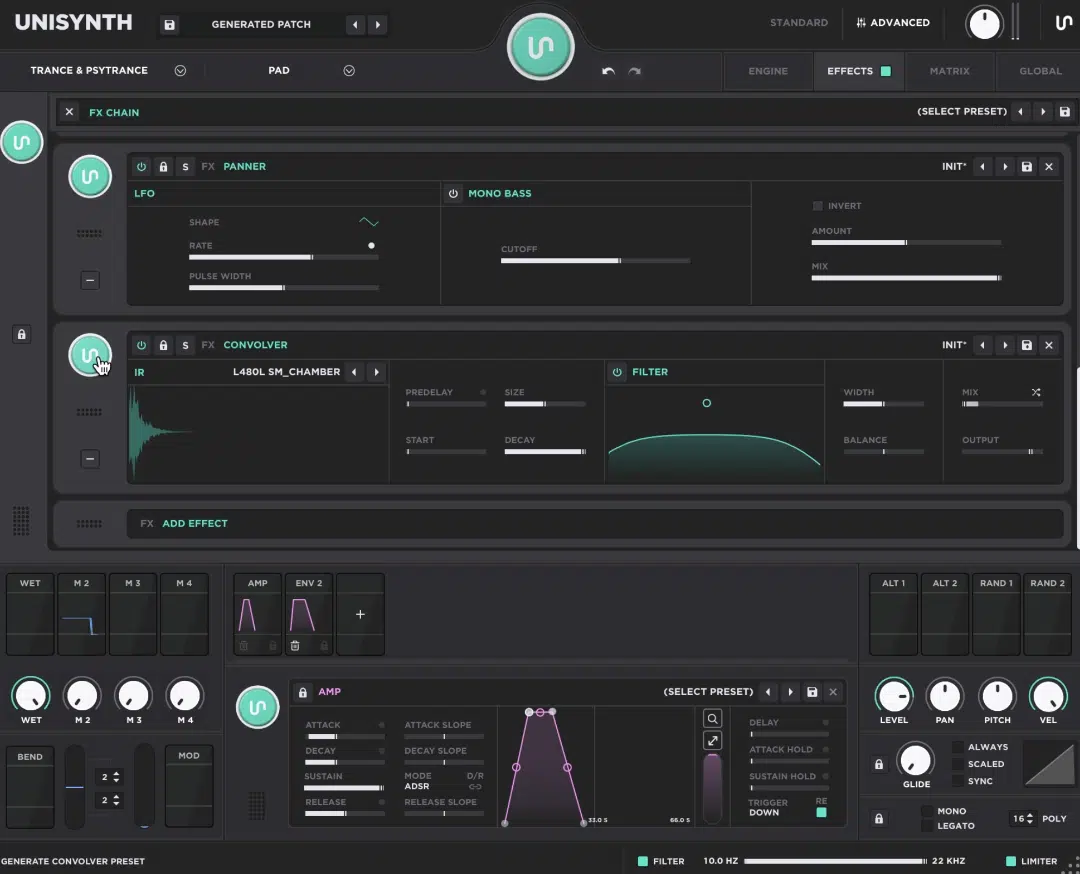
Like everything else that this epic AI synth plugin has to offer, the FX side is seriously stacked as well.
You can build a chain with up to 24 effects and either generate it instantly with the FX-Chain Generator or build it manually if that’s your thing.
This is huge when you want to go from a raw patch to something way more finished without ever leaving Unisynth.
Everything runs left to right, and you can drag effects into any order you want because, as you may know, Tape into Reverb is a totally different vibe from Reverb into Tape, and Distortion into Chorus hits way differently than Chorus into Distortion.
While you may not be able to imagine the difference just by thinking about it, a few simple clicks will show you the importance of signal flow and the order of effects.
Again, that makes it an incredible learning resource not just for sound design and synthesis, but for mixing in general.
You’ll have access to a traditional Delay of course…
But it also includes a special Reverse module that takes the incoming signal and repeats it in reverse by the specified delay time.
That gives you an effect that would normally take a ton of manipulation inside your DAW after you have already laid down your track.
You’ll also be getting countless distortion effects that go way beyond the typical, like:
- Destroy
- Mangle
- Preamp
- Redux
- Tape
- More obscure options like Asymmetrical, Wiggle, Stairs, Fold, Etc.
There’s also more dynamic tools like Compressor and OTT, as well as filter tools like an 8-band parametric EQ and a post-FX Filter.
Given the unique routing options, that post-FX Filter can be an indispensable tool whether you need a third filter or want to bypass the first two.
You also get modulation effects like Chorus, Flanger, Phaser, Super Unison, Tremolo, and Vibrato, and spatial tools like Convolver, Panner, Reverb, and Space.
Plus, utility and stereo tools like Utility and Width.
And these are not basic stock or throwaway versions either as it offers advanced functionality, for example the main Delay even has its very own LFO.
That is in addition to Unisynth’s internal LFOs, which you can use as modulation sources on any FX parameter, since those parameters are available as modulation destinations.
On top of that, the Delay also includes stereo Left/Right times, Link, Offset, Ping Pong, Feedback, FB Balance, a feedback-loop bandpass filter, Width, Additive mode.
And a Warmth section with Soft, Fuzz, Tape, and BBD saturation styles.
NOTE: The deeper processors get pretty wild too since Distortion includes pre- and post-filters with slopes from -12 dB/8ve to -48 dB/8ve and modes like Soft Clip, Hard Clip, Germanium, Wiggle, Fuzz, Fold, and Bucket Brigade.
And then there’s Tape which adds noise, smear, warble, and motor speed for that dirty, drifting character people go crazy for.
On the cleaner side, the EQ lets you add up to 8 nodes with control over frequency, gain, Q, type, and slope, the FX Filter works after the chain when you want filtering after distortion or reverb.
Convolver and Reverb both give you legit space-shaping controls like pre-delay, size, decay, width, balance, color, and built-in filtering.
Workflow-wise, Unisynth makes the whole rack easy to live with too…
You can lock the chain from the generators, bypass the whole section, collapse or re-expand effects for a much cleaner overview.
And, even set a global preference so only the selected effect stays expanded.
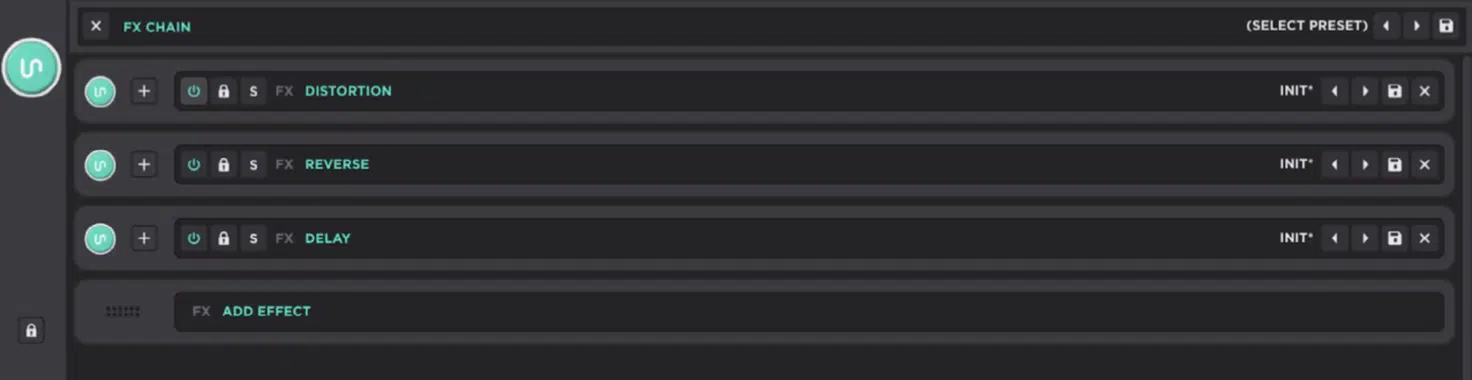
Each effect also has its own power, solo, lock, swap, preset browse, save, and remove controls, and you can save or load full FX Chain presets, clear the whole rack, sync timing-based controls to your DAW with the little white dot, and modulate nearly every effect parameter as well.
So, when I say Unisynth is going to be the only synth plugin you’ll ever need, I’m not exaggerating in the slightest.
Built-In Wavetable Editing
At this point, Unisynth has already proven it can demolish any other synth plugin, AI or not, on the planet, but this next part is where it starts pulling even further ahead. And because Unisynth lets you edit the actual wavetable material inside the plugin itself, let’s now talk about why that is such a big deal for producers and sound designers who want truly original tones. Honestly, you might even use it just for the wavetable editor’s abilities alone, it’s that powerful.
Create Your Own Tables Like a Boss
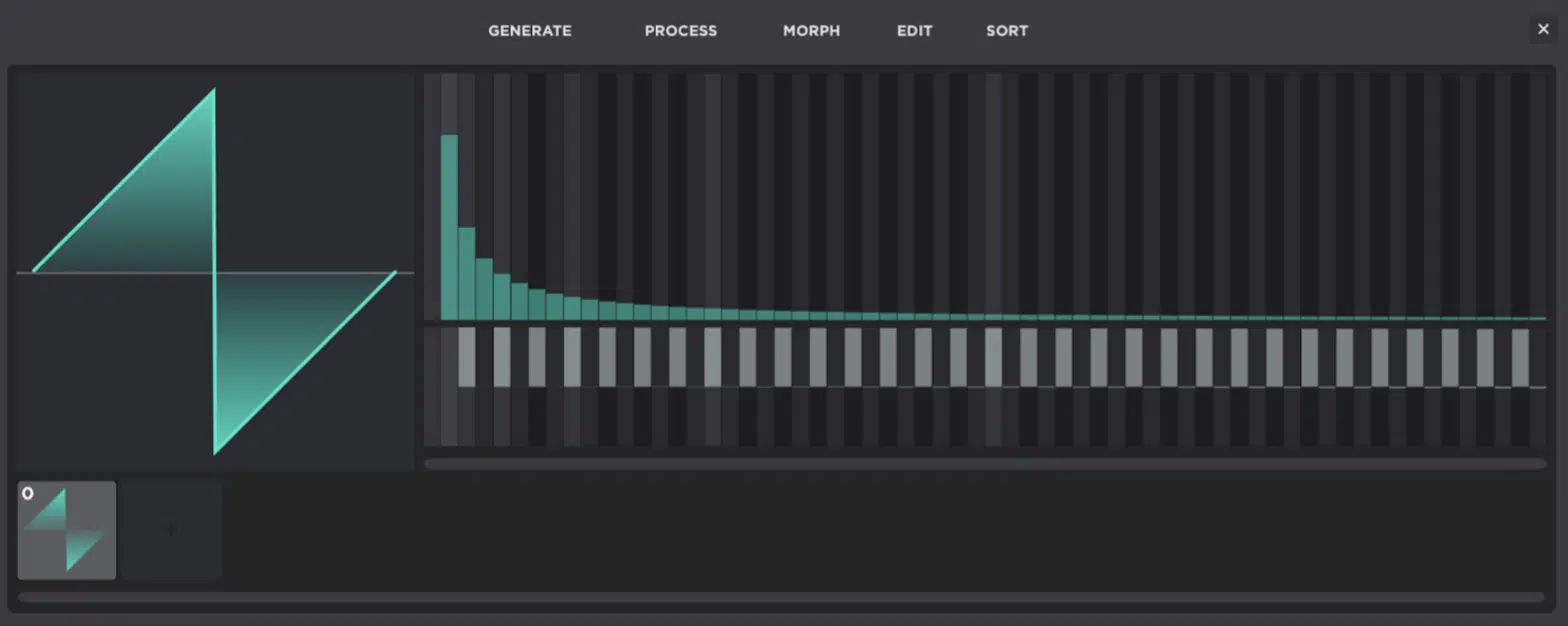
The built-in wavetable editor in Unisynth is the kind of feature that instantly tells you this AI synth plugin is not just about generating sounds fast.
You can actually create and edit your own wavetables right inside the synth instead of bouncing out to some separate tool.
At the very bottom of the editor, you get the table frames…
This is where you can add new frames with the “+” icon or the Add button, click any frame to select it, set the wavetable position to that frame just by clicking it, and drag frames around to rearrange the order.
Then, above that, you get the FFT area (which is the partial editor), which is where things get real because each vertical bin controls a harmonic from left to right.
The top half handles harmonic volume and the bottom half handles phase.
Unisynth also gives you a bunch of editing shortcuts here, which are amazing when you’re really dialing in, like:
- Hovering to see the partial number and value
- Clicking to set the slider to your mouse position
- Dragging to draw across multiple bins
- Right-clicking for fine control
- Shift-clicking to move all bins above the selected one
- Command-clicking to isolate one slider
- Option-clicking to draw a straight line
Then you get the Generate menu, which can replace the selected frames with fresh starting shapes like Clear, Sine, Saw, Square, Noise, Triangle, and Pulse.
That last one even gives you a slider to adjust the pulse width while you generate it.
For example, you could start with a clean Sine, add a couple of new frames, turn one into a Saw, another into Noise, and already have a table that moves from smooth to bright to gritty before you even touch modulation (mind = blown).
And if you select multiple frames, the FFT editor not only changes the first selected frame, but the dropdown tools tweak all selected frames as well.
When you want broad changes across part of the table without rebuilding everything one frame at a time, it’s awesome.
So, when I say Unisynth gives you real wavetable editing, I mean it.
It’s such an epic sound-design workspace where you can build source material from scratch instead of just browsing whatever somebody else has already made.
I can confidently say without any shadow of a doubt, that this wavetable editor is the most powerful one available inside any synth in the game, period.
Morph, Process, And Sort
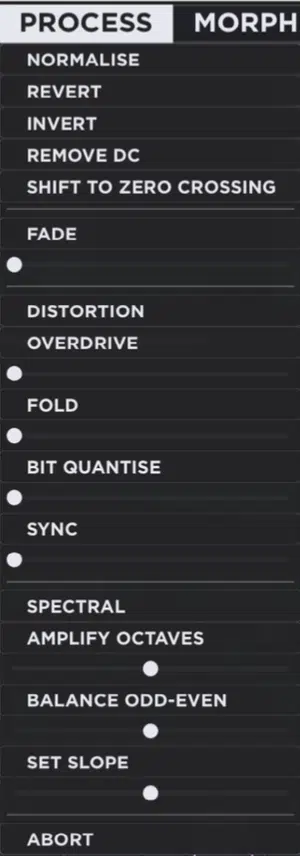
Once you have a solid wavetable going in Unisynth, the Morph, Process, and Sort menus bring even more power to the table.
It’s how you’re going to reshape the table, smooth it out, mess it up, or completely reorganize how it moves altogether.
The Morph menu works across multiple selected frames…
So if you grab, say, the first 5 frames of a table, Unisynth can create transitions between the first and last frame using Crossfade, Spectral, Zero-Phase Fund, or Zero-Phase All.
Then you have Process which is more like a quick toolbox for changing the selected frame with operations like Normalize, Revert, Invert, Remove DC, Shift to Zero Crossing, and Fade.
Perfect for when the wave shape needs cleanup or a different feel before you move on.
It also goes way further than cleanup, because the same Process area includes Overdrive, Fold, Bit Quantize, Sync, Amplify Octaves, Balance Odd-Even, and Set Slope.
Plus, Abort if you want to bail without committing the change.
So, for example, you can take a frame in Unisynth, hit Bit Quantize to add stepped digital grit, and use Amplify Octaves to push the harmonic octaves harder.
Then, use Set Slope to tilt the whole tone brighter or darker before the oscillator even starts scanning it.
The Sort menu is on point too, because it can rearrange the order of the entire table by fundamental magnitude, odd-even balance, spectrum slope, spectrum peak, or spectrum average.
It also gives you Randomize Table and Revert Table when you want to go more chaotic or just flip the whole thing backward.
When it comes to frame order, it changes the feel of wavetable motion like crazy, so a table that scans smoothly in one order can turn twitchy, tense, or way more animated just by sorting it differently.
That’s what makes the wavetable side of Unisynth feel so deep…
You’re not only editing the sound itself, but also controlling how that sound evolves, transforms, and moves over time.
Bonus: Extra Features/Functions for Beginners & Professionals
One thing I really like about Unisynth is that it does not stop at sound creation.
It also gives you a bunch of smooth workflow features that make it much easier to live with once you start building your very own library.
When you land on a patch you want to keep, you can save it straight from the Preset Selector with the save icon, name it properly, and then browse it again later from the preset menu.
Or, flip through your sounds one by one with the arrow buttons beside the preset title.
That is a bigger deal than it sounds, because if you just built a patch with a custom wavetable, a dialed-in FX chain, and a bunch of macro movement, Unisynth lets you lock that whole state in without having to rebuild anything later.
And if you like keeping your sounds organized (which I highly recommend that you all do), Unisynth also lets you structure presets into folders and subfolders.
Simply name them the right way 一 keeping your library a lot cleaner once you start stacking up pads, basses, leads, keys, and custom artist banks.
It gets even better once you start turning those sounds into Expansion Packs too, because Unisynth lets you group presets by using a pack name/preset name format and then export that whole preset pack directly from the plugin.
So, let’s say you built something like 20 basses, 15 pads, and 10 leads for a certain sound…
You can then package them together cleanly instead of leaving them scattered all over the place, and Unisynth will also collect any non-factory samples, wavetables, and impulse responses used in those presets so the pack stays complete.
Then, on the output side, you also get super useful mix-focused tools like Output Gain, which sits at the very end of the signal chain after the limiter.
Plus Global High-Pass and Low-Pass Filters and a Master Limiter in the Direct Out stage.
And they’re not just stored inside presets, so you can actually shape how Unisynth sits in the current session, like trimming rumble, smoothing some extra top end, or backing the overall level down a touch.
All without changing the actual saved patch itself.
So, whether you are brand new and just trying to keep your best sounds organized, or you are deep in this and building full custom banks for future releases, Unisynth gives you the extra workflow and output features that make it feel polished all day.
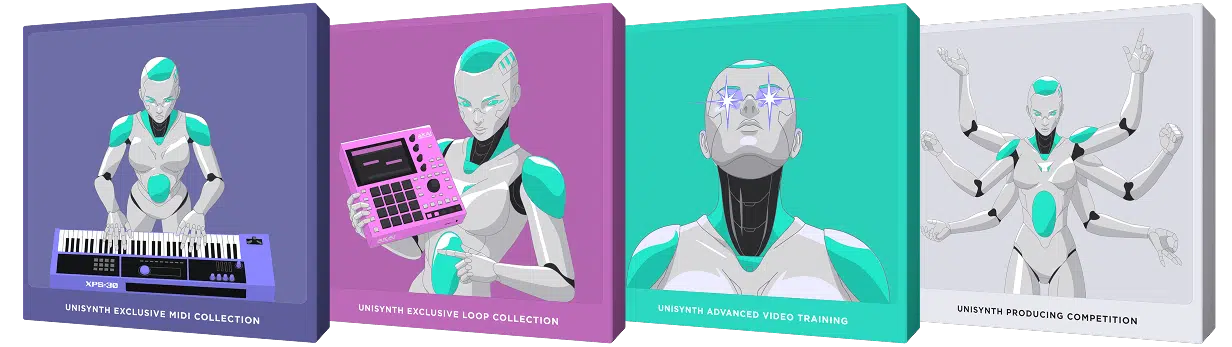
NOTE: When you purchase Unisynth, you’ll also get 4 free (exclusive) bonuses: the Unisynth Exclusive MIDI Collection, Unisynth Exclusive Loop Collection, Unisynth Advanced Implementation Training, and the chance to win $1,000 by participating in an exclusive production competition that you’ll gain access to upon purchase.
Final Thoughts: Unisynth Out Now
At the end of the day, Unisynth is not impressive just because it uses AI… Any plugin can throw some AI into the mix and call it a day.
Unisynth is going to be considered the best AI synth plugin of all time because it backs everything up with the kind of deep synth sound design most plugins only dream about.
You are getting 32 genres, 6 sound roles, 4 hybrid oscillators, 95 filters, 24 built-in effects, 48 simultaneous modulators, 80 AI generators, built-in wavetable editing, preset exporting, expansion-pack creation, and mix-ready output tools all inside one plugin.
It is an idea-generation engine that can assist at any point in the sound-design process, letting the AI play as big or as small a role as you want at any stage.
You can go from generating a dark chord patch in seconds to editing the wavetable, stacking 5 unison voices, dialing in 20% detune, and routing layers in parallel.
Plus, modulating filter cutoff with an LFO and finishing the whole thing with a custom FX chain without ever leaving Unisynth (or, if using the AI engine, have Unisynth do this itself with a simple click of a button).
Or, if you have the perfect FX chain and modulation setup but just want to change the core oscillator functions and have AI generate new ones, no problem.
Likewise if you have the nuts and bolts for the perfect patch but need some inspiration on the FX side, you can do that too 一 the possibilities are truly endless.
The beauty is that if you already have the perfect 3-oscillator sound, you can simply have Unisynth generate the fourth oscillator to add more backbone to any preset.
That is way more than just “AI convenience.”
And honestly, it is way more than what most flagship synths are offering in one place right now (with or without the AI capabilities).
Bottom line, if you are asking me where Unisynth stands in the current synth world, I would say it is more than just AI, more than just flagship, and honestly one of the most complete, forward-thinking, GOAT-level synth plugins ever created.




Leave a Reply
You must belogged in to post a comment.