




We’ve been doing a bunch of articles comparing the best synths in the world to the new reigning champ: Unisynth.
A lot of you have asked me to break down Unisynth vs Massive X, and I heard you guys loud and clear.
That’s exactly why I’m going to show you why Unisynth just can’t take an L.
No synth can come out on top against a synth this forward-thinking, this flexible, and this ridiculously easy to get great pro-level results with.
I’ll be covering everything you’d want to know, like:
- Workflow speed ✓
- Play view vs Standard View ✓
- Sound generation ✓
- Oscillator engines ✓
- Wavetables ✓
- Wave creation ✓
- Filters and shaping ✓
- Motion and macros ✓
- Routing and signal flow ✓
- FX and chain building ✓
- Ease of use/creativity potential ✓
- Sound design possibilities ✓
- So much more ✓
After the breakdown, you’ll be able to see which synth actually makes it easier to create the sounds you hear in your head.
And, on the downside, which one asks a lot more from you and requires extensive sound design experience before things start clicking.
Plus, you’ll get an exclusive look into what makes Unisynth so unique and game-changing in the first place.
So, If you want to understand why it’s become such a monster for modern producers and why it keeps outclassing older “advanced” synths in real-world workflow, stay tuned.
You are not going to be disappointed.
So, let’s get into it…
Table of Contents
Unisynth: Revolutionary & One-of-a-Kind
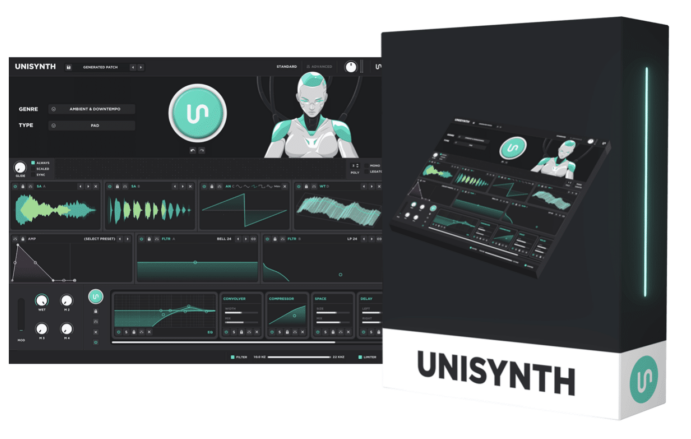
Unisynth feels revolutionary because it completely changed the synth game forever.
It’s not just another synth with a big preset library, the world’s first and only AI-powered, generative synth that’s genre-specific.
Instead of opening to a blank patch or digging through folders, you simply:
- Select one of 32 genres
- Pick one of 6 sound types
- Hit the AI Patch Generator
- Boom: fresh sounds in the most popular genres ever
So if you’re after a hazy Ambient pad, a sharper Trap pluck, or a wider Pop chord texture, you’ll get it in seconds.
No more wasting massive time trying to force the instrument into the right lane.
Standard View is built for beginners, and it lays everything out in three clear sections 一 the Generator Panel, the Synth Panel, and the FX Panel.
Right there on that main page, you can work with the generator, the four oscillators, the amp envelope, the two primary filters, the macros, and the chain itself.
It really feels more like shaping a sound than operating a machine.
And don’t even worry if you’re looking for more control and endless sound design freedom, because the Advanced View has you covered.
Here you’ll get access to the Engine, Effects, Matrix, and Global tabs, plus the deeper mini-generator side of the synth.
Under the hood, it’s even deeper: four oscillators, four engine types per oscillator (Analog, Wavetable, Sampler, and Resonator) two primary filters with 95 filter options, and drag-and-drop modulation.
Drag-and-drop modulation that can also be managed inside a dedicated Mod Matrix, mind you.
Add the fully configurable FX rack and the internal wavetable editor, and you can see why even the most seasoned (world famous) producers are hyping it up!
NOTE: If you want to know absolutely everything about Unisynth, make sure to check out this extensive Unisynth breakdown article and download it below.
Massive X: Deep, Modern, and More Involved
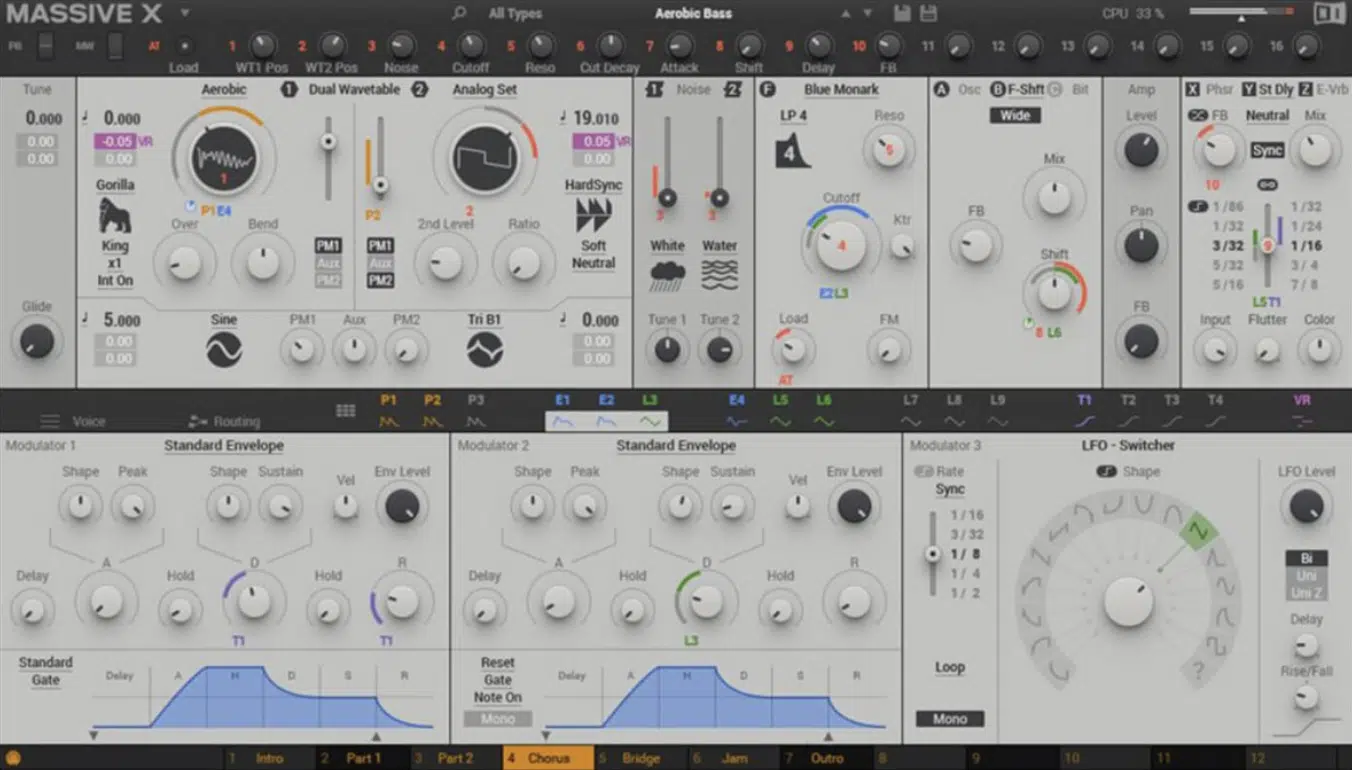
Massive X is the newer Massive, and was built to feel more modern than the original.
Up front, Play view gives you the side browser, Macros 1–8, the Morpher, and the Animator.
Once you hit Edit view, though, you’re dealing with the real engine…
Two core wavetable oscillators, two PM oscillators, and two noise modules feeding a much deeper patch structure.
On top of that, there’s nine filter types, three Insert Effects inside the polyphonic voice path, three Stereo Effects after the signal is summed, and a semi-modular routing system tying it all together.
For movement and control, Massive X has 16 Macro knobs, three Performers, and four Trackers, so the ceiling is obviously high…
But trust me, once you keep reading, you’ll see why Unisynth still blows it out of the water.
The point isn’t that Massive X is missing modern tools, because it isn’t, but rather you only get the best stuff once you really understand what the modules, routes, and modulation sources are doing.
And, on top of that, it has an extensive learning curve and you really need to be a sound design expert to be able to correctly use it.
Unisynth vs Massive X: Breaking it All Down
At first glance, Unisynth vs Massive X looks like a clash between two of the most deep, modern synths in the game, but the bigger story is how differently they approach the creative process. One is built to get you to a strong, custom sound fast with guidance at every step, while the other opens up a deeper, more involved system that asks a lot more from you once you move past the simple preset layer. You’ll see what I’m saying in a second, stick with me…
The Real Angle: Guided vs Involved
When I say guided vs involved, I’m simply talking about what each synth asks from you before the fun part really starts (just wanted to clear that up real quick).
Not just what a synth can technically do, but how fast it lets you get from a basic idea in your head to something that actually sounds alive and polished.
Massive X has a much better front end than the old Massive, sure.
However, Play view is still mostly about browsing presets, touching Macros 1–8, and morphing or animating a sound that already exists.
In other words, you’re usually starting from somebody else’s decision-making first, then shaping that into your own thing after the fact.
That can work sometimes, sure, but it’s a very different feeling from building the identity of the patch around your exact goal from the jump if you ask me.
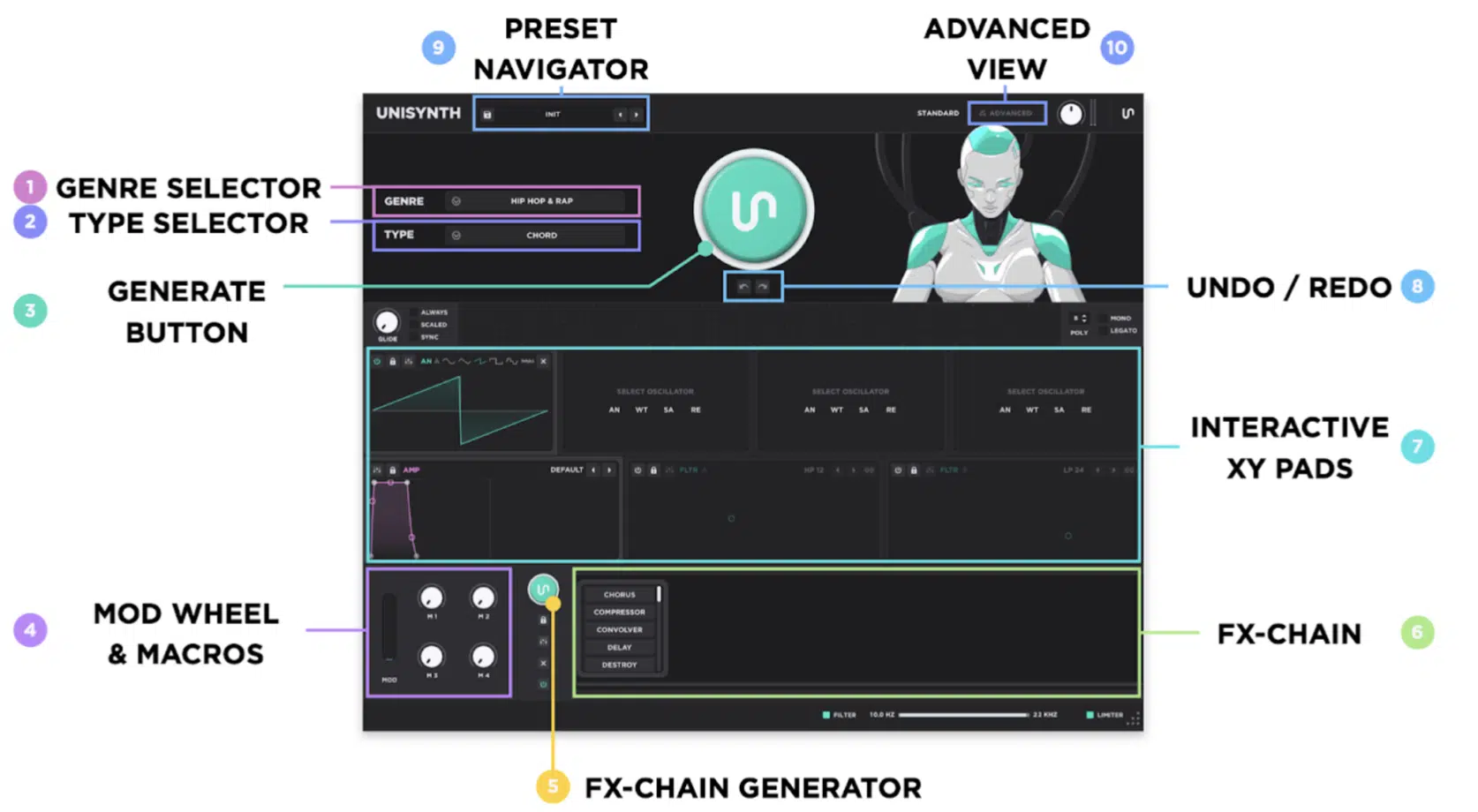
Unisynth’s fast layer is different, because you’re generating the starting patch itself with the AI engine 一 not just grabbing the nearest factory preset and nudging it around.
And that’s where the whole thing starts feeling way more modern; you’re not spending the first few minutes asking, “Which preset folder is closest?”
You’re basically telling the synth what lane you want, then letting it hand you the perfect starting point that already makes sense for that unique lane.
After that, you can keep moving the patch through:
- Genre and type selection
- Macros
- Oscillator
- Filter XY control
- The FX-Chain Generator
So it’s not just “generate and hope for the best” either, believe me, you can keep steering the sound in real-time…
Maybe tighten the tone with the oscillator controls, push the filter movement a little harder with the XY control, then swap the whole FX direction if the patch needs more width, grit, or motion, dealer’s choice.
That makes the workflow feel a lot more interactive, because every next move is right there in front of you instead of tucked behind another layer of setup.
That makes a big difference when you’re laying down beats because Massive X usually starts with “find a patch” and Unisynth starts with “make me one in my exact style.”
Then once you push deeper, Massive X starts asking for more manual calls around routing, insert placement, PM behavior, modulation pages, and voice setup.
You’re also managing architecture at this point, which is cool if you already know your way around, but if you don’t (or don’t feel like being), it’s super intense.
So, bottom line, Unisynth is still way deeper under the hood and keeps that depth close to the surface, or used in a fully-automated way.
And if you’re dealing with beat block, dry spells, or just don’t want to build every patch from zero for the hundredth time, that kind of help goes a very long way.
Standard View vs Play/Edit View
Next up in the Unisynth vs Massive X debate, let’s talk about Standard View and Play/Edit View for a minute.
These are the respective screens that tell you what the synth wants you to touch first.
So, in a way, this isn’t just about layout at all, but rather workflow philosophy…
What gets put in front of you first, what gets buried, and how many steps it takes before you’re actually shaping the sound the way you want.
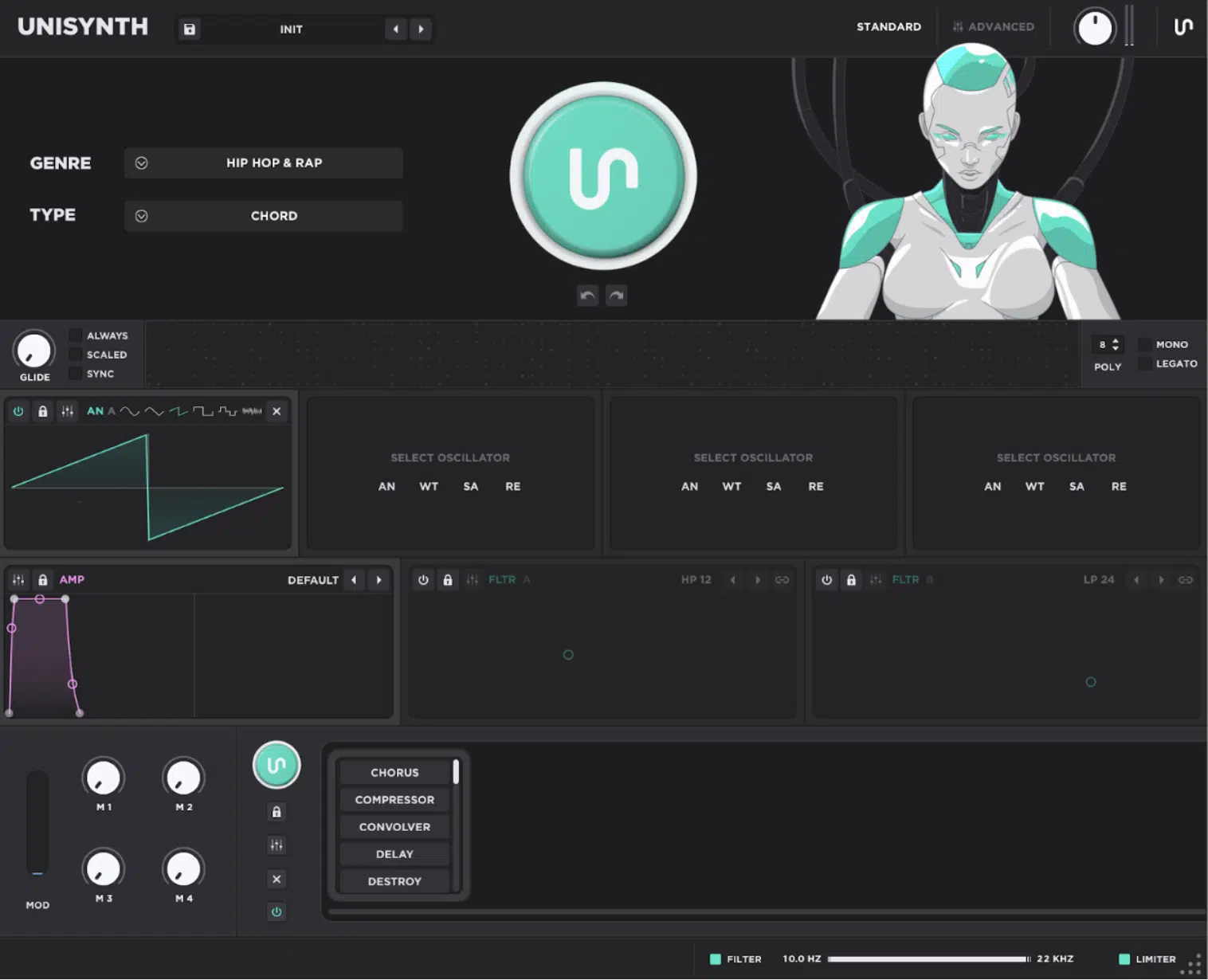
In Unisynth, Standard View puts the generator, oscillators, amp envelope, filters, macros, and FX chain right in front of you across the Generator Panel, Synth Panel, and FX Panel.
So you can easily:
- Generate a patch
- Reshape the core tone
- Tweak the envelope
- Test macro movement
- Drag the chain around without bouncing between separate workspaces
For example, you can generate a patch, soften the amp shape, and brighten the oscillator balance.
Then, rearrange the FX order in one pass without feeling like you’ve left the creative lane and had your inspiration shattered.
And when you need more control, Advanced View opens Engine, Effects, Matrix, and Global, going deeper into the same instrument rather than switching gears completely.
Massive X splits that job up more, because Play view is mainly for preset interaction, Macros 1–8, Morpher, and Animator.
Edit view, on the other hand, is where the engine, modules, routing, voice settings, and deeper modulation pages really live.
Even the effects follow that same mindset, since Massive X gives you three Insert slots in the polyphonic path and three Stereo slots at the end.
That can be powerful, of course, but it also means you have to think more carefully about where the processing is happening and why.
Unisynth on the flip side, gives you a freer rack where chain order and drag-and-drop experimentation stay right in front of you.
So if you want to hear what happens when distortion hits before reverb, or when a filter shapes the repeats before delay feedback starts building up, you can test it out.
So Massive X can absolutely go deep, but Unisynth keeps the important moves closer together 一 making it way easier to stay in the music/moment when you’re in the zone.
Oscillators and Cored Sound Design
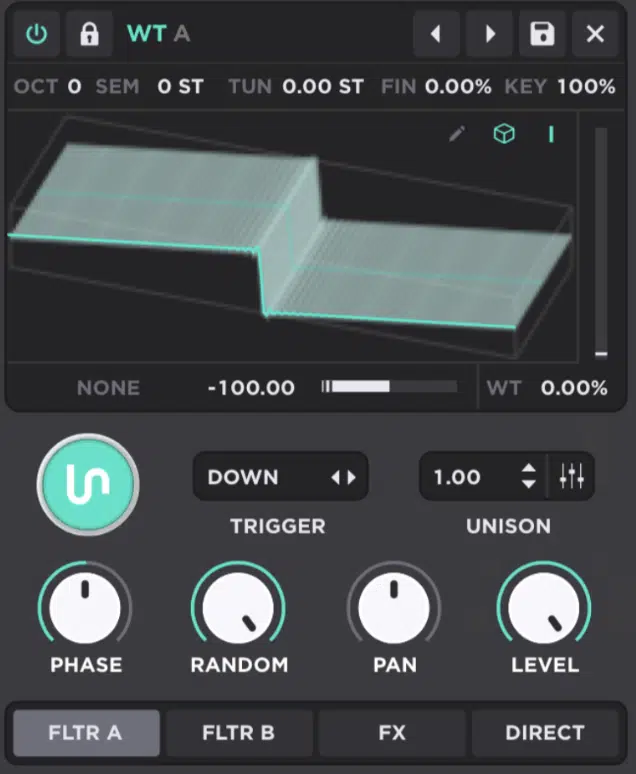
Oscillators and cored sound design are where you can really find out what a synth is made of, and in the Unisynth vs Massive X debate, this is a big one.
It’s the layer that gives a patch its character before filters, FX, and modulation start changing the picture altogether.
Depending on how the synth is built, you’ll either be shaping tone right away or spending your first few minutes working around the architecture instead.
Unisynth keeps that first contact wide open 一 each of its four oscillator slots can become an Analog, Wavetable, Sampler, or Resonator engine.
So, one patch can stack classic waveform weight, wavetable motion, sampled texture, and resonant tone before you’ve even touched routing (sick, right?).
Even better, the Oscillator displays themselves double as interactive XY controllers, so dragging a wavetable layer can move warp amount and table position at once.
While other engine types expose their own paired controls the same way.
That makes the first stage of sound design feel tactile instead of technical, which is why people are raving about Unisynth feeling like a creative collaborator.
Massive X starts from a narrower but very deep and extensive architecture.
It has two main wavetable oscillators, two dedicated PM oscillators, two Noise modules, and ten wavetable modes such as Bend, Mirror, Hardsync, Wrap, Formant, ART, Gorilla, Random, and Jitter.
They reshape how the table is read and how the harmonic content behaves.
So yes, Massive X can go super far at the source, especially once you start layering PM and routing ideas.
However, the heart of it is still a factory-table workflow, and even Native Instruments admits custom wavetable import still isn’t possible.
The two Noise modules help, and Massive X does let you import custom noise samples there…
But that certainly doesn’t replace having a true Sampler oscillator, dedicated analog-modeled oscillator mode, or dedicated Resonator oscillator mode sitting right beside the wavetable side.
In other words, Massive X is sophisticated and flexible 一 but what you see up front is much closer to what you get.
On the flip side, Unisynth gives you more engine variety, more immediate control, and a much easier first five minutes (it doesn’t feel like an engineering exercise).
NOTE: Unisynth feels more open from the first click because you can mess around all day, customize to perfection, and chase multiple ideas fast instead of first translating the idea into the architecture the synth prefers.
Wavetables and Wave Creation
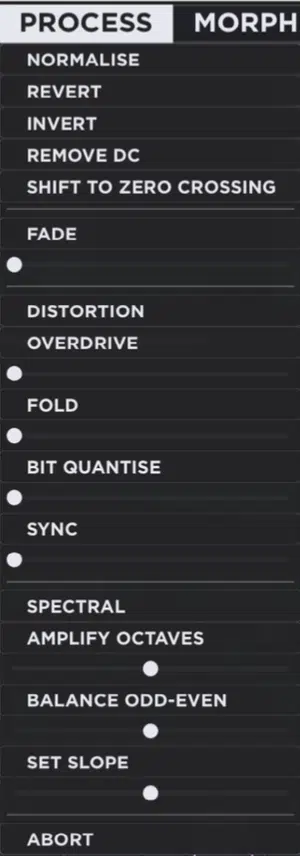
Wavetables and wave creation are where the difference between Unisynth vs Massive X really gets serious.
Using a table well is one thing, but being able to build and reshape the table itself is a whole different level of control.
And when it comes to Unisynth, it doesn’t stop at simply loading a wavetable and scanning through it, not by a long shot.
This is because its internal Wavetable Editor lets you Generate, Process, Morph, Add or Remove frames, and Sort the table without ever leaving the synth.
So if a table feels almost right, you can easily:
- Create a new sine or saw frame
- Normalize it
- Fold or bit-quantize it
- Morph a run of frames spectrally
- Then reorder the whole table by peak, slope, or odd-even balance right inside the same workflow
That puts waveform creation right in the middle of sound design instead of turning it into a separate technical chore.
Plus, it gets even more interesting because Unisynth’s generator system makes deep editing feel within reach instead of super intimidating/overwhelming.
It’s the kind of frame-level control people usually associate with dedicated wavetable-editing specialists…
Except here it sits inside a genre-aware, AI-driven synth that already wants to help you quickly get to banging out killer sounds.
Massive X is strong on the use side of wavetable synthesis, too.
It gives you over 170 factory wavetables, ten oscillator modes, and powerful phase-modulation options that can push a single table into very different territory.
What it doesn’t give you is custom wavetable import or a built-in wavetable editor where you can generate frames, redraw spectral content, add or remove frames, and reorganize the table from inside the instrument.
Bottom line, the Massive X workflow is all about picking a great factory table, choosing the right mode, then squeezing more life out of it with PM, modulation, and routing.
Now, this can sound fantastic if you know what you’re doing, but it’s still much more about interpretation than creation.
For a synth that’s supposed to feel ‘next-gen,’ that’s a real gap, because Unisynth lets you get hands-on with the actual wave material itself 一 not just the way that material is scanned, bent, or modulated later.
Motion, Performers, and Macros
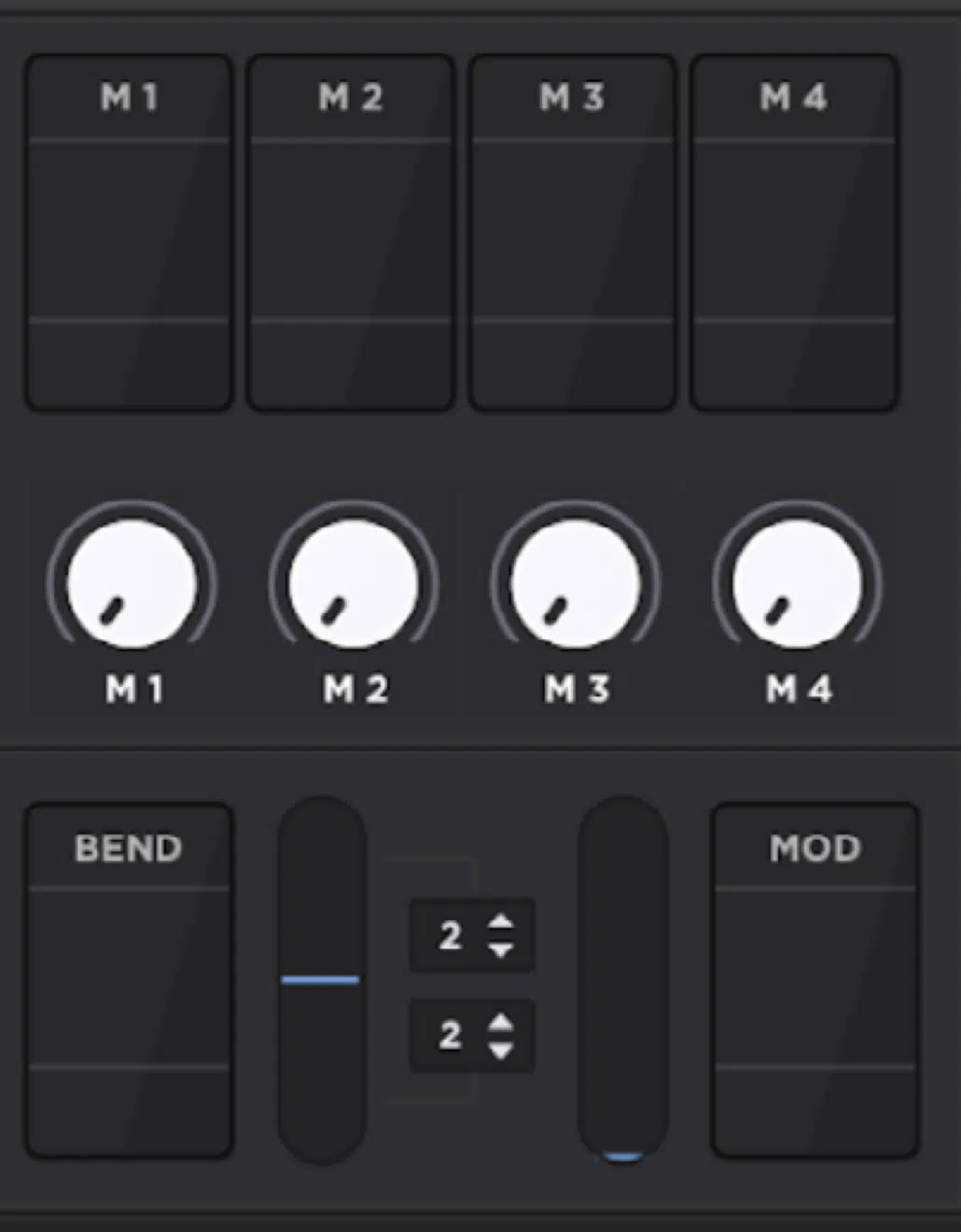
Motion, Performers, and Macros are where a patch stops feeling static and starts feeling playable.
It’s where a sound turns into something that breathes, pulses, opens up, and reacts under your hands.
In Unisynth, that process is very visual, because you:
- Drag a mod source straight onto a destination
- Hover the target to set the depth with floating controls
- Draw LFO curves
- Use four macros to bundle big moves into a few easy knobs
So one macro can open filter cutoff and delay mix together and another can tighten a sampler layer while adding drive.
Plus, an LFO can be thrown onto wavetable position or resonance in a few seconds without making you leave the creative flow.
Unisynth also gives you up to 48 simultaneous modulators and a full Mod Matrix when you want to organize things properly…
But the nice part is you rarely have to start there just to get a patch moving.
Massive X gives you drag-and-drop modulation, 16 Macro knobs, and three Performers for sequenced rhythmic motion.
As well as a Morpher in Play view that blends between four macro snapshots either by hand or automatically along a curve.
That setup can produce some seriously advanced movement — evolving bass motion, pulsing filter animation, shifting timbre states across a held note.
However, it also tends to involve more page-switching and a clearer understanding of what each mod source is really doing in the architecture.
Massive X feels amazing once you’ve learned its system, while Unisynth feels generous much earlier, because you can get expressive movement visually and quickly instead of first translating the idea into Performers, Macro pages, and routing logic.
So although Massive X offers bigger modulation infrastructure on paper, Unisynth gets more producers to the fun part faster.
Filters and Tone Shaping

Filters and tone shaping are where raw material turns into an actual masterpiece, because this is the stage that decides whether, in your mix, a sound sits:
- Smooth
- Nasal
- Sharp
- Hollow
- Wide
- Aggressive
For this, Unisynth has two primary filters, 95 filter options, linkable behavior, and XY-style control, so you can drag cutoff and resonance together, isolate one axis with Shift or Cmd/Ctrl when you need precision.
And, treat both filters almost like performance surfaces.
That means going from a cleaner low-pass move to a comb, formant, or modeled analog color doesn’t feel like a technical detour…
Plus, because the filter controls stay visually clear in both Standard and Advanced workflows, it’s crazy easy to keep sculpting without losing your patch’s momentum.
NOTE: If you’ve ever wanted to hear what happens when the same pad gets pushed from soft and open into tighter, more resonant territory in a few mouse moves, Unisynth is built for exactly that kind of fast A-to-B experimentation.
Massive X gives you nine filter types and deeper routing possibilities around them, including dual-filter setups that can be run in series or parallel.
So, like I said, the ceiling is definitely high once you know how to work the system.
The tradeoff is that the filter section opens up most fully when you understand the semi-modular signal flow around it, which means the best tricks aren’t always sitting right on the surface for the average producer in the middle of a session.
This isn’t a case of Massive X being weak at filtering (far from it) , it’s more that Unisynth gets you to epic filter moves faster.
Massive X, on the other hand, only rewards the people who are comfortable thinking about routing as part of the tone-shaping process.
And when speed matters, that’s everything 一 Unisynth keeps filter sculpting feeling like music-making instead of homework.
Routing and Signal Flow
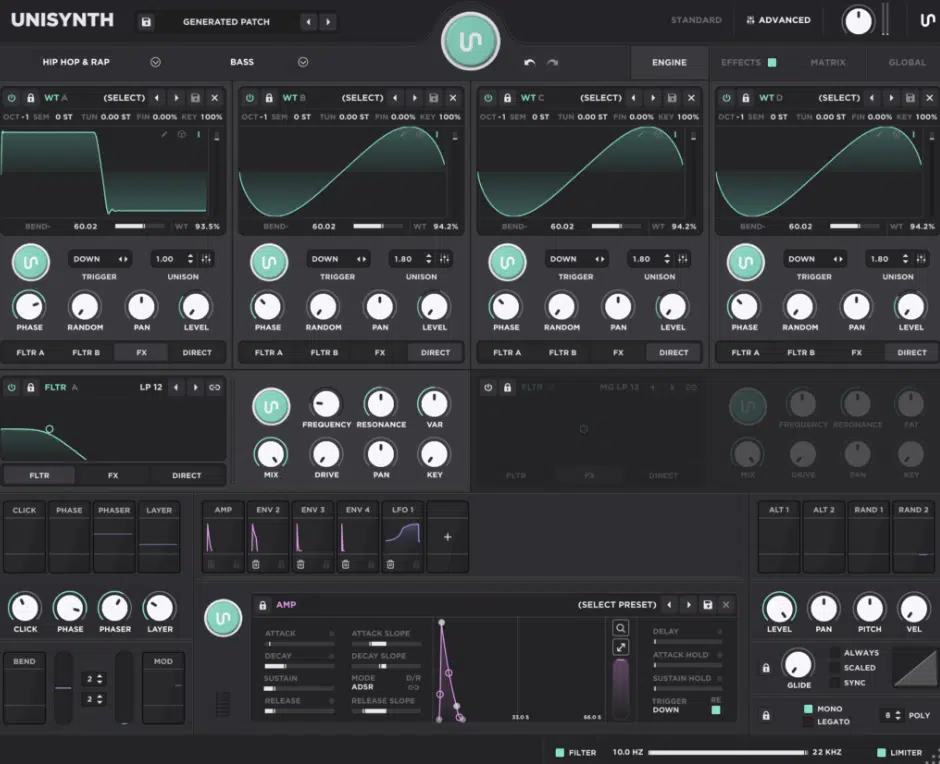
Routing and signal flow are where these two synths really show their face…
One gives you a semi-modular playground and the other gives you deep options while still trying to keep the road signs up.
Massive X has that more open vibe: the Routing page, where you can arrange generators and processors freely, and work in a polyphonic area.
As well a monophonic stereo-effects area where you tap into the PM Aux bus, build feedback loops, and place insert modules at very specific points in the voice structure.
The downside is pretty obvious once you step back from the manual…
A lot of producers aren’t going to squeeze the full value out of that depth when the workflow starts feeling more like patch design than producing.
Unisynth goes deep too, but it does it in a much more guided way through:
- Routing mixers inside each oscillator and filter
- Straightforward destinations like filters, FX, and direct out
- Bars you can click to switch destinations or option-drag as split mixers
So you still get the ability to split, reroute, and recombine signals in endless ways, but the routing doesn’t require you to mentally map an entire modular system every time you want to try something.
Side note, if you don’t fully understand what the architecture should do next, Unisynth has another huge advantage.
Its generator-driven design can take over parts of the heavy lifting instead of forcing you to solve every routing move manually from scratch.
So the philosophical split is pretty simple…
Massive X gives you more open architecture, while Unisynth gives you more structure, and a much easier path to actually using that depth in your session.
FX and Signal Chains
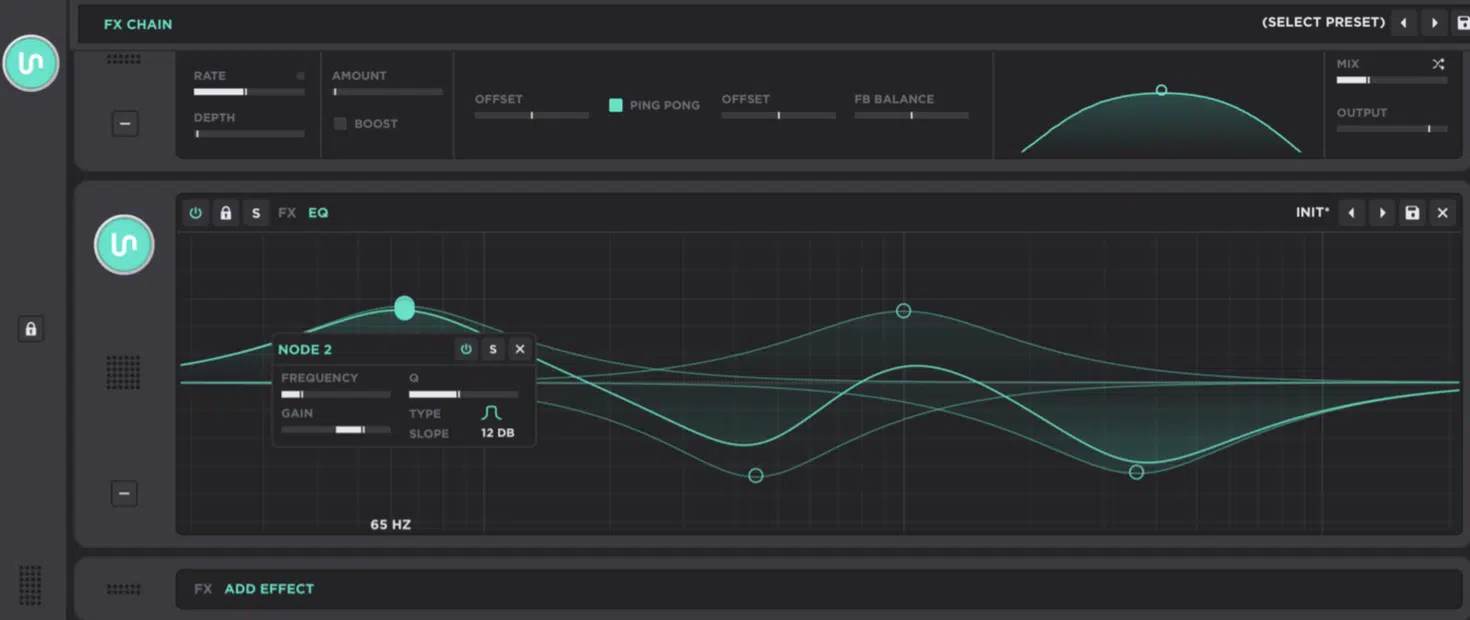
FX and signal chains are where a patch either stays raw or turns into something mix-ready.
In Unisynth, that whole stage feels built for momentum, because the FX-Chain Generator can throw out a fresh chain in one click, then lets you:
- Keep what works
- Lock what you like
- Keep pushing the sound further
The chain runs left to right, which means a move like distortion into reverb hits very differently than reverb into distortion.
Unisynth makes that order obvious instead of hiding it behind aimless menus.
Even in Standard View you can work off the miniature effect panels, tweak the basic controls, and drag units around fast.
Testing something like Chorus → Compressor → Convolver → Delay versus Delay → Destroy → Space becomes part of the creative flow, not a separate technical task.
Then, once you open the Effects tab in Advanced View, the rack opens up fully with up to 24 effects units, collapsed or expanded views and swap and preset controls.
You can add, remove, reorder, solo, bypass, and fine-tune the entire chain like a real-deal sound designer would all day.
Massive X, on the other hand, gives you three Insert Effects that live inside the polyphonic voice structure.
Those Insert slots can host things like distortion or even additional oscillators or processors, and then three Stereo Effects sit later on the summed signal at the final stage.
That opens the door to some seriously smart setups like mangling one part of the voice path before the whole sound hits the stereo stage.
Or, using the X > Y > Z and parallel-style Stereo routing options to shape width and space after everything is summed.
However, it also means placement is part of the synth design, not just a flavor decision.
So from an everyday view, Massive X is powerful, but Unisynth makes experimentation, combination testing, and chain building feel much more on point.
And, as every professional producer/sound designer would agree, is vital when you’re chasing the sound and don’t want the inspiration to die in the process.
Unisynth vs Massive X: The Final Verdict Is In
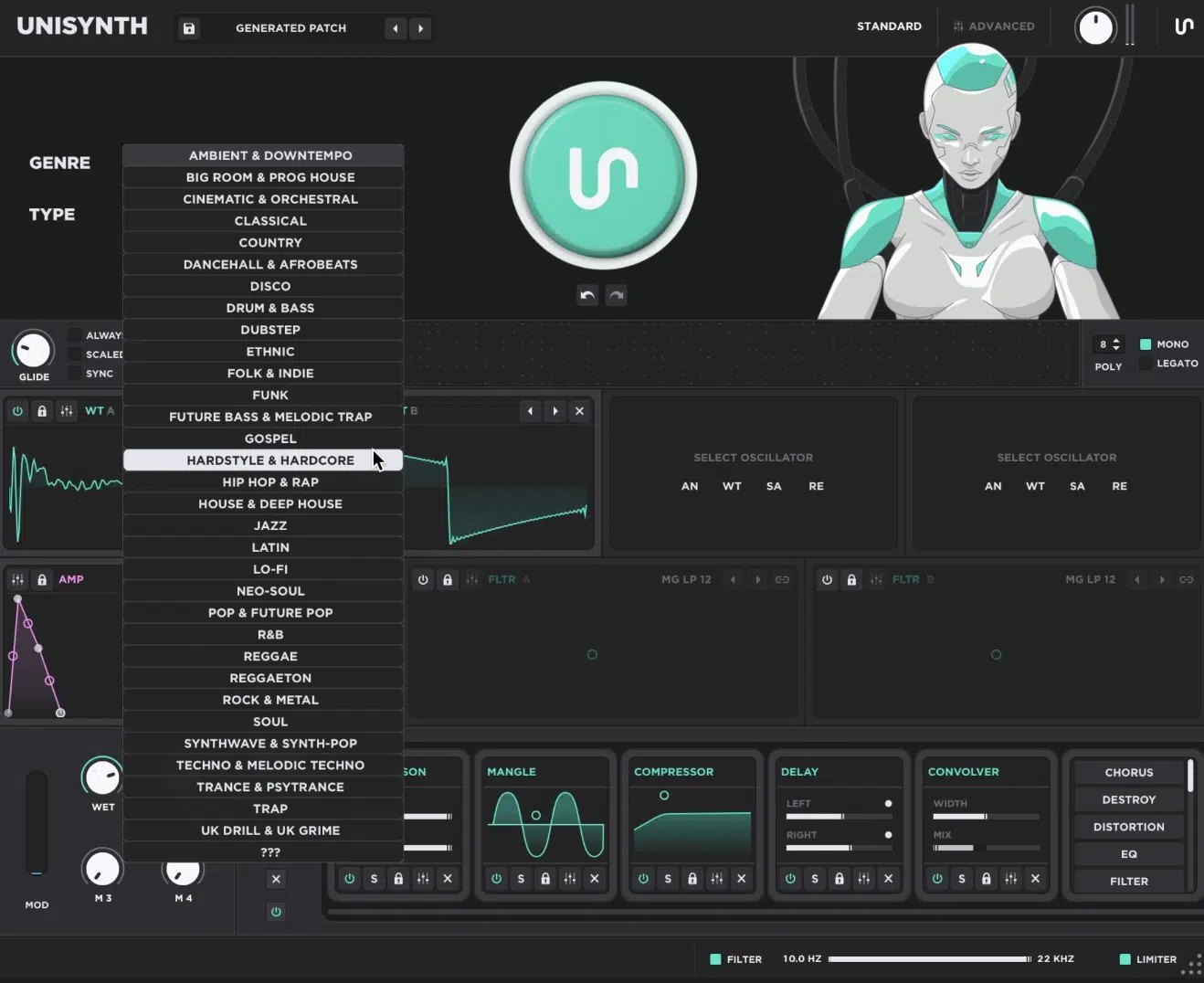
When it comes to the much-anticipated Unisynth vs Massive X debate, I think the answer is pretty clear at this point my friends…
Massive X is still a serious synth, and in the right hands it can get incredibly deep.
But once you move past the spec sheet and all that, Unisynth is obviously the better synth for the way most producers/sound designers actually work.
It gets you to a mind-blowing, custom sound way faster, and keeps the whole process feeling smooth and fun from the jump.
Instead of starting with preset hunting and then working your way through layers of architecture, Unisynth lets you generate a genre-specific patch from scratch, shape it quickly, and keep building without losing the idea.
It also gives you more freedom where it counts 一 from its revolutionary engine options and sick FX workflow to its deeper control and built-in wavetable editing.
Massive X rewards people who enjoy living inside routing, modulation pages, and system design, but not everyone at all levels (especially beginners).
Unisynth gives you real flagship depth without making you work nearly as hard to reach it, and don’t ever worry about getting frustrated because it helps every step of the way.
So if you’re asking which synth is more inspiring, fluid, and just flat-out better to make music with, Unisynth wins all day!
Until next time…
Download The #1 AI Synth Plugin In the World!




Leave a Reply
You must belogged in to post a comment.