




In yesterday’s article Unisynth went head-to-head with Pigments 7, one of the most loved synths in the game, and completely dominated.
Today, it’s all about Unisynth vs Hive 2, and with all of their differences 一 it’s going to be a super sick breakdown.
When it comes to synth plugins, it’s all about speed, flexibility, and how far you can actually push a sound before the synth starts boxing you in.
Plus, it is about workflow, sound quality, and how easily you can turn a random idea into something polished, original, and ready to use in a real track.
That is exactly why I’m going to be covering all the features and functions of Unisynth vs Hive 2, including:
- AI generation ✓
- Oscillator types ✓
- Wavetable power ✓
- Sample playback ✓
- Source material ✓
- Filter options ✓
- Tone shaping ✓
- Modulation depth ✓
- Effect chains ✓
- Routing control ✓
- Creative freedom/sound design value ✓
- And so much more ✓
After today’s article, you’ll see exactly how game-changing Unisynth is, especially when compared to Hive 2 (yes, spoiler alert, it’s better in just about every way).
It really brings the entire AI plugin game to a whole new level THATS NEVER BEEN OFFERED IN A SYTNEHSIZER BEFORE.
It’s changing how producers and sound designers create sounds from the bottom up.
So, if you’re ready for the ultimate Unisynth vs Hive 2 showdown, let’s get into it…
Table of Contents
Unisynth: The Best AI Synth in the Game
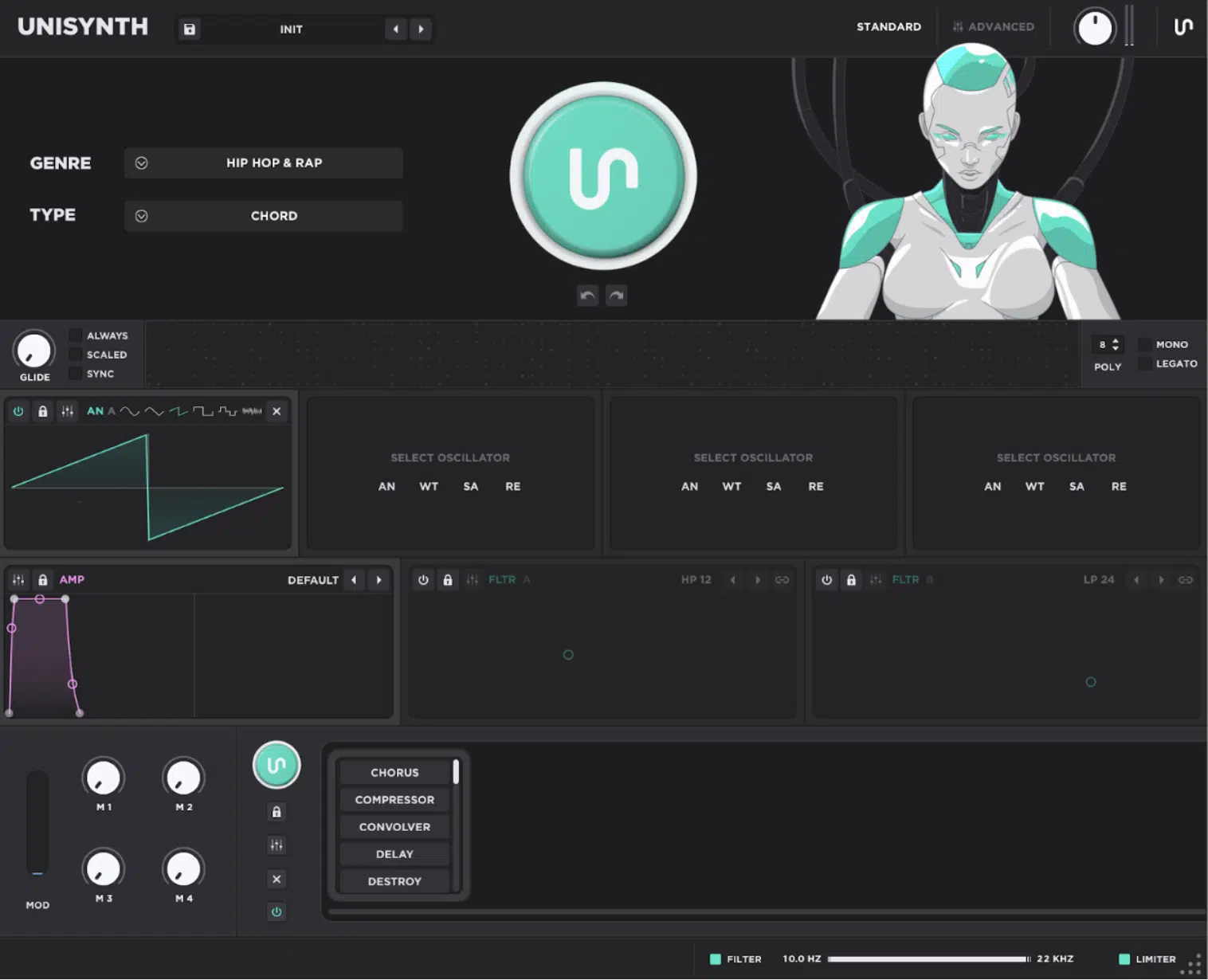
Unisynth is a revolutionary new synth that feels like it took everybody’s suggestions and came up with the perfect AI-powered, generative synth for ALL producers.
With its 80 independent AI generators it can create fresh patches for you all day, without making you build everything from scratch.
You can bang out unique sounds in 32 popular genres by simply choosing a specific genre and sound type, hitting that Patch Generator, and BOOM: instant magic!
It’s built around 4 independent oscillators (the main sound sources of the synth), and each one can run one of 4 engine types:
- Analog: classic synth waveforms with a twist
- Wavetable: digitally scanned waveform collections for moving harmonic tone
- Sampler: sample playback for real sample-based synthesis
- Resonator: a physical-modeling style engine that uses an exciter source to create resonant tones
On top of that, Unisynth comes loaded with 350+ wavetables and 1,250+ samples, so the raw source library is already crazy deep before you even think about editing.
It gives you way more room for basses, leads, plucks, chords, pads, textures, and hybrid sounds that don’t just feel like the same stock preset pack everyone else is using.
And when it comes to the overall architecture, it’s not slacking there either 一 it’s stacked too with 2 primary filters (the tone-shaping stage that cuts, emphasizes, or colors frequencies) and 48 filter types to choose from.
As well as 6 routing mixers, a fully customizable FX rack with free signal flow for its 24 high-quality FX units, and master limiter.
If I’m being honest, it feels way more like a full-blown sound creation playground than just a synth plugin.
Then you get the deeper modulation side, which is one of my personal favorites because it can run up to 48 simultaneous modulators, which we’ll break down in a minute.
And nearly every parameter can be hit by up to 16 modulators at once, which is freakin’ wild if you want patches that feel alive instead of boring and static.
NOTE: Modulation can also be assigned in a variety of ways using either drag and drop, right-clicking directly on the desired parameter, or assigning sources and destinations using a dedicated mod matrix.
It gives you a bunch of additional options, too…
Bi-polar and unipolar modulation, curve/scale settings for the modulation itself, and additional AUX mod sources with their own curve settings, just to name a few things.
And when it comes to workflow, there’s Standard View, which focuses on the Genre selector, Type selector, Patch Generator, streamlined synth controls, FX-Chain Generator, Mod Wheel, and 4 Macros and Advanced View.
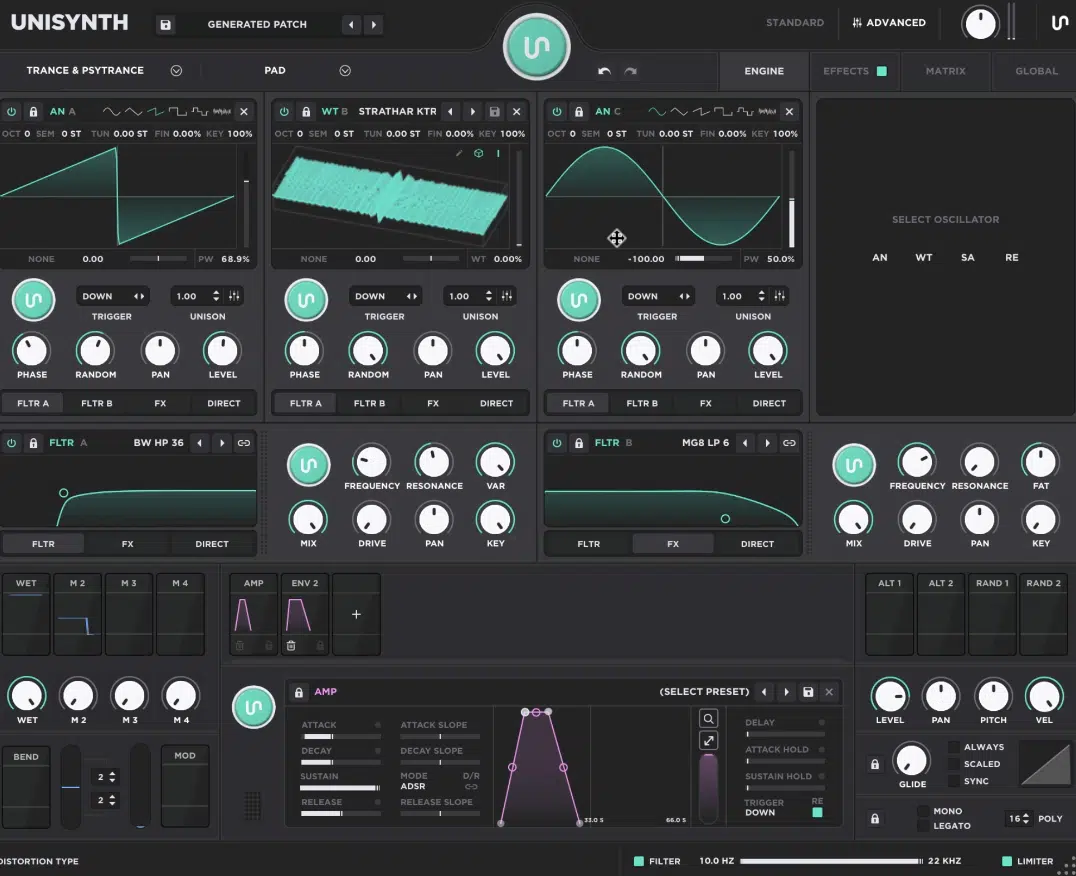
The Advanced View is where the real fun starts thanks to the deeper wavetable editor, modulation system, routing, and full effects control when you want to get more surgical.
So yeah, Unisynth is not just “another synth with some cool presets.”
Between the AI generation, 32-genre direction, 4 hybrid oscillators, 350+ wavetables, 1,250+ samples, 24-FX architecture, the modulation depth with a dedicated matrix, and 80 generators overall, it’s unmatched.
It feels like a straight-up monster flagship synth built to give you speed, flexibility, and nasty sound design power all at once.
Hive 2: Breaking Down the Essentials
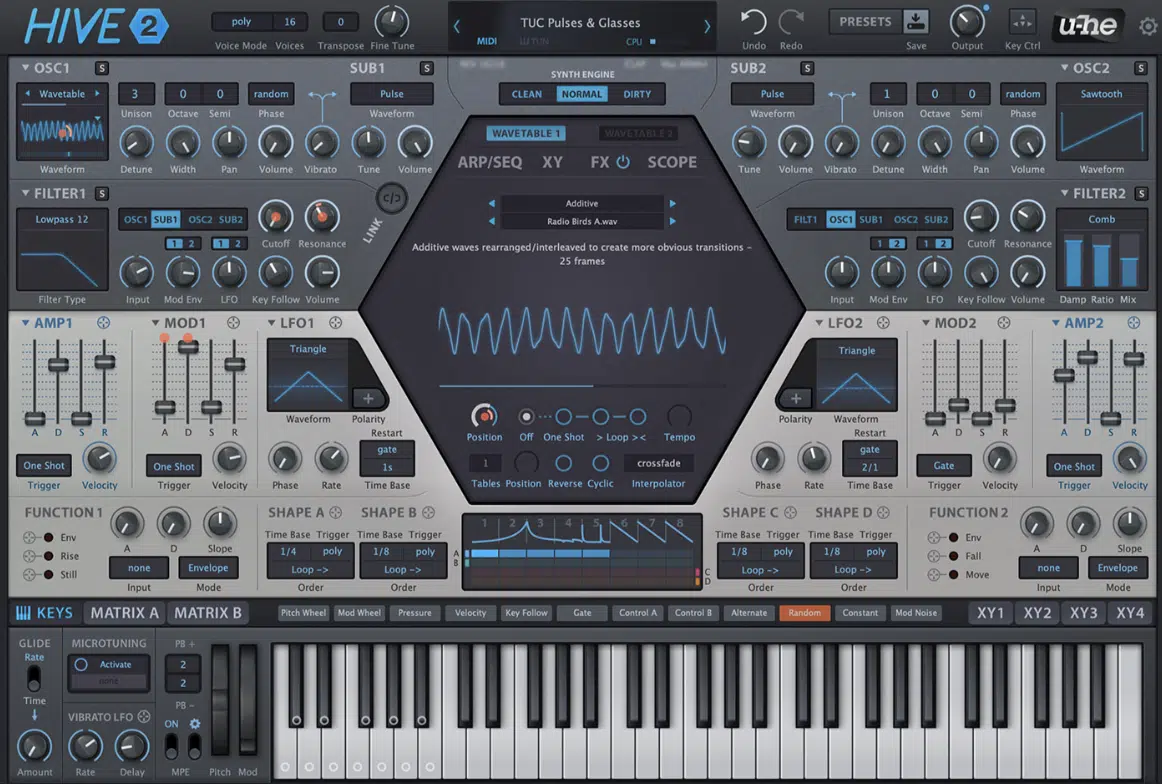
Hive 2 is still a really solid synth, but it is more of a hands-on subtractive synth with wavetable capabilities, less like a fully featured wavetable synth.
Not to mention it doesn’t have any AI capabilities, but we’ll talk about that in a second.
In a nutshell, the 2 main oscillators are the star of the show 一 the primary sound sources and sub oscillators (extra low-end layers used for weight and support).
But the most popular features would have to be its somewhat flexible signal routing, wavetable support, quality effects, and a shape sequencer.
On the modulation side of things, you’ll get:
- A 12-slot modulation matrix
- 2 regular LFOs
- 2 function generators
Plus, a pretty big list of internal and MIDI-based sources like Key Follow, Velocity, Pressure, Random, Mod Wheel, and more.
And we can’t leave out the 4 XY pads, because each pad has its own matrix where you can assign up to 4 target parameters for performance sweeps, quick sound morphing, and bigger macro-style moves across oscillators, filters, envelopes, and effects.
It also offers 16 split tables, multiple interpolation modes, reverse and cyclic options, and even support for .uhm scripting, too.
So while Hive 2 is polished, capable, and honestly very respectable, you’ll see throughout this Unisynth vs Hive 2 article why it doesn’t match up in any area.
Unisynth vs Hive: Key Features, Functions & Capabilities
Now that you know the general run-down of each synth (Unisynth vs Hive 2), it’s time to really dive into their unique features, functions, abilities, capabilities, stand out inclusions, and creative extras. This will show you why Unisynth really blows Hive 2 out of the water at every twist and turn. Let’s kick things off with AI generation power.
AI Generation Power
AI (artificial intelligence) generation is something that no other synth plugin has included before… like EVER.
And honestly, that changes everything right out of the gate.
Once a synth can actually help you come up with fire sounds on command, it stops being just another instrument and becomes a legend.
You don’t have to build every layer, every modulation, and every effect by hand (like with Hive 2), which will save you countless time.
With Unisynth, the whole front end is built around that speed, because the Generator Panel gives you a Genre selector, a Type selector, and the Patch Generator.
And, side note, that generator already understands 32 genres and 6 sound types before it ever creates the preset.
That means you’re not just hitting a random button and hoping for the best; you can pick the exact vibe/genre you’re going for and get killer results every single time.
And remember how I mentioned the 80 generators in total?…
Well, besides the main Patch Generator and FX-Chain Generator, it also has generators found within each:
- Oscillator
- Filter
- Modulator
- The matrix
- Each individual FX unit
So if the tone is close but not quite there, you don’t need to trash the whole preset, just regenerate whichever part isn’t working for you.
One sound can go through multiple versions and each version can keep getting narrowed down (talk about game-changing).
Hive 2 has absolutely none of that AI backbone at all, so if you don’t have the knowledge and skills, you’re going to end up completely lost in the dark.
You’ll have to build every single layer, modulation, and effect by hand.
The closest Hive gets would have to be the auto-assign unused pad dimensions behavior in the XY section, but it’s nowhere near as convenient or helpful.
So, when it comes to Unisynth vs Hive 2 in this particular category, it’s not even a competition.
Oscillator Strength & Flexibility
Oscillator strength and flexibility are a massive deal because the oscillators are the actual sound sources.
This is the part that decides how much raw tone, color, texture, and layering potential you have before the rest of the synth even comes into the picture.
Unisynth gives you 4 oscillators (like we talked about) and each oscillator can run as any one of 4 engine types: Analog, Wavetable, Sampler, and Resonator.
That alone is a huge competitive advantage.
And because each and every one of those 4 slots can become any of those engines, the amount of freedom you get is honestly kind of crazy.
For example, one preset can stack an Analog low-end, a Wavetable mid layer, a Sampler transient, and a Resonator shimmer all at once.
And once you start doing that, you’ll see why people are calling Unisynth a full hybrid sound-design machine.
You’re not layering four versions of the same thing, you’re layering four completely different synthesis methods.
Side note, on the interface itself, you can use each oscillator section as an XY pad and modulate various settings without having to menu dive for performance-based features.
That’s a huge deal, because when you are in the middle of creating or performing, being able to grab movement controls instantly is invaluable.
Hive 2, on the other hand, definitely has a strong oscillator section too, and yeah, its Wavetable mode is somewhat powerful.
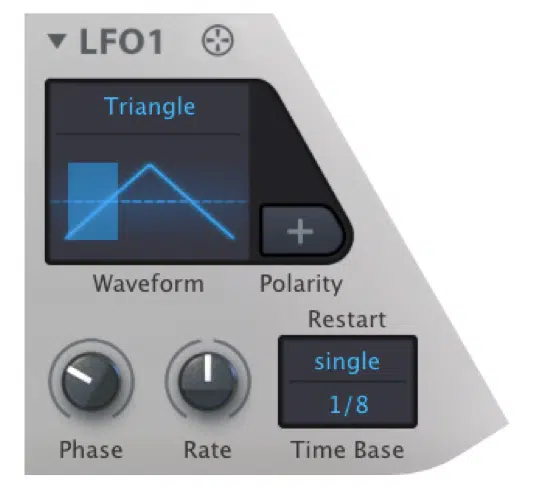
However, that is also where the buck stops…
The core design is still built around 2 oscillators and a sub-oscillator rather than four hybrid engines that can all switch roles interchangeably.
Its main oscillator menu covers classic waves like Sine, Sawtooth, Triangle, Square, Half, Narrow, Pulse, White, Pink, and then Wavetable.
So even though it covers the basics, it doesn’t let each oscillator become a sampler or resonator the way Unisynth successfully does.
Plus, there are no sample-based options or anything like a resonator, so the sounds you’re going to get will be typical and boring.
They’re exactly what you’d expect from a subtractive-style synth, with a little wavetable flavor 一 nothing more, nothing less.
You do need to do some menu diving in order to access Hive’s XY pads, which I dislike as well because that can slow you down big-time (especially when experimenting).
That is exactly why the oscillator section in the Unisynth vs Hive 2 debate feels so one-sided, because Hive sounds good, but Unisynth is an undeniable powerhouse.
It gives you way more depth, combinations, options, and sonic variety before you even reach the filters.
Wavetables & Sonic Range
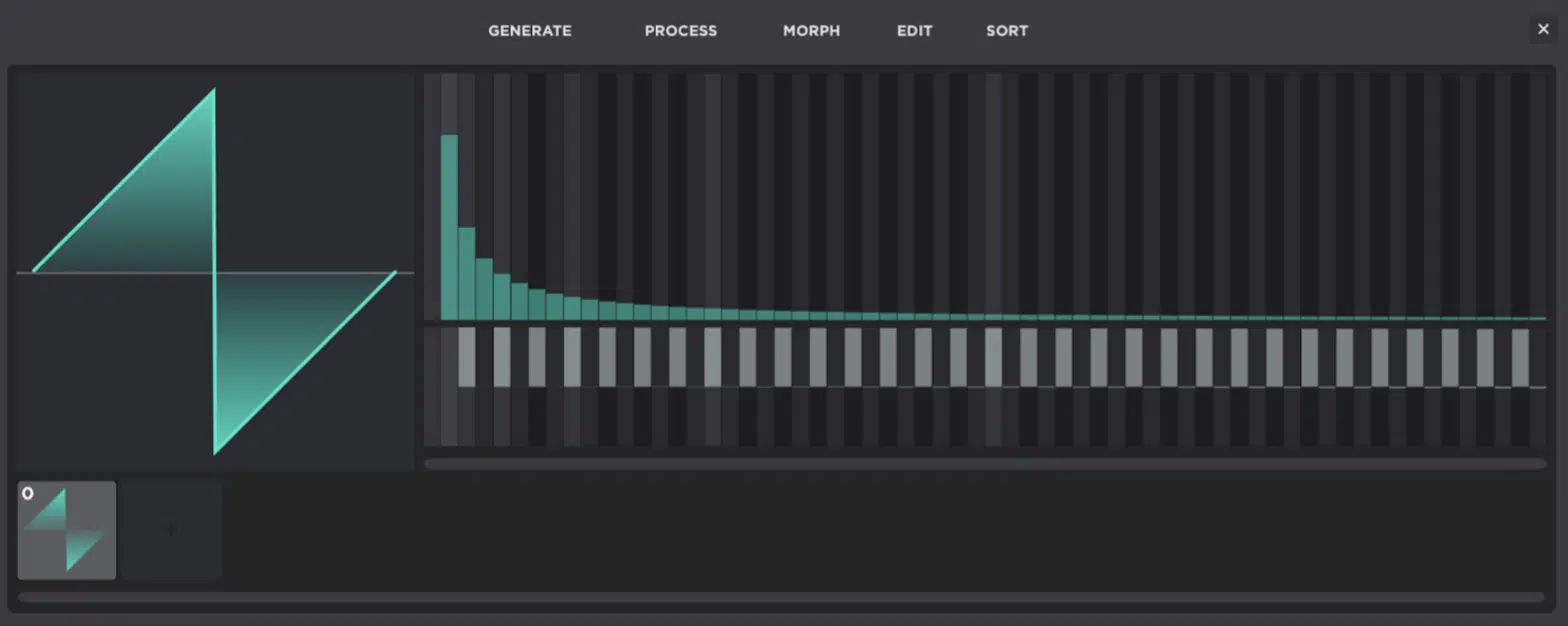
We can’t have a Unisynth vs Hive 2 debate without talking about wavetables and sonic range now, can we?
Scanning through those frames is what gives you that moving, shifting harmonic tone that all modern wavetable synths are known for.
It’s a major step up from traditional subtractive synthesis where you usually start with a typical waveform and use other parts of the synth (like filters, modulation, FX,) to shape the sound while the raw waveforms themselves stay the same, static, and familiar.
With Unisynth, you get 350+ wavetables and access to its advanced Serum-style WT engine 一 not just another simple wavetable editor by a long shot.
You can also modify and completely transform those existing waves in some pretty wild ways, with controls that go beyond the basic Generate, Process, Morph, Add/Remove, and Sort functions inside the editor itself.
You’re never limited or stuck browsing through tables anymore’.
For example, if a wavetable starts off bright but a little too stiff, you can:
- Change the table behavior
- Move the position
- Process it
- Morph it
Or you can sort and reshape it until it feels smoother, dirtier, sharper, or just more alive (it all just depends on what you’re going for).
Hive 2’s wavetable side is interesting too, because it can load .uhm and .wav tables, and each table can hold up to 256 individual waveforms.
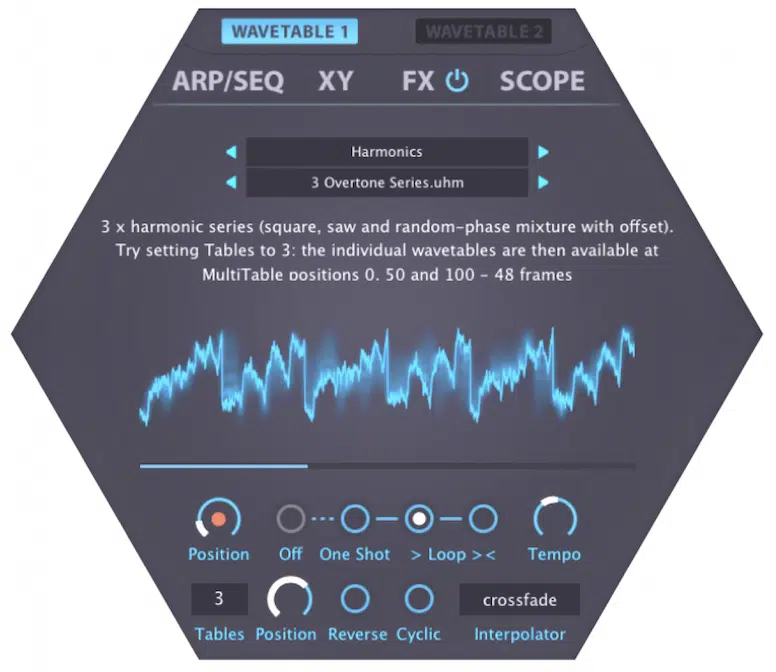
It also has the typical controls for Position, Auto Mode, Tempo, Reverse, Cyclic, Tables, and 4 interpolation algorithms: switch, crossfade, spectral, and zero phase.
That might sound cool at first, but Hive still leans more on its own proprietary wavetable format and extra scripting docs…
Unisynth, on the flip side, gives you the whole Wavetable Editor right there as part of the oscillator experience itself.
And you can’t forget about those 350+ wavetables that do not exist in isolation either!
So even though Hive 2 has a wavetable engine with up to 256 frames and some nice tricks, Unisynth clearly still wins this section too.
The built-in editor, deeper wavetable-shaping tools, and broader hybrid setup open up way more sonic possibilities than you probably ever imagined.
PRO TIP: If you want to use/create your own wavetables to then use in Hive 2 (or any other synth), Unisynth’s WT Editor is really one of the most effective, creative, and easiest ways to do that.
Not only can you use the editor itself for creation, but also for inspiration. Remember, it is the only editor with AI generation capabilities.
Oh, and one last thing before moving on to the other sections of Unisynth vs Hive 2: some of its 80 AI generators also live inside the WT Editor.
So if you are short on inspiration, or even the knowledge to create your own tables, now you can do exactly that with as much or as little hands-on control as you want!
Samples & Source Material
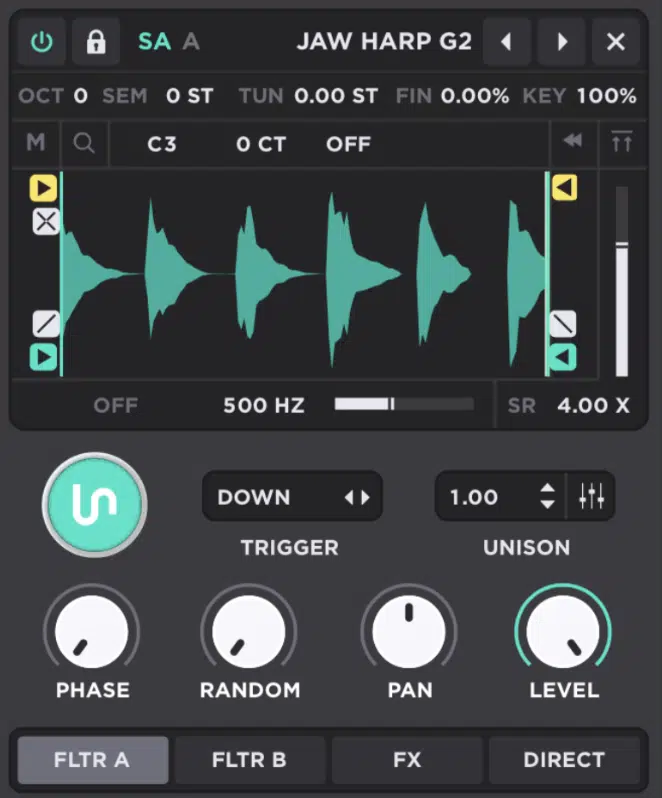
Samples and source material are a massive deal in Unisynth vs Hive 2 showdown as well, of course.
It’s the raw material the synth is actually pulling from before you start filtering it, modulating it, processing it with FX, and turning it into something more polished.
Unisynth has a full Sampler engine, and the sampler is different from a normal oscillator because instead of generating tone from a basic waveform, it plays back real audio that can be:
- Pitched
- Looped
- Reversed
- Trimmed
- Filtered
- Layered into a patch
It’s also the quickest way to get up and running with a ready-to-use synth patch without having to rely on advanced sound-design techniques for the oscillator to generate epic sounds.
Inside that legendary sampler, Unisynth gives you Sample Select, Sample Rate, Filter, Source, Reverse, Start/End, Loop points, fades, and crossfade-style shaping tools.
So, needless to say, it’s not just some throwaway extra, it is a proper sample-based synthesis lane.
On top of that, there’s 1,250+ samples (huge number), so you’re actually starting off with a very deep built-in library before you even begin layering your own material on top.
That library also hits harder than the usual stock stuff, because you already know Unison Audio is famous for their sample packs.
And because of that, the source material feels much more like premium, chart-ready content than random stock filler sounds.
Hive 2 doesn’t even offer a sample oscillator or true sample playback in any form…
Its oscillator section is centered around classic static waveforms, noise, and wavetables, not full sample-based playback with start, end, loop, and sample-rate controls.
So when you are building modern sounds, Unisynth can combine a sampled attack, a wavetable body, an analog layer, and a resonator texture in one patch.
While Hive 2, on the other hand, stays in a much narrower synthetic lane from the start.
That is a huge reason the source-material side of the Unisynth vs Hive 2 debate feels so one-sided, because Unisynth gives you more raw content, more variety, and way more options.
Filters & Tone Shaping
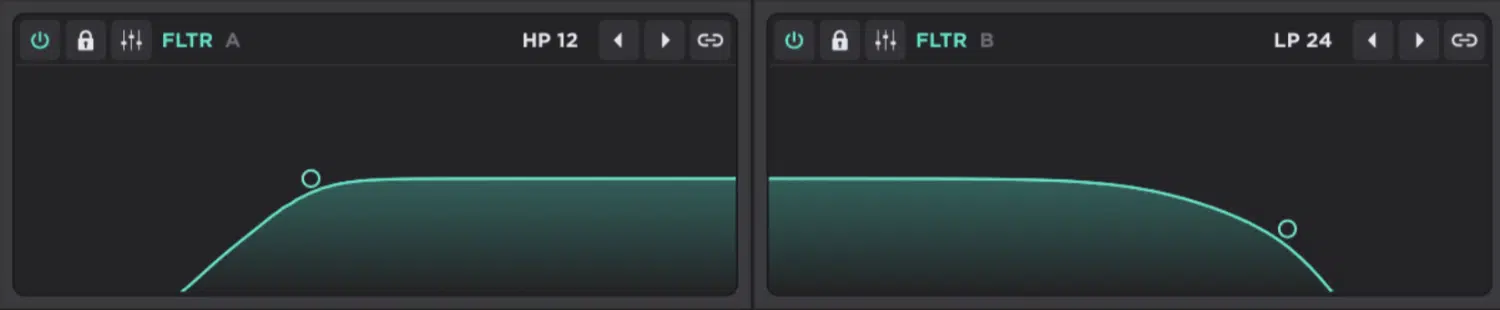
Filters and tone shaping are where a sound really starts to take on its character because they help cut, boost, reshape, or color certain frequencies.
Unisynth gives you way more room to push a patch into something sharp, dark, vocal, metallic, wide, or straight up mind-bending than Hive 2.
It’s got a crazy extensive (broad) range of filter types that you can mess around with, and you’ll have 2 multimode filters with other 40 types to choose from!
And better yet, each one has a deep control set with:
- Frequency (cutoff point)
- Resonance (emphasis around the cutoff)
- VAR (a variable character control that changes by filter type)
- Mix (dry/wet balance)
- Drive (built-in saturation)
- Pan
- Key tracking
- Routing
And, not to mention an XY pad that lets you move cutoff and resonance together in one gesture, which is awesome.
Then you get into the actual categorized filter list, which is where Unisynth starts feeling way more like a big flagship synth in the Serum 2 realm (surpassing it, actually).
It has well over 40 filter variations spread across categories like Flanges, Comb, SVF, MG, MG8, Misc, VA, and BW.
So you are not just getting the usual LP, HP, BP, Notch, Peak, Bell, Low Shelf, and High Shelf types…
You’re also getting stuff like Comb LP12, Comb BP12, Comb HP12, Vowel and Vowel 5 filters for more vocal-style shaping, phaser-style modes, and modeled analog options like Korg LP/HP, Oberheim LP/BP/HP/BS, Half Ladder, Diode Ladder, and Moog Ladder.
One sound can be tightened with a basic 24 dB lowpass, followed by a metallic ring from a Comb variant.
While another preset can pick up a nasal vowel tone and still get that warmer classic-synth flavor from one of the analog-modeled filters.
And, fun fact, they’re inspired from some of the most legendary classic synthesizers in existence.
Not to mention, you can route the sound through the filters in various ways/blends or have an oscillator bypass the filters and route directly to the FX rack or output.
Or, using its mixer sliders, a combination of both.
Hive 2’s filter section is definitely great quality, and to be fair, it does go beyond the absolute basics with types like Comb, Dissonant, Reverb, and Sideband.
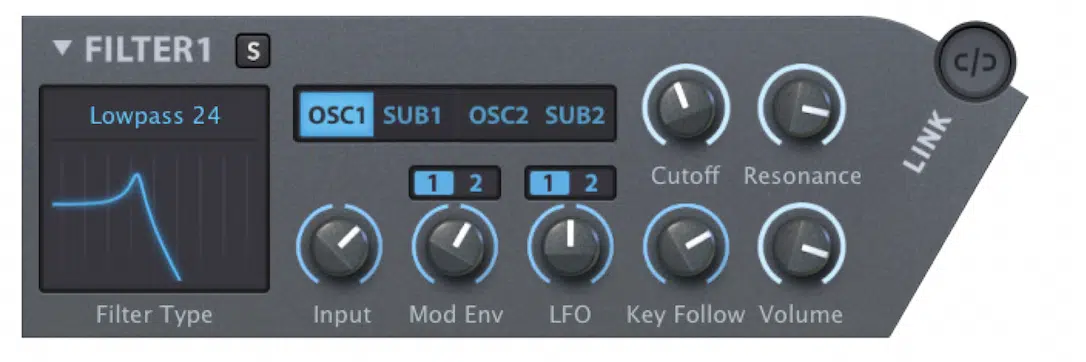
On top of the usual more standard modes too, so it is not weak by any means.
Still, next to Unisynth it feels way more limited in scope, because Hive is giving you a smaller, more traditional menu with a few comb-like and specialty options.
Unisynth, on the other hand, is giving you a much wider spread of not just basic filters with multiple variations 一 but also analog-modeled classics, comb families, flange-style categories, vocal-ish shapes, and more unusual tone colors all in one place.
So yeah, Hive 2’s filters sound good, but in Unisynth vs Hive 2 there is no way Hive can really hold a candle here.
Unisynth’s filter section is simply deeper, more flexible, more colorful, and way better equipped for modern sound design.
Modulation & Movement
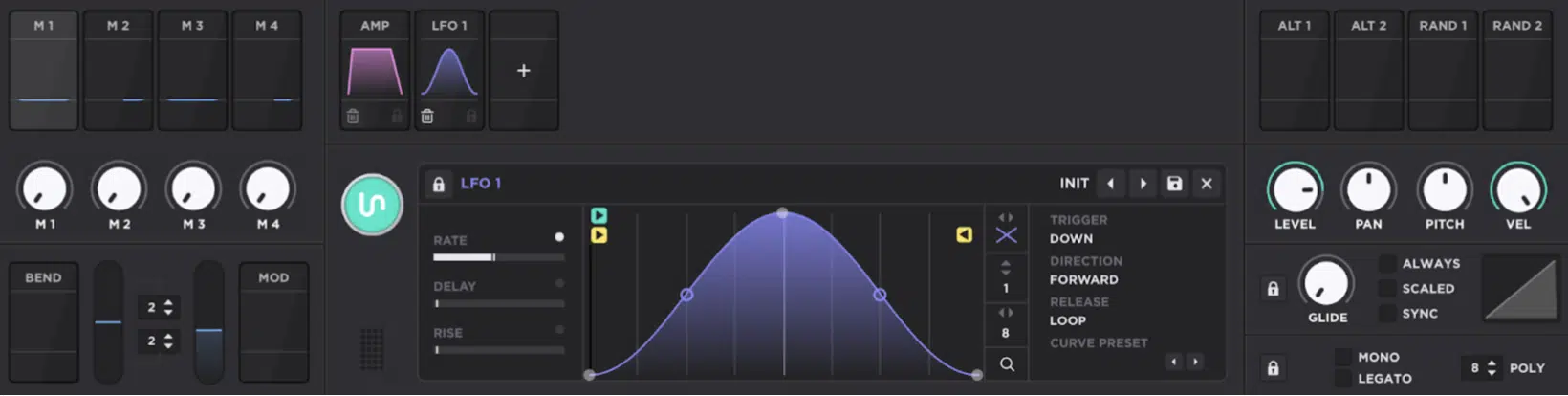
Modulation and movement are what make a synth patch breathe 一 it’s the system that moves parameters over time or changes them based on performance data.
So, instead of a sound just sitting there, it can swell, wobble, drift, snap, open up, or react to velocity, pitch, pressure, etc.
In the Unisynth vs Hive 2 debate, Unisynth is miles ahead here, hands down.
Unisynth is a straight-up modulation powerhouse, because it can run up to 48 simultaneous modulators, and nearly every parameter can be hit by up to 16 modulators at once.
I mean, this is nuts when you start stacking envelope movement, LFO motion, tracker control, macro sweeps, and aux modulation on the same sound.
The actual modulator list is deep too, since Unisynth gives you:
- Chaos (organic random motion)
- Envelope (one-shot movement for attack, decay, sustain, and release-style shaping)
- LFO (looping motion)
- Tracker (a smart, performance-based mapping tool that can tie note, velocity, off-velocity, pressure, timbre, and pitch-bend style data to parameters)
Plus Macros, Bend, Mod Wheel, Alt 1/2, and Random 1/2 sources, so you are not just getting the usual basic MOD sources.
Then it gets even better because Unisynth lets you assign modulation in a variety of ways beyond its advanced modulation matrix…
You can either drag and drop or, by right-clicking directly on the destination parameter, get access to color-coded depth controls right on the target.
It also supports AUX modulation (modulating the amount of modulation itself using another source modulator), and lets you work in unipolar (movement in one direction) or bipolar (movement in both directions) modes.
And if shaping the modulation curve is your thing, you can easily curve off the direction on top of shaping the curve for the modulation as a whole
Meaning, you can scale the modulation and shape it in virtually infinite ways!
Unisynth also has 80 AI generators overall like we talked about all throughout the article 一 including generators for each modulator and the deeper routing around them.
So, even if modulation normally feels underwhelming, static, or dry, it can hand you strong movement ideas just by clicking one of the many generators.
You’ll be sounding like a straight up professional in no time, and you won’t have to input all of the MOD entries from scratch either.
You can just have the AI generators choose sources and destinations to modulation, plus generate settings for all individual sources.
When it comes to Hive 2, its modulation side is definitely respectable as well because it gives you a 12-slot matrix with 2 targets per slot for 24 destination amounts total.
Along with 2 LFOs, 2 function generators, 4 lanes of shape sequencer modulation, MIDI sources like Velocity, Pressure, Mod Wheel, Pitch Wheel, Control A/B, Key Follow, and extras like Random and Alternate.
Still, next to Unisynth, HIVE 2 feels a lot more like the kind of MOD system you would expect in a subtractive synth like Sylenth1.
The matrix has a limited number of slots, the source pool leans more traditional, and the sound design potential depends much more on you already knowing the nuts and bolts of synthesis before you can really make it sing.
So yeah, Hive 2 absolutely has modulation covered, but Unisynth’s modulation system is lightyears ahead, no doubt about it.
Bottom line, for this Unisynth vs Hive 2 topic, Unisynth gives you more modulators, more expressive sources like Trackers, more ways to stack motion, and generator-assisted modulation.
It can easily take a beginner from “I barely know what I’m doing” to “this sounds like a real sound designer made it” way faster.
Besides, no synth in existence has an AI engine solely dedicated to generating every aspect of modulation… I can’t stress that enough.
Enhance Your Sound Design Skills in Minutes
Effects, Effects, Effects
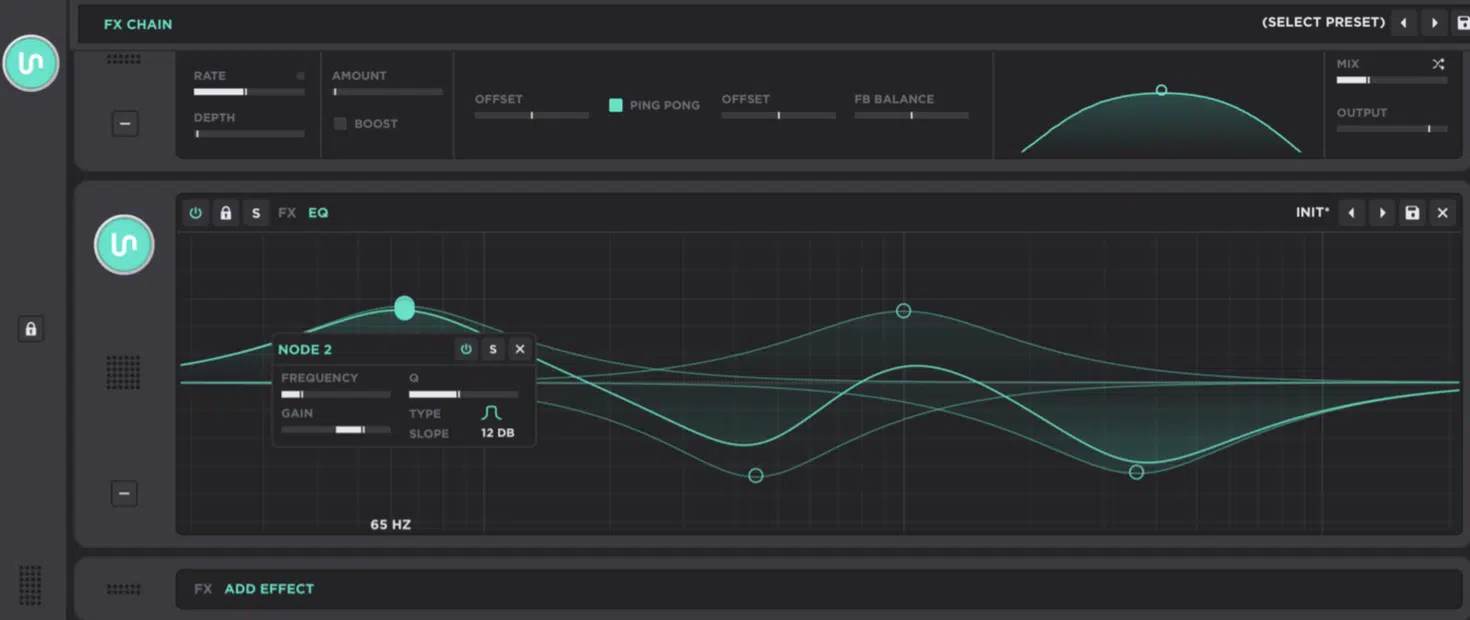
Effects are what take a patch from a cool raw sound to something polished, huge, destroyed, washed out, reversed, hyped, or completely unrecognizable.
So, in the Unisynth vs Hive 2 face-off, this section is a massive consideration.
Unisynth gives you a fully customizable Serum-style FX chain (with a freely configurable signal chain that operates as a row of processors that the signal passes through one by one) with up to 24 effects at once.
That’s a crazy amount of room when you want to stack things like saturation, compression, filtering, modulation, width, and space inside one patch.
The effect lineup is also way more modern and way more aggressive, because Unisynth includes stuff like:
- OTT (an extreme multiband compressor/exciter that adds life, density, and that bright “finished” energy)
- Reverse (a special delay that plays repeats backwards)
- Redux (bitcrushing and sample-rate reduction for digital destruction)
- Tape (saturation, noise, and warble)
- Convolver (impulse-response reverb)
- Super Unison, Destroy, Mangle, Preamp, Width
- A full 8-band EQ on top of the more standard chorus, flanger, phaser, reverb, compressor, and delay stuff
So if we start with a basic chord patch, you can throw on Tape for grit, OTT for hype, Reverse for that sucked-in bounce and Width for a bigger stereo image.
Then, Convolver or Reverb to push it into a whole different space, which is exactly why Unisynth can turn one preset into like 5 or 10 totally different versions of itself, fast.
Then it gets even nastier, because Unisynth also has an FX-Chain Generator (a one-click tool that generates a full chain for you).
And, since it also has mini-generators on each effect itself, you can keep the core patch and regenerate just the effects.
Or even swap, tweak/generate settings for each individual processor until the sound feels brand new and out of this world.
Hive 2’s effects themselves sound great, no question, but the overall selection is still much more basic, because you are mainly working with 7 fixed effect slots.
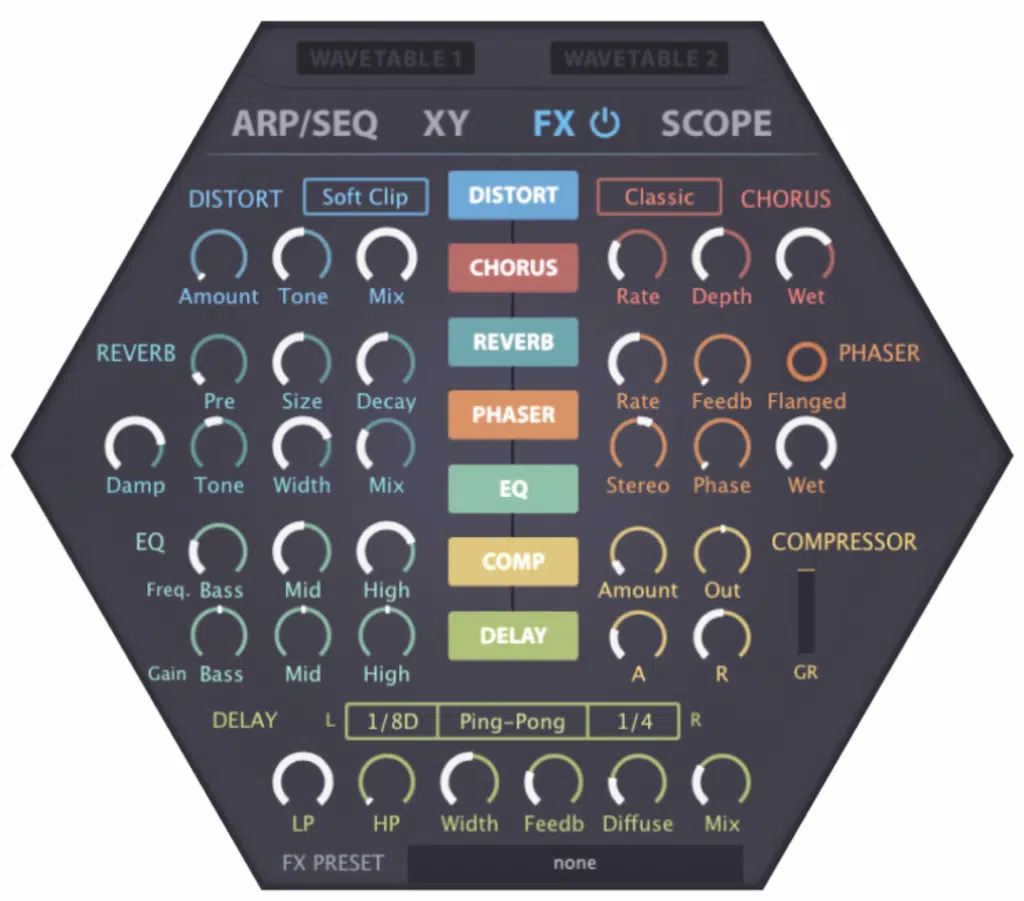
The classic set of Distortion, Reverb, EQ, Chorus, Phaser, Compressor, and Delay is solid, sure, but nowhere near the same level of variety.
And while Hive does let you switch each effect on or off and drag the 7 slots up or down, the whole thing still feels more like a typical basic synth’s effects section.
It doesn’t give off that signal-flow freedom we’re really looking for as producers/sound designers.
It locks you into that smaller lineup and does not give you the same kind of wide-open chain architecture Unisynth does.
Plus, it only offers the typical bread-and-butter effects (reverb, delay, and so on) you would expect in a stock DAW-bundled synth…
There’s nothing modern or cutting edge like you will find in synths like Serum and Unisynth.
Bottom line, Hive 2’s effects sound good, but in Unisynth vs Hive 2 there’s no real contest here, because Unisynth gives you way more processors, and way more modern tools, way more creative range.
Plus the ability to generate entire FX chains or effect-level settings so fast that you can flip almost any preset into something totally fresh before Hive even opens up.
Routing & Signal Control
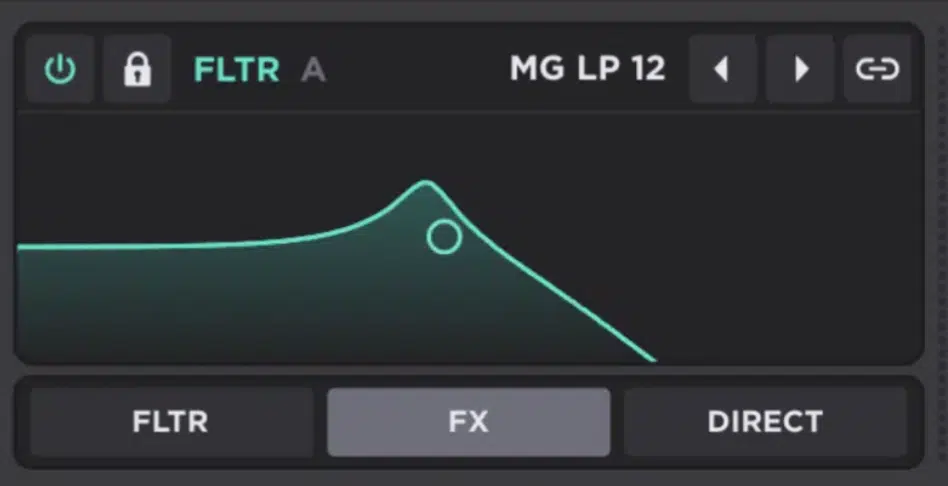
Routing and signal control are what decide where each sound source flows, what hits the filters, skips them, goes into the FX chain, and flows directly to the output.
So in Unisynth vs Hive 2, this section tells you a lot about how open-ended each synth really is.
Unisynth gives you 6 routing mixers, which breaks down to routing control for its 4 oscillators plus its 2 primary filters.
And each one can be sent toward Filter A, Filter B, FX, or Direct Out, or a user-defined combination of them all, any way you want, depending on how you want the patch built.
You’re not forced into one fixed lane, so one oscillator can go into Filter A for tone shaping, and another can skip the filters and go straight into the effects for a cleaner transient layer.
Another could even hit Direct Out so it skips the processing and behaves more like a raw sub or utility layer sitting outside the rest of the chain.
And believe it or not, things get even deeper, because when you option-click and drag on a routing bar, it turns into a mixer.
This means the same source can be split across multiple destinations at once in different amounts instead of being locked to only one path.
Then once you bring the filters into it, Unisynth opens up even more, because the 2 primary filters can run in:
- Parallel (both processing separate paths)
- Series (one feeding into the other)
You can do stuff like run a sampled attack through one filter while a wavetable body gets shaped by another before both hit the FX chain. Or get even crazier whatever works.
Hive 2, by comparison, really has more of a subtractive-synth style vibe…
And while that can be great for making typical synth presets, it does not go into the full wavetable lane like something such as Serum 2, Pigments, or Unisynth.
It really just feels like a subtractive synth with wavetables added on top than a fully fleshed-out wavetable-hybrid environment.
Its routing is cleaner and simpler, with that 2-voice / 2-filter concept and input choices like OSC1, SUB1, OSC2, and SUB2.
Plus serial filter flow where Filter 1 can feed Filter 2, which works fine 一 but it is still a much narrower routing world overall which is insanely restrictive.
So when you really zoom out, Unisynth vs Hive 2 swings hard toward Unisynth again, because Unisynth gives you more routing points, split-path freedom, and hybrid-layering options.
As well as way more control over how a patch actually travels from oscillator to filter to FX to output (which means the world to me, personally, and I’m sure to you too).
Preset Creation Potential
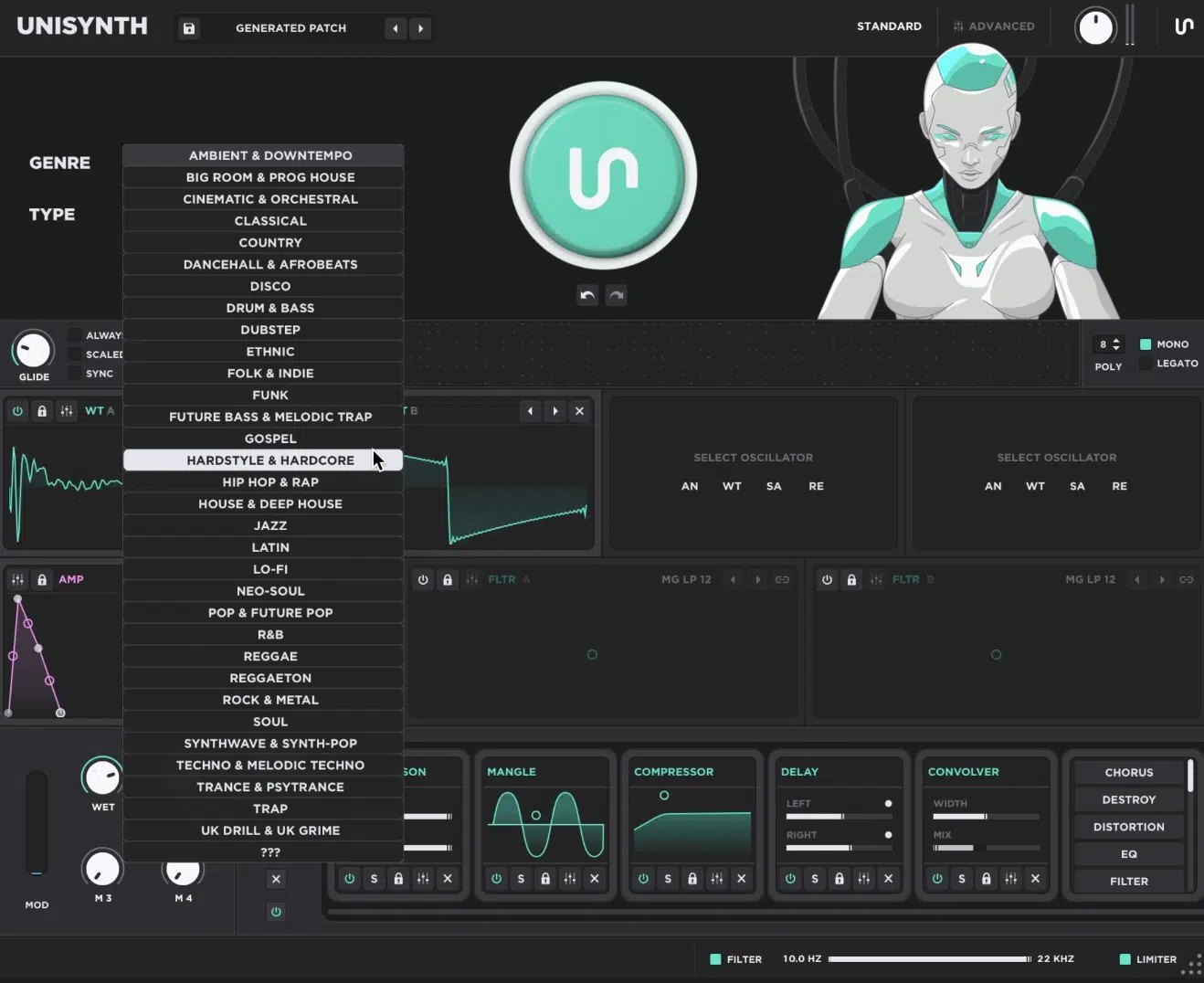
When it comes to preset creation potential, Unisynth cannot be touched; it’s really what it was all designed for.
So, when it comes to the Unisynth vs Hive 2 debate, this section might be a little unfair, but it’s definitely needed.
One of these synths can keep feeding you new ideas all day, while the other mostly expects you to do the work yourself.
Unisynth is basically an endless generative preset-making powerhouse, since the Patch Generator can build sounds around 32 genres and 6 sound types.
You’re not just asking for some random patch, you’re nudging it toward a specific lane before it even starts (talk about unfair advantage).
You can aim toward something like a darker hip-hop chord, a brighter pop pluck, a more cinematic pad, or a hard-hitting electronic bass.
Then, easily keep shaping it to perfection instead of wasting endless time trying to get the synth to understand what you even want, which can shatter inspiration.
And no, it doesn’t stop there my friends because it doesn’t just give you one top-level generator and call it a day 一 it has the FX-Chain Generator and 80 generators as you know!
You can regenerate the full patch or zoom in and regenerate just the oscillators, just the filters, just the movement, or just the effects, dealer’s choice.
That is what makes it feel so unbelievably creative, because you can keep the part you like and swap the part you do not.
It’s hands down better than throwing the whole preset in the trash every time one section is off, which can get insanely infuriating.
Hive 2 has none of that AI stuff, so preset creation is fully hands-on, from start to finish.
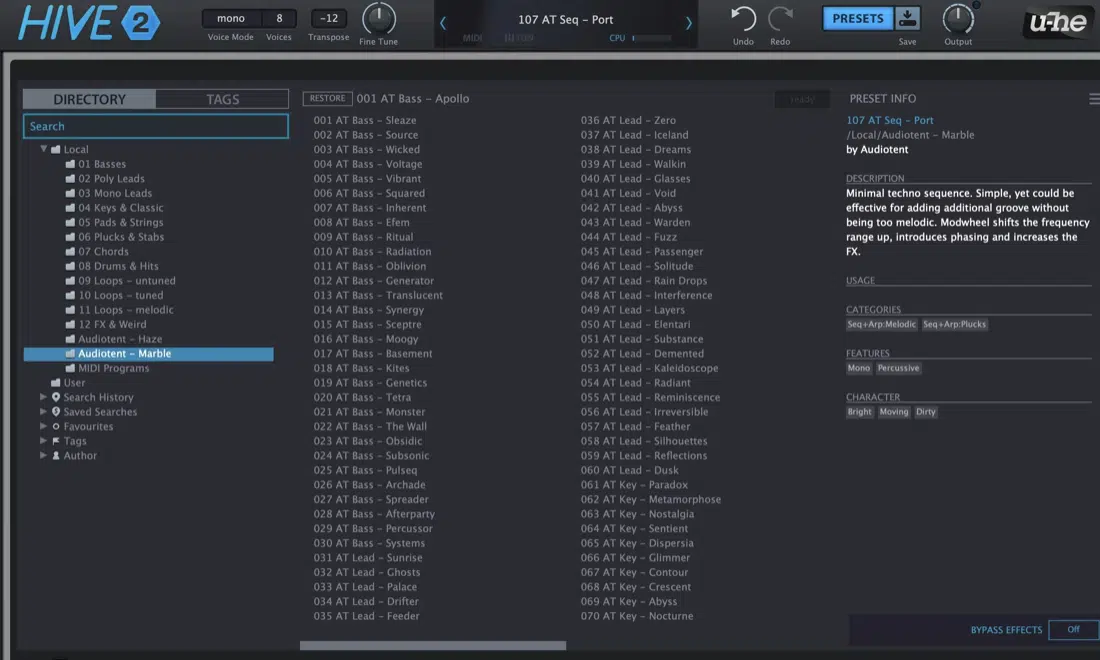
And unless you are already pretty well versed in sound design and synthesis, there is a good chance you are going to live inside the presets it ships with and mostly tweak around the edges, if that.
To be fair, Hive’s browser is solid in the sense that it gives you folders, search, tags, favorites, junk filtering, drag-and-drop preset management, and even 30 steps of undo/redo, which is useful, but that is still organization, not generation.
So between Unisynth vs Hive 2, Hive gives you the classic “build it yourself or find a preset” path, while Unisynth gives you endless possibilities.
It’s a synth that can generate by sound type, guide by 32 genres, let you go deep after, and keep throwing fresh ideas at you until one hits exactly right.
Final Thoughts: Unisynth vs Hive 2 (Why Unisynth Blows Hive 2 Out of the Water)
At the end of the day, Hive 2 is a very solid synth, and for classic subtractive-style programming, polished electronic presets, and hands-on traditional workflow, it absolutely earns respect.
But Unisynth vs Hive 2 is not really a fair fight… I mean, once you look at the full picture, Unisynth takes the crown every single time.
It gives you AI generation, 32 genres, 6 sound types, 80 individual AI generators, 4 hybrid oscillators, 95 filter options per filter, 48 modulators, deep routing, and up to 24 effects in one system.
Hive 2 feels like a strong synth you work inside, while Unisynth feels like a production/sound design dream that pushes all boundaries.
Yes, you can still call Hive 2 a great synth at the end of the day, but if you’re looking for the most revolutionary, game-changing synth plugin EVER, it’s Unisynth, period.
So if you want a synth that can help you create pro-level, original, genre-specific sounds (whether you know sound design or not), and use an AI engine never seen before in a synth of any kind 一 Unisynth is going to be the best decision you’ve ever made.
And if you don’t believe me, go check it out for yourself by clicking the link below.
Until next time…
Download The #1 Synth Plugin In the World




Leave a Reply
You must belogged in to post a comment.