




Phase Plant by Kilohearts is a flexible, deep modular synth plugin that’s definitely known around the music production world.
But today, it’s taking on the industry’s new heavyweight AI synth plugin champ: Unisynth.
It’s a genre-specific generative synth built to create pro-level sounds fast across 32 genres, with 4 oscillators, 350+ wavetables, 1,250+ samples, and 25 built-in FX.
Unisynth has already made a name for itself in these head-to-heads, winning every single one of them it’s went up against (including Serum).
So, needless to say, it’s going to take a LOT to knock it off the throne.
Today, I’ll be breaking down everything about Unisynth vs Phase Plant, including key features and functions,
- Sound generation ✓
- Overall workflow ✓
- Oscillator engines ✓
- Generator depth ✓
- Wavetable versatility ✓
- Harmonic editing ✓
- Sampling & texture ✓
- Filter options ✓
- Modulation power ✓
- Routing flexibility ✓
- FX processing ✓
- So much more ✓
After this head-to-head, you’ll know who the real king is 一 we’ll be judging based on speed, depth, flexibility, versatility and complexity.
The winner is going to be the one that gives more inspiration, more control, and better overall value for all producers/sound designers.
So, if you’re ready to see which one really comes out on top, let’s get right into it…
Table of Contents
- Unisynth: The New Modern Genre-Specific AI Synth
- Phase Plant: Kilohearts’ Flagship Plugin Unwrapped
- Unisynth vs Phase Plant: Key Features & Functions
- Workflow, Patch Creation, and First Impressions
- Oscillators, Sound Sources, and Engine Design
- Wavetables, Editing, and Harmonic Shaping
- Sampling, Audio Manipulation, and Texture Building
- Filters, Tone Shaping, and Ultimate Sonic Control
- Modulation Power & Performance Control
- Routing, Signal Flow, and Internal Flexibility
- Built-In FX & Final Polishing
- Unisynth vs Phase Plant: The Final Verdict Is In
Unisynth: The New Modern Genre-Specific AI Synth
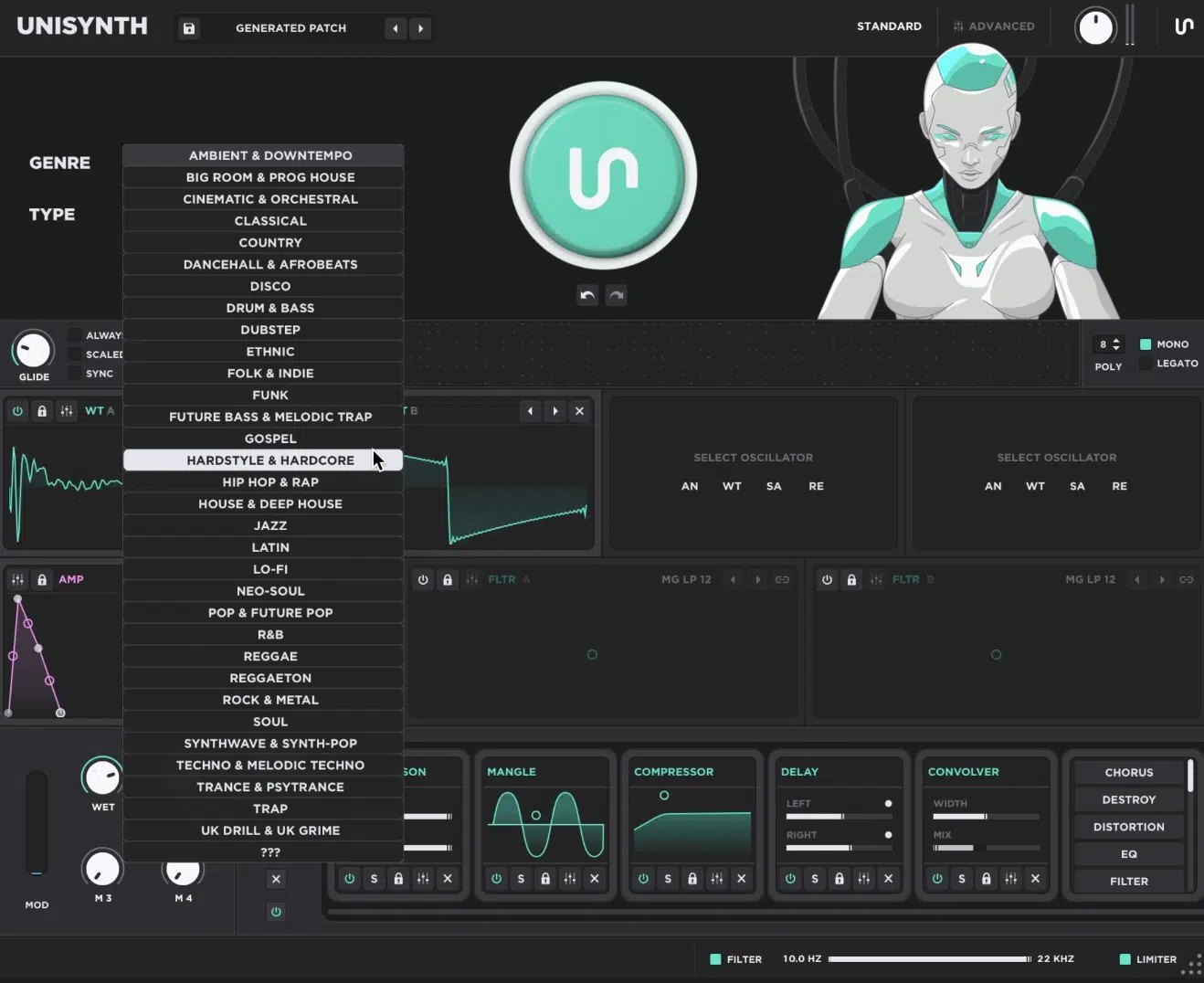
Unisynth is a new AI-powered, genre-specific synth built to generate sounds around 32 genres and 6 sound types… it’s the first (and only) one of its kind.
It’s not one of these “open a blank patch and build everything yourself” plugins at all.
So, instead of starting with silence and a pile of choices, you’re starting with a sound that is already targeted, whether that’s a bass, chord, lead, pad, pluck, or 808.
Under the hood, the synth is built around 4 oscillators, and each one can run in 4 different engine modes: Analog, Wavetable, Sampler, and Resonator.
That gives it a hybrid, semi-modular-inspired design right out of the gate, so you’re never boxed into one specific synthesis style.
Then, once you zoom out and look at the full structure, Unisynth also gives you 2 primary filters with 95 filter options each.
That includes everything from the basics, to analog-modeled filters inspired by classic synths, to more unusual and modern takes on familiar designs.
And no basic stuff either, I’m talking it dominates Serum in every single way.
On top of that, you’re also getting:
- 2 global filters
- 1 master limiter
- 48 simultaneous modulators
- 80 AI generators
- A built-in wavetable editor
- 350+ wavetables
- 1,250+ samples
- 25 top-notch built-in FX
Those FX can be selected or generated, then configured and reconfigured inside Unisynth’s Serum-style FX rack…
So there’s a lot more depth here than the “AI synth” label might make some people assume at first, believe me.
In fact, unlike most AI audio plugins, Unisynth was built so you can either let AI handle a lot of the heavy lifting or forget that side of it is even there altogether (dealer’s choice).
And anywhere in between those two extremes, it still gives you more room to work and more possibilities than any other synth in existence.
The workflow is also split up in a smart way, because Unisynth gives you 2 interfaces that you can switch between easily depending on what you’re trying to do at the time.
And if you want to stay in just one view the whole time, that’s completely fine too.
Standard View is not just for beginners like you might think; it’s for anybody who wants to move fast and get things done properly.
The Generator Panel, Synth Panel, and FX Panel lay out the basic sound-design process in a direct order, while most of the deeper parameters stay tucked away.
Side note, the generators are still working on those deeper parameters in the background, so you’re getting the benefit of that complexity on the back end.
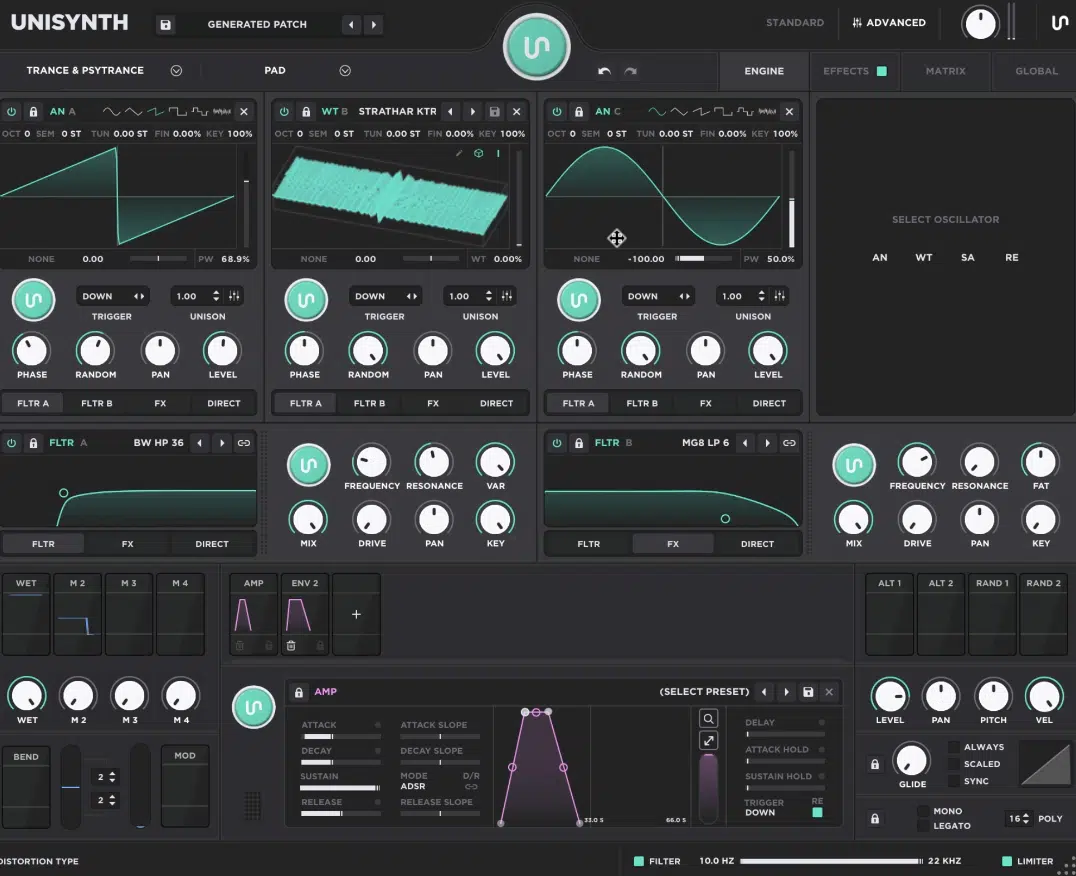
Advanced View, on the other hand, is where you get all the fun (deeper) features and functions through the Engine, Effects, Matrix, and Global tabs.
That gives you access to every parameter, generator, modulator, feature, and function Unisynth has to offer.
So, bottom line, Standard View is where you can generate, shape, and keep the beat moving, while Advanced View is where you can get into the more surgical stuff, like:
This includes oscillator control, full routing, detailed modulation work, wavetable editing, user preferences, oversampling choices, and more precise FX editing.
On top of that, you’ve got Undo/Redo, 4 macros, a mod wheel, interactive XY controls directly on the oscillator and filter sections.
Plus, a master section made up of 2 global filters and a master limiter, so Unisynth isn’t just a one-click gimmick and it’s definitely not just “easy mode” either.
It’s a revolutionary synth that starts with speed and inspiration 一 then keeps opening up into real sound-design depth the more you push into it.
Phase Plant: Kilohearts’ Flagship Plugin Unwrapped
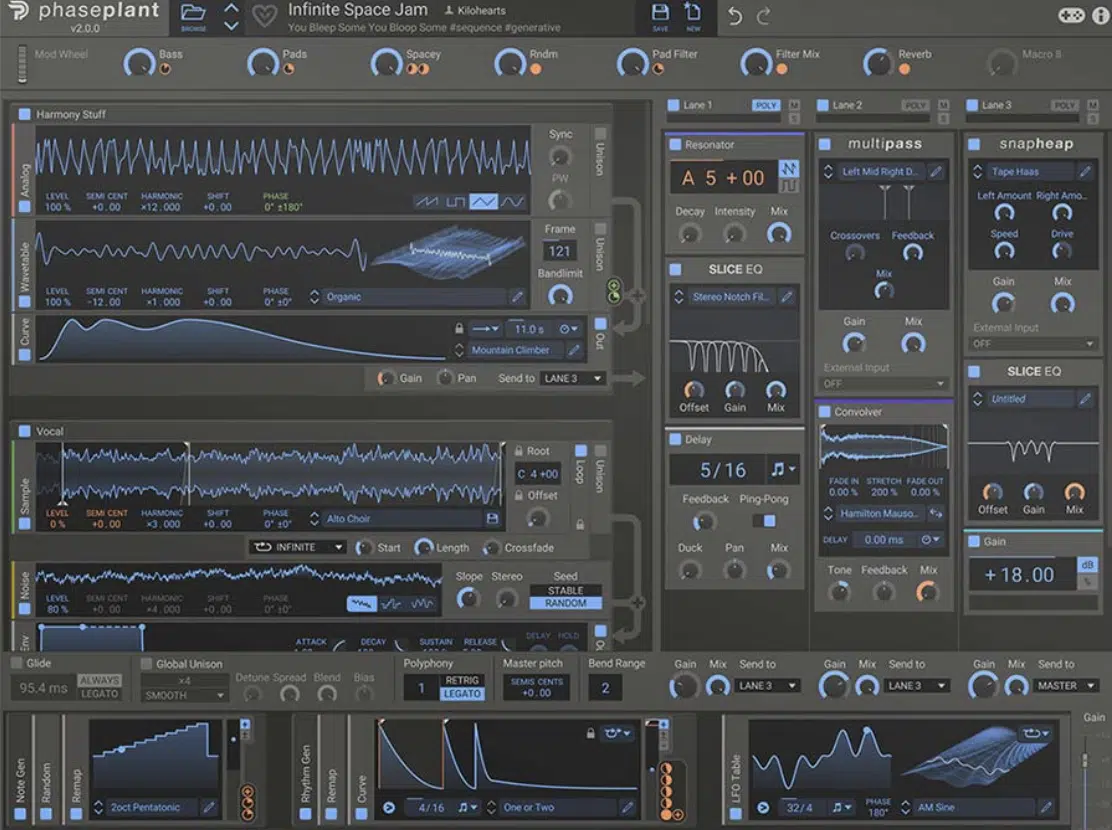
Phase Plant is a semi-modular synth built for creating a sound in layers and structures.
Its whole appeal is that you are not just selecting a patch, you’re piecing together the system that creates the patch.
It’s all about manual construction, signal-flow control, open-ended layering, and deep patch design than any kind of guided or genre-specific generation.
It’s great for professional sound designers, sure, but at the same time, it tends to detract from what producers are all about: producing fast.
Its source section gives you 5 oscillator types 一 Analog Oscillator, Wavetable Oscillator, Sample Player, Granular Generator, and Noise Osc.
And that area can hold up to 32 modules, so you’re able to stack, split, layer, and combine sound sources inside a single patch.
And when it comes to effects, they run through 3 Snapin lanes that can be structured in different ways, which is a big reason Phase Plant is appealing to sound designers.
Side note, you can combine different source types, build more unusual signal paths, and even push audio-rate modulation, where one module modulates another fast enough to create FM-style, PM-style, AM-style, etc.
However, I gotta say, it really doesn’t hold your hand through any of this 一 which is part of the appeal for some people.
It expects you to make choices, define the structure, and shape the patch intentionally rather than guiding you every step of the way.
So, from a pure flexibility standpoint, it absolutely earns its place as a heavyweight synth, I would lose my credibility if I said otherwise…
But at the same time, its whole identity is still much more technical/construction-based, which is exactly why it makes such a strong contrast to Unisynth.
Unisynth goes after depth too (and kills it!), but it does it with a much faster and more producer-friendly path into it.
Unisynth vs Phase Plant: Key Features & Functions
Now that the bigger picture is clear, it is time to get into the actual comparison points that matter most when you are using Unisynth vs Phase Plant. So, from here on out, the focus is not just on who has more features on paper, but on how those features actually work, how they feel, and how quickly they help you get to a sound that is worth keeping.
Workflow, Patch Creation, and First Impressions
Sound generation is really about the path from an empty plugin window to a sound that already feels like it belongs in your track.
And when you put these two synths (Unisynth vs Phase Plant) side by side, that path is one of the clearest differences between them.
With Unisynth, the workflow starts in a way that feels super musical right off the bat because of the genre-specific, generative workflow.
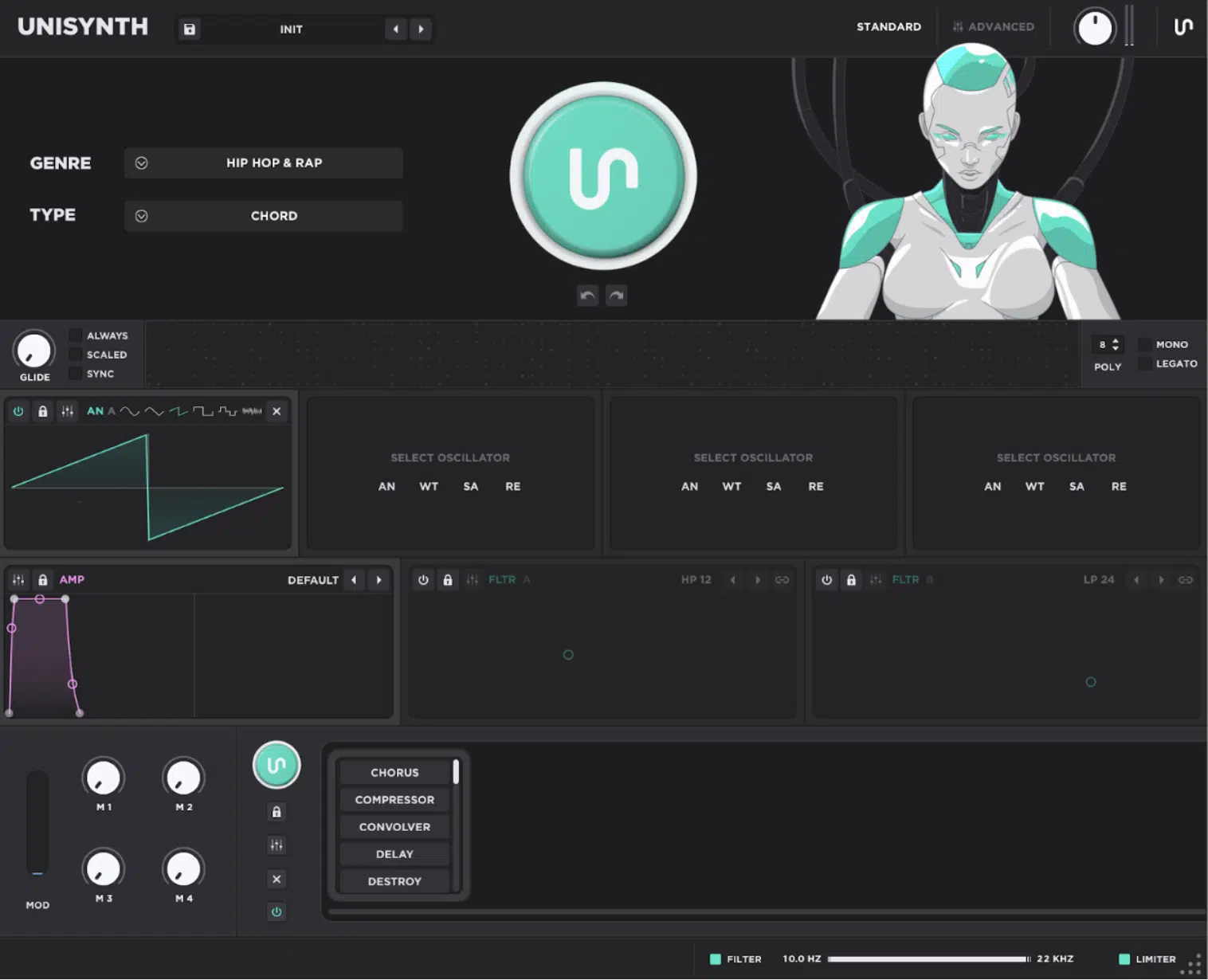
You simply choose a genre and a type, then hit the central Patch Generator and boom 一 you got a crazy sick sound that matches the vibe you’re going for perfectly.
So, the first question isn’t, “how do I build this patch from scratch?” or “what oscillator should I load?” but rather “what kind of sound do I need for this unique record?”
And for most producers, that is a much more natural, beneficial place to begin.
From there, Unisynth drops you into a 3-part Standard View:
- The Generator Panel (up top) handles genre, type, patch generation, and undo/redo
- The Synth Panel (in the middle) gives you glide, voicing, the 4 oscillators, the amp envelope, and the 2 primary filters
- The FX Panel (at the bottom) gives you the FX-Chain Generator, the effect slots, the mod wheel, and 4 macros
So, it’s not just vaguely easy, it’s actually structured around the natural order in which professional producers like myself like to work.
First, you get the sound, then you shape the body, and finally you finish it with movement, color, and effects.
And, better yet, you can edit the sound immediately thanks to the XY controls on the oscillators and XY movement on the filters.
As well as envelope shaping, pre-assigned macro behavior in many generated patches, and quick access to effect generation without ever leaving the main page.
Then, if the patch is close but not quite there, the FX-Chain Generator can rework the processing side too, which is huge.
You’re not just generating a raw source tone, you’re generating a more complete sonic direction around it.
And once you’re happy with the FX chain that you generated, you can still go another layer deeper because each individual effect in the rack has its own generator too.
So, if the overall rack feels right but the delay, reverb, or distortion is still off, you do not have to stop and figure out exactly why.
You can just go into that effect itself and keep regenerating until it sounds right.
Phase Plant takes a very different route here… Instead of giving you a genre-aware result up front, it starts by asking you a whole bunch of parameter questions.
This includes what generators to load, how many to stack, what modulators to add, how to structure the signal flow, and how to arrange the effects across the 3 Snapin lanes.
In fact, Phase Plant is one of those synths that can very easily lead to ‘option paralysis’ because its structure is so user-configurable.
It gives you almost no guidance on what to do, when to do it, or where to start (which I find super inconvenient).
Sure, you can put filters between oscillators, modulators before filters, and create all kinds of unusual setups, which is great for experienced pro sound designers, but it’s a nightmare for anyone who doesn’t know advanced synthesis.
It also means Phase Plant often feels like a patch-construction environment first and a “give me a musically useful sound now” environment later.
So, for the first section of Unisynth vs Phase Plant, I’d have to say Unisynth wins this pretty clearly, because it gets you to something styled, fluid, and editable much faster.
And once the inspiration is already there, it still lets you dive as deep as you want, and go crazy all day in Advanced View instead of being boxed in.
Oscillators, Sound Sources, and Engine Design
Next up, let’s talk about oscillators and generators for a minute, which are the raw sound sources of a synth.
This unique section really comes down to what each plugin gives you before filters, modulation, routing, and effects start reshaping everything.
Unisynth builds that foundation around 4 independent oscillators like I mentioned, and each one can be switched into Analog, Wavetable, Sampler, or Resonator mode.
This tells you right off rip it’s designed to cover multiple synthesis methods inside one organized framework instead of making you patch that flexibility together from separate pieces.
Its Analog engine handles the classic waveform side of synthesis, but it is not just a bare-bones “pick a saw and go” setup either.
It also includes oscillator-level shaping and a deep list of oscillator distortion modes like Sync, Quantize, Bend, Squeeze, PWM, Mirror, Flip, and asymmetrical phase-based warping options.
Then, once another oscillator is active, that same engine can move into cross-oscillator behavior with FM, PM, RM, and AM.
This means the analog side can already be pushed into a wave with a much more complex harmonic spectrum and movement than the word “analog” might make you expect.
Next up is the Wavetable engine that pushes things into more modern digital territory with table selection, wavetable-position scanning, and interpolation choices.
As well as visual table handling and direct access to the editor itself.
So, you are not locked into the factory tables 一 you can actually get in there and reshape the harmonic content itself like a boss.
And if you want to kick things up yet another notch, you have the freedom to create your very own tables too (either by hand or by importing/converting your own samples).
Then we have the Sampler engine which adds another layer of flexibility.
Not just for one-shot playback, but it can actually handle the core controls you would expect from a sample-based oscillator, like root-note setup, detune, loop behavior, playback start and end points, reverse, normalize, sample-rate reduction, and filtering.
This is why it’s perfect for both realistic textures and more synthetic sample-based materials as well.
Last but not least: Resonator. This one works very differently from the other engines because it uses physical-modeling synthesis.
And since it requires another oscillator to be set as the excitation source, it’s not simply playing back its own waveform like the others…
It takes an impulse from that source, runs it through resonant feedback behavior, and reshapes it into something that feels more organic, percussive, and reactive.
So, even before you get into the Unisynth vs Phase Plant comparison itself, Unisynth’s engine design feels very complete:
- One synth
- Four oscillator slots
- Four engine types each
- A ton of tonal range without the structure becoming messy
Phase Plant, on the flip side, has 5 oscillator types and lets you load up to 32 generator modules into a single patch.
That means it absolutely wins the “how much can I stack?” conversation, but at the same time, that openness is also what makes it slower and more technical.
It constantly asks you to decide what to load, where to place it, and how to build the patch before the sound really starts to feel like it has real musical direction.
Honestly, that can sometimes put you at a disadvantage, because once you remove too much structure, you also remove the limitations that often help keep musicality solid.
At the end of the day, the goal is to finish a project, period, and sometimes when there’s no clear place or step to stop, you end up in one of those dreaded run-on sessions.
This is where the patch keeps getting bigger, more complicated, and less worth finishing.
On top of that, patches that get too big often do not sit well in the context of a full track anyway, so keep that in mind as well.
Unisynth feels more focused right from the jump because its 4-engine hybrid design still covers a lot of sonic ground, but it does it in a way that gives you less friction, less structural guesswork, and a much faster route to the perfect sound.
It also gives you a much clearer path to the finish line, because it never leaves you without structure.
It keeps guiding you through the process while still giving you more options than most producers would ever truly need.
Wavetables, Editing, and Harmonic Shaping
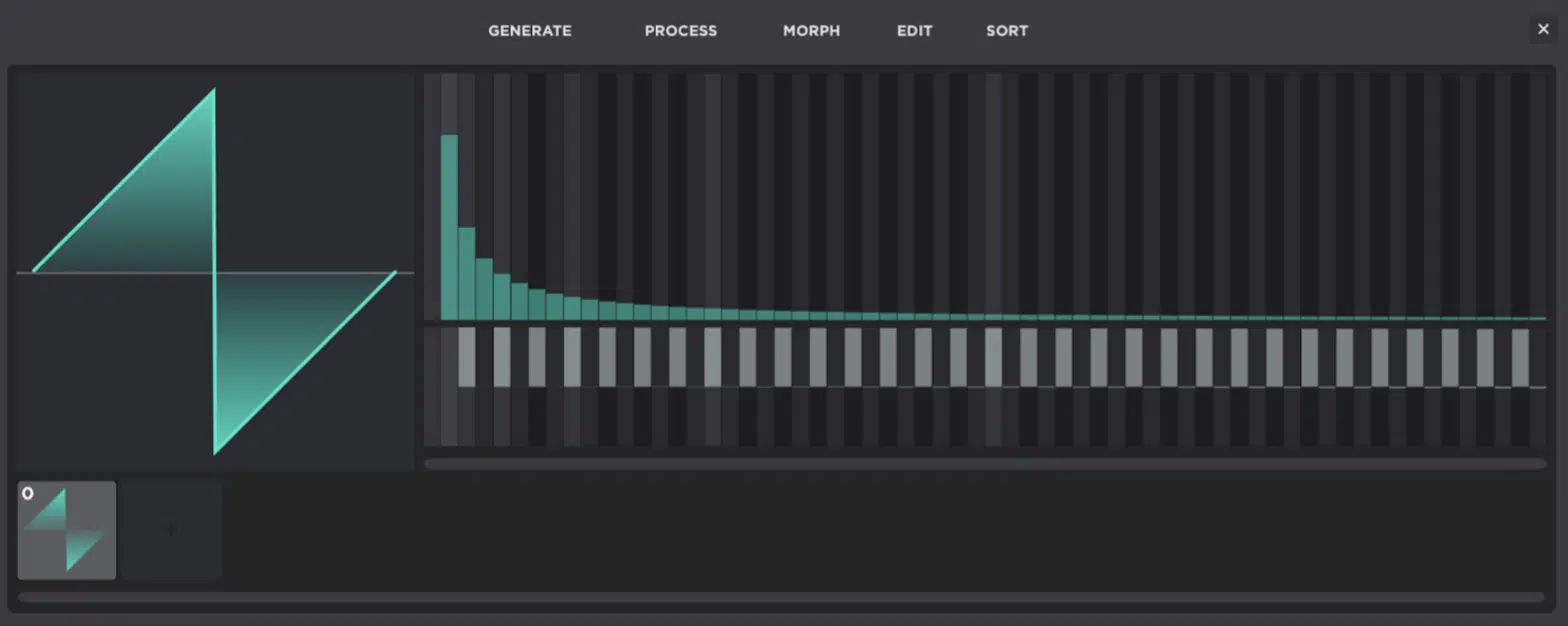
Wavetable synthesis is really about moving through a sequence of waveform frames over time…
The deeper question here is not just how many tables a synth has, but how far it lets you go in actually controlling the harmonic movement inside those tables.
Unisynth comes in blazing right away with 350+ wavetables and a built-in wavetable editor on deck.
So, even before you start making custom changes, there’s already a huge pool of harmonic material to work from.
Once you open the editor, you’ll be able to see that the wavetable side is not shallow at all because you can add frames, remove frames, click to select frames directly, and drag frames to rearrange their order.
This turns the table into something you can actively sculpt rather than just browse.
Then it gets even more advanced with FFT partial editing, which means you can work directly on the amplitude and phase of individual harmonics inside the selected frame.
This way, you’re not only changing where the table scans 一 you’re changing the actual spectral makeup of the waveform itself.
The editor is also on point because the main tool groups are split into Generate, Process, Morph, Add/Remove, and Sort.
Each one does a different job instead of just throwing everything into one crowded menu.
Under Generate, you can create shapes like sine, saw, square, triangle, pulse, and noise, so if you want to start from a familiar base shape instead of importing or scrolling through factory content, that option is already built in.
Under Process, you can push things much further with moves like normalize, invert, remove DC, sync, fold, overdrive, bit, quantize, fade, and set slope.
Meaning, the editor can move very quickly from clean basic tones into much more colored, aggressive, or spectrally unusual territory.
The Morph side lets you create transitions across multiple frames with options like Crossfade and Spectral.
The Sort tools can reorganize the table by things like fundamental magnitude, odd-even balance, spectrum slope, spectrum peak, spectrum average, or even randomize and reverse the frame order entirely.
So, by the time you step back from the editor, Unisynth’s wavetable side is not just about quantity… not by a long shot.
It’s about having a lot of meaningful control over how the harmonic content is created, organized, and animated like a true producer/sound designer.
And don’t forget that some of Unisynth’s 80 generators live inside the wavetable editor too, so if any part of that process starts feeling too boring, too technical, or too time-consuming, that’s totally fine.
You can still take advantage of deep table creation and modification without having to do every little step by hand.
The difference between Unisynth vs Phase Plant is that Unisynth lets you benefit from that depth without needing to fully learn the more technical side of wavetable design.
Now, don’t get me wrong, Phase Plant is definitely strong here too thanks to its Wavetable Oscillator that uses 256 frames.
Each frame being 2048 samples long, and it supports compatible WAV and FLAC wavetable files that meet the required full table size.
This gives it a high-resolution frame-based wavetable structure and a lot of technical flexibility.
On the other hand, Unisynth still takes the W here because it combines real wavetable depth with a more integrated, music-first workflow.
So, you’re not just building technical tables for the sake of it 一 you’re shaping them inside a synth that is already pushing you toward a chart-topping sound.
Sampling, Audio Manipulation, and Texture Building
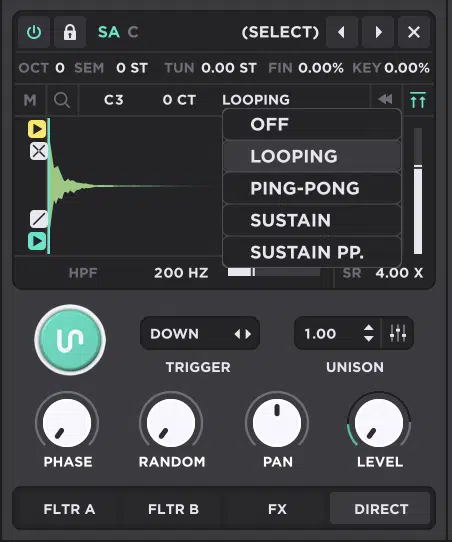
Next up in our Unisynth vs Phase Plant showdown, let’s talk about sample-based sound design, which is where a synth starts bringing in recorded audio as raw material.
It opens the door to everything from realistic transients and texture layers to strange, resampled hybrid tones that sit somewhere between synthesis and audio manipulation.
Unisynth’s Sampler oscillator is pretty loaded in that department, because it lets you work with included or custom samples while adjusting:
- Root note
- Detune
- Mono mode
- Zoom
- Reverse
- Normalize
- Playback start and end points
- Loop start and end points
- Crossfade
- Fade
That already makes it much more than a basic playback slot, because you are not just dropping in a file.
You’re turning that file into a playable sound source that can be tuned, looped, reshaped, and blended into the rest of the synth architecture.
It also gives you multiple loop modes like Off, Looping, Ping Pong, Sustain, and Sustain PP, which is great because those aren’t all doing the same thing…
Some repeat the selected section forward, some bounce backward and forward, and some keep looping only while the note is held before continuing after release.
Then, once you add in sample-rate adjustment and built-in sample filtering with Off, LPF, and HPF modes, the sampler starts feeling even more flexible.
You can easily move from clean playback to more degraded, bandwidth-limited, or lo-fi textures without leaving the oscillator itself, which is sick.
So basically Unisynth’s sample side feels like it was designed for producers who want audio-based texture and realism.
All without having to stop the writing process and enter a completely different sound-design mindset (which, as I’m sure you know, can ruin everything).
Phase Plant, on the other hand, approaches this area from two different angles.
It gives you both a Sample Player and a separate Granular Generator, so if your main goal is specifically granular experimentation, it’s fine.
However, like everything else, you have to get very technical and get deep into sound design territory.
You’re shaping lots of little pieces of audio behavior very deliberately rather than moving quickly toward a musically guided result as we talked about.
Plus, Phase Plant is pretty thin when it comes to built-in samples, wavetables, and preset content too, by the way, and what it does include doesn’t touch Unison quality.
NOTE: If you want access to everything Phase Plant offers in terms of bundled content, that is really something you only get through a Kilohearts subscription. And that same subscription is also what opens the door to the full range of Snapin effects inside Phase Plant.
So, if you just buy the license on its own, you are only getting the more basic effect types. If you want the full set, you either need the subscription or you have to buy the Snapins you want individually.
So, even though Phase Plant is stronger in raw granular specialization, Unisynth still wins the section overall, hands down.
Its sample-based design is more solid, giving you serious playback, looping, and texture controls on site.
Plus it keeps everything tied into a faster, genre-specific patch-building process instead of turning sampling into its own separate rabbit hole.
Filters, Tone Shaping, and Ultimate Sonic Control
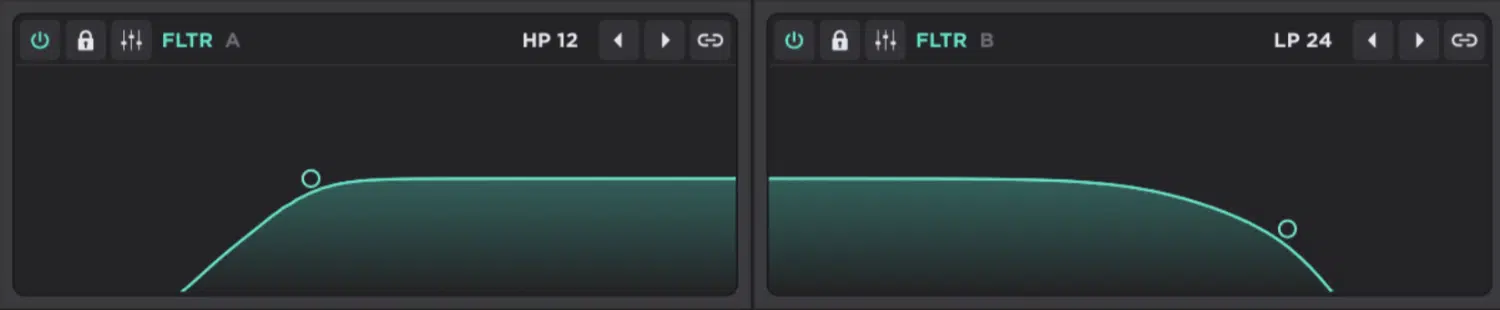
Filters are what let you carve a synth sound into the shape you actually want, whether that means softening the top end, hollowing the mids or adding bite.
Even exaggerating movement or making the whole thing feel more aggressive and alive.
Unisynth gives you endless opportunities here as well, thanks to the 2 primary filters built directly into the core architecture.
Each one offers 95 filter options (which is already a serious amount of shaping range before you even touch the effects section).
Then, outside the preset path, it also gives you 2 global filters, one high-pass and one low-pass, plus a master limiter.
So, you’re able to easily shape the full output of the plugin itself without changing the patch structure underneath.
The main filter controls are also pretty beast, because you are not just working with cutoff and resonance, you also get:
- VAR (a variable parameter whose behavior changes depending on the filter type)
- Mix
- Drive
- Pan
- Key tracking
- Routing
- An XY display (lets you move cutoff and resonance together in a more visual, hands on, natural way)
You can also link Filter A and Filter B, which is great for when you want both filters to move together while still preserving offsets between them.
That lets you shape more complex dual-filter behavior without having to tweak everything twice by hand, which is a huge time-saver.
Then the actual filter list goes well beyond basic LP and HP behavior, because it includes comb filters, vowel and formant-style filters and state-variable options.
Plus a range of modeled analog-style categories that cover different tonal families instead of just one generic flavor.
There’s even more obscure and unique filter types, as well as hybrids that basically add a new twist to the classic filters (super cool!).
So, instead of filters feeling like a small utility section, Unisynth treats them as they sound 一 like one of the main character-shaping parts of the synth.
That comes through both in the control depth and in how broadly the filter menu is built.
Phase Plant handles filtering more modularly with its standard Filter module and Non-Linear Filter module.
This means you can insert filters as part of the patch structure instead of always treating them like a fixed central stage.
That does give it flexibility, but it is worth noting that the standard filter side is still built around more conventional filter categories.
While the non-linear side is there to add more color, saturation, and less perfectly clean behavior on top of the basic shaping job.
So while Phase Plant is definitely capable here, Unisynth still comes out ahead because it gives you a broader stated filter count right in the main architecture.
Plus a way stronger at-a-glance filter depth, linked dual-filter control, built-in global filtering, and a smoother path from raw source material to polished tone.
NOTE: Remember when Serum (and then Serum 2’s filter section) set the bar for filters found within a software synth?… Well, Unisynth just raised it!
Modulation Power & Performance Control
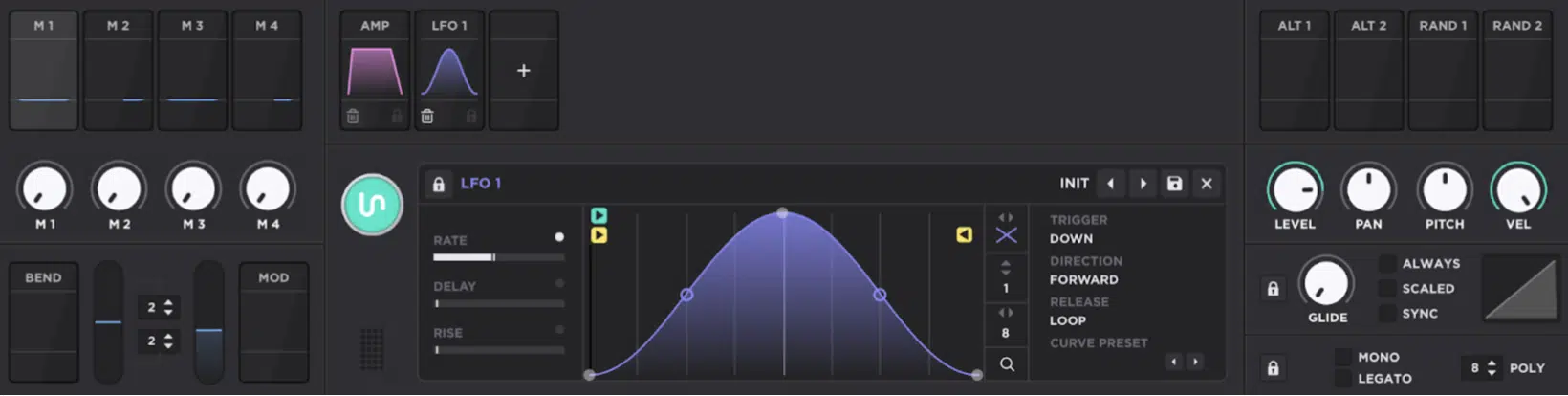
Moving on with our Unisynth vs Phase Plant debacle, let’s talk about modulation, which makes a synth patch really breathe.
It’s the part that adds movement, performance control, variation, and evolving expression instead of leaving the sound frozen in one place.
With Unisynth, you get much deeper than you might think because it supports 48 simultaneous modulators, and nearly every parameter can be assigned up to 16 modulators at once.
Talk about motion-design power inside one patch, am I right?
Then, once you get into the actual modulator lineup, it becomes clear that this is not a basic system either, because Unisynth gives you Envelopes, Chaos, LFOs, Trackers, Macros, Bend, Mod Wheel, Alt ½, and Random ½ (to name a few).
Each one plays a different role, so the system feels expansive in a useful way rather than broad just for the sake of numbers.
Let me break them down for you a little more:
- Envelopes shape controls over time after a note is played
- Chaos adds that Serum-style analog-inspired random variation
- LFOs create repeating motion in a bunch of editable ways
- The Tracker plus Alt/Random sources handle switching, alternating values, and per-note variation without forcing you to draw in manual automation every time
That means you can get more advanced movement without having to stop and put on your full sound-designer hat to create something that should feel natural/expressive.
Side note, the Tracker side is super useful because it can respond to note number, velocity, off velocity, pitch bend, pressure, timbre, and other MIDI or MPE-style performance data.
This gives you a very direct way to make the synth react differently depending on how the part is actually being played.
So, whether you want something that feels more like a live instrument, or something wild and expressive that cries, screams, bends, and shifts with your playing, the Trackers have your back.
And if you do not have an MPE controller (or just don’t want to spend your whole session setting up hardware and controller mappings), that’s totally fine.
You can still get a lot of that expression out of more standard MIDI sources like pitch bend, mod wheel, note trigger, and velocity.
On top of that, Unisynth gives you 4 super powerful macros…
One macro can control multiple destinations at once while still preserving the relationship between each linked parameter.
So, you can tie together things like filter cutoff, delay mix, distortion drive, and reverb amount under one knob.
Then, make musical tweaks without wrecking the balance between the individual settings underneath.
That’s also where Unisynth’s macro generator gets really smart, because it can give you new destination combinations and value ranges you may not have thought to assign on your own.
It has the ability/flexibility to make a traditionally slow and uninspiring part of sound design feel much faster and more creative.
NOTE: It even has a really slick trick with the FX rack. If you leave one macro unassigned before generating a new FX chain, Unisynth can turn that macro into a dry/wet control for the entire rack, while still preserving a custom min/max range for each effect instead of just sweeping every wet knob from 0 to 100.
For example, one macro move could take the reverb from 10% to 45%, the OTT from 50% to 90%, and the delay from 15% to 35%.
This gives you the kind of parallel-style control you would normally need a lot more time and technical setup to build by hand.
The modulation workflow is super strong too as you’re able to assign things with drag and drop and right-click to open assignment lists and related controls.
Or, jump into the Matrix tab where every route can be organized by source, destination, amount, polarity, and even an aux modulation source for each assignment.
That aux side is fire because it lets one modulator scale or control the depth of another, so you can do things like assign a macro to the wobble amount in a bass patch and only bring that movement in when you actually want it.
And once your assignments are in place, Unisynth shows floating modulation depth controls right on the destination parameter, so you can adjust movement right there.
No more constantly bouncing back to the Matrix page for tiny changes.
Its LFOs go deeper than basic shape selection too, because you can draw custom curves with nodes, use grid settings to line rhythmic shapes up more easily and stamp in motion with brush tools.
Plus control things like start position, loop position, direction, and release behavior for more detailed movement.
Phase Plant is undeniably strong here too, because it supports up to 32 modulator modules, gives you 8 macro knobs, and allows modulation access across the instrument like we talked about.
Plus, it pushes into audio-rate modulation for more advanced FM-style and phase-based behavior.
Still, Unisynth takes the category overall because it balances serious movement design with a much more immediate workflow.
You get the depth, the control, and the expressive side fast 一 and that’s a much bigger advantage in real sessions than a lot of people want to admit (trust me).
Routing, Signal Flow, and Internal Flexibility
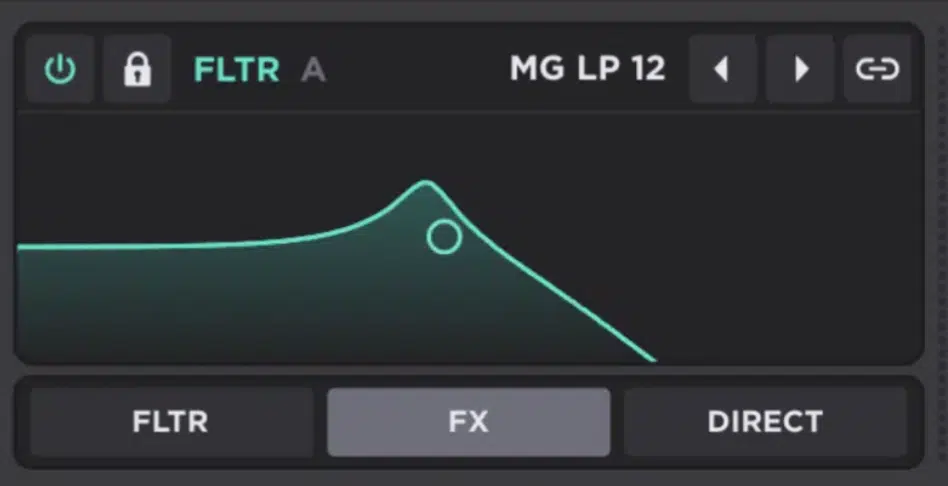
Routing is what decides where the sound actually goes inside a synth, so this section is really about whether Unisynth vs Phase Plant gives you meaningful internal flexibility.
Or, locks you into one obvious path the whole time, which nobody wants.
Unisynth is super flexible in this department because it includes 6 routing mixers, which already tells you the signal flow is not just hardwired into one straight line.
At the oscillator level, each source can be routed to Filter A, Filter B, FX, or Direct so you can easily:
- Send an oscillator through one filter
- Split it into a different path
- Bypass both filters into the effects chain
- Skip both filters and effects entirely by sending it straight to the output
And, with that last one is priceless for something like a sub or attack/percussive layer because it lets you keep one source clean, centered, and stable while the rest of the patch goes through more dramatic filtering and processing above it.
The filters work in a similarly versatile way as each filter can route onward to the other filter, into the FX section, or bypassing the rack and direct to the output.
This means Unisynth can handle both more traditional serial filtering and more separated branch-like structures depending on what the patch needs.
There is also a useful limitation here that actually helps keep the structure understandable…
Only one filter can be routed into the other at a time so the routing stays flexible without becoming chaotic and unmanageable.
Then, once you dive in deeper, you’ll see the routing bars are not just simple destination switches either, because Option-click-and-drag turns them into mixers that can split signals across multiple destinations in different proportions.
This is way more advanced parallel routing/mixing behavior than a fixed-path synth usually gives you, I’ll tell you that.
On top of that, the FX chain itself can be rearranged freely, so effects do not have to stay in any kind of locked order (because remember, Unisynth = no restrictions).
And that’s everything because a sound hitting distortion before reverb behaves very differently from one hitting distortion after the reverb tail has already formed.
It’s also one of the best ways to get a better feel for signal flow if that’s an area you have wanted to understand more deeply.
Because when you can play the synth back, move effects around instantly, and hear the result without loading screens or interruptions, you start learning with your ears instead of just memorizing rules.
And, just a little piece of advice, that’s really what helps the most, because proper signal flow is not that hard to learn on paper.
The harder part is building up the sonic memory to know what something like reverb and delay actually sound like when a compressor is placed before them, after them, or right in between them.
Phase Plant, on the flip side, is more open in pure modular terms.
It uses device groups to break the stack into separate logical units, and audio does not automatically flow between those groups unless you route it there deliberately.
This gives it a much more “build the system yourself” kind of structure.
From there, the signal can be sent into one of three effect lanes, and those lanes can run serially or in parallel, so on paper, yes, Phase Plant is more architecturally open.
Still, Unisynth wins this one because it gives you more than enough routing depth to do serious patch design, including bypasses, splits, direct outs, dual-filter behavior, and freely reorderable effects.
All without forcing every sound into a full modular systems-design exercise before the patch can really breathe.
Built-In FX & Final Polishing
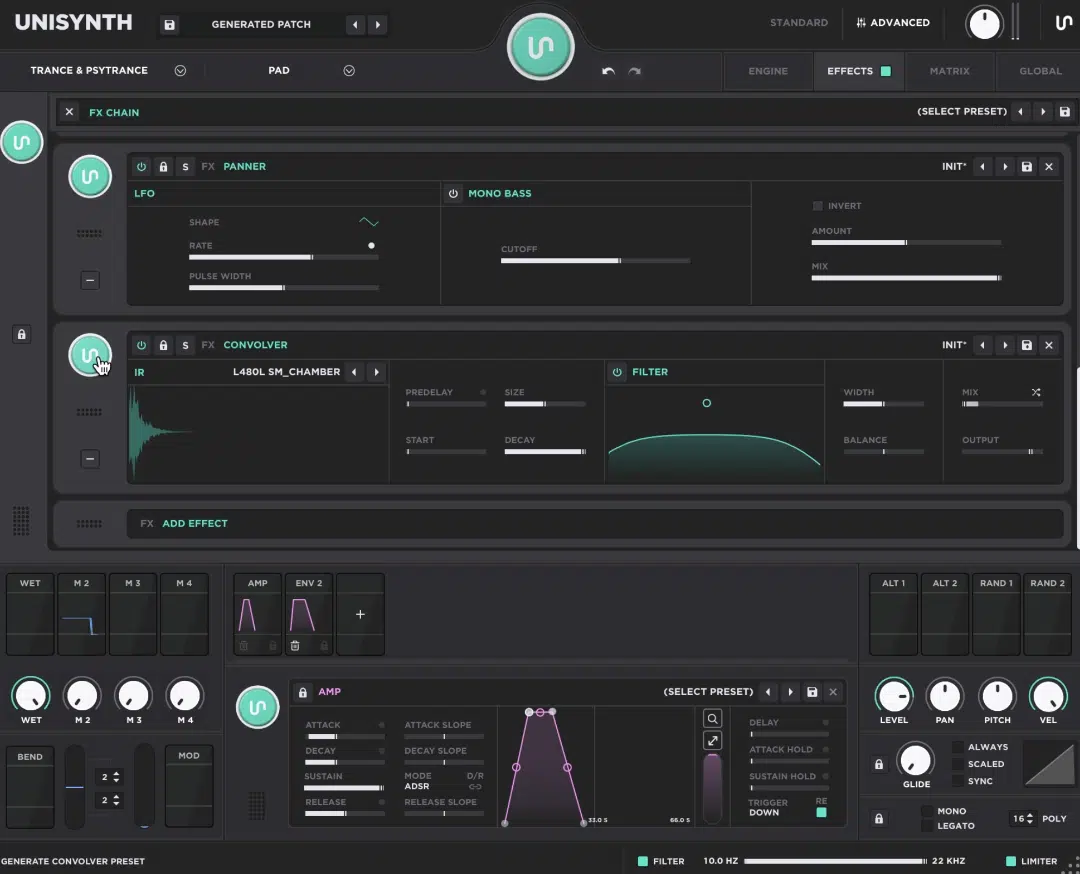
FX are usually where a synth patch stops sounding ‘raw’ and starts sounding finished.
So, for this last Unisynth vs Phast Plant section, it all comes down to how complete each plugin feels once you start pushing the sound beyond the oscillator stage.
Unisynth is stacked here, because it has 25 built-in FX, and those cover a lot of ground:
- Delay
- Reverse
- Destroy
- Distortion
- Mangle
- Preamp
- Redux
- Tape
- Compressor
- OTT
- EQ
- Filter
- Chorus
- Flanger
- Phaser
- Super Unison
- Tremolo
- Vibrato
- Convolver
- Panner
- Reverb
- Space
- Utility
- Width
That is a strong lineup because it is not just one flavor of processing repeated over and over, not by a long shot.
You’re getting time-based effects, distortion and saturation colors, dynamic control, modulation effects, spatial processors, and utility correction tools all at once.
And, not to mention Standard View includes the FX-Chain Generator…
Meaning,you can generate a processing direction quickly, lock the chain if you want to preserve it, swap effects around, and keep moving while the idea is still fresh.
Once you jump into Advanced View, the FX section is where you get detailed controls, individual effect presets, a full-chain preset menu and drag-and-drop reordering.
And, even collapsible units, which helps a lot when the chain gets longer and you still want to stay organized.
It also goes deeper at the unit level, because individual effects can be bypassed, soloed, locked, removed, or swapped.
It really feels like a proper finishing environment instead of a few bonus processors tacked onto the synth at the end.
There is even a preference for keeping only one unit expanded at a time, which sounds small, but it makes longer chains much easier to manage when fine-tuning.
So, rather than treating FX like a little extra page after the “real synth stuff,” Unisynth treats them as part of the sound-design engine itself.
First generate, then shape, then finish 一 all without leaving the plugin.
Phase Plant handles the effects side through 3 Snapin lanes, and each lane can hold multiple Snapins while the lanes themselves can be routed in serial or parallel ways.
That said, the whole approach leans harder on the modular Snapin mindset, whereas Unisynth feels more self-contained and more immediate.
The effects are already framed as part of the instrument’s built-in sound-creation flow from the very beginning.
Plus, with Unisynth, you get all 25 effects that make up its FX rack right out of the box, and that’s not the case when it comes to Phase Plant.
When you buy a Phase Plant license without an added subscription or separate Snapin purchases, you only get a limited handful of the full effect options you could potentially use inside the synth.
The same idea applies to its preset, wavetable, and sample expansions too.
So, while Phase Plant can absolutely be expanded into something much bigger, a lot of that extra depth is not really included in the base experience the way it is with Unisynth.
So when the question becomes “which synth gives you the more complete generate-shape-finish experience inside one environment?”, Unisynth takes it pretty convincingly.
Unisynth vs Phase Plant: The Final Verdict Is In
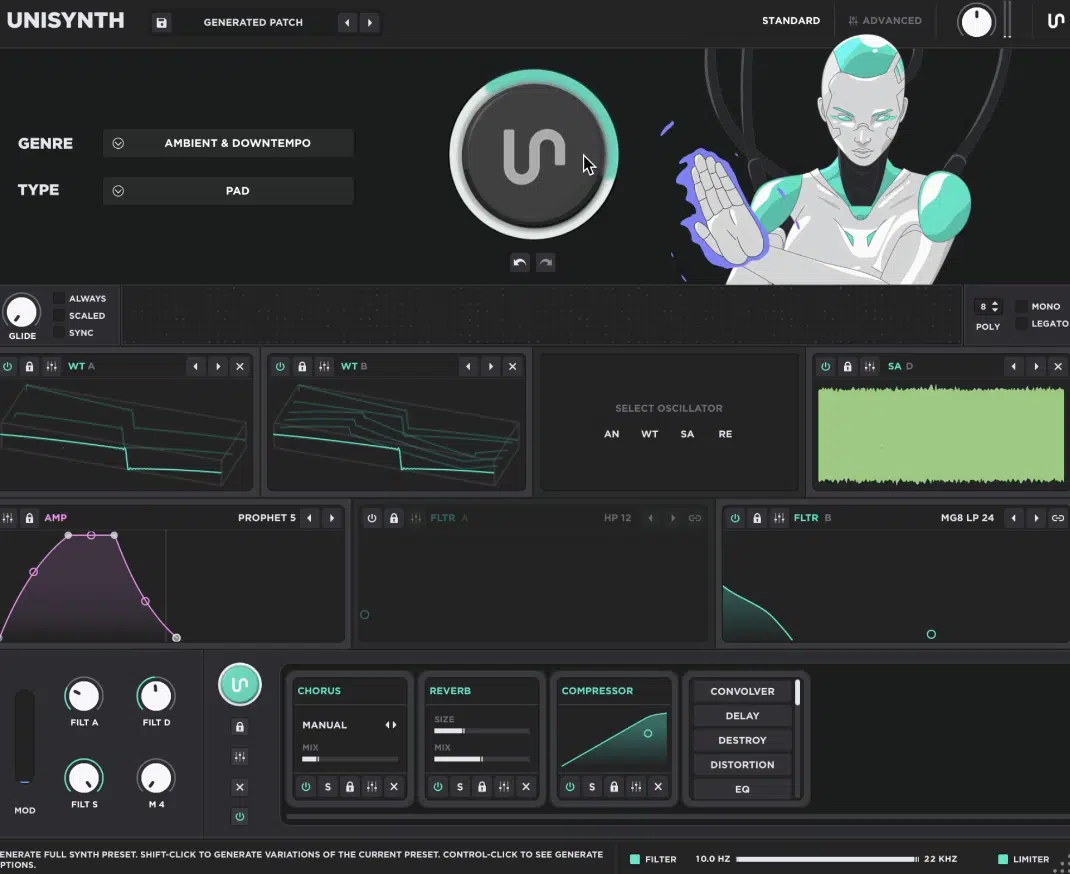
Phase Plant is absolutely deep, powerful, and customizable, sometimes to the point where that freedom can become one of its biggest pitfalls for producers..
Unisynth, on the other hand, feels more complete because it combines AI-powered generation, 32 genres, 6 sound types, 4 hybrid oscillators and 350+ wavetables.
As well as 1,250+ samples, 2 primary filters with 95 options each, 48 simultaneous modulators, 80 generators, and 25 built-in FX inside.
So, whether you are a beginner trying to get better sounds without burning half the session, or an experienced professional, Unisynth is the unmatched king.
Bottom line, at the end of the day, Phase Plant deserves real respect 一 but Unisynth is the more modern, more complete, and more producer-friendly champion.
If you don’t believe me, you should definitely download Unisynth (below) and find out for yourself; you’ll thank me later.
Until next time…
Download The Undefeated Champ of Synth Plugins




Leave a Reply
You must belogged in to post a comment.