




Sylenth1 is one of those synths that a ton of producers have known, used, and respected for years (I’m sure you recognize the name right away).
It’s definitely earned its place with its clean layout and strong virtual-analog sound.
And I have to say it helped set the tone for what a bunch of producers expected from a software subtractive synth as a whole.
But, can it take on the reigning champ of the world 一 Unisynth?
Well, today we’re going to find out because we’re breaking down the ultimate Unisynth vs Sylenth1 competition.
You’ll find out who is taking the crown in all the most important synth essentials, like:
- Raw sound sources ✓
- Oscillator power ✓
- Wavetable depth ✓
- Sample capabilities ✓
- Modern sound design ✓
- Filter flexibility ✓
- Routing options ✓
- Modulation range ✓
- Internal FX ✓
- Workflow depth ✓
- Overall completeness ✓
- So much more ✓
After you see all the head-to-head details, you’ll see who really deserves the win, and who’s taking a big fat L.
Remember, it’s all about range, real-world flexibility, and unmatched depth.
Plus, the winner would clearly have to cover more ground, give you more control, and help you build better sounds from the first idea all the way to the finished patch.
I mean, nobody wants a one-trick pony synth, am I right?
So, now that you know what we’ll be getting into, let’s jump right in…
Table of Contents
Unisynth: The New #1 Synth in the World
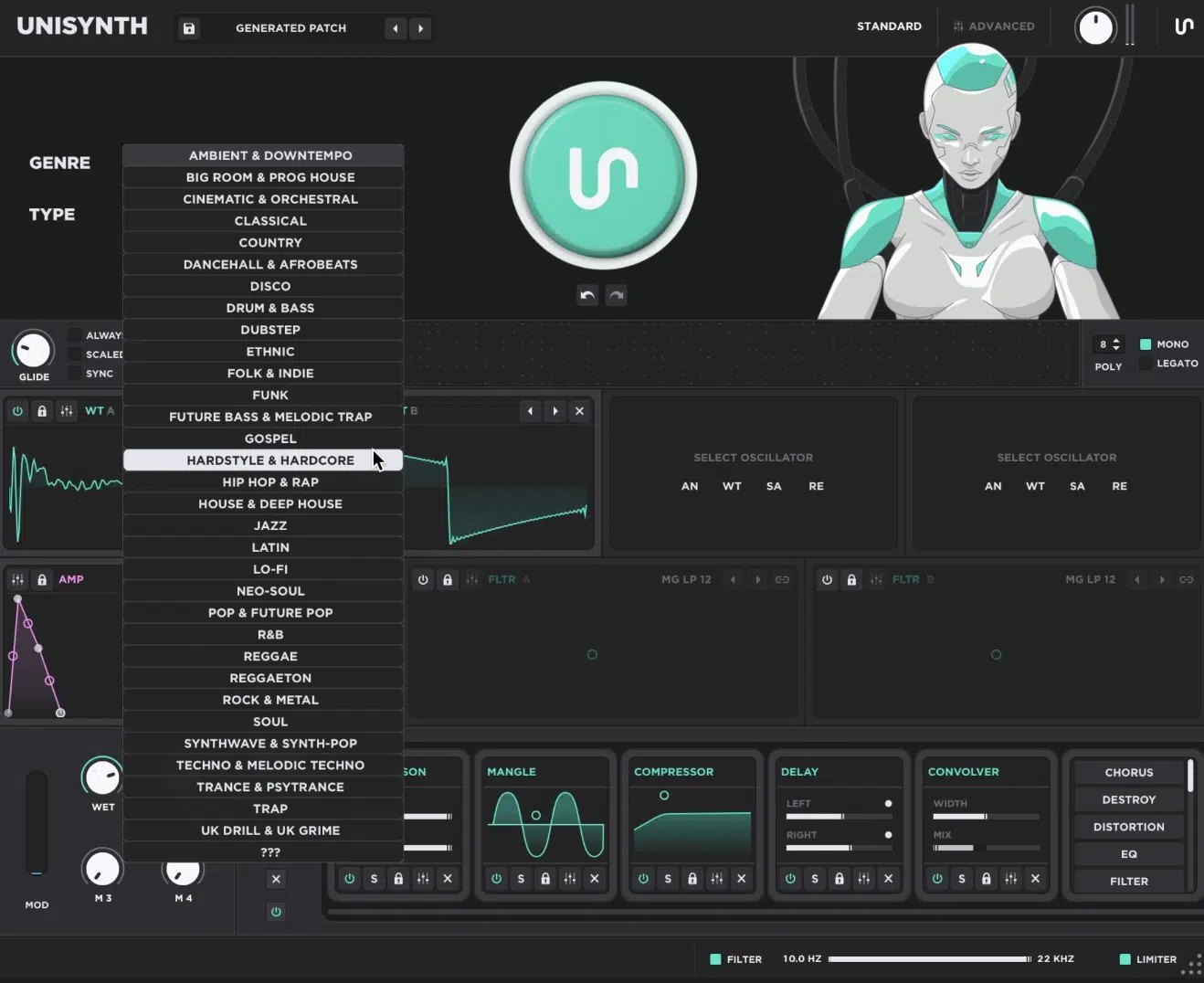
Unisynth is the world’s first (and only) genre-specific generative AI synth 一 it doesn’t just give you a synth engine and throw you into the deep end before you can swim.
Instead, it gives you a guided starting point without boxing you in.
That balance is a huge part of why it’s making major waves in the industry, because it can move fast when you want speed and go deep when you want control.
It starts with 32 genres and 6 sound types, so you can direct it toward the exact kind of sound/vibe you’re looking for.
Then, you simply hit that Patch Generator and get one that already feels on point (no more starting from scratch if you don’t want to!).
So if you need something like a trap pluck, a house chord, a cinematic pad, or a drill lead, Unisynth’s got you right away.
From there, it opens up Standard View for broad shaping, which is where you’ll work with macros, adjust the filters, and build momentum without staring at a wall of tiny parameters.
And when you want to go deeper and dive into the weeds, Advanced View gives you the full architecture with the Engine, Effects, Matrix, and Global settings.
And that architecture is no joke either, let me tell you, because you’ll be working with 4 independent oscillators, and each one can run 4 unique engine types.
These are: Analog, Wavetable, Sampler, and Resonator (which we’ll talk about in a minute).
This alone already puts it in a much wider lane than a typical subtractive synth.
That means one patch can start with a more classic analog-style oscillator, blend in a moving wavetable, and add a sampled layer for texture or realism.
Then bring in a resonator for extra tone and character, so it’s not some narrow, one-lane synth pretending to be more than it is, not by a long shot.
Then it keeps stacking on the good stuff with:
- 2 primary filters
- 95 filter types per filter
- 24 effect units in the full FX environment
- Up to 48 simultaneous modulators
- A full modulation matrix
- 80 generators spread across the synth for patches, oscillators, filters, modulators & effects
Two filters with 95 options each means you are not stuck with the same old low-pass and high-pass moves over and over again.
And, with 48 modulators, that means Unisynth has enough movement and control depth to handle patches that evolve, react, and stay interesting over time.
It’s never about just looping the same behavior over and over again.
NOTE: It also starts from a seriously deep source pool with 350+ wavetables and 1,250+ samples 一 and since it has a built-in wavetable editor, you are not just browsing raw material, but actually reshaping it from the inside out.
Browsing is one thing, but being able to edit frames, reorder them, morph them, and mess with harmonic content inside the synth is a sound design dream.
When it comes to samples, it doesn’t slack there either.
With over 1,250 samples in the engine before even loading your own, you have way more tonal starting points than a basic waveform-only synth could EVER give you.
So before the Unisynth vs Sylenth1 showdown even really begins, it’s obvious Unisynth is going to be pretty impossible to beat.
A full modern sound-design environment that can handle inspiration, synthesis, movement, routing, processing, and deeper editing all in one place… unmatched!
Bottom line, when it comes to Unisynth, it’s not only about helping you get a sick patch, but giving you enough under the hood to bring it to the next level (and then some).
PRO TIP: Unisynth’s proprietary AI side is a huge part of why it feels so crazy compared to a normal synth, because it is not just spitting out random sounds and hoping one sticks. It’s pulling from genre-aware logic, sound-type direction, and a much deeper engine to generate patches that already feel way closer to something you would actually want to use, regardless of style/vibe.
The AI is not a gimmick like with most other plugins available right now, and you never have to sacrifice depth or control.
Sylenth1: The Classic
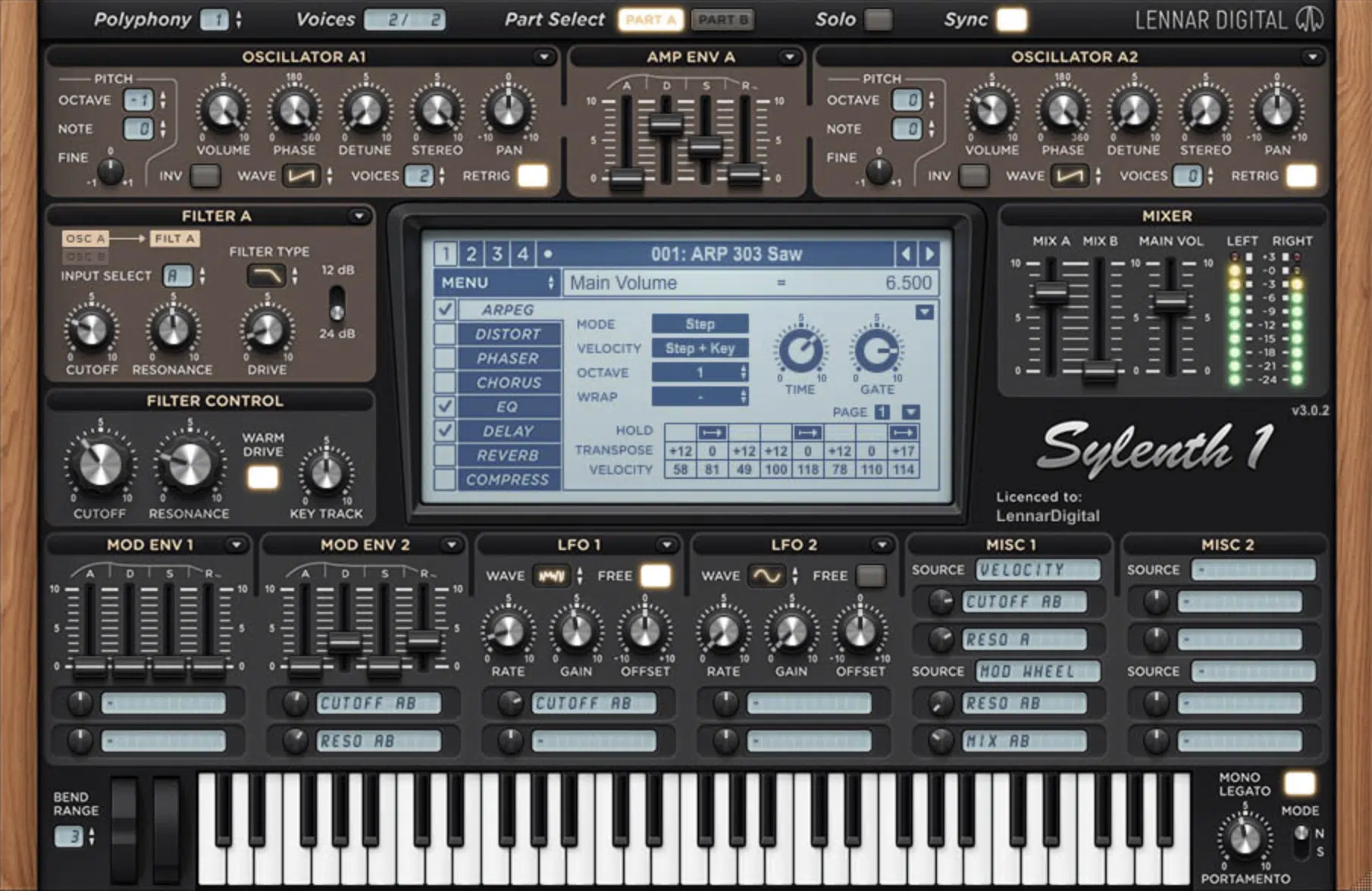
Sylenth1 has been around long enough that most producers know fvthe name.
It mainly built that reputation by being simple, clean, and centered on a straightforward virtual-analog subtractive workflow as I told you in the introduction.
At its core, you’ll get some basic waveforms and shape them with filters, envelopes, modulation, and effects.
Its structure is still pretty clear and focused 一 4 oscillators, up to 8 unison voices per oscillator, 16-note polyphony, and up to 512 total voices.
Plus, 2 filter sections, 2 ADSR envelopes, 2 LFOs, extra modulation sources like velocity, key track, and mod wheel, a built-in arpeggiator, and onboard effects.
A lot of its long-term appeal came from the fact that it could bang out familiar leads, plucks, basses, and supersaw-style sounds without being too demanding.
That also helped it stick around, along with its 2500+ presets which made it an easy pull for producers/sound designers who wanted ready-to-go subtractive sounds.
Still, once you put it next to a newer hybrid synth, you can hear (and feel) how narrow that design really is…
It stays in the classic subtractive lane and does not do much outside of it.
So while Sylenth1 is a recognizable classic, in this Unisynth vs Sylenth1 comparison it makes more sense to see it as a much more limited, older-school instrument.
As opposed to something that covers every single aspect of the process.
Oscillators and Raw Sound Sources
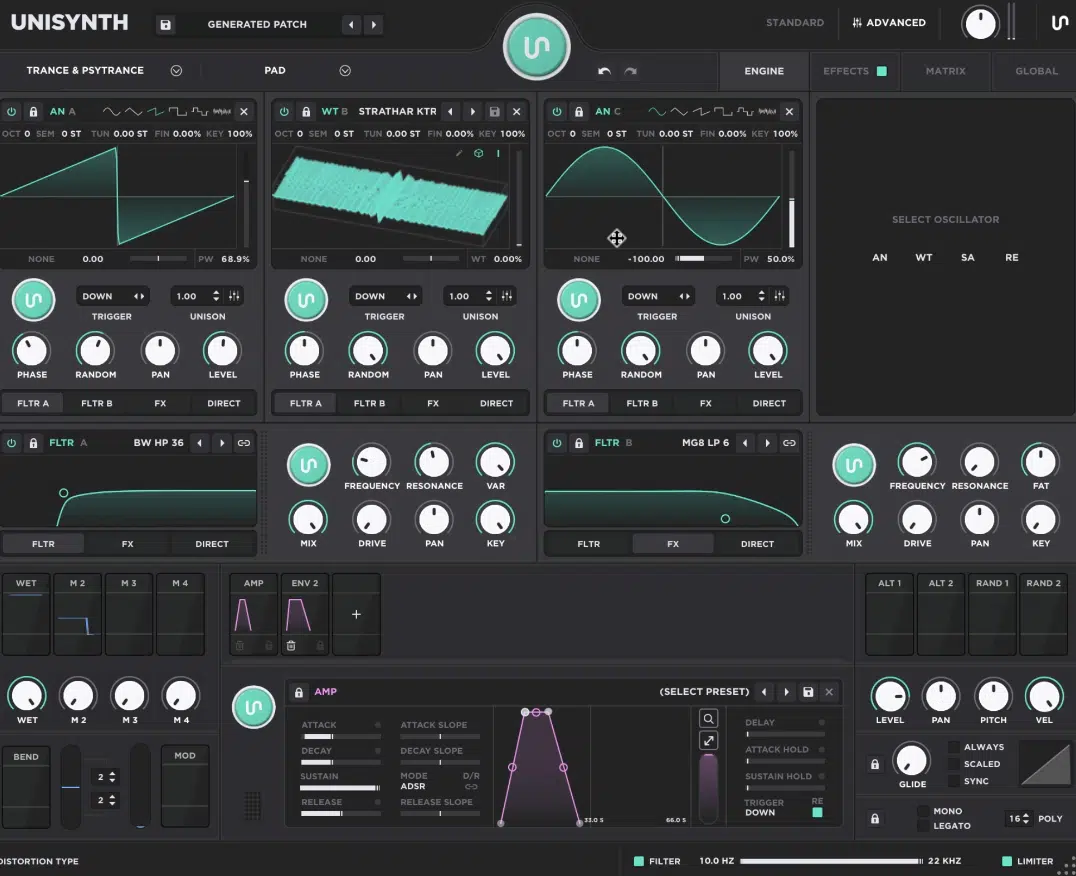
Unisynth comes out swinging right out of the gate when it comes to oscillators and raw sound sources…
Before you even think about touching a filter or effect, it already gives you way more raw material to build from.
If the raw ingredients are limited, everything after that is working harder just to fake variety.
You get 4 independent oscillators, and each one can run in 4 different engine modes:
- AN for classic analog-style waveforms
- WT for wavetables, which are collections of waveform frames you can scan through for moving harmonic tone
- SA for sampler playback and audio shaping
- RE for resonator tones, where one sound excites another and creates a more physical, resonant result
So, before you even get into filter movement or FX, Unisynth is already covering a lot more ground at the source level.
One patch can start from a more familiar analog-style tone, while the next can lean into wavetable motion, sampled texture, or a resonant layer that behaves totally differently.
When the oscillator stage is this wide 一 it doesn’t just keep feeding you the same basic starting point with a different coat of paint on top.
That extra range keeps the patch design from feeling boring, basic, or repetitive, so you can make sounds that actually stand apart from one another.
Then, when it comes to individual oscillators, each one has its very own:
- Tuning controls
- Trigger modes
- Unison settings
- Pan
- Level
- Routing
So, you are not just picking a source type, but deciding how that source behaves, where it goes, and how it sits against everything else in the patch.
The oscillator display also works as an XY controller in a lot of cases, which makes shaping much smoother than endlessly clicking through a bunch of tiny parameters.
And that’s super nice when you want to move quickly and hear the sound change in real time instead of getting pulled out of the creative flow (which is the worst).
And when you land on an oscillator layer you really like, you can simply Lock it so the generators do not wipe it out while you keep experimenting with the rest of the patch.
That feature is just one example of why Unisynth feels crazy smart and intuitive 一 you can keep the parts that are working and keep pushing everything else around them.
Once you jump into Advanced View, each oscillator opens up into a much deeper section with more detailed controls and its own mini-generator.
So now you are not only generating whole patches, but also targeting smaller parts of the architecture when that makes more sense.
I mean, sometimes you don’t want to randomize the entire sound, you just want a new wavetable behavior, a different sample layer, or a fresh resonant source, am I right?
It’s not just adding one extra sound source and calling it a day, but giving you a front-end engine that can move between subtractive tones, wavetable motion, sample-based material, and resonant modeling all inside the same patching environment.
Sylenth1, on the other hand, is way more limited.

All 4 oscillators are built around the same basic analog-style waveform approach, with the usual starting shapes like saw, sine, triangle, square, and white noise.
Those waveforms can still do the classic subtractive jobs Sylenth1 is famous for, but they’re just being stacked and reshaped over and over.
You are not getting wavetable scanning, sample playback, or any resonator-style source behavior at the oscillator stage like you do with Unisynth.
Yes, with up to 8 unison voices per oscillator and up to 512 total voices, Sylenth1 can stack those basic waveforms into big supersaws, thick plucks, and solid subtractive sounds.
But even then, it’s still building from a much smaller and more basic pool of raw material than Unisynth is (and you’ll really feel that difference, I promise).
Before modulation, filtering, or effects even start doing their thing, Unisynth already gives you a much bigger canvas to work on, but let’s keep moving.
Wavetables, Samples, and Modern Sound Design
Wavetables, samples, and killer sound design is not just about starting from a saw wave and pushing it through a filter anymore, this isn’t 2010.
A lot of current patch design lives in the source itself now, which means:
- Movement inside the waveform
- Sample-based texture
- Hybrid layering
- More direct control over harmonic content before the filter
Unisynth already has a crazy head start here with 350+ wavetables and 1,250+ samples.
This means the raw material inside the engine is already far bigger than what you’d get from a classic subtractive setup like Sylenth1’s.
And when a synth gives you that much source variety up front, it naturally opens up more tonal directions without forcing you to leave the plugin.
But the real flex is not just that those materials are there 一 it’s what you can actually do with them once they are loaded.
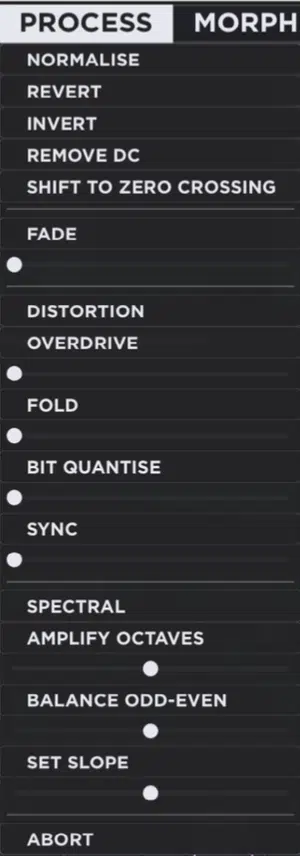
On the wavetable side of things, Unisynth comes in hot too, with its dedicated wavetable editor, so you’re not stuck just browsing through tables.
You can easily add frames, remove frames, select and rearrange frames, and go further with tools like Generate, Process, Morph, and Sort.
So instead of just scanning through whatever table came with the synth, you’ll be able to actually change the structure of the table itself all day.
That means you can build movement into the source at a much deeper level than just assigning an LFO and calling it a day.
Then it gets even deeper with the FFT partial editor, where you can reshape the harmonic content of a selected frame by changing amplitude and phase.
This basically means you’re editing the actual spectral makeup of the waveform instead of only dressing it up later with effects.
Remember, amplitude changes the strength of the harmonics, while phase affects the waveform shape and behavior in more subtle ways.
You can get way down into the harmonic DNA, not just change the tone.
The sampler side is just as solid, because Unisynth’s SA oscillator can use included or user-loaded material and gives you hands-on controls for:
- Sample start
- Sample end
- Loop start
- Loop end
- Fade
- Crossfade
- Reverse
- Normalize
- Mono mode
- Detune
- Sample-rate control
- Filtering
And with that level of control, you can turn one piece of audio into endless different (playable) results like a true professional.
A sample can be used as a transient layer, a sustained tone, a textural bed, or something more experimental depending on how you set the playback and looping.
It also gives you multiple loop behaviors like Looping, Ping Pong, Sustain, and Sustain PP, so you can go from one-shot texture to sustained material without plugin-jumping.
So, when you want to build a patch that starts from real audio but still behaves musically across the keyboard, you got it.
The sampler side is not just there for decoration, but built to be part of the actual synthesis workflow.
And when you pair all of that with the fact that Unisynth can generate sounds across 32 genre frameworks, then build those sounds from analog, wavetable, sampled, or resonant sources, it’s unmatched.
You’re looking at a synth that starts from a way wider sonic and stylistic base than Sylenth1 could ever even imagine.
Sylenth1 just does not play in this territory at all…
So, if your idea of modern sound design includes wavetable editing, sample-based synthesis, deeper timbre creation, or broader genre-specific sound generation (which I’m sure it does), Unisynth is the one for you.
Filters and Routing
Once the oscillator spits out raw tone, the next big question is how much control you have over shaping and moving that sound inside the synth.
And this, ladies and gentlemen, is another place where Unisynth pulls way ahead.
The filter stage is where a lot of synth personality really shows up 一 not just about cutting highs or lows, but about shaping color, focus, weight, bite, and motion.
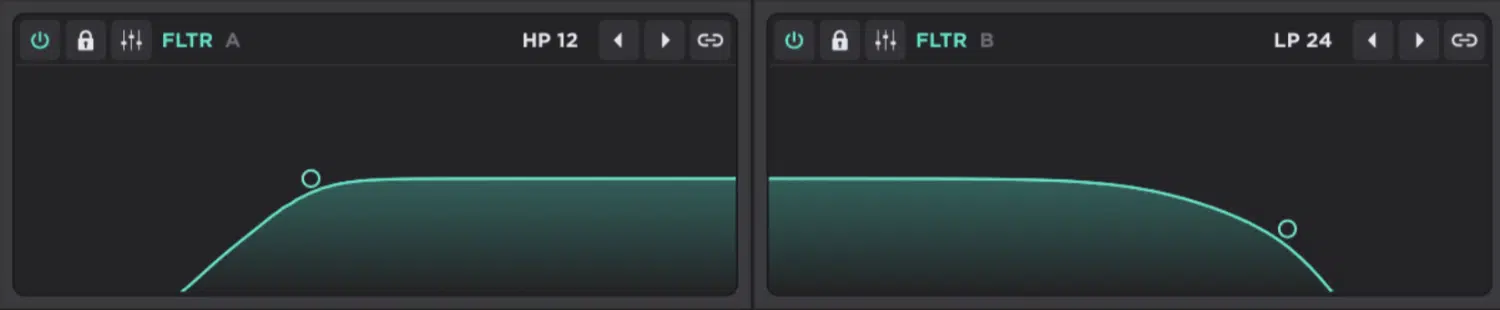
It starts with 2 primary filters (shown above), and each one gives you 95 filter types, which already tells you this is not some basic low-pass-and-call-it-a-day setup.
95 per filter is a lot of territory, to say the least.
That means the filter section is doing way more than giving you a few familiar options and asking you to live with them/deal with it, because that’s super restrictive.
You’ll be getting filters way beyond the usual, with:
- Comb filters
- Vowel and formant filters
- State-variable styles
- Multiple analog-modeled styles options
So, needless to say, the filters can shape character just as much as they shape frequency.
Then you get the controls that actually make those filter types useful in a mix or patch like frequency, resonance, VAR, mix, drive, pan, and key tracking.
Plus the option to link both filters together so they move as one when you want MAX control (remember, filter type alone doesn’t mean much if the control around it sucks).
Here, you have enough shaping power to move from subtle cleanup to heavy character design without feeling stuck.
The routing side is where it gets even nastier, because each oscillator can be sent to Filter A, Filter B, FX, or Direct, and the routing bar can even act like a mixer.
This lets you split signal across multiple destinations in different amounts so you’re never forced into one signal path, which I personally love.
An oscillator can be mostly filtered but still leak a little directly to output, or hit both filters in different proportions, or bypass them and go straight to the effects.
That means you can build sounds in series, where one stage feeds another, in parallel, where multiple paths run side by side, or in blended setups where part of the signal gets filtered while another part bypasses the whole thing and stays clean.
That is the kind of routing that starts making patches feel more layered and more intentional, and gives you more ways to preserve clarity in one part of a sound while mangling another part.
Then, when you want to really get in there and make the routing do something mind-blowing, the Advanced view is ready for that too.
Sylenth1 is way more traditional here, and that shows not just in routing but in the filter choices too, because it sticks to the basics with the usual LP, HP, BP, and Notch styles.
It doesn’t venture out of there because they can still do the normal subtractive jobs, and that’s the only thing Sylenth1 is concerned about.
However, they don’t open up the same level of color, character, or internal signal design.
So the real win for Unisynth is not just that it has more filters on paper, but that it gives you far more freedom in how audio gets split, combined, bypassed, and sculpted.
It really makes Sylenth1 feel pretty narrow once you hear what Unisynth can do inside the same patch, no joke.
That is the difference between a synth that shapes sound well and a synth that lets you architect the whole signal flow in a much more creative way.
Modulation and Movement
Next, let’s get into one of my favorite topics: modulation (the system that makes a sound move, react, and change over time instead of sitting there flat and static).
A patch can sound nice at first, but modulation is what gives it life once it starts playing over time.
In Unisynth, every parameter can be modulated, and the numbers alone already tell you this is not a lightweight setup…
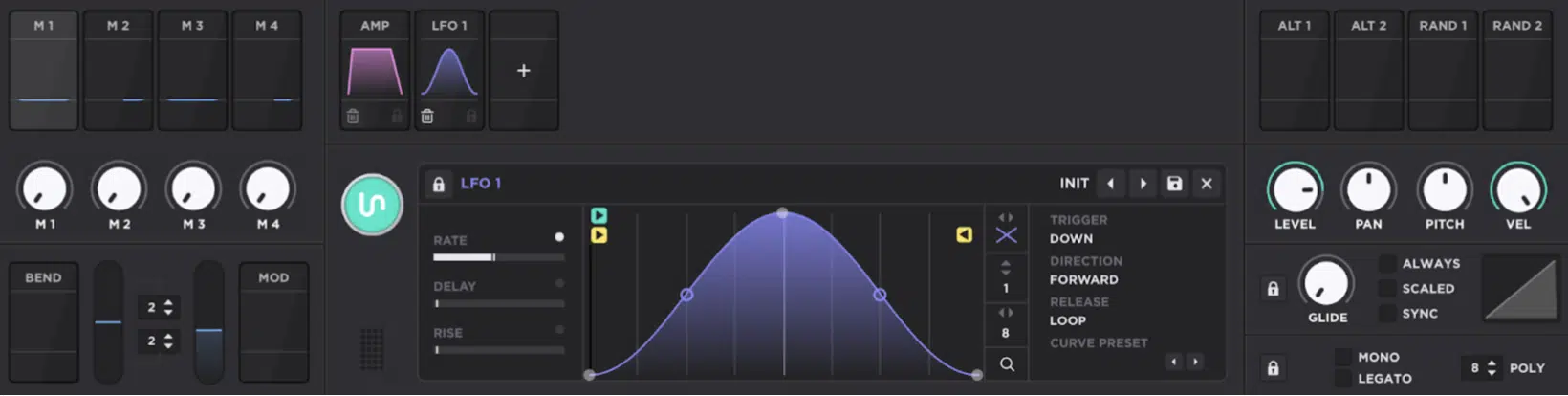
You can run up to 16 modulators on a single parameter and up to 48 modulators at the same time across the patch, which is a huge amount of control for one instrument.
One target can have multiple layers of movement happening at once.
For example, a filter cutoff could be shaped by an envelope, nudged by an LFO, offset by a macro, and then further changed by performance input, all at the same time.
The source list is stacked too, because you are working with:
- Envelope
- Chaos
- LFO
- Tracker
- Macros
- Pitch Bend
- Mod Wheel
- Alt ½
- Random ½
So, you can build everything from subtle analog-style drift to aggressive rhythmic movement and performance-based changes.
Side note, the Chaos source is great for random, unstable, more human-feeling variation and the Alt sources can alternate values between notes.
The Random sources can push different values every time a note hits 一 great for when you want repetition without sounding too repeated.
And its LFOs go way beyond the usual sine, triangle, and square stuff as well, since you can draw custom shapes, change the grid size, use a brush mode, set different trigger modes like Beat, Down, Up, First, Last, and Down/Up.
As well as choose different playback directions like Forward, Backward, PingPong, and Random, and even change what happens after note release.
This could be with options like Loop, Oneshot, Leave, Pause, Break, Hold, and Stop for a crazy amount of control over how motion behaves.
And no, an LFO doesn’t just wobble a parameter here…
It can be shaped, timed, restarted, reversed, paused, or turned into a very specific rhythmic movement that matches the patch and the track.
Then you’ve got the Tracker, which maps performance data like note number, velocity, off velocity, pitch bend, pressure, and timbre.
So, instead of the patch behaving the same way every time, it can react differently depending on which key you hit, how hard you hit it, or what expressive data is coming in.
That way, your patch will feel more playable, higher notes can respond differently than lower ones, and hard hits can change tone/movement differently than softer ones.
On top of that, Unisynth makes the whole thing easier to work with because modulation can be assigned by drag and drop, by right-clicking on a destination, or directly through the modulation matrix.
And once a target is assigned you get floating depth controls right on the parameter so you do not have to keep diving through menus just to fine-tune movement (epic!).
A deep modulation system is nice, sure, but it becomes priceless when you can actually get around it fast and see what is happening without losing the patch thread.
NOTE: The matrix itself is a big reason it feels so expandable, because you can sort routings by source, destination, or amount, change the curve, switch polarity, invert behavior, add aux modulation, and bypass or delete routings without wrecking the rest of the patch. So, it’s not just deep, but super organized as well.
And once a patch starts getting more complex, that kind of control is the difference between a system you can keep building on and one that turns into a mess.
Sylenth1 does have a usable classic modulation setup for simpler jobs, so it can still handle the basics…
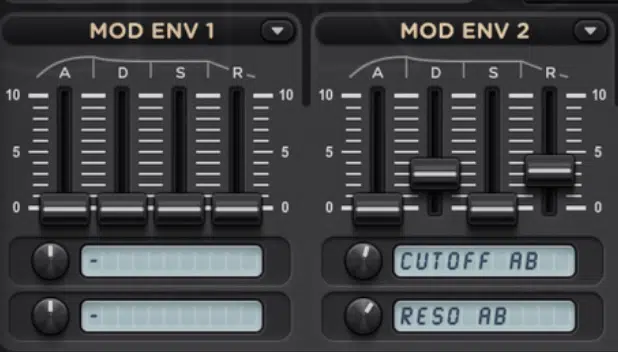
However it only gives you a tiny fraction of the modulation reach, editing depth, and performance mapping that Unisynth does.
It can cover the standard subtractive moves, it just can’t open up the same kind of detailed behavior, layered modulation, or performance-driven complexity.
So whether you are building evolving pads, basses that keep shifting, macro-driven drops, or patches that react in very specific ways to your playing, Unisynth is key.
It gives you way more room to shape that motion, while Sylenth1 feels much more locked into a narrower, older-school modulation lane.
And once you get used to that level of modulation depth, going back to something more limited feels pretty cramped.
Download The #1 Synth Plugin In the World
Effects and Internal Processing
Next up in the Unisynth vs Sylenth1 debate let’s talk about effects and internal processing for a second…
Unisynth’s internal processing is deep enough that you can get a sound surprisingly far inside the synth before you even think about reaching for additional plugins.
A lot of synths can generate a decent core tone, but then still need a bunch of extra help from the rest of the plugin chain before the sound really feels finished (not Unisynth!).
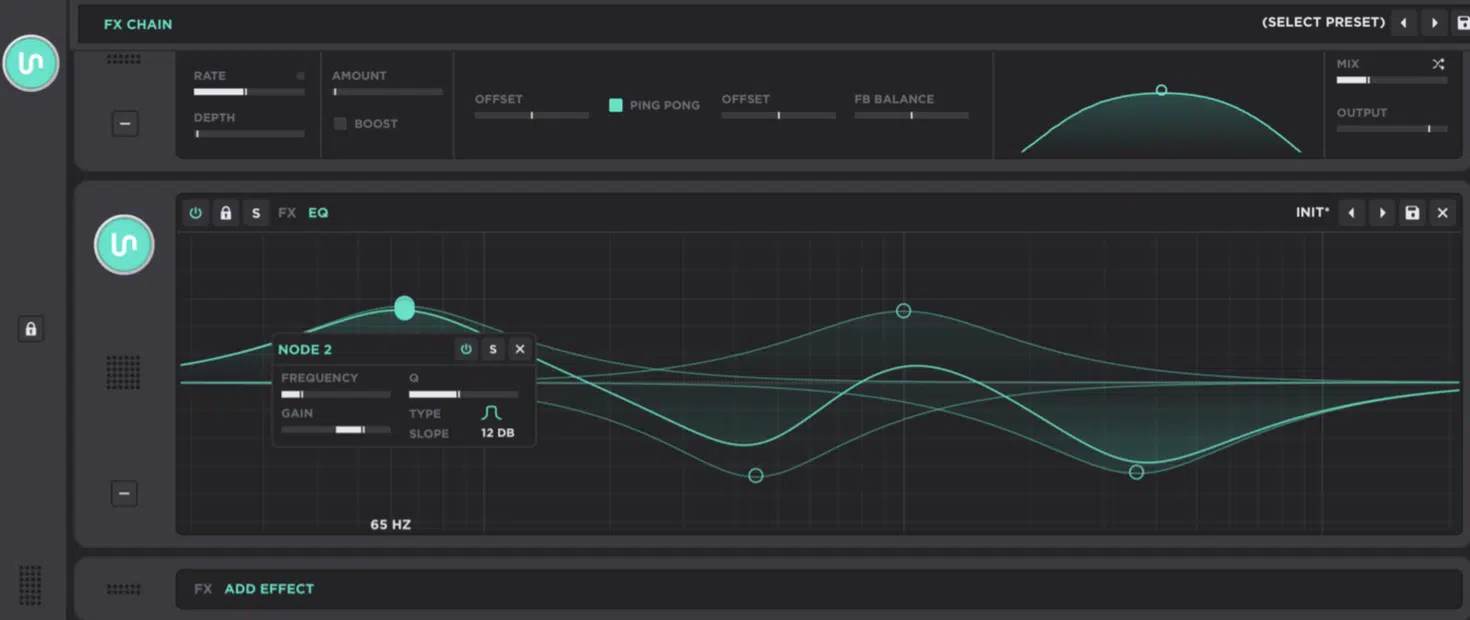
The full FX environment supports 24 effect units, and those units live inside a chain that can be generated, saved, reordered, collapsed, expanded, bypassed, soloed, and edited.
All with a lot more detail than you might expect.
You can keep things simple at first, then open up the details as the patch gets closer to what you want.
And what’s especially sick here is that the FX-Chain Generator responds to the current Genre and Type, so the processing side is tied into the same concept as the patch generation side instead of feeling like some random bonus bolted on later.
So the synth is not only generating a source sound with context 一 but also generating a processing direction that matches that specific context.
This way, it never acts like separate parts taped together; everything feels unified.
And the actual effect pool is show-stopping as well:
- Delay and Reverse for echo and time-based movement
- Destroy, Distortion, Mangle, Preamp, Redux, and Tape for saturation, clipping, crushing, and color
- Compressor and OTT for dynamics
- EQ and Filter for tone shaping
- Chorus, Flanger, Phaser, Super Unison, Tremolo, and Vibrato for modulation
- Convolver, Panner, Reverb, and Space for width and depth
- Utility and Width for gain and stereo control.
We’re talking time effects, color effects, dynamics, tone shaping, movement, space, and utility all inside the same environment.
The details are what really sell it, though, because this is not just a list of FX names…
The EQ is 8-band, the OTT is multiband, the main Delay has its own LFO, warmth modes like Soft, Fuzz, Tape, and BBD, plus filter and stereo controls.
And, the Convolver works with impulse responses (which are sampled spaces used to create more natural reverb behavior).
So the delay is not just there to repeat audio 一 It can add movement, saturation, stereo spread, and character all at once.
The convolver also gives you a different kind of space than a simple algorithmic reverb, helping when you really want that realistic, textured flavor.
Plus the chain runs left to right, so the order changes the sound big time, and since you can drag effects into different positions, you decide.
Whether something gets filtered before distortion, compressed after modulation, or widened after reverb instead of being stuck with one fixed path is all up to you.
I really love those details because it makes the FX section feel like part of the sound-design engine, not just a finishing rack.
Sylenth1’s onboard effects can still handle simple sweetening, but they stay in the lane of a much more basic (whack) stock-sounding effect section.
It has fewer FX types, fewer parameters, and much more limited routing and processing depth.
They can help with the usual finishing touches, but they’re not really built to be a full-fledged creative processing environment, if you know what I’m saying.
So once again, the patch often ends up needing more help from outside plugins, and nobody has time for that when you’re in the zone.
All-in-all, Unisynth feels a LOT more like a complete sound-design playground where you can generate, shape, animate, process, and finish a patch in one cohesive place.
Sylenth1, on the other hand, feels more like a classic synth that still expects a lot more help from the rest of your plugin chain.
That extra self-sufficiency is a big part of why Unisynth feels more modern in the end.
Bonus: Why Unisynth Feels More Complete
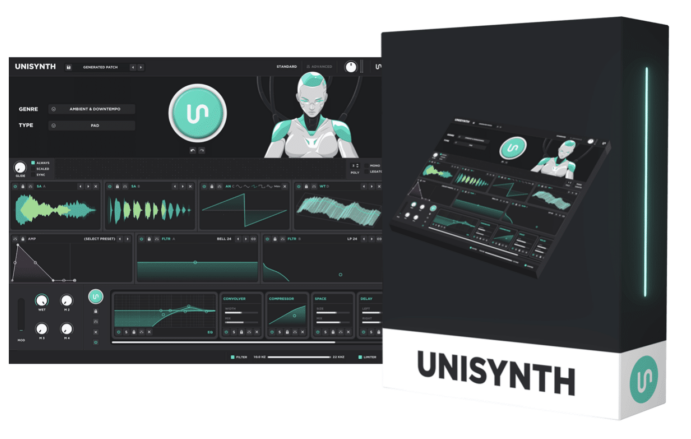
Another big reason Unisynth feels more complete is that it is not just deep in the flashy areas, but also in the small system-level stuff.
The kinds of things that you don’t even know you miss until they’re gone.
For example, it gives you:
- Global reset controls for things like amp, envelopes, filters, and oscillators
- Multiple voice-stealing modes like Inner, Oldest, and Newest
- Polyphonic glide behavior with different glide-start options
- Internal quality settings that can run from Normal (44.1 kHz) all the way up to Extreme (352.8 kHz), depending on how hard you want to push the engine.
Those oversampling-quality options are actually super important because they affect just how cleanly the synth processes audio on the back end.
So if you want to save CPU while sketching ideas, you can stay lower 一 if you want higher internal quality for bouncing or final work, you can push it further.
It also has smart details like global high-pass and low-pass filters, a master limiter, declick modes to help reduce pops between notes and preset-pack exporting.
Plus, user preferences like default wavetable view, effect-window behavior, and animation control.
These all make it feel more like a full instrument than just a cool front end.
The declick side is actually invaluable believe it or not, because little note transitions and pop issues can ruin an otherwise great patch.
And the global filters (plus limiter) help with keeping output under control right inside the synth instead of reaching for extra utility plugins.
A synth starts feeling complete when the deeper session-level stuff is already accounted for instead of missing until you run into problems.
So even outside the obvious headliners like wavetable editing, hybrid oscillators, and genre-based generation, Unisynth still feels more complete.
There are more layers of control, refinement, and finish built into the whole thing; the kind of depth that keeps paying off after the first impression wears off.
I gotta say, in the Unisynth vs Sylenth1 debate, it seems to me like Unisynth blows Sylenth1 out of the water at every twist and turn.
Unisynth vs Sylenth1: Final Thoughts
Sylenth1 absolutely earned its place, and there is no taking that away from it; I wouldn’t be a reputable reviewer if I said that.
For a long time it was even one of the clearest, strongest, and most approachable virtual-analog synths you could load up, and it surely deserves big props for that.
A lot of producers learned real subtractive basics on it, and for years it was a pretty easy recommendation if someone wanted a straightforward software synth in that lane.
But once you really stack Unisynth vs Sylenth1 side by side, the difference gets pretty obvious in every which way.
Unisynth is bigger at the source stage, in modulation, in filtering and routing, and in how much of the full patch-building process it can handle without any outside help.
Between the 4 oscillator modes, 350+ wavetables, 1,250+ samples, 95 filter types per filter, up to 48 simultaneous modulators, 24 effect units, deeper routing, and the whole Standard View / Advanced View workflow, it checks all the boxes.
And the important part is that this is not only about numbers 一 it’s about performance, reliability, and flexibility.
Well, Unisynth excels in every single one of those areas.
Sylenth1 still does the classic subtractive thing well, absolutely, but it stays in that lane, while Unisynth can do that lane too and then zooms way past it.
That is really the whole story in one sentence.
One synth stays focused on a classic role, while the other takes that role and expands it into something revolutionary and invaluable.
So if the question is which synth feels more complete, more flexible, and more in step with how producers actually work now, Unisynth takes it pretty easily.
It gives you more ways to start, more ways to shape, more ways to move, and more ways to finish (and everything in between).
And if you don’t believe me, try it out for yourself by downloading Unisynth below. You’ll thank me later, guaranteed.
Until next time…




Leave a Reply
You must belogged in to post a comment.