




Vital by Matt Tytel is one of those plugins that a lot of producers are impressed with because it’s flexible, modern, and capable of making some great sounds.
And sure, it’s solid, especially if you like getting hands-on with wavetable shaping, modulation, and overly complex sound design.
But, can it take on the reigning champ of the world: Unisynth 一 the brand new, first and only, AI genre-specific, generative synth plugin in the world?
So, needless to say, it’s been making major waves throughout the industry.
Today, I’ll be breaking down everything you need to know about Unisynth vs Vital so you can see who the real king is, like:
- Sound generation ✓
- Workflow speed ✓
- Oscillator engines ✓
- Wavetables & wave editing ✓
- Sampling power ✓
- Filter depth ✓
- Modulation features & functions ✓
- Signal flow ✓
- FX section & patchwork ✓
- Overall flexibility/versatility ✓
- So much more ✓
By the very end, you’ll see which plugin really gives you the most power, speed, and actual value, regardless of style or experience.
You’ll know who the real king is because the winner won’t only help you create better sounds faster, but have all the deeper features locked down too.
When it comes to shaping, tweaking, and unmatched sound design possibilities, only one is going to come out on top.
So, if you’re ready to break down everything about Unisynth vs Vital and see who the #1 pick will be, let’s get into it…
Table of Contents
Unisynth: Breaking Down Unison’s AI-Powered Hybrid Synth
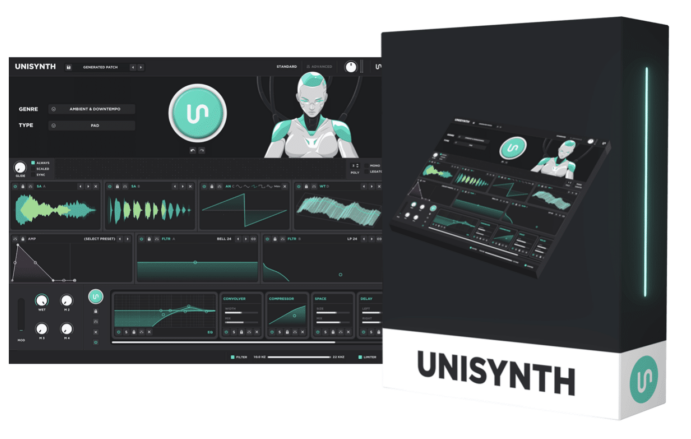
Unisynth is built very differently than most synths, and it’s taking the industry by storm because of it.
Instead of handing you a blank patch and expecting you to build everything yourself, it starts with AI-powered, genre-specific patch generation (the very first of its kind).
This way, you can easily knock out professional sounds fast that match the exact vibe you’re going for.
On the front end, you’re working with 32 genres and 6 sound types…
So the first thing you are deciding is not “how do I program this from scratch?” but rather “what kind of sound does this track actually need?”
That whole workflow is split into two views:
- Standard View For quick generation, general shaping & fast movement
- Advanced View For the deeper stuff once you want full control over what is really happening under the hood
And once you do look under the hood, Unisynth is clearly much more than a one-click synth, because it is built around 4 oscillators, with 4 engine types per oscillator.
Those are 一 Analog (classic waveform-based synthesis), Wavetable (frame-scanned digital wave motion), Sampler (audio used as an oscillator source), and Resonator (physical-modeling style tone creation).
On top of that, it also packs in 2 primary filters, 95 filter options per filter, up to 48 simultaneous modulators, 80 generators, a built-in wavetable editor, and 25 FX.
Needless to say, Unisynh has way more real synthesis depth here than the “AI synth” label might give off (definitely don’t sleep on it).
So, instead of forcing you to choose between speed and depth, you get the best of both worlds, and then some.
A fast way into a strong sound, then a much deeper path once you want to reshape, refine, and really make it yours.
Bottom line, Unisynth is built to get you to a professional, customizable sound all day, with the complexity/flexibility that even the most advanced sound designer can appreciate.
Don’t worry, we’ll be breaking down everything you need to know (in detail) throughout the article so you get the full picture.
Vital by Matt Tytel: Breakdown
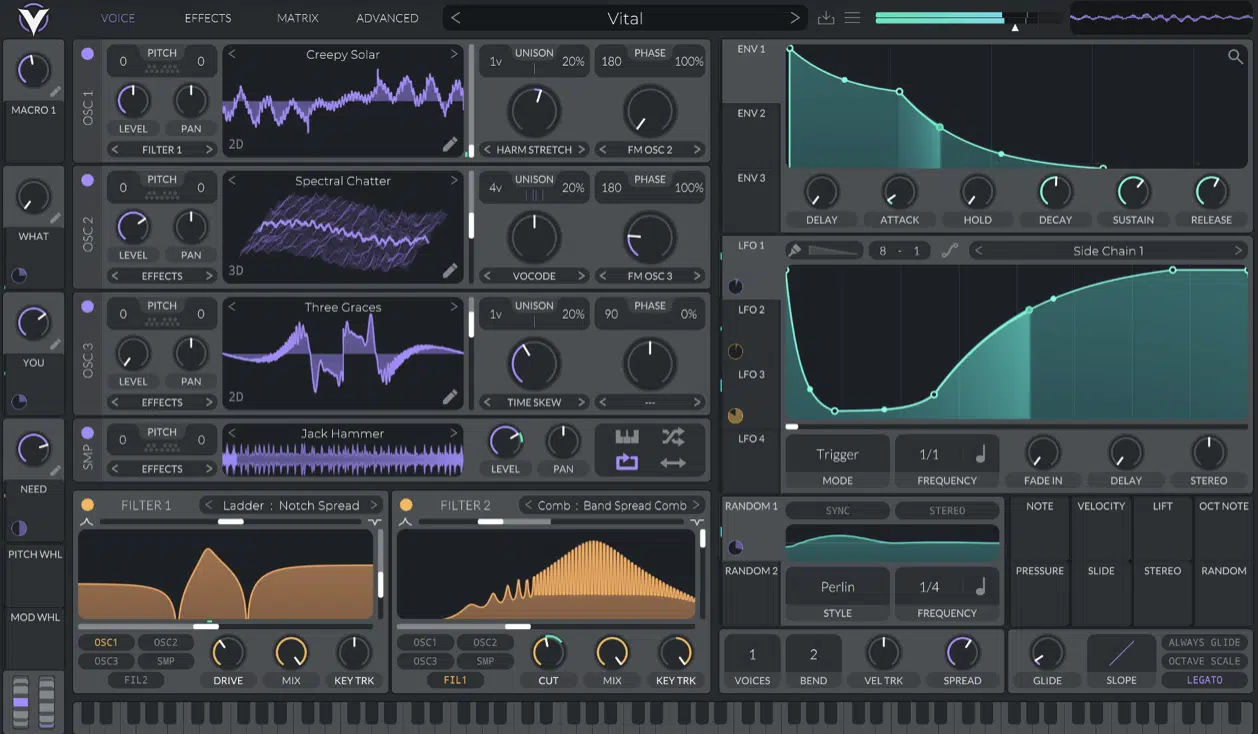
Next up we have Vital, which is a warping wavetable synth, so right away, its whole center of gravity is a little different.
It’s less about genre-aware generation and more about deeper wavetable shaping, heavy modulation, and modern digital sound design.
What it’s known for most is features like spectral oscillator warping, sample-to-wavetable conversion, text-to-wavetable, and drag-and-drop modulation.
There’s also custom LFO shapes and a very visual interface built around animated waveforms, filter displays, spectrograms, and clear modulation feedback.
And yes it does support MPE, audio-rate modulation, and microtonal files.
It’s also worth pointing out that every official Vital tier includes the full synth engine.
Now this is important because the main differences between versions are not the actual synthesis core but things like the included number of packs and presets, wavetables, skins, and text-to-wavetable request limits.
This might be a seemingly cool feature previously, but really it’s more of a gimmick when compared to Unisynth’s AI-assisted wavetable editor.
The results you can get when you and Unisynth generate tables together versus paying for Vital to generate new tables based on a description you give it are night and day.
NOTE: The only way to get results this way in Vital is by doing a lot of complicated math and explicitly typing in a formula that equates to a new wavetable. So if you’re not a legit mathematician, you’re going to have real problems.
All in all, that makes Vital feel deep, modern, and very legit.
However, it’s a lot more centered around wavetable design and modulation than the hybrid direction Unisynth is going for.
And that is exactly what sets up the rest of the Unisynth vs Vital competition article, because Vital is strong, just in a much more specific (niche) way.
Unisynth vs Vital: Comparing Key Features & Functions
Now that the bigger picture is out of the way, it is time to really break down Unisynth vs Vital where it actually counts. Things like how sounds get made, what engines you actually have access to, how deep the wavetable side goes, how sample material is handled, how filtering and routing work, how deep the customization goes, etc. So, Let’s get into it…
Sound Generation & Overall Synthesis Workflow
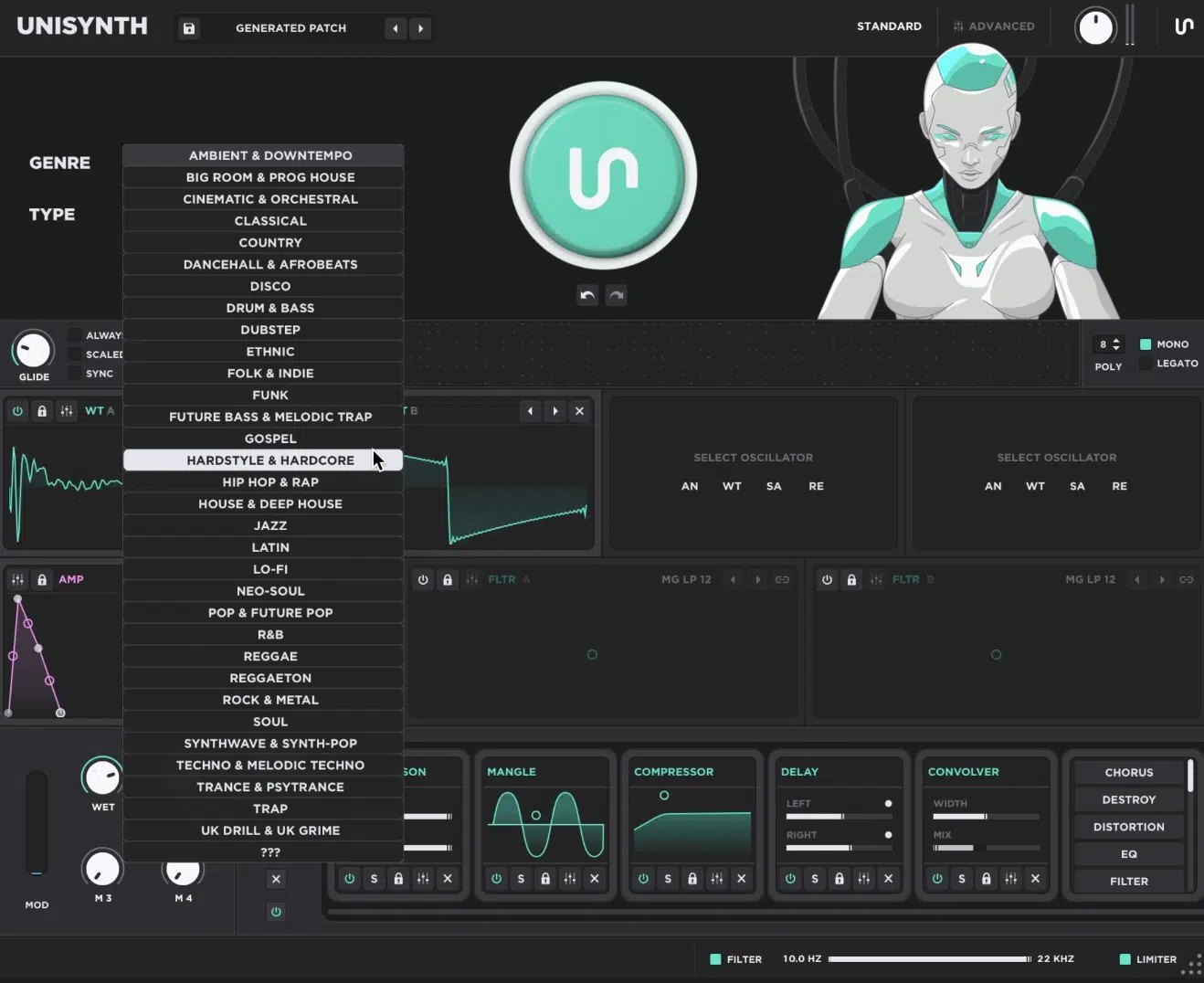
Sound generation is all about how fast a synth can take you from an empty window to a killer sound that matches your track perfectly.
With Unisynth, that process is super direct…
You simply pick one of 32 (popular) genres and one of 6 sound types, hit the Patch Generator, and boom: you instantly get a professional sound built around your unique track.
Instead of acting like a blank canvas, Unisynth acts more like an endless idea engine that gives you a bass, chord, lead, pad, pluck, or 808 in seconds.
And once that first patch lands, you can stay in that same pocket, because you can:
- Regenerate
- Jump back with undo/redo
- Tweak the patch in Standard View
- Hit the FX-Chain Generator to take the same sound in a new direction
Instead of spending the first chunk of the session figuring out what kind of synth architecture to build, you’re already hearing massive results and reacting to them.
This is a way better place for most producers to start!
Now, sure, there are a few synths with AI-style features, but most of the time that stuff feels more like a bogus extra, usually just touching one or two features only.
Unisynth, on the other hand, incorporates AI in every section, but the coolest thing is it doesn’t take any of the control away from you.
A lot of plugins hide the important stuff in the back end once AI gets involved, but Unisynth does the complete opposite.
Its 80 individual AI generators can create settings across basically every part of the synth, while still giving you full hands-on control over those same parameters yourself.
So you can let Unisynth handle a lot, do everything manually, or work somewhere in between, which makes it feel less like AI is replacing the process, more like a friendly collaborator.
That one big Generate button at the top can instantly build a full preset from the ground up (but I suggest you think about it more like a macro trigger, firing all 80 gens at once).
And if you want, you can easily go section by section and trigger those generators separately, which is awesome as well.
So let’s say you build most of the patch yourself, but the sound still feels a little dry; you can simply generate a new FX rack.
Or, if the patch sounds solid, but it’s just not moving enough, you have the ability to generate fresh modulation entries right at your fingertips, my friends.
And if the whole thing feels too expected, you can flip to a more left-field genre and suddenly land on a twist you probably never would have come up with on your own.
That kind of flexibility is crazy useful, and it’s what makes Unisynth a legit way to learn synthesis as you go (talk about invaluable).
NOTE: By watching what changes when different generators are triggered, you start to understand what each section of the synth is actually doing and which settings are responsible for certain results.
So you’re not just getting faster outcomes, you’re also building unmatched sound design instincts in the process.
Vital on the other hand takes a much more traditional route, which means the starting point is more manual and the learning curve is a lot steeper.
Most of the time, you are opening oscillators, choosing or building wavetables, setting modulation, and shaping the tone yourself.
And because Vital does not have anything like Unisynth’s 80 generators to help fill in weak spots or keep momentum going, you’re on your own from the jump.
It’s you, the interface, the manual, and a whole lot of time-killing trial and error.
That fact that it’s built around wavetable manipulation, spectral warping, and manual shaping rather than helping you land on a musically relevant patch for the song first.
So while Vital absolutely gives you strong tools like spectral warping, sample-to-wavetable conversion, etc., it still all depends on your knowledge.
Unisynth covers all bases and is for all producers/sound designers, while Vital just gives you a deep wavetable environment and expects you to build from there alone.
And inside an actual session, that’s make-or-break, because one synth helps you keep momentum while the other asks you to do more construction work before the patch really starts paying you back.
Bottom line, Vital can absolutely get deep once you know what you are doing…
But Unisynth creates momentum much faster, keeps you in the sound-selection flow, and gives you a cleaner path from first click to a professional patch.
That makes Unisynth the stronger synth for sure in this Unisynth vs Vital category 一 giving you the faster starting point, the smoother workflow, and a better shot at staying inspired while the beat is still coming together.
Oscillator Design & Engine Flexibility
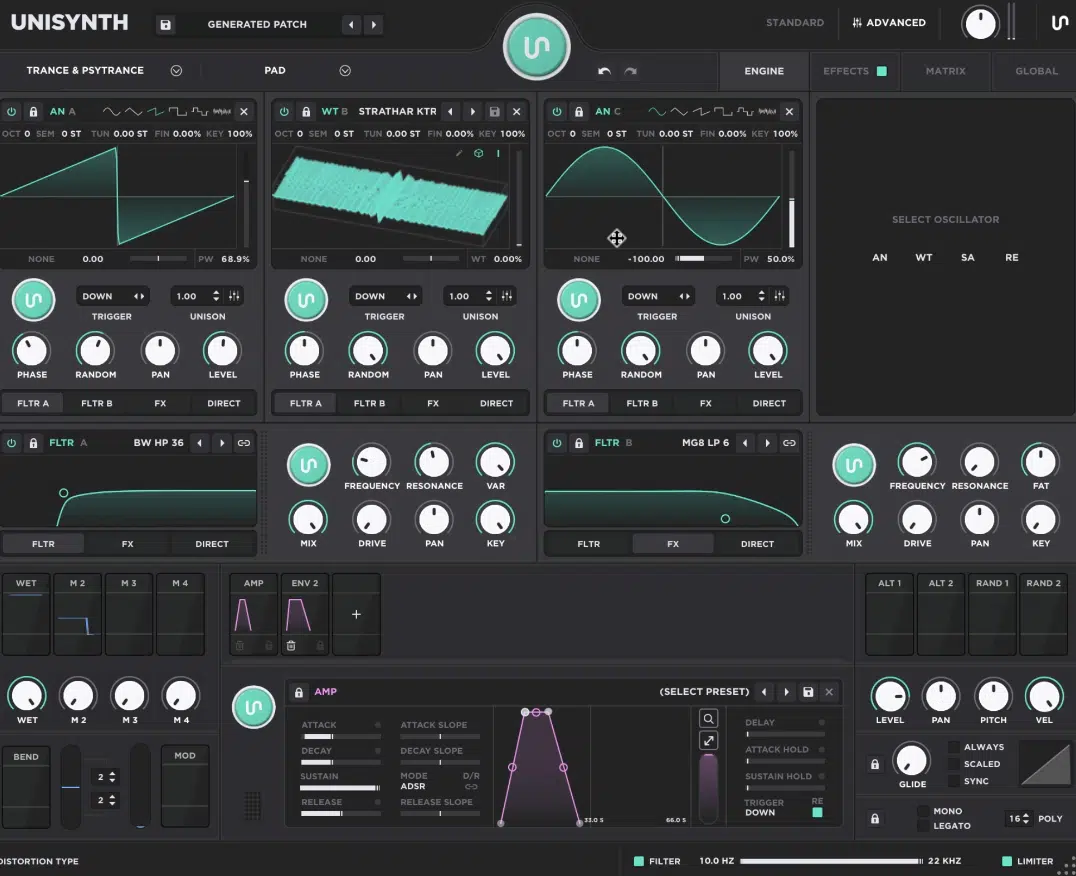
Oscillator design is basically the foundation of any synth.
The oscillator is the sound source that everything else (filters, modulation, routing, and effects) ends up shaping, sculpting, and modifying the harmonic content of.
That’s why each OSC having its own AI generator with Unisynth is game-changing, and triggering it is the fastest way to change the heart of any patch.
All while keeping the modulation and the other aspects of the sound in play, of course.
Unisynth gives you 4 independent oscillator slots, and each slot can be switched between Analog, Wavetable, Sampler, and Resonator modes.
This means one patch can pull from four different synthesis methods without leaving the synth, so it’s not just a wavetable synth…
It’s a full-blown wavetable-style synthesizer with hybrid oscillator options multiplying many times over the sonic scope and tonal depth of the sound design potential.
I mean really think about it for a second…
When you can build something like a sampled transient for the attack, a wavetable for the main body, an analog layer for extra weight, and a resonator layer for more organic top-end texture (all inside one patch), it’s invaluable.
You no longer have to bounce around between different tools and process them separately first, then do another set of processing to fuse them together.
On top of the engine types themselves, each oscillator also gives you useful hands-on controls like performance-based options (e.g., XY pad found in each oscillator).
This gives you hands-on control on the fly for some of the most sonically important morphing parameters in each osc’s engine.
As well as trigger modes like Down, Up, First, Last, and Down/Up.
These decide when the oscillator actually fires 一 plus unison, pan, level, and direct routing, so you can do some important routing and mixing before the sound even reaches the FX rack.
That routing is important too, because each oscillator can be sent to Filter A, Filter B, FX, or Direct Out, so one layer can go straight to the output as a clean sub while another gets filtered and another goes straight into effects.
And even the individual engines are not shallow, no sir.
The Analog side goes beyond basic waveforms, as its engine is actually analog-modeled, including emulating classic hardware synths with its oscillator distortion and cross-oscillator options like FM, PM, RM, and AM.
The Wavetable side handles scanning, interpolation, and full access to the editor so you can shape, modify, and create from scratch (even by hand-drawing waveforms) the wavetable spectra from the source, frame by frame.
The Sampler side covers looping, root note, reverse, normalize, filtering, and sample-rate control. This lets you merge in some sample-based synthesis even if it’s just by layering attack samples or beds of ambience to add texture only possible by sampling and processing organic sources.
The Resonator adds even more range, because it uses physical-modeling behavior and another oscillator as an excitation source. Therefore, you can turn incoming energy into something more reactive, percussive, and organic than a normal static oscillator.
This is super exciting because, up until recently with the release of Pigments 7, this kind of OSC engine was not found within WT synths, period.
It’s a complete game-changer and opens up the possibilities of the type of sound the synth can generate.
You can merge the expected synthesized-type sounds we’d expect from wavetable synths with organic texture that wouldn’t be easy for anyone to generate from a waveform.
Vital is much more centered around wavetable oscillator design, so its strength is not this kind of broad hybrid-engine setup…
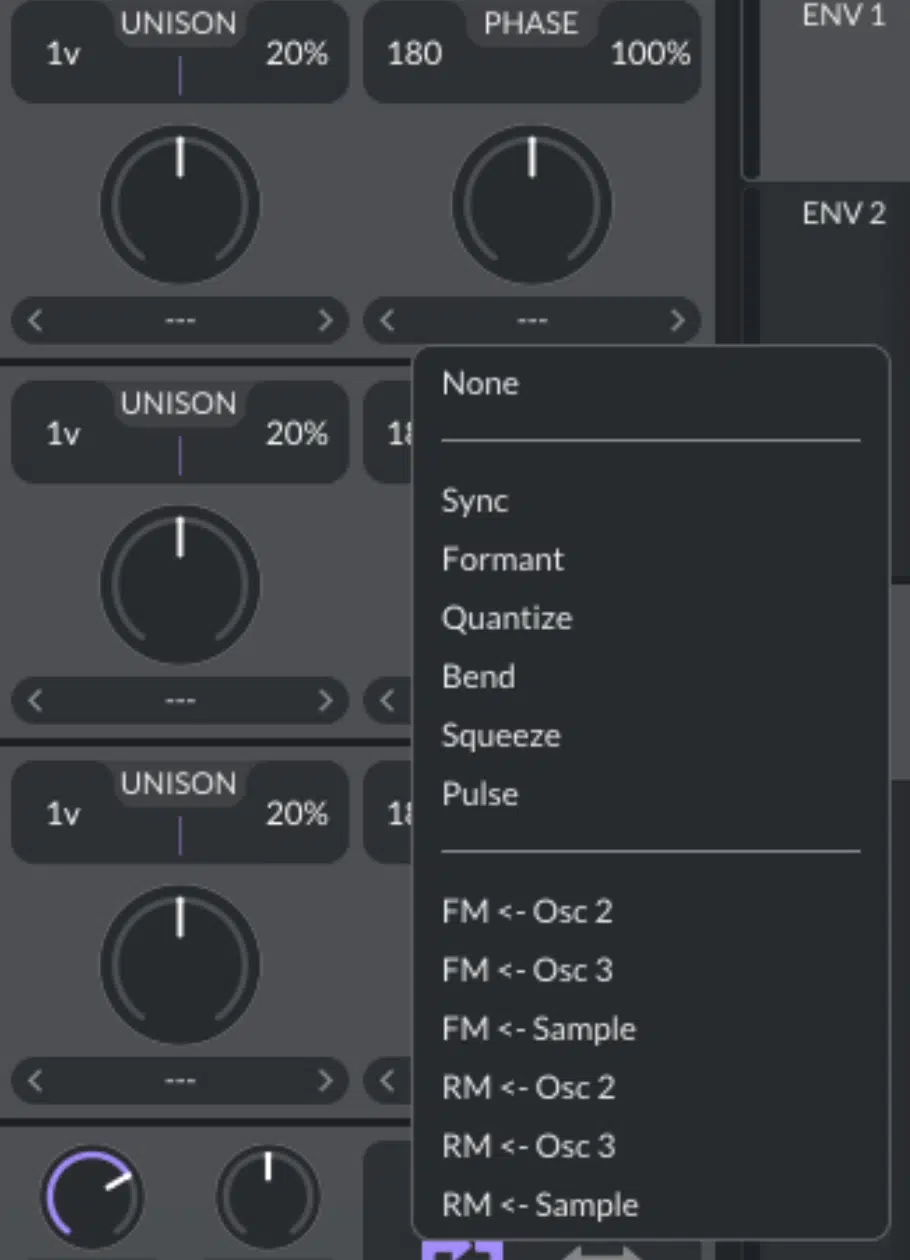
It’s more of a focused digital approach built around spectral warping and wavetable shaping, if we break it down.
That makes it good at staying in its lane, but also means Vital feels more specialized around one main synthesis identity.
It doesn’t feel like a true hybrid multi-synthesis OSC engine, not by a long shot.
When you compare Unisynth vs Vital in this category, Unisynth clearly gives you more ways to build one patch.
I’m not just talking more sound, but more sound-source roles, routing roles, and synthesis types all working together at once.
So, while Vital is fine if all you really want is a wavetable-focused synth, Unisynth feels much more complete in essentially every way.
It can cover analog, wavetable, sample-based, and resonator-based ideas in the same patch without the workflow getting messy.
Bottom line, Unisynth takes the W here all day.
The overall oscillator design is more epic, flexible, and better-suited to producers and sound designers who want one synth that can handle several different synthesis jobs at the same time.
Wavetable Editing, Warping & Harmonic Manipulation
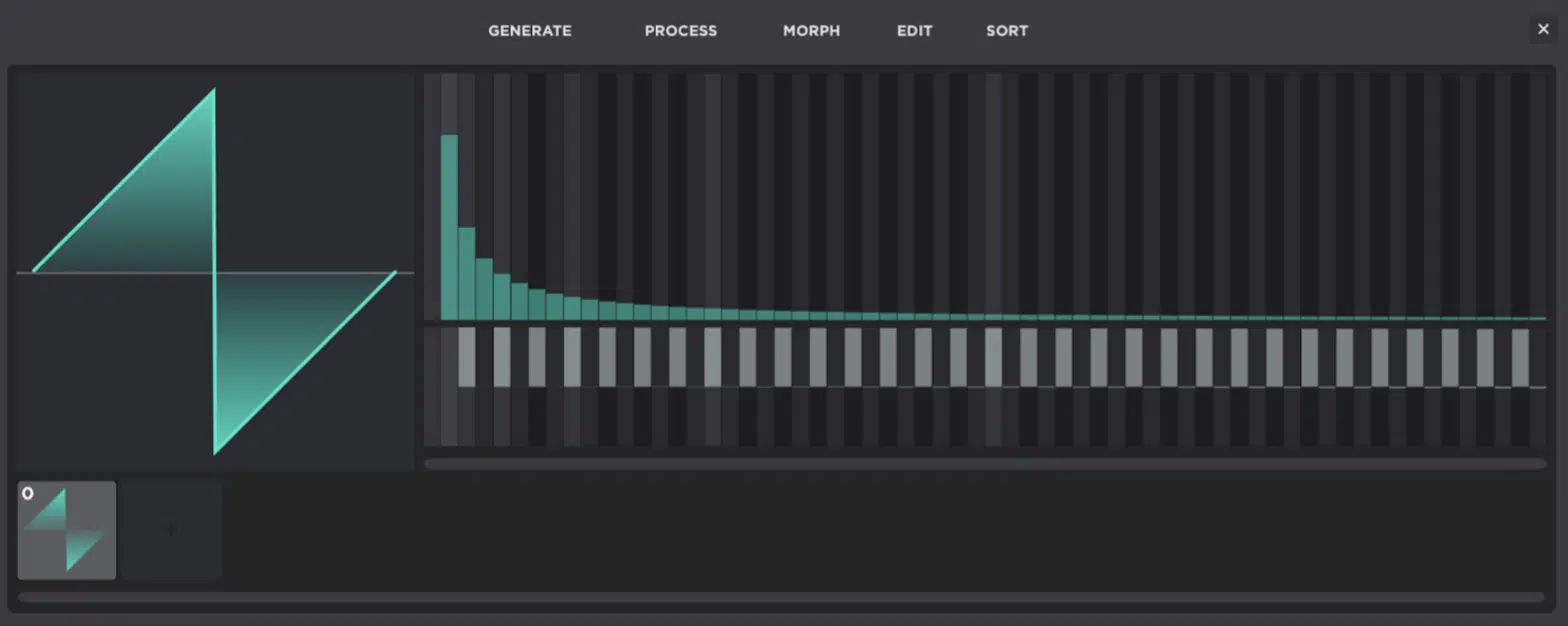
Wavetable editing is the part of a synth where you stop just choosing a waveform and start changing the actual harmonic makeup of the sound itself.
Frame by frame, partial by partial, and movement by movement.
Unisynth’s built-in wavetable editor lets you add frames, remove frames, click directly on a frame to select it, and drag frames into a new order.
So, you’re never stuck just scanning through a table exactly the way it shipped.
Once you get inside the editor, the real power starts showing up in the FFT partial editor, basically a harmonic editing panel, where the:
- Top half controls the amplitude of each partial (how loud each harmonic is)
- Bottom half controls the phase (where that harmonic begins inside the waveform cycle)
So, if a frame feels too hollow, too nasal, too harsh, or too flat, you’re not limited to broad tone-shaping after the fact.
You can easily go into the source itself and reshape the harmonic balance before the filters and FX even touch it.
The editor is also split into clear menus, which helps a lot…
Under Generate you can instantly create sine, saw, square, noise, triangle, and pulse shapes instead of drawing everything up from absolute nothing.
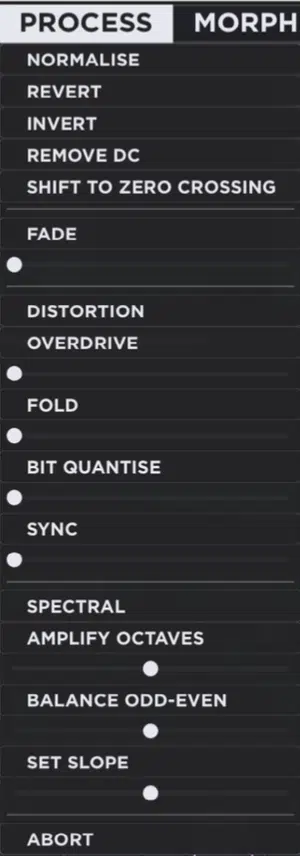
Under Process, Unisynth lets you do much more surgical or aggressive work with options like normalize (bringing the waveform up to full level), invert (flipping polarity) and remove DC (cleaning unwanted offset).
As well as shift to zero crossing (starting the wave more cleanly), overdrive, fold, bit quantize, sync, amplify octaves, odd/even balance, and set slope.
The Morph menu handles the movement between frames.
You’ll be able to mess around with tools like Crossfade and Spectral interpolation, so you can decide whether the table changes in a smoother blended way or in a more spectrally calculated one.
The Sort side, once the table itself starts taking shape, can reorganize the frame order by fundamental magnitude, odd/even balance, spectrum slope, spectrum peak, spectrum average, or just randomize and reverse the whole thing.
This is a very fast, easy, and fun way to stumble into movement you most likely wouldn’t have been able to build by hand.
On top of all that, some of Unisynth’s 80 AI generators show up throughout the wavetable side too.
Meaning, if this whole process starts feeling too technical, too tedious, or just too deep for the moment, you can still generate custom table ideas and table modifications.
All without having to become a full-on wavetable specialist first!
Vital’s entire identity, on the other hand, is much more centered around spectral warping which is, if you’re not familiar, reshaping a wavetable by bending and reworking its harmonic content in more extreme digital ways.
It also leans hard into sample-to-wavetable conversion, text-to-wavetable, and its own built-in editor like we talked about.
So, in pure wavetable terms, Vital absolutely gives you a deep playground.
However, it still requires you to know what you are trying to build, how you want to warp it, and why a certain spectral move is getting you closer to the sound in your head.
Unisynth comes at it from a more useful angle for most producers, because you still get serious wavetable editing.
But, better yet, you’re getting it inside a synth that’s also doing FAR more than just living and dying by its wavetable lane.
So, with this specific Unisynth vs Vital section, Unisynth wins yet again because it gives you real wavetable depth without making the whole instrument revolve around that one discipline.
Enhance Your Sound Design Skills Like a Pro
Filters, Routing & Signal Flow Control
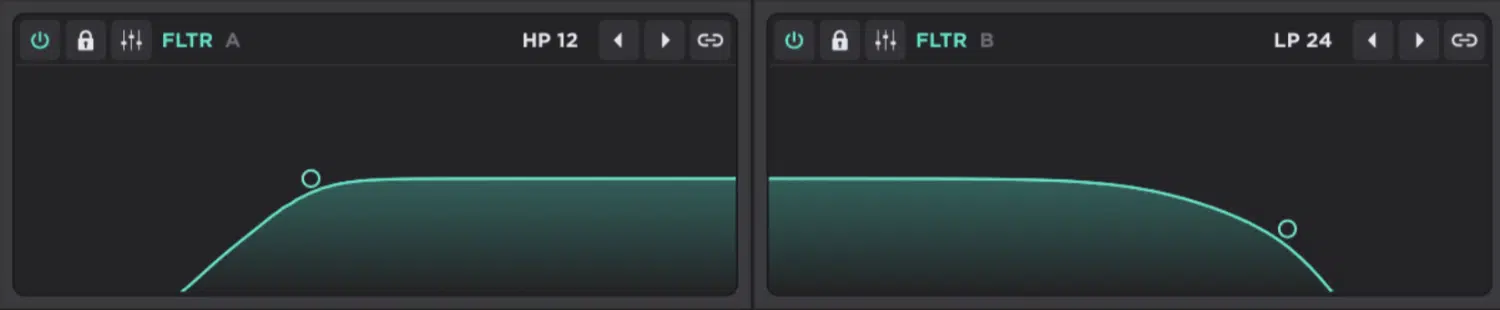
Filters are the part of a synth that let you carve, soften, sharpen, hollow out, or exaggerate a sound, and routing is what decides where that sound actually goes once it leaves the oscillator.
Unisynth is locked and loaded on both fronts here as well with its 2 primary filters, each having 95 filter options.
This is a huge amount of tone-shaping range before you even touch the FX section.
Those 95 options are not just slight variations of the same thing either, because they span all filter families you know and love.
This includes Comb, SVF (low-pass, band-pass, high-pass, notch, peak, and shelves), MG & MG8, Vowel, Pass, VA-modeled analog types, and BW shapes.
So, if you want a classic low-pass sweep, a more nasal formant tone, a comb-filter metallic bite, or an analog-style ladder response, you got it.
No more having to fake it later with extra plugins.
The control set is also deeper than just cutoff and resonance too, as each filter gives you:
- Frequency
- Resonance
- VAR (a variable control that changes depending on the filter model)
- Mix
- Drive
- Pan
- Key tracking
- Routing
- A visual XY filter display (for moving frequency and resonance together)
And in Standard View, that XY method is everything.
Instead of opening up a deeper page just to shape the filter, you can grab the filter area itself and push the sound brighter, darker, sharper, or more resonant right there.
On the signal-flow side of things, Unisynth is much more flexible than it might look at first, believe you me…
Every single oscillator can be routed to Filter A, Filter B, FX, or Direct Out.
This means one layer can go through the filter path, another can skip straight to the effects, and another can bypass everything to stay clean.
The filters themselves can also be routed forward in different ways 一 into each other, into FX, or straight to output.
So, you’re able to run them in series for more compounded shaping or in parallel for more separated tone design.
Then, sitting outside the preset path, Unisynth also gives you 2 global filters (one high-pass filter and one low-pass filter) and a master limiter.
This lets you trim the final output of the whole synth without changing the patch itself.
On the flip side, Vital handles filtering more like you would expect from a wavetable-first synth.
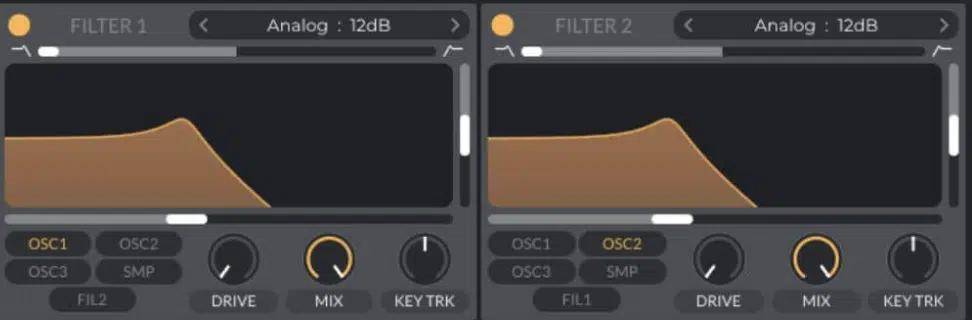
While its interface is clean and visual, the bigger story there is still the oscillator warping and modulation side rather than this kind of filter-family count + visible routing.
So, yes, Vital can shape tone, but Unisynth gives you a lot more filter variety on paper and a lot more obvious routing flexibility between oscillators, filters, FX, and direct output inside one patch.
Vital takes the L here yet again because Unisynth doesn’t just give you more ways to color a sound…
It gives you more ways to decide where that sound goes, how it gets there, and what shape it is in by the time it reaches the track.
Modulation System & Movement Creation
Next up in our Unisynth vs Vital debate, let’s talk about Modulation, because we all know how important this one is when it comes to showing how deep a synth really is.
Modulation is what makes a patch move, breathe, wobble, swell, duck, open up, drift, or react to how you play.
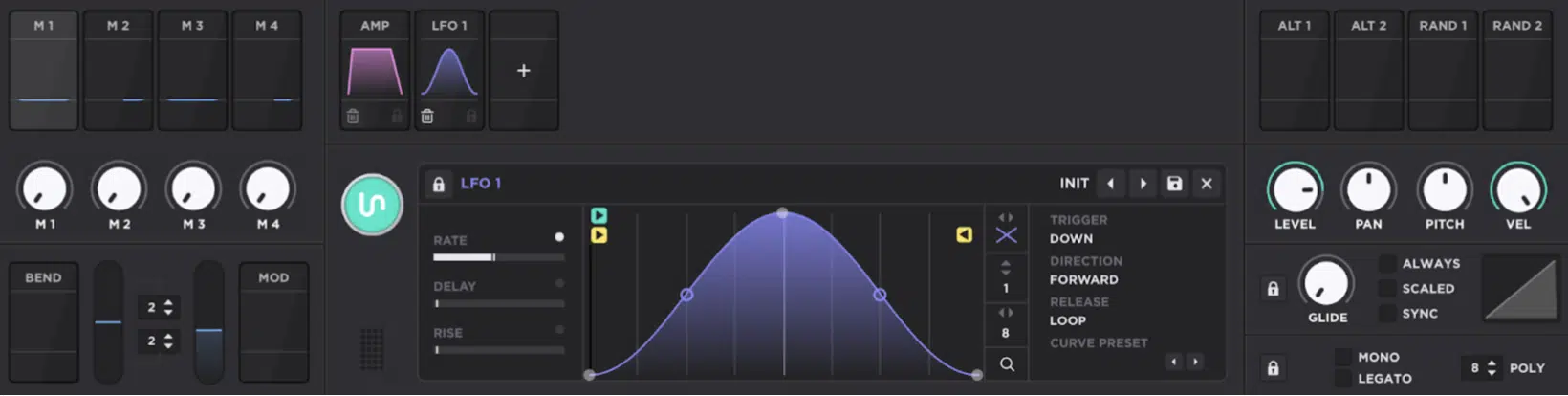
Unisynth supports up to 48 simultaneous modulators, and nearly every parameter in the synth can be modulated.
With as many as 16 modulators targeting a single destination if you really want to layer movement, by the way.
The actual mod source list is solid as well, because you get:
- Envelope
- Chaos
- LFO
- Tracker
- Macros
- Pitch Bend
- Mod Wheel
- Alt ½
- Random ½
You’re not just working with the usual envelope-and-LFO combo, so you can use envelopes for note-shaped movement and Chaos for analog-style random drift.
Plus LFOs for repeating motion, Trackers for MIDI-responsive behavior, Alt sources for alternating states, and Random sources for fresh per-note values without drawing automation by hand (dealer’s choice).
And when it comes to the assignment workflow, Unisynth is insanely strong here too because it lets you do it with drag and drop and right-click assignment menus.
Or, inside the full Matrix tab, where you can see and organize each route by source, destination, amount, polarity, curve, and more.
NOTE: Once a route is assigned, Unisynth shows floating modulation depth controls directly on the target parameter.
Meaning, if the wobble is too deep or the filter sweep is too small, you can fix it right there without constantly jumping back into the matrix.
It also goes deeper with aux modulation…
One modulator can control the depth of another, so something like a macro can fade an LFO in and out, or velocity can scale how much a filter envelope hits.
Then the LFO side really opens up, because you can draw custom LFO shapes with nodes, set start position and loop position, use grid settings for rhythmic alignment and stamp motion in with brush tools.
Plus choose different direction modes and release behaviors so the movement can loop, stop, hold, or continue in different ways.
Vital is strong here too, naturally, leaning heavy into drag-and-drop modulation, custom LFO shapes and randomized sources like perlin noise.
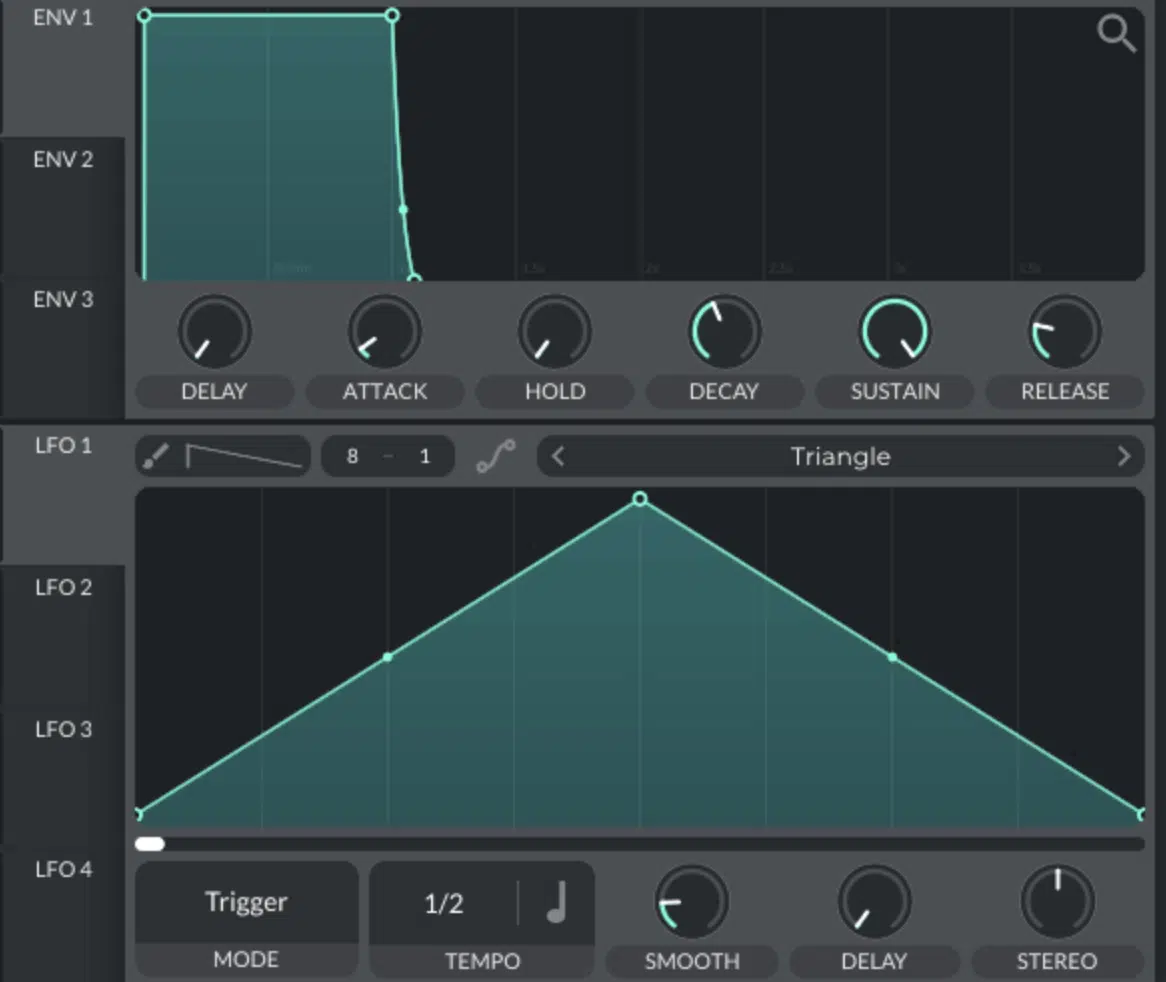
Plus velocity, aftertouch, MPE, stereo modulation, and remapped modulation curves for reshaping how a modulation connection behaves.
So, yes, Vital is legitimately good at movement creation.
However, the whole thing still lives more inside its core lane of warping, modulation, and digital shaping rather than spreading out across a bigger hybrid instrument.
Unisynth, on the winning side, gives you all the motion tools most producers could realistically want.
And bonus, then spreads them across analog, wavetable, sample, resonator, routing, FX, and macro behavior in a much bigger patch environment.
This was a competitive section, not gonna lie… But ultimately Unisynth still comes out on top all day.
It feels just as serious on modulation while also giving you more overall scope, more synthesis methods to animate, and a cleaner path to expressive results.
Built-In FX & Patch-Finishing Power
Built-in FX are what decide how much of the sound you can actually finish inside the synth itself…
This is because, once the oscillator and filter work is done, you still need space, width, color, glue, dirt, movement, and polish, am I right?
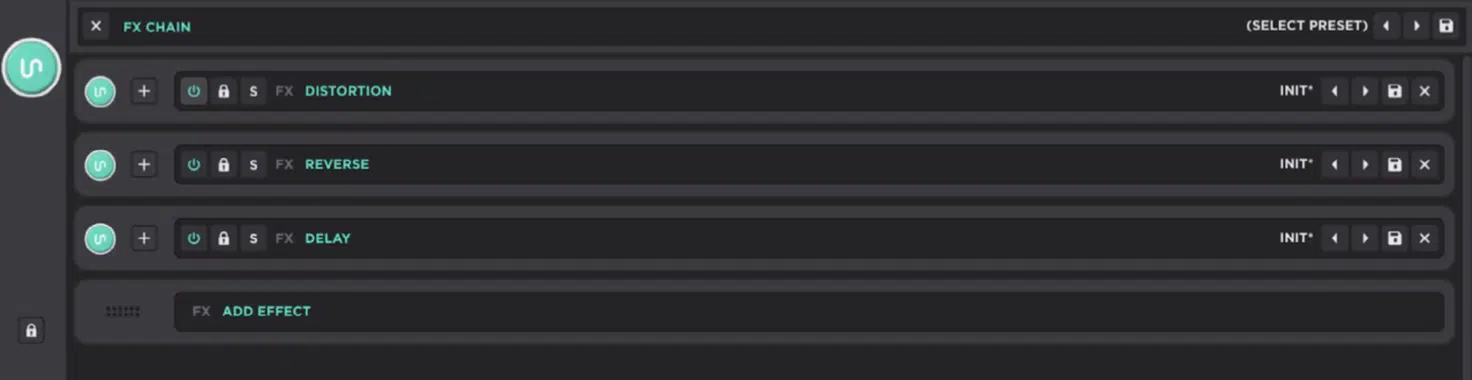
So, let’s kick things off with Unisynth 一 giving you 25 built-in FX and a dedicated FX tab, so the effects side feels more like a full internal finishing rack than a small bonus.
You can generate a full chain with the FX-Chain Generator, then handle each effect with its own bypass, solo, lock, preset saving, preset loading, and drag-and-drop reordering.
And yes, the whole chain can be saved and recalled as a complete preset too (bonus!).
The actual suite is flexible enough to cover most of what a producer would realistically want without leaving the synth:
- Delay tools like Delay and Reverse
- Distortion tools like Destroy, Distortion, Mangle, Preamp, Redux & Tape
- Dynamics tools like Compressor and OTT
- Filter tools like EQ and Filter
- Modulation tools like Chorus, Flanger, Phaser, Super Unison, Tremolo & Vibrato
- Spatial tools like Convolver, Panner, Reverb, and Space
- Utility tools like Utility and Width
So if a patch needs saturation, stereo width, rhythmic delay, modulation movement, convolution reverb, multiband-style OTT energy, or just basic cleanup, you got it.
And usually without you having to bounce out to separate plugins right away!
The chain itself is also easy to manage in deeper sessions, because effect units can be collapsed for a cleaner overview…
There’s even a preference for keeping only one effect expanded at a time so longer chains do not get messy, which I personally love.
And that all works super nice with the rest of Unisynth’s design, because you can start with patch generation, then generate an FX direction, then fine-tune the individual modules until the patch feels much closer to finished.
Vital does have a solid built-in FX section, but this is one of the categories where Unisynth looks much more complete.
This is because Vital’s effect side reads more like a useful companion to the synth rather than a full internal finishing rack built to compete with a hybrid engine.
And that difference becomes even more obvious when you compare how much chain control Unisynth gives you between Unisynth vs Vital.
Chain generation, per-effect management, chain presets, reordering, collapsible units, and the sheer range of processors available in one place.
So, when the category is patch-finishing power, Unisynth wins very comfortably, because it lets you do a lot more of the actual record-ready shaping, coloring, widening, saturating, and polishing before you ever feel the need to reach outside it.
Preset Generation, Customization & Sound-Shaping Depth
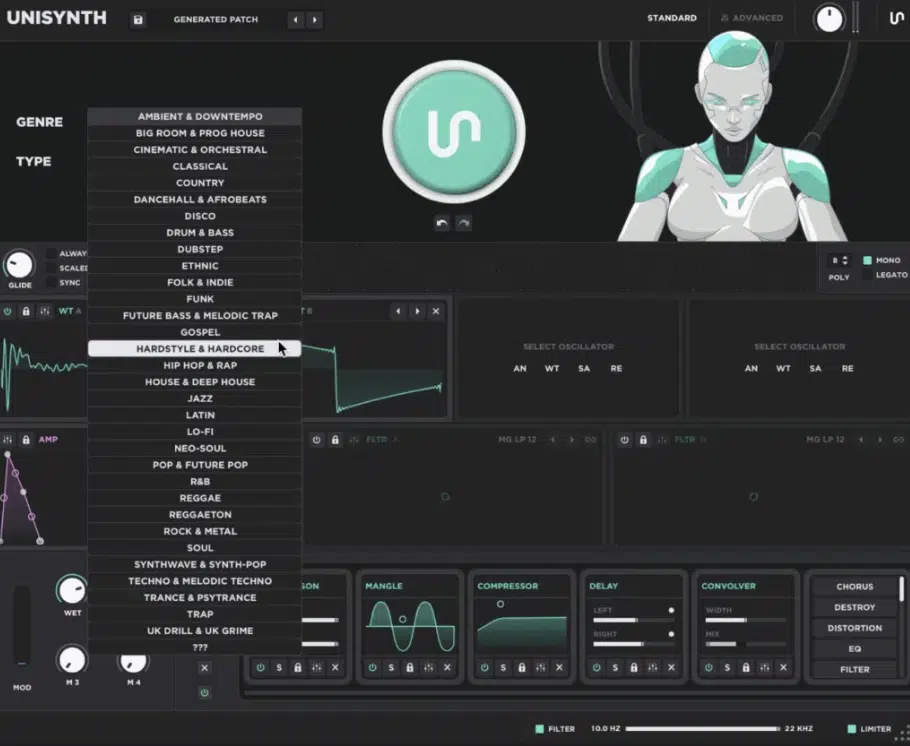
A lot of synths either give you a fast starting point or a deep editing path, but not both 一 Unisynth is different!
The first patch is really just the beginning, because once it appears, you can start shaping it right away with the mod wheel, 4 macros, and the interactive XY pads.
They let you push oscillator behavior and filter tone without opening up Advanced.
Meaning, a generated patch is not some locked result you are stuck with.
You can move its tone, motion, brightness, resonance, and general feel almost instantly while the idea is still fresh (and before beatblock kicks in).
Then, if the overall patch feels good but the processing doesn’t, you can simply generate a new FX chain and keep regenerating until the direction feels right.
You’re even able to ‘lock’ parts of the synth before another generation pass so the sections you like do not get touched, which I think is awesome (and trust me, you will too).
That lock behavior goes further than just the front page, too… Oscillators, filters, envelopes, and effects can each be protected from the generators.
This is perfect when you want to keep one part of the patch stable while exploring another.
On top of that, Unisynth lets you:
- Save your own presets (unlimited)
- Scroll through presets (with next/previous navigation)
- Export presets as expansion packs (including collecting any non-factory samples, wavetables, or impulse responses used in those sounds)
So, if you land on a patch you love, or build a whole custom bank around your own sounds, Unisynth is already set up to let you organize, store, and package that work.
It doesn’t treat everything like a one-off experiment.
Then, once you jump into Advanced View, the whole thing opens up even more because that is where you get the deeper Engine, Effects, Matrix, and Global pages.
Along with much more detailed access to oscillator controls, routing, modulation behavior, wavetable editing, and overall synth preferences as well.
And, side note, one of the smartest parts is that the deeper pages also contain mini-generators spread throughout the synth, so you are not limited to one front-end randomize button.
You can easily generate individual oscillators, filters, modulators, and effects inside the deeper architecture itself, which is another big bonus.
That makes the whole sound-shaping path feel much more collaborative, as you can start with a general AI-generated idea, then go deeper section by section.
It’s all about regenerating only the specific part you want to rethink rather than wiping the whole patch every time, which sucks, let’s be honest.
Vital, by comparison, is much more traditional in this part of the workflow, because deep manual editing is the whole point from the start.
Now, this is fine if you already know exactly how you want to shape the patch.
However, it doesn’t give you the same genre-and-type-based preset generation concept or the same guided path from first patch to deeper customization.
Bottom line, Unisynth wins this section (that’s ALL sections now) because it gives you both sides of the equation.
A very fast entry point for finding strong sounds quickly and a genuinely deep customization path afterward 一 no need to choose between speed and control.
Unisynth vs Vital Final Thoughts (Value, Versatility & Victory)
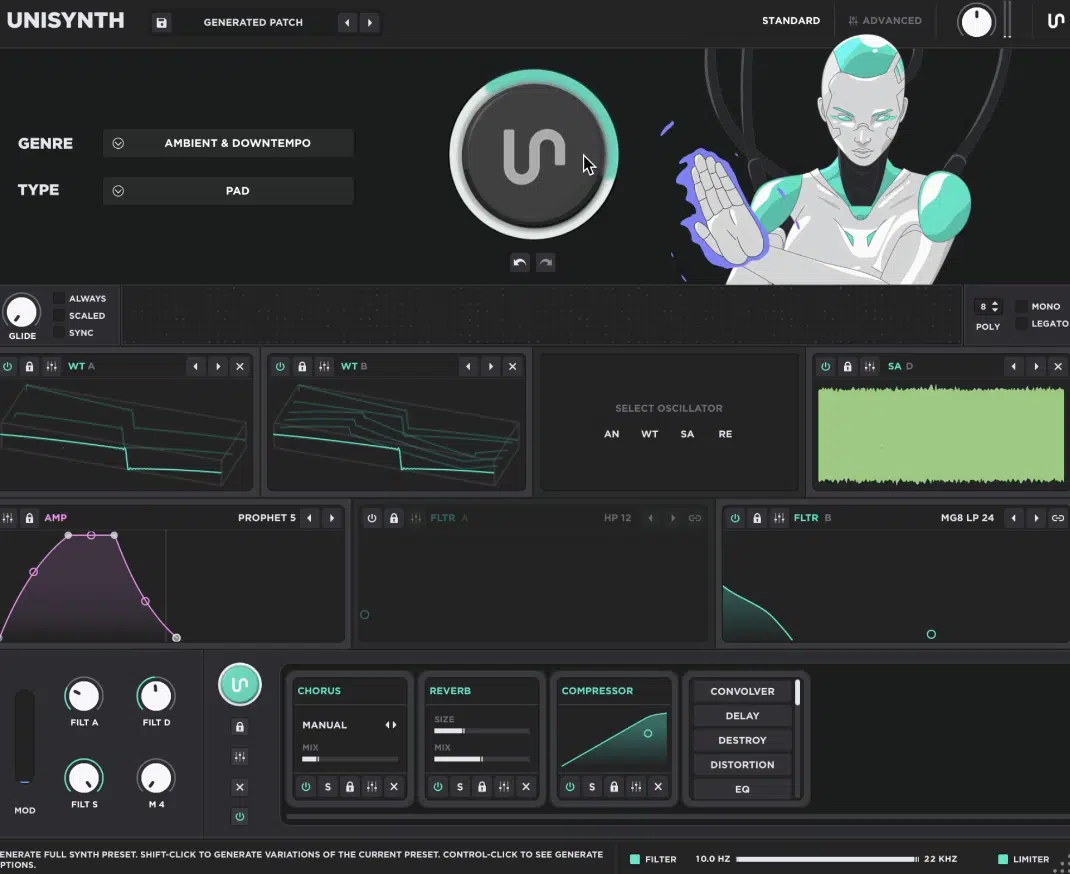
Now after breaking down all Unisynth vs Vital features and functions, we have a clear winner here.
Vital is a strong synth in its own lane, especially if what you mainly want is a modern wavetable instrument with lots of manual control, modulation options, and deep spectral shaping.
However, Unisynth is the undeniable winner of this competition.
It feels much more complete as an overall producer’s synth, because it combines all of the most game-changing synth requirements, which are:
- AI-powered patch generation
- 32 genres and 6 sound types
- 4 hybrid oscillator engines
- 95 filter options per primary filter
- Up to 48 simultaneous modulators
- 80 generators
- A built-in wavetable editor & dedicated sampler
- 25 built-in FX inside one much more flexible workflow
So, whether you want a professional sound quickly, customize it deeply, build your own presets, shape audio and wavetables, or finish more of the patch inside the synth itself, Unisynth has you covered.
Vital is still legit, no doubt, but it leans much harder on you already knowing how to build the sound like a true professional.
On the flip side, Unisynth can help you find the sound, shape the sound, and then push it much further than you could ever even imagine.
That balance of speed, structure, depth, and flexibility is worth a lot more than just having a deep wavetable engine on its own, believe me.
So, when you put everything together (value, versatility, workflow, sound-shaping power, and how much each synth can really do inside an active project) Unisynth takes it.
And if you don’t believe me, you should definitely check it out for yourself by clicking the link below. You’ll thank me later.
Until next time…
Download The #1 Synth Plugin In the World




Leave a Reply
You must belogged in to post a comment.