




Last but not least in our Unisynth vs all other plugins series in the game, we’re breaking down AI preset generation.
And for this final showdown, Unisynth will be going up against Nexus5 in what is basically the battle of the century.
A bunch of you have been asking how these two actually compare when it comes to creating sounds fast and getting inspired quicker.
As well as seeing whether AI preset generation is really the future or just another flashy buzzword, of course.
At the end of the day, it boils down to whether you want a synth that helps generate ideal (fresh) sounds or one that gives you a huge preset library and basically throws you in the deep end without a floatie.
So, in this Unisynth vs Nexus5 showdown, I’ll be breaking down:
- AI preset generation ✓
- Preset browsing ✓
- Workflow speed ✓
- Creative momentum ✓
- Genre targeting & sound direction ✓
- Library size ✓
- Sound customization ✓
- Editing depth & FX flexibility ✓
- Inspiration value & modern workflow ✓
- So much more ✓
After this epic head-to-head, you’ll see exactly which plugin takes the crown.
Plus, you’ll be able to successfully choose the one that fits your specific production style better and get to the right sounds a whole lot faster.
This way, you can knock out fire beats, create with more confidence, stay in the zone longer, and obviously generate killer presets.
So, if you’re ready to dive in, let’s get started…
Table of Contents
Unisynth: The #1 AI Synth in the World
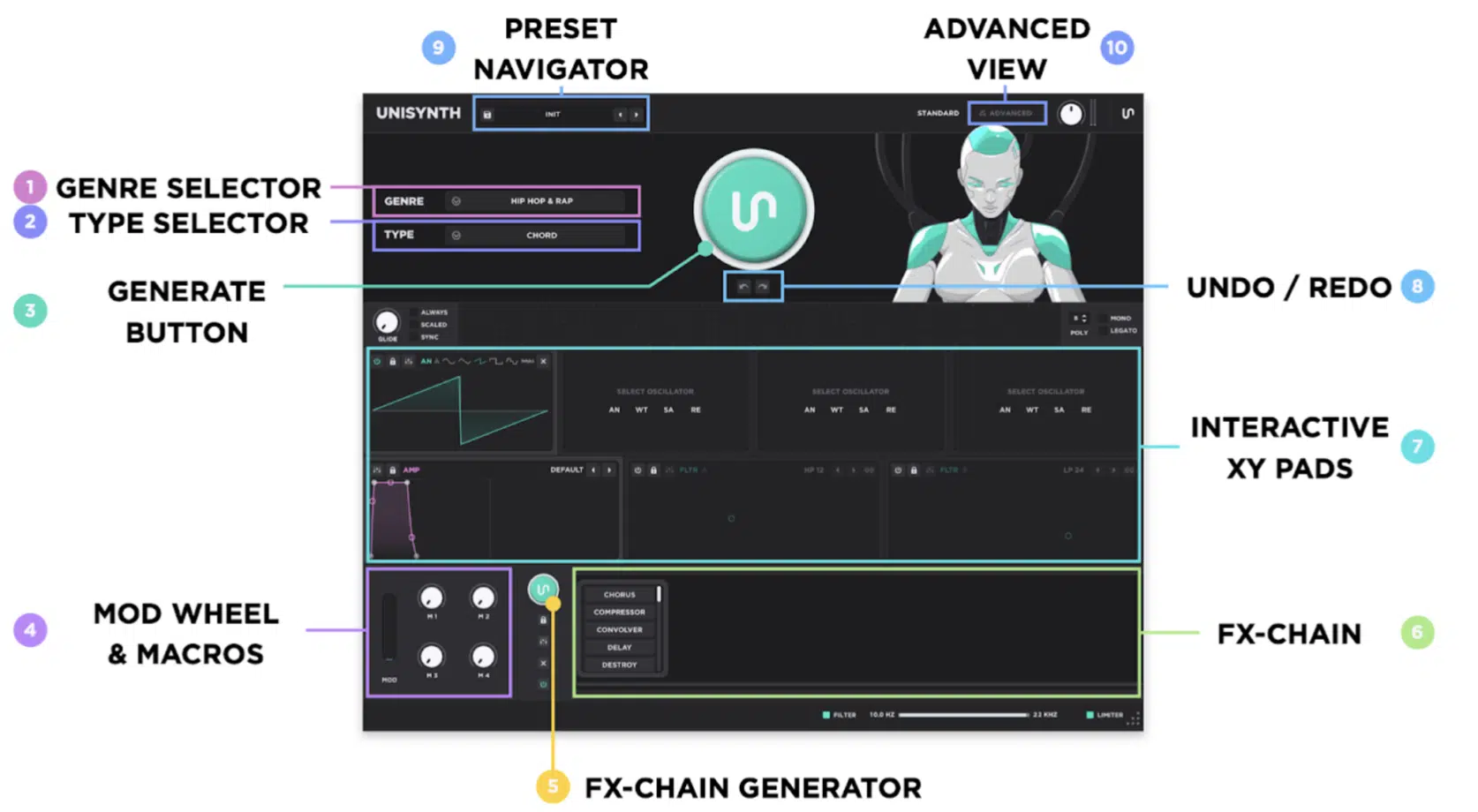
Unisynth is the world’s first AI genre-specific, generative synth plugin, and it’s making major waves in the industry for flipping the ‘normal’ workflow on its head.
Instead of dumping you into a giant preset rabbit hole and making you fend for yourself, you can simply:
- Choose from 32 genres and 6 sound types
- Hit the main generator button
- Pull up a fresh sound right away
This is epic because you’re already starting with the general foundation (that you actually need) insteading of taking a shot in the dark.
You don’t have to go crazy hoping some random preset happens to fit, was tagged properly, and matches its description perfectly.
But Unisynth is not just a cool front end with a button in the middle either, because once you get past that first layer, there is a lot of real synth power under the hood…
You’re working with 4 independent oscillators, and each one can run Analog, Wavetable, Sampler, or Resonator.
This sets it apart from most other synths and gives you a ton of ground to cover before you even touch the rest of the engine.
Then you add in 2 primary filters with 95 different options 一 from analog-modeled hardware filters to unique, obscure filter types you may have never used.
As well as 48 simultaneous modulators and 80 independent AI generators (as the main generator button is just a macro triggering these 80 generators simultaneously).
Plus insanely flexible routing and a built-in wavetable editor.
So, needless to say, there’s plenty of room to push a sound way further once the first patch lands.
In fact, you can ignore the AI aspect and it is still one of the most advanced wavetable synths with hybrid oscillators and capabilities on the market, real talk.
And on the FX side, Unisynth is loaded here too.
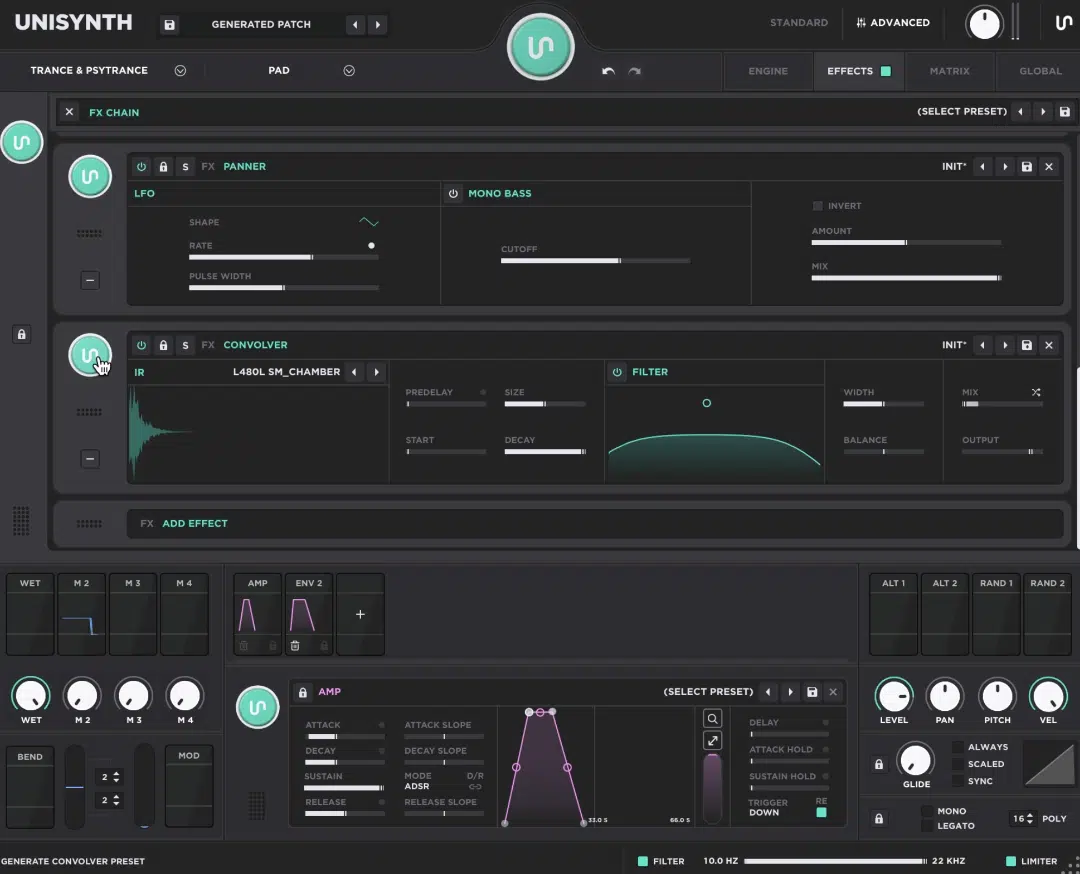
It has a legendary Serum-style FX rack with a fully customizable and reconfigurable signal flow you can change on the fly in any way you can imagine (25 FX total).
This is not just some stripped-down toy, that’s for sure.
Bottom line, Unisynth starts by giving you a brand-new idea fast, but then backs it up with enough depth to actually make that sound yours.
Nexus5 by reFX: Breaking it Down
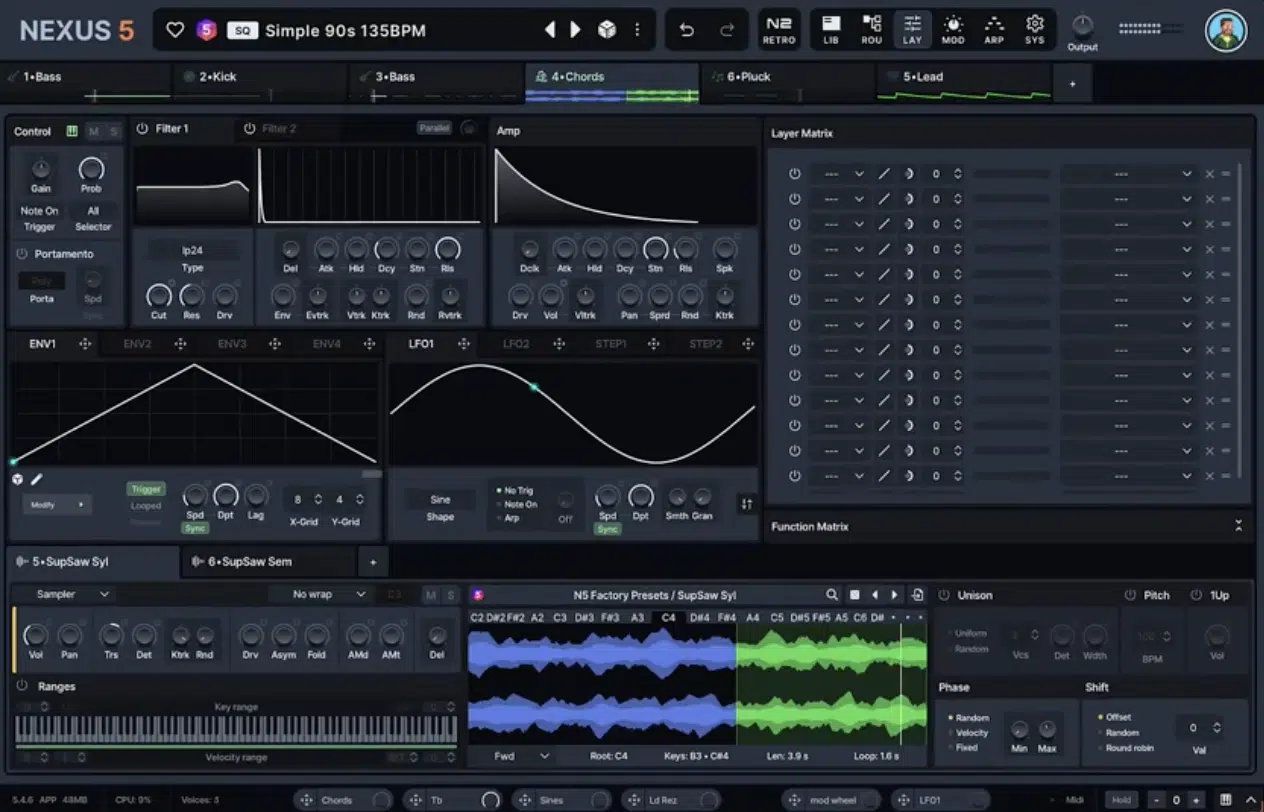
Nexus5 is a hybrid synth workstation, built around a huge preset ecosystem first (although most have to be purchased as expansions).
It gives you solid editing, layering, and sound-building control, as well as open architecture for importing your own samples and wavetables.
So, it’s definitely deeper than the old “preset box” reputation some people still attach to the brand, honestly.
It also added 1,177 new presets, while the Standard edition includes more than 5,300 presets overall, so there’s a massive amount of ready-to-load material.
And that’s really the whole point of Nexus5…
It’s built to give you a ton of sounds, a polished browser, and a cleaner way to sort, layer, and shape them once they are loaded.
The thing is, that still puts it in a different lane from a true AI-generative instrument, because even with its Random Preset button and upgraded librarian or something, it’s still mainly a load-and-tweak synth at heart.
So yeah, Nexus5 is powerful and much more flexible than some people give it credit for, but it is not built around AI preset generation in the same way Unisynth is, that’s for sure.
Not genre-specific, and certainly not session-context-aware (BPM).
Unisynth vs Nexus5: AI Preset Generation
Now this is where Unisynth vs Nexus5 starts getting really interesting, because both of them can get you to a sound fast, but they’re clearly not doing it the same way. One is built around generating a new patch from a specific target; the other is all about finding the right preset inside a huge library. So, from here on out, the real question is which one actually gives you the more modern, direct, inspiring way to start a sound.
Generating New Sounds vs Flipping Through Presets
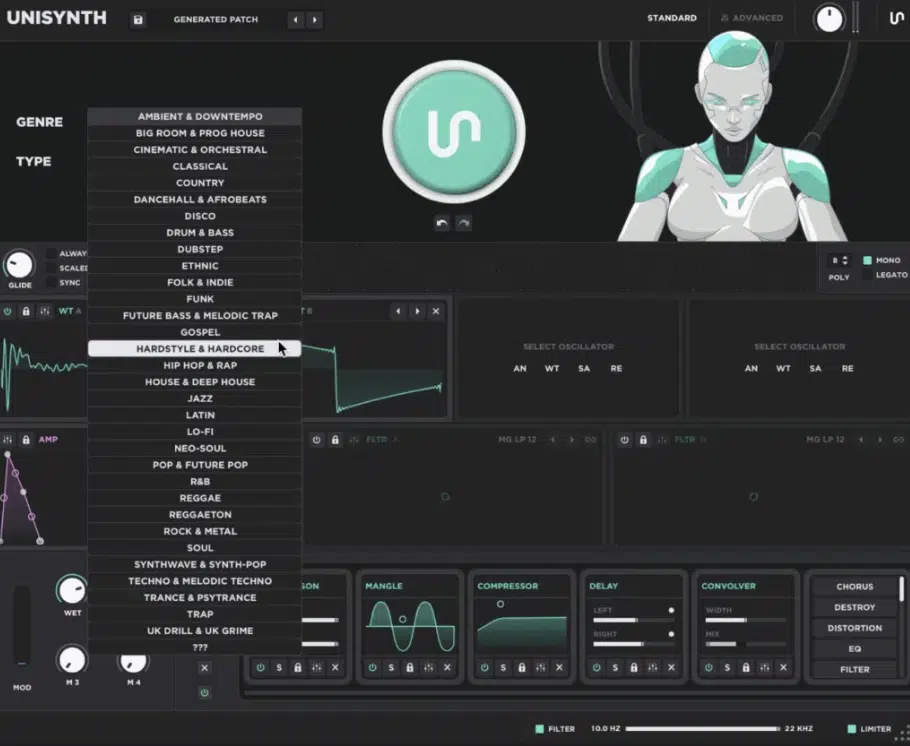
First up on our Unisynth vs Nexus5 showdown, let’s talk about the heart/main topic of this whole article: generating new sounds vs. flipping through presets.
It shows the difference between a synth that helps create a patch around your idea and one that mainly helps you browse what’s already there.
With Unisynth, the process is super direct like we said…
You simply pick from 32 popular genres and 6 sound types, hit that big generator button, and boom, it gives you a fresh patch built around that input.
This makes the workflow feel way more immediate when you’re actually in a session.
So, instead of opening a browser and wondering which bank, tag, or folder is going to get you closest, you already have the kind of role you need the sound to play.
When you’re trying to keep momentum up (and demolish beat-block), that’s everything because the synth is already aiming at a bass, lead, pad, chord, pluck, or whatever lane you are in.
No more making you dig through and waste endless time first.
Nexus5 does the exact opposite, as it’s built around loading from a huge library (more than 5,300 presets in the Standard edition) and then narrowing things down with its browser/library tools.
And yeah, that can still be fast, especially once you know the ecosystem well, but it’s still a preset-selection workflow at its core, let’s be honest.
Even the Random Preset-style vibe is still just pulling another existing patch from the pile 一 not generating something new around your chosen direction.
NOTE: Unisynth feels more like saying, “I need this kind of sound — give me one,” while Nexus5 feels more like, “Show me everything you’ve got, and hopefully I’ll sort it out.”
And when the category in question is specifically Unisynth vs Nexus5 AI preset generation, that difference is not some tiny technical detail, it’s the entire freakin’ point.
How Much Control You Get After the Sound Is Generated
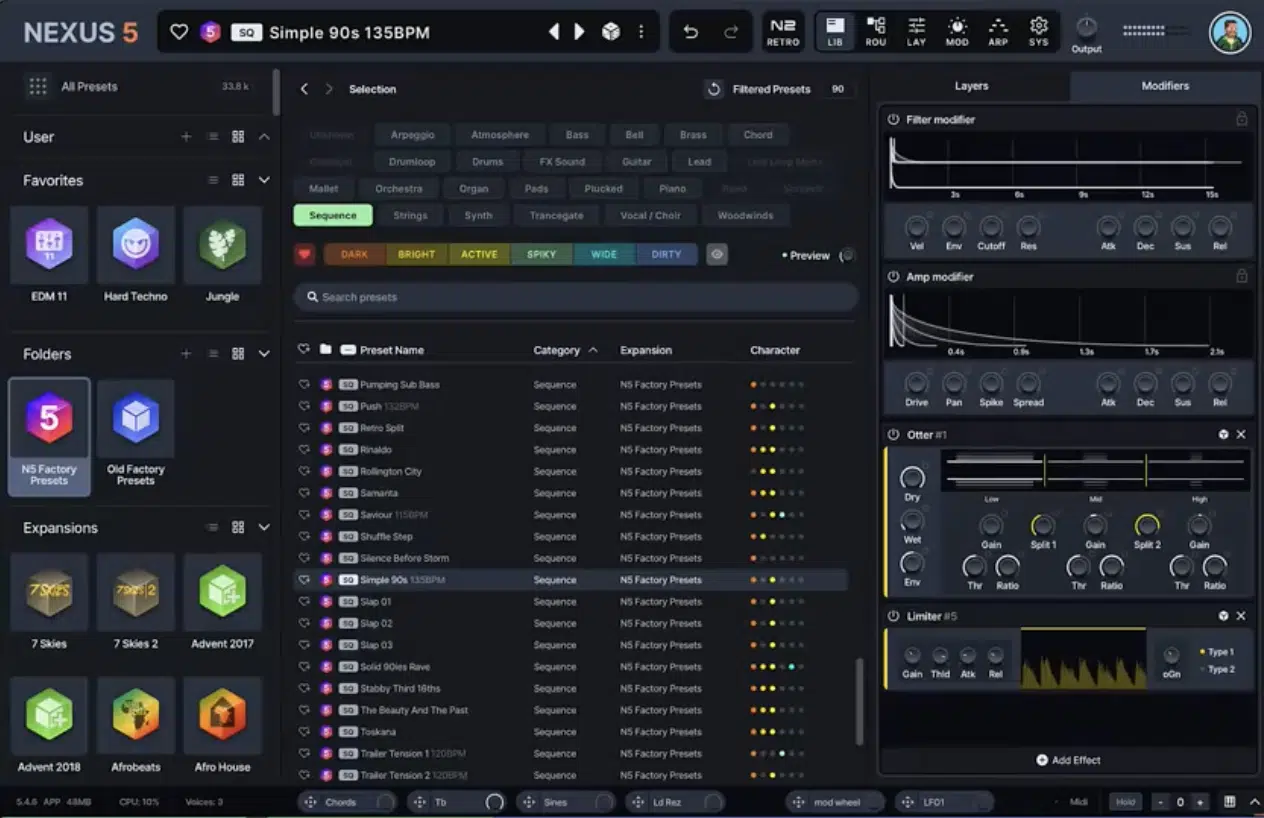
How much control you get after the sound is generated matters a lot, especially in this Unisynth vs Nexus5 battle.
I mean, a fast starting point is only impressive for about five seconds if the synth falls apart the moment you want to shape it, am I right?
Unisynth doesn’t have that problem, because once the patch is generated, you still have a crazy amount of room to work.
Let’s break it down:
- 4 oscillators
- 4 engine types per oscillator (Analog, Wavetable, Sampler, and Resonator)
- 2 primary filters (each primary filter gives you 95 filter options)
That alone is already a lot more than people typically expect, or ever get from a synth that starts with AI generation.
Then it takes it even further with 48 simultaneous modulators, 80 independent AI generators that can be triggered individually or all at once and flexible routing.
Plus macros, an FX-chain generator, and a built-in wavetable editor which is supreme 一 so once something lands close, you can really tear into it and rebuild it around your own taste.
The AI side is not replacing sound design, that’s not what it’s all about.
It’s just skipping the slow part where you would normally hunt for a decent starting patch or, if you want to leave Standard View, seriously working as a collaborator.
You can still swap oscillator modes, change the harmonic behavior, reroute the signal path, build movement with modulation and reshape the FX chain in Standard View.
But you also have the option to get way more surgical with the wavetable editor if you want to (in Advanced View).
We’ll talk about Advanced View two sections down, so definitely stay tuned.
NOTE: You’ll have full control over triggering each AI generator based on how you see fit, ignoring them for some parts like filter selection, but using them, for instance, to help create a tricked-out FX chain.
Then, if you want to alter some of its decisions, like the way the signal flow is ordered or even changing the individual effects, you can do that too.
And, thanks to the generators, regenerate settings for each individual effect.
Nexus5 gets some credit here too, because it is much deeper than the old “preset ROMpler” label makes it sound.
reFX gives it 64 oscillators, 8 generator types, including Virtual Analog, Sampler, Wavetable, Time Stretcher, Retro Sampler, Grain, Cloud, and FM.
Plus open import for your own samples and wavetables…
Meaning, there’s definitely real editing depth once a sound is loaded.
It also supports up to 16 parallel FX chains and 1 global FX chain, so there is a lot of room to stack, layer, and process sounds after the fact.
However, even with all of that, the main difference still stays the same; Nexus5 gives you depth after you pull in a preset.
Unisynth gives you a generated sound first, then lets you go just as hands-on with it after that, which is absolutely priceless my friends.
So, if the concern is that Unisynth might be one of those flashy AI tools that gets boring the second you want real control, it honestly is not.
It starts fast and straightforward, sure, but it still has enough under the hood to keep more advanced users/sound designers like myself hooked in (and that’s really what it all boils down to). Unisynth vs Nexus5 Unisynth vs Nexus5 Unisynth vs Nexus5
How Fast Each One Gets You Inspired
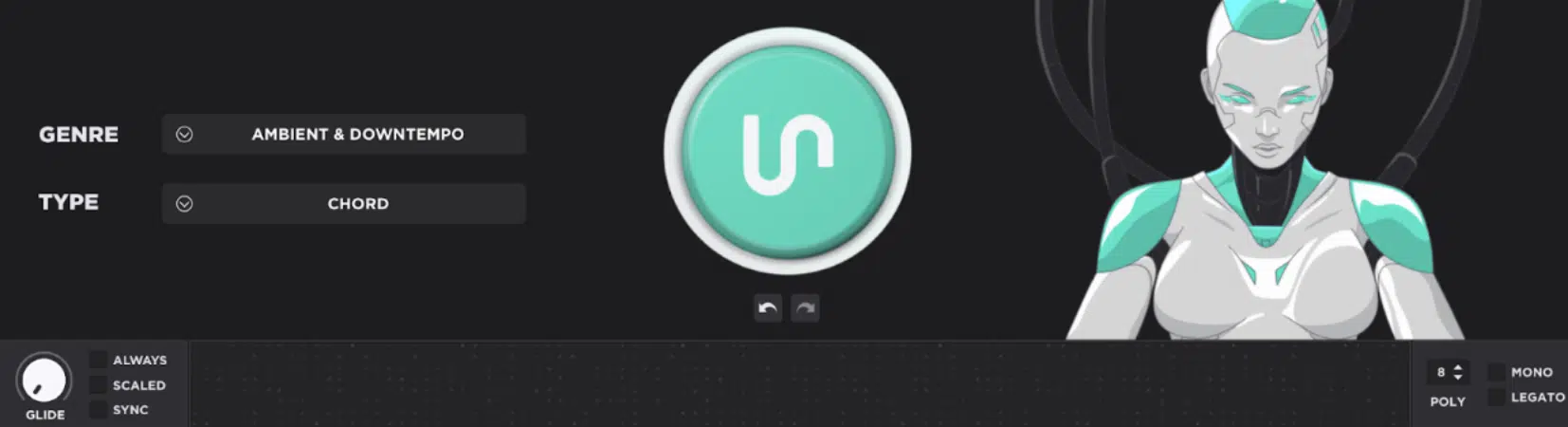
How fast each one gets you inspired really comes down to how quickly they can get you out of decision fatigue and back into making music like a boss.
Unisynth has a clear advantage here because picking a genre/sound type and generating a fresh patch is just a more immediate spark than opening a giant library and hoping something jumps out fast enough.
Nexus5 can still move quickly, especially because reFX highlights fast preset loading and strong CPU performance.
But that speed is still tied to browsing and recall more than actual generation.
So when you’re coming up dry on ideas, stuck in loop mode, or just tired of hearing the same kind of presets over and over, Unisynth is a lifesaver for real.
And in real producer terms, that means less scrolling, less second-guessing, and more moments where a track actually starts building itself!
Bonus: Unisynth’s Advanced View (Game-Changer)
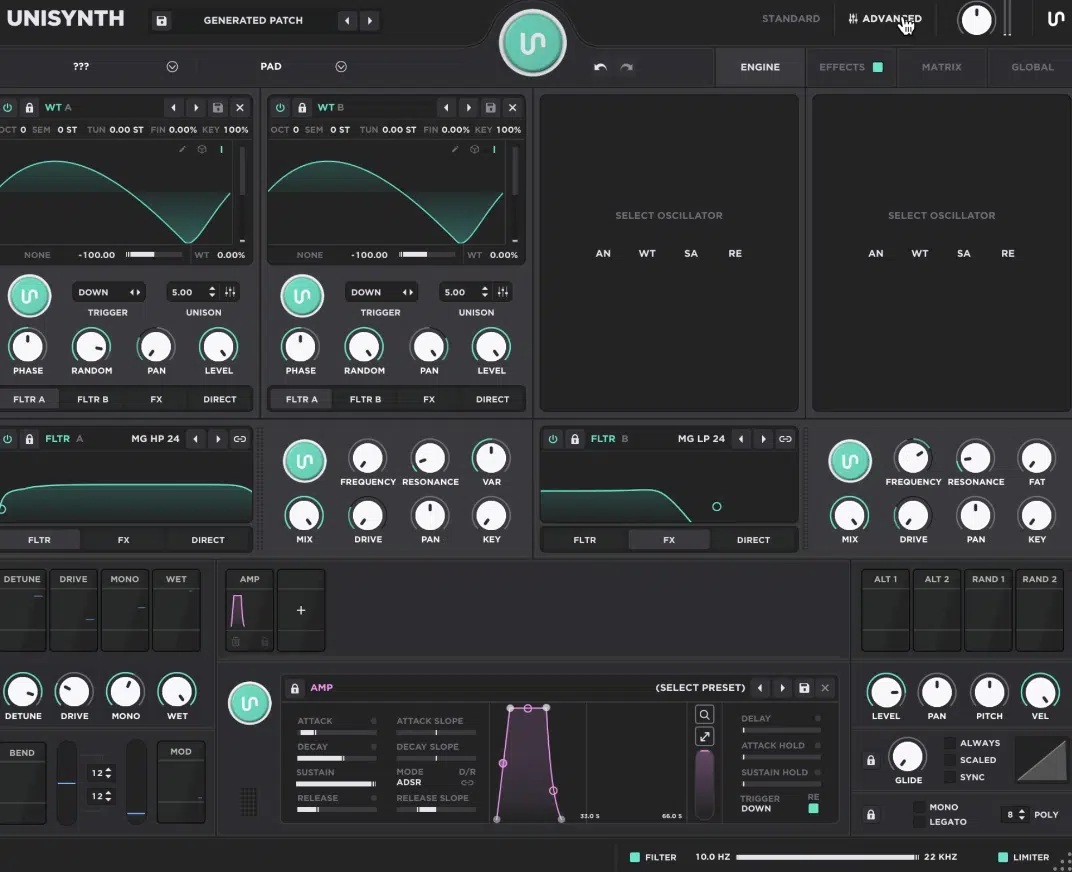
Last but not least in our Unisynth vs Nexus5 head-to-head, I needed to just bring up the Advanced View section in Unisynth because it makes a HUGE difference.
It lets you work with the individual generators more like a creative partner instead of just hitting one main button and accepting whatever comes back.
So, rather than generating the entire patch all at once, you can decide exactly which part of the synth you want help with, like the:
- Oscillators
- Filters
- Modulation
- FX
And, generate those sections separately based on what the sound still needs.
You can keep the parts you already like, leave certain sections alone, and only regenerate the area that is not hitting yet (it’s awesome!).
It doesn’t stop there though…
You can also switch genres for specific areas of the synth and start building real hybrid presets in a much more intentional way.
For example, you could keep the oscillators in Trap, generate the filters with a Hip-Hop mindset, and then use something like Rock or EDM for the FX section to get a way more interesting end result.
That opens up a lot of creative doors, because you’re not just generating a preset, you’re directing how different genre flavors get blended into different parts of the patch.
So, if Standard View is all about speed and instant inspiration, Advanced View is where Unisynth turns into a real co-creator you can guide, shape, and push into much more unique territory.
I think we see where this is going in our Unisynth vs Nexus5 debate.
Unisynth vs Nexus5: Final Verdict
At the end of the day, Unisynth is just the stronger synth when the conversation is AI preset generation 一 hands down.
You create dope patches in seconds from 32 genres and 6 sound types in a way that feels faster, smarter, and way more in tune with how modern producers actually work.
Nexus5 still gives you a huge amount of sounds and a much deeper engine than a lot of people expect, no doubt.
However, it’s still mainly built around loading, browsing, and tweaking existing presets rather than generating new ones around your exact direction.
And, as I’m sure you know, when inspiration hits or you’re suffering from beat-block, those precious seconds mean everything.
So, when you really break down Unisynth vs Nexus5 in this area, Unisynth takes the win pretty clearly.
Until next time…
Try Out the #1 Synth Plugin in the Game Now!




Leave a Reply
You must belogged in to post a comment.