




Unisynth is the #1 AI genre-specific, generative synth plugin in the world right now — making some serious noise throughout the industry.
Synplant 2 is all about experimental sound recreation, resynthesis, and sonic exploration.
So today, these two are going head-to-head to see which one actually comes out on top when it’s time to make epic music and build killer sounds.
Plus, keep a session moving without killing the vibe.
It’s all about musicality, workflow, depth, and which synth helps you land on stronger sounds without sending you down a rabbit hole for half the day.
So, to see who takes the crown in this Unisynth vs Synplant 2 showdown, I’m going to break down all the key features and functions, like:
- Starting workflow ✓
- First sound quality ✓
- Genre-specific generation ✓
- Sample-based recreation ✓
- Hybrid oscillator design ✓
- Filter depth ✓
- Routing options ✓
- Modulation power ✓
- Wavetable control ✓
- FX workflow ✓
- Session speed ✓
- Versatility & flexibility ✓
- So much more ✓
By the end, you’ll be able to see exactly which synth shines in all areas, and which one just falls a little bit short.
That way, you can sharpen your sound design skills and choose the synth that’s really built for all producers (new and professional) and worth every single penny.
So, if you’re ready to see who the real champ is, let’s get into it…
Table of Contents
Unisynth: The World’s #1 Genre-Specific, Generative Synth
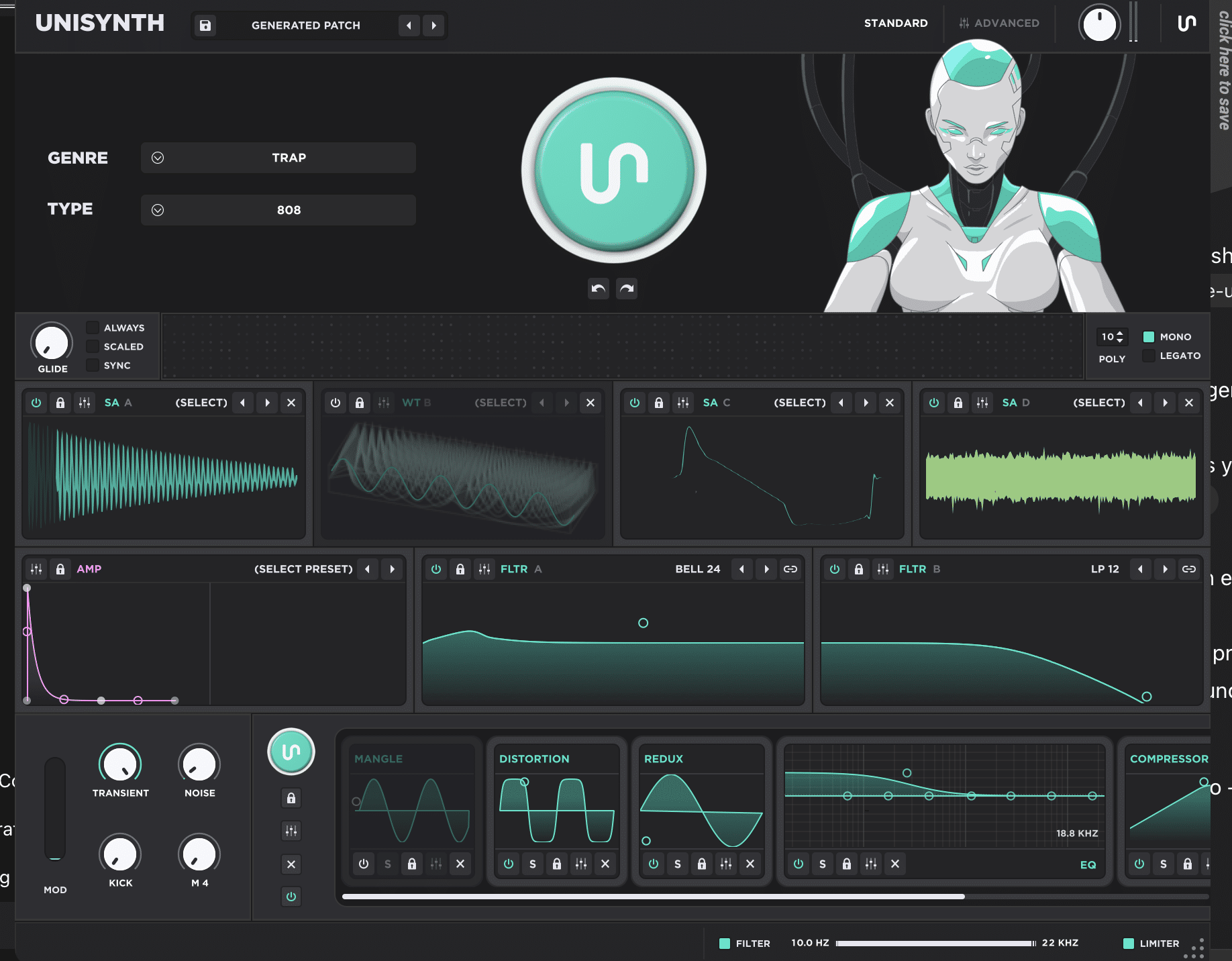
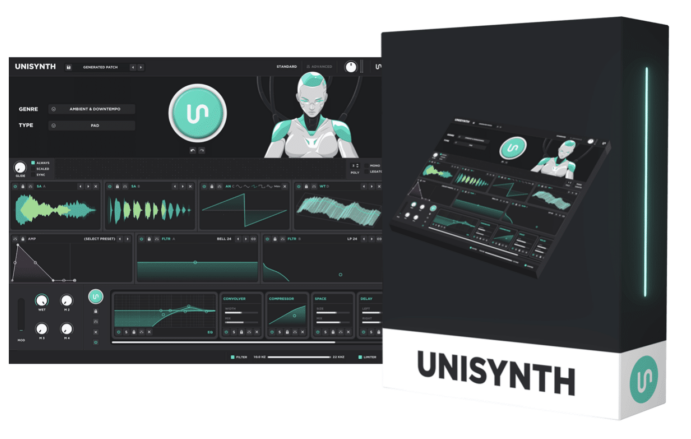
Unisynth is the world’s first AI-powered, genre-specific generative synth, but the most impressive thing is that it feels like a real synth when you actually sit down and use it.
Instead of throwing you into a blank patch and telling you to figure it out, it starts with 32 genres and 6 sound types.
This way, even before you ever hit Generate, it’ll know the exact vibe/style you’re looking for based on the specific genre and sound type you select.
First and foremost there’s Standard View (for fast shaping) and Advanced View (for deeper editing), as well as basic things like Undo/Redo, preset saving, preset browsing, and quick patch generation.
Then, once you look under the hood, it opens up into a much bigger instrument with 4 independent oscillators, each one capable of running in the following modes:
- Analog 一 Classic subtractive synthesis
- Wavetable 一 Frame-scanning digital synthesis
- Sampler 一 Sample-based playback
- Resonator 一 A physical-model-style engine
On top of that, it gives you 2 primary filters with 95 filter types each, which is a serious amount of tone-shaping range.
Everything from classic low-pass and high-pass shapes to comb, vowel, shelf, modeled analog, and more is right there at your fingertips.
And I’m not just talking surface-level tweaking either…
You’ll have access to 6 routing mixers, 4 macros, up to 48 simultaneous modulators, and 80 generators spread throughout the synth.
This way, you can randomize, refine & rebuild pieces of a patch instead of just accepting whatever the main Generate button gave you.
When it comes to effects, Unisynth excels in this area too, with 25 built-in FX and a fully customizable signal flow.
NOTE: The manual shows deep control over the FX chain itself as well, like locking effects, soloing them, bypassing them, dragging them into a new order, and saving full chain presets.
It also includes the extras that all producers and sound designers, such as myself, end up using on the regular to kick things up a notch.
This includes global filters, a master limiter and interactive XY pads.
Plus a built-in wavetable editor with FFT partial editing (editing the amplitude and phase of individual harmonics inside a wavetable frame).
This is the kind of feature that instantly tells you this isn’t some stripped-down AI shortcut box, trust me.
So, once you put the whole picture together, Unisynth feels less like a gimmick with a shiny button and way more like a full-blown flagship hybrid synth that just happens to get you to chart-topping sounds much faster than the competition.
Synplant 2
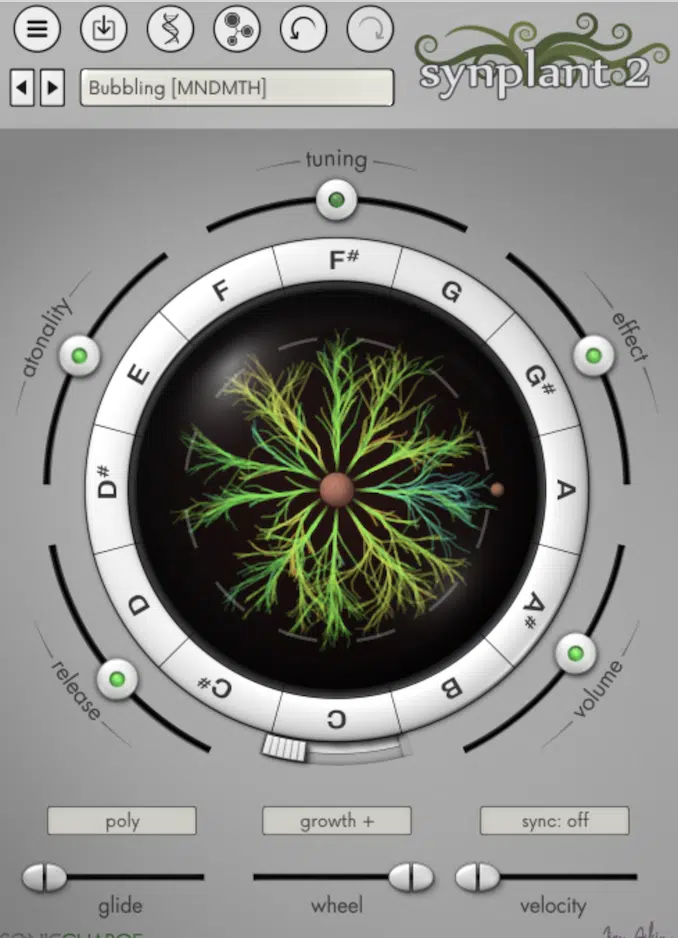
Synplant 2 is definitely creative, but it’s coming from a much more experimental angle, and you feel that right off rip.
The whole appeal is Genopatch, which uses machine learning to analyze an audio sample and generate a Synplant seed from it.
Basically, it’s trying to recreate/resynthesize what you fed it in its own internal way.
Once you get past the first stage, the interface keeps leaning into that same mindset with the seed-and-branches layout.
This is where dragging outward from the center changes the sound in different directions instead of giving you that signature oscillator-filter workflow we all love.
It also has a DNA Editor with 48 genes, split across areas like Oscillators, Envelope and LFO, and Filter and Effect.
So, I can’t lie, there is depth there 一 but it’s depth inside a very unusual design that asks you to learn its language first (and nobody really has time for that).
Because of that, Synplant 2 feels less like a go-to workhorse synth and more like a specialized concept instrument for people who enjoy experimenting, mutating sounds, and seeing where the synth takes them.
Also, while that unpredictability is a big part of its charm, it’s also the exact reason the results can feel pretty hit-or-miss,
Especially when you’re trying to make a track and need something super fast.
So, even though it absolutely has its own lane and its own fanbase, Synplant 2 feels more like a creative side weapon for adventurous users…
Less like the kind of broad, dependable, music-first synth most producers would want sitting at the center of their daily workflow.
NOTE: When it comes to Unisynth vs Synplant 2, you can clearly see already that Unisynth is all about making hit-worthy tracks (genre-aware tracks, mind you) all day.
Whereas Synplant 2 is more interested in turning sample analysis, resynthesis, and exploration into an instrument of its own.
Unisynth vs Synplant 2: Which One Is Better for All Producers
When you look at the full picture, you’ll see that this whole Unisynth vs Synplant 2 debate is not about which plugin is stranger, flashier, or more “out there” for a few minutes. It’s really about which one is more flexible, versatile, able to shape things better with no friction, etc. without making you get lost in side quests. So, let’s get into it, feature by feature.
Starting Workflow & First Sound
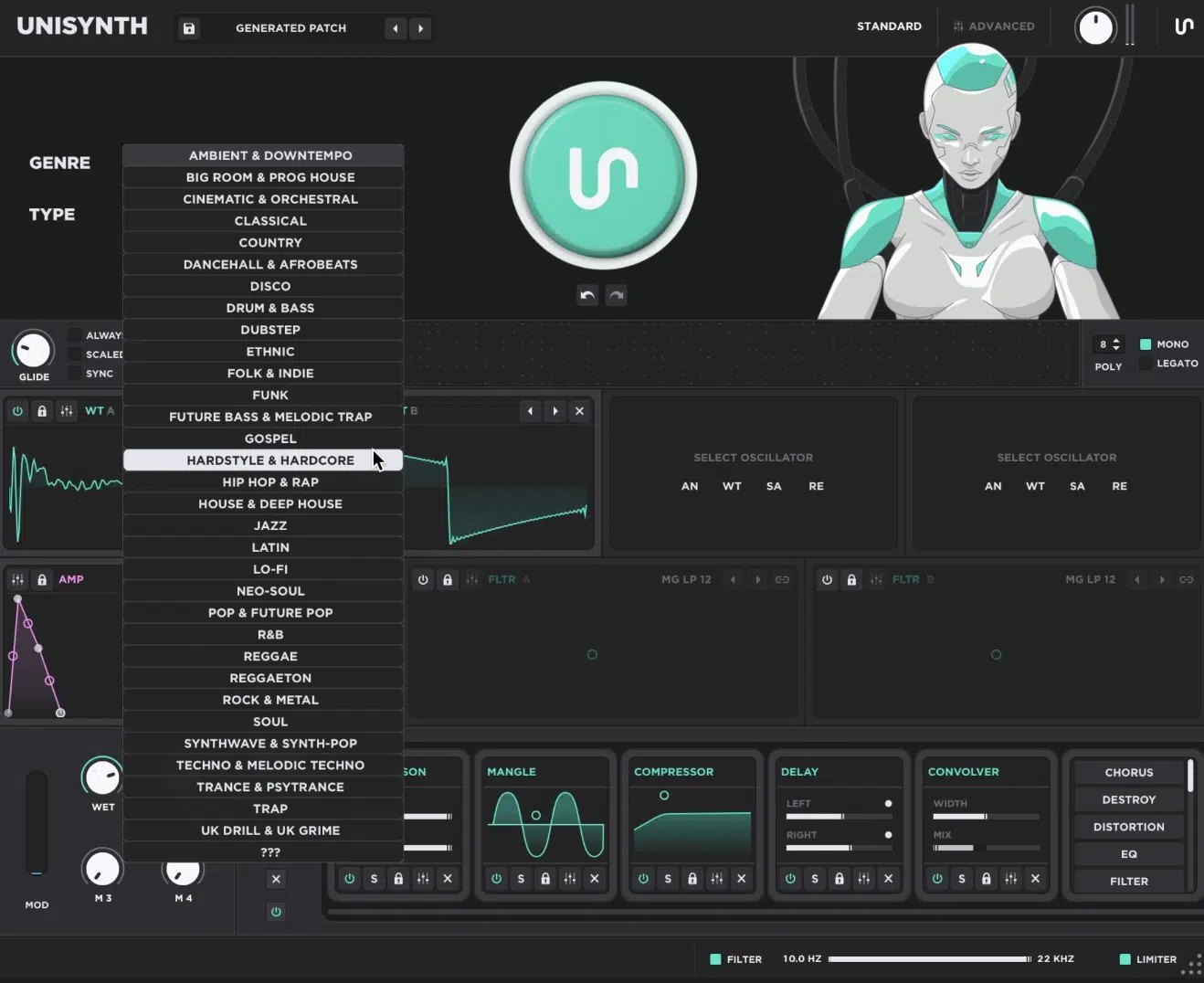
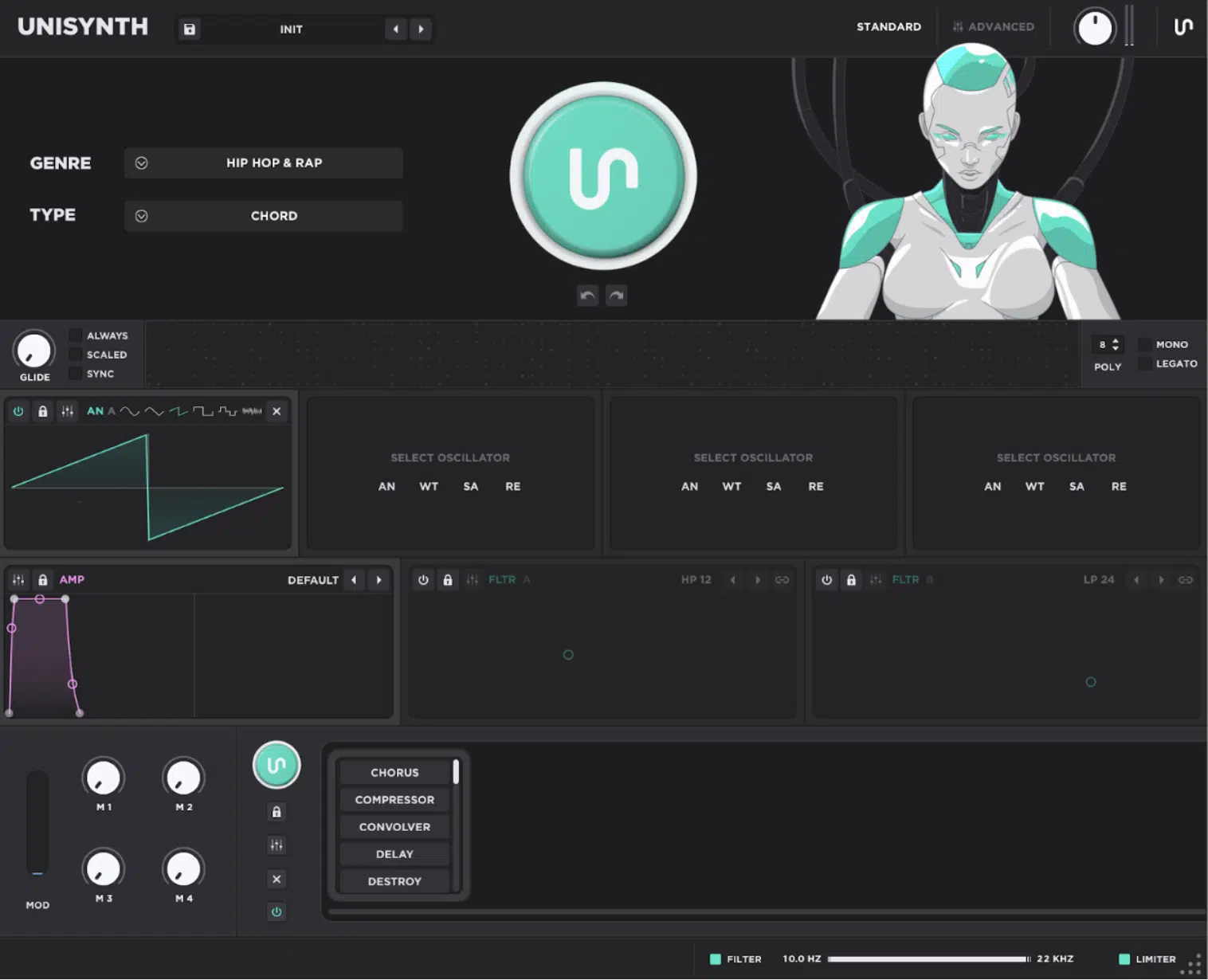
When you open Unisynth, the first thing it feels like is a beat-maker’s dream; straightforward and right to the point.
You pick a popular Genre first (e.g., Trap, House, R&B, Pop, etc.), and then you pick a Type, which is the role the sound is supposed to play, like a bass, 808, chord, pad, lead, or pluck.
Then you hit Generate, and instead of staring at an empty synth wondering where to start, you’re hearing a full patch that is already pointed toward a real part in the track.
If it is close but not quite there, you have Undo/Redo right under the generator.
So, you can move through ideas fast without killing the vibe or losing the version that was almost right.
After that, if you want to start shaping things, Standard View keeps it simple and visual, with the core controls, XY pads, macros, filters, and FX all right there.
So, you can start tweaking without having to open five million menus just to get a little movement or tone change.
Then, once you want to get more surgical, you can play around with 80 individual generators throughout the synth.
Meaning, you’re not stuck regenerating the entire patch every time.
So, for example, if the oscillator blend is hard, but the filter shape is a little bland, or the patch is solid but the FX chain is not hitting right yet, you can simply regenerate those parts specifically and keep the rest how it is.
That’s a big deal, believe me, because it lets you secure that musical identity of the patch while improving the weaker pieces instead of starting over from zero.
NOTE: When you hit the generator button, it’s essentially just a macro control triggering all of these individual generators at once.
So, by triggering them yourself, you can easily isolate certain parts, sections, and parameters in the synth and really do some fine-tuning.
Even if you don’t understand what a parameter means, you’ll be able to hear what it does and see what needs to be tweaked/left alone.
Synplant 2, on the other hand, comes at the sound-generating process from a completely different angle…
A lot of the time the starting point is feeding it a sample and seeing how it tries to rebuild or reinterpret that sound inside its own engine.
That can be cool, no doubt, but it also means the first few minutes are often about seeing what happens.
Unisynth is much more about getting you to something playable, useful, and track-ready as fast as possible, so it definitely takes the win here.
Genre Targeting vs Sample Recreation
This next section is where Unisynth vs Synplant 2 really split hard.
Unisynth is trying to make a sound that fits the genre of your song and the type of patch you desire.
And, by being context-aware, it also knows the BPM/tempo of your session.
Synplant 2 is trying to reconstruct or resynthesize the sound you gave it, trying to get as close as possible (but the goal isn’t an exact replica or anywhere close).
The idea is to “sample” it and then make it your own.
With Unisynth, those 32 genres and 6 sound types are not just there to look nice on the screen, they’re steering the whole patch in a specific direction from the start.
So, if you choose a pad in one genre, you don’t have to worry about getting the exact same patch structure with a different coat of paint, no siree.
You’ll be getting different:
- Oscillator choices
- Movement
- Filter behavior
- FX choices
- Overall feel
It’s all based on what that role usually needs in that style of music, which is what makes it a lot more session-aware.
Unisynth expertly knows where the sound is supposed to sit and how it’s supposed to behave once you input MIDI.
It doesn’t just throw random settings together and hopes for the best; it’s building a patch around a purpose so you can fine-tune all day until it’s perfect.
So, if you need a darker R&B chord patch, a bright house pluck, a wide cinematic pad, or a heavier trap lead, boom 一 you got it.
Synplant 2 is pretty much the opposite as it starts with a sound file and then tries to match the feel of it.
Stuff like the timbre (the color and texture of the sound), the envelope (how it attacks, holds, and fades), the pitch shape, and any movement it hears in the source.
That’s an enormously different mindset, because it’s not asking, “What kind of part do you need for this beat?” It is asking, “How close can I get to this sound, and what else might come out while I am trying?”
That’s why most producers call it a ‘hit-or-miss synth.’
Sometimes you’ll get interesting and workable, other times it’s just too out of the box (and not in a good way).
Unisynth, on the other hand, is much more locked into giving you sounds that already make sense in real songs.
This is why the industry is raving about it, calling it one of the most musical, practical, all-around dope synths in the game, period.
Full Synth Architecture vs Experimental Design
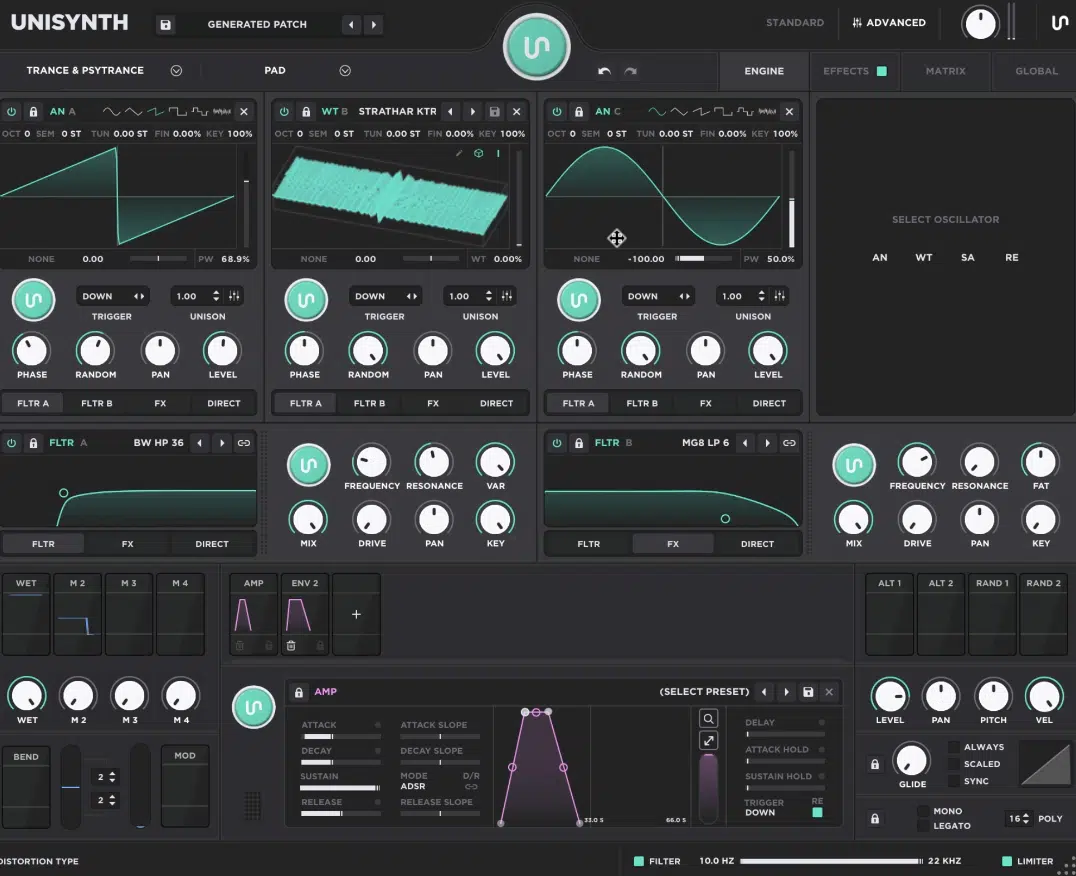
When you really break the structure down, Unisynth vs Synplant 2 feels extremely different, that’s a fact.
Synplant 2 feels more like a wild experimental instrument with its own strange rules, as we talked about.
Unisynth, however, gives you 4 hybrid oscillators, and each one can run in Analog mode for classic waveform-based synthesis and Wavetable mode for moving digital timbres.
As well as Sampler mode for pitched audio playback, and/or Resonator mode for physically modeled, resonant tones that react more like excited material than a normal oscillator
Right there, you’re already covering a crazy amount of ground all inside one patch.
From basic subtractive sounds to wavetable movement, sample texture, and more acoustic-ish resonant behavior, it’s all for the taking.
Then you get 2 primary filters, and each one has 95 filter types 一 a lot deeper than the usual low-pass, high-pass, and band-pass setup most synths stop at.
On top of that, the routing is flexible too, because each oscillator can be sent into Filter A, Filter B, the FX chain, or straight to the output.
The filters themselves can run in parallel or series depending on how you route them.
And then, as you know, there’s Standard View and Advanced View, which is a big reason Unisynth feels bigger than life, not one-dimensional.
Once you jump into the deeper side, there are:
- 4 macros
- Up to 48 simultaneous modulators
- 6 routing mixers
- 80 generators
- A full modulation matrix
- A built-in wavetable editor
You’ll never hit a wall the second you want to go past the first page, which is why it feels like a real flagship synth.
Sure you can use it casually, but you can also get crazy detailed with it when the patch needs more love.
Synplant 2, by comparison, is built around a much more unusual design.
A lot of its identity lives inside its DNA system and 48 genes, which is cool 一 but also not how most producers and sound designers naturally think when shaping sounds.
In fact, it’s not a way anyone or anything thinks when shaping sounds.
But the same thing that makes it appealing, is also its biggest weakness for the modern producer/sound designer.
As opposed to moving through the kind of familiar oscillator-filter-modulation workflow that most people already know from Serum 2, Pigments, Massive, or Vital, you’re dealing with a more experimental concept.
It’s like learning Mandarin as an adult… technically, it’s possible, but you’d have to dedicate all your time to mastering it (too much time).
Bottom line, Unisynth covers way more normal producer ground while still being deep as hell, whereas Synplant 2 leans much harder into being a niche creative tool built around experimentation first.
Session Speed, Tweaking & Staying in Flow
When you’re first starting out a session, speed is everything (especially if you suffer from beat-block).
And that’s another area where Unisynth takes the W.
In Standard View, you get those interactive XY pads on the oscillators and filters, so instead of stopping to dial five little knobs one by one, you can drag around and hear big tone shifts fast…
This could be like changing wavetable position and warp at the same time, or pushing filter cutoff and resonance together in one move.
Then you’ve got the Mod Wheel and 4 macros right there, which makes it easy to test out different parameters, such as:
- Movement
- Brightness
- Width
- Intensity
All without opening the deeper pages every two seconds, which is a big plus.
The FX-Chain Generator also saves a ton of time, because you can generate a full effects chain in one shot, then keep the good parts and swap or reorder the weak ones.
So, if the patch already sounds strong but just needs more edge, more space, or a wider stereo image 一 you can get there super fast.
Preset browsing is smooth as butter too, and the Undo/Redo setup helps a lot because you can chase ideas without that annoying feeling of, “Damn, I just lost the version that was almost perfect.”
Then, once the chain is locked and loaded, you can drag effects into a new order, bypass them, solo them, or lock them in place.
And, as I’m sure you know, this is huge, because effect order changes everything.
On top of that, the global high-pass and low-pass filters let you clean up the entire output fast, and the master limiter keeps things under control so you do not get smacked with random volume spikes while designing.
All of that adds up to a synth that helps you keep moving, tweaking, and building the track instead of constantly stopping to manage things.
NOTE: Synplant 2 can definitely spark ideas too, but its workflow is way more likely to pull you into “let me see what happens if I push this further” mode.
Sometimes that’s inspiring, but other times it’s exactly how you lost 30 minutes – 1 hour looking for the perfect sound and never finding it.
Advanced Editing, Modulation & Wavetable Control
Next up on our Unisynth vs Synplant 2 breakdown, let’s talk about advanced editing, modulation, and wavetable control for a second.
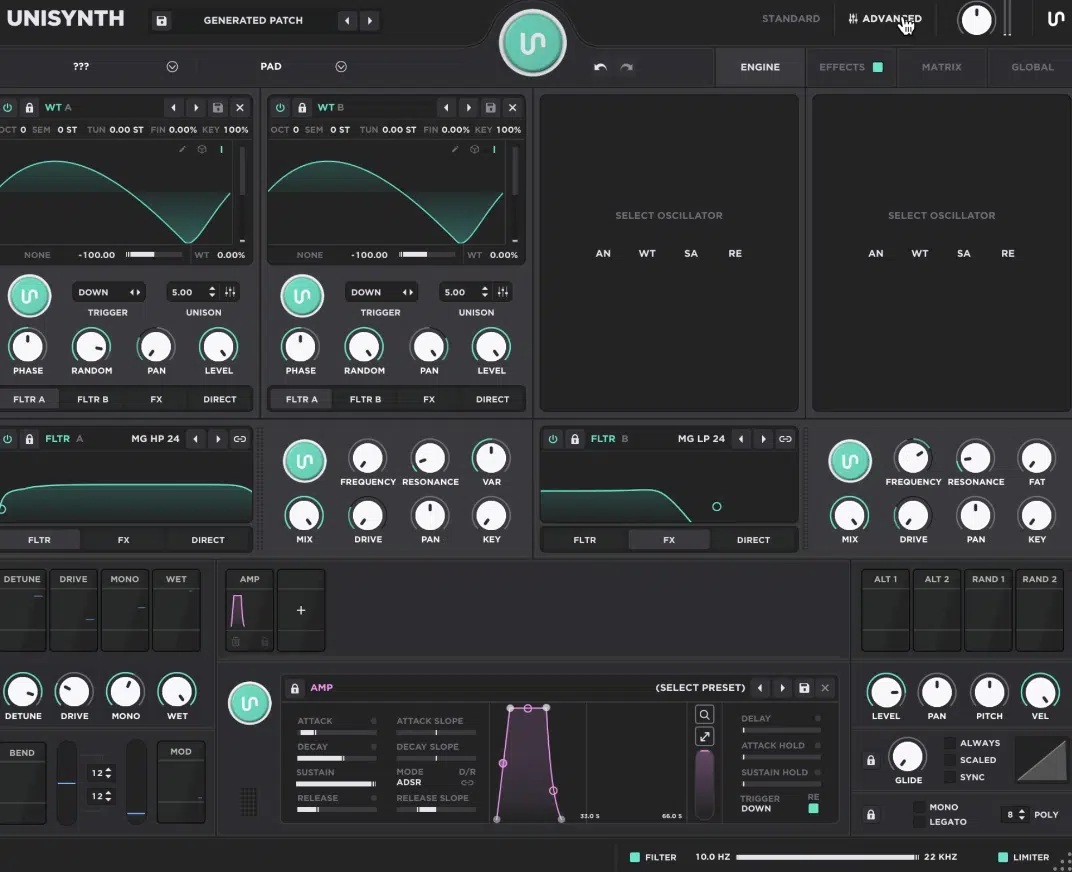
Once you open up Advanced View in Unisynth, it becomes really obvious that the easy front-end workflow is only one part of the story, not the bulk of it.
The deeper layout is split into Engine, Effects, Matrix, and Global tabs, so everything has its own proper lane instead of being crammed into one messy page.
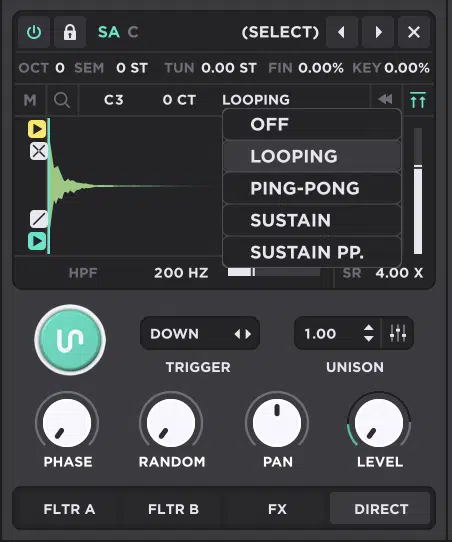
Inside the Engine tab, each oscillator gets way more control 一 including octave, semitone, fine tune, key tracking, trigger modes, unison, pan, level, and routing.
This means you can shape how the patch plays just as much as how it sounds.
The unison section alone gets pretty serious, because you can change voice count, detune, spread, blend, and the curves for those settings.
You’re never stuck with some basic “more voices = more width” setup.
Then the filters go a lot deeper too, because those 95 filter types are not just a number on paper.
You’re working with classic low-pass and band-pass shapes, sure, but also comb filters, vowel filters, modeled analog ladders, shelves, notches, and phasers.
Plus a bunch of more colorful options that can completely change the character of the patch.
The modulation side gets pretty nuts in a good way, because you’re able to stack so many things it’s ridiculous, including:
- Envelopes
- LFOs
- Chaos modulators (random movement generators)
- Trackers (MIDI-driven mapping sources)
- Macros
- Alt sources
- Random sources
Then, route all of that through the Matrix tab with unmatched depth, polarity, and destination control.
So if you want a pad where the wavetable slowly drifts, the filter opens harder with velocity, and the FX mix changes every time you hit a new note, Unisynth’s got you.
The wavetable editor is another huge part of why it feels legit, because you are not just browsing tables — you can actually edit them from the inside.
You can add, remove, select, and rearrange frames, which are the individual wave snapshots the oscillator scans through.
And then you can go into FFT partial editing to change the amplitude/phase of individual harmonics inside a frame.
Meaning, you’re literally reshaping the spectral makeup of the wavetable itself, not just moving a macro and hoping it sounds different.
NOTE: On top of that, you get Generate tools like Sine, Saw, Square, Noise, and Pulse, Process tools like Normalize, Invert, Fold, Bit Quantize, Sync, and spectral shaping, plus Morph tools that can crossfade or spectrally interpolate between frames.
Then you can sort frames by things like fundamental strength, odd/even balance, slope, peak, or average spectral content.
This is the kind of detail that sound designers like myself eat up, because it gives us invaluable control over how a table moves across its scan path.
So yeah, Unisynth is easy to get into at first…
But once you want to go deep, it absolutely has the modulation muscle, editing range, and wavetable control to hang with serious synths all day.
FX, Routing & Track-Ready Sound Shaping
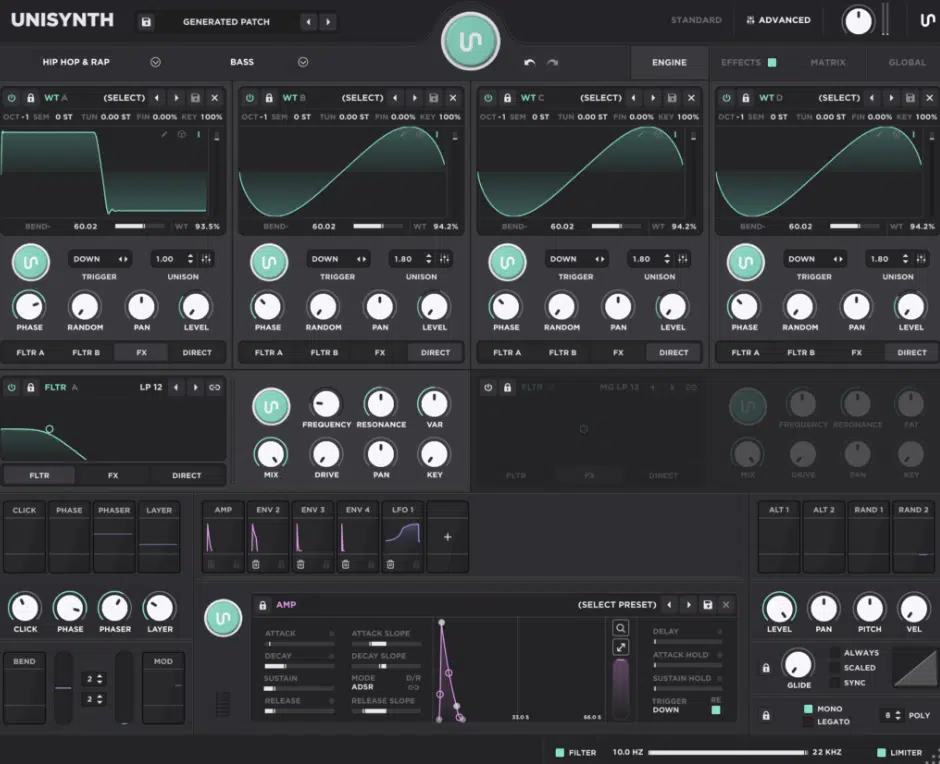
When it comes to FX, routing, and sound shaping, this is another spot where Unisynth feels way more complete.
It doesn’t just help you find a sound; it helps you start and finish one too (all within the same keystroke if you desire).
You can generate a full FX chain in one move, and then keep building from there instead of jumping straight into a pile of extra plugins.
The overall FX lineup is 25 effects that can all be run at once in any order or combination your heart desires.
And let me tell you, that’s a lot of room for stacking color, space, movement, cleanup, and glue all inside on patch.
Then, once a chain is loaded, you can easily lock effects you like, solo one effect to hear exactly what it’s doing, bypass anything, drag effects into new order, etc.
For example, a distortion before a reverb gives you a more aggressive, smeared tail, while distortion after the reverb chews up the whole space in a way that feels dirtier and more blown out.
The same goes for delay and filtering…
A filter before the repeats changes every echo going into the feedback path, while a filter after the delay shapes the full result after all that motion is already there.
On top of that, Unisynth gives you actual mixing and finishing weapons inside the chain, like:
- Compressor (for level control and punch)
- OTT (for that bright, squeezed, modern lift)
- EQ (for tone shaping)
- Utility (for gain and stereo fixes)
- Width tools (for pushing the image out without leaving the instrument)
Then you’ve got the color and movement side covered too 一 chorus, flanger, phaser, vibrato, tremolo, tape, preamp, redux, and destroy.
Meaning, Unisynth can go from clean and polished to gritty, wide, warped, or straight-up mangled depending on what the track needs.
The space section is jam-packed as well, with convolver (convolution reverb built from impulse responses), algorithmic reverb, space, reverse delay, and panner.
With them, you can turn a dry patch into something huge, tucked back, weirdly moving, or super cinematic without breaking your flow.
It also helps that each effect can have its own preset, and the whole chain can be saved as an FX-chain preset.
So, when you land on a combo that works and want to reuse that flavor later, you can always have it.
NOTE: Because a lot of those FX parameters are modulation-ready, you can do more than static polishing.
You can have reverb size swell with a macro, delay mix open up with the mod wheel, or width shift over time with an envelope, or LFO.
Or, even the Chaos modulator so the patch keeps breathing while the part plays.
Synplant 2 can absolutely spit out interesting textures, but Unisynth is way better set up for that last 20 to 30% that makes a sound feel polished and mix-ready.
Plus, with Unisynth, you’re always going to get results that sound like they belong on a song or in your track.
Synplant 2, on the flip, is far more experimental and probably hard to place in anything but a very specific situation or type of track.
Unisynth vs Synplant 2: Final Thoughts
At the end of the day, Synplant 2 is cool for what it is, and there is no reason to act like it does not have its own lane.
However, when the goal is actually making music (getting to better sounds faster, shaping them with more control, and keeping the whole session moving) Unisynth is just the stronger pick.
It gives beginners a way in, gives intermediate producers room to level up, and gives advanced users enough depth to keep pushing without feeling boxed in.
Plus, it does ALL of that while staying way more grounded in musicality, workflow, and real track-building than in experimental sound chasing for its own sake.
That’s really why it makes way more sense as your main go-to synth instead of just some side piece you pull up when you want to get weird for a minute.
It’s faster when you need speed, deeper when you want control, and way more consistent when you’re trying to build tracks that actually make a statement.
So, if the question is which synth makes more sense for all producers and sound designers 一 Unisynth takes the win all day long.
If you don’t believe me, just click the link below and try it out for yourself.
Until next time…
Try Out the #1 Synth Plugin in the Game Now!




Leave a Reply
You must belogged in to post a comment.