




Wavetables are all about movement and personality.
With them, you’re able to build a sound that actually evolves instead of just sitting there like a static, single-cycle oscillator generating a stagnant harmonic spectra.
Also, they help you avoid having to rely on sculpting the shape of harmonics and adding any additional movement on filters/modulation.
Plus, once you understand how frames, harmonics, phase, and wavetable position all work together, you’ll start shaping tones that feel way more unique from the source.
Today, I’m breaking down how to work with wavetables in Unisynth 一 the first (and only) AI genre-specific, generative synth plugin in the WORLD.
This way, you’ll be able to design stronger tables, shape more intentional sweeps, and build sounds that hit way harder all day.
You’ll learn all types of invaluable things, like:
- What makes wavetables so powerful ✓
- How frames shape the movement ✓
- Why harmonic sequencing matters ✓
- The secret sauce of WT Position ✓
- How interpolation changes everything ✓
- When 2D or 3D view wins ✓
- The real power of FFT editing ✓
- How to shape amplitude and phase ✓
- Ways to fix broken sweeps fast ✓
- How to build custom tables from scratch ✓
- Advanced tips & tricks to kick things up a notch ✓
- So much more ✓
By the end of today’s breakdown, you’ll be able to successfully build better custom tables, clean up awkward sweeps, and shape wavetable movement like a boss.
Plus, you’ll know how to design more unique tones, push the editor with way more confidence, and control your harmonic content as the pros do.
If you’re trying to stand out, make your presets feel more original, and stop relying on the same recycled source material as everybody else, then wavetable design is the key.
And with this information, you’ll be able to bang out way more custom sounds in all genres/styles and completely dominate the competition.
So, let’s stop talking, and let’s get to the breakdown…
Table of Contents
- Unisynth: The World’s First (and only) AI Genre-Specific Generative Synth Plugin
- Wavetables 101: What They Are, How They Work, and Why They Matter
- Unisynth’s Wavetable Oscillator: The Power Behind the Perfection
- Inside Unisynth’s Wavetable Editor
- Modifying Existing Wavetables Without Wrecking Them
- Building Your Own Wavetables from Scratch
- Drawing Custom Waves with a Clear Sonic Goal
- Bonus: 7 Advanced Tips & Tricks (Unisynth Edition)
- #1. Going Off Script with Formant and Comb-Style Shapes
- #2. How to Make a Digital Wavetable Feel More Analog
- #3. Designing Wavetables for FM, Warp, and Resonator Osc Source Signals
- #4. How to Make WT Position Modulation Sound More Musical
- #5. How to Avoid Harsh Jumps Between Frames
- #6. How to Know When a Table Needs More Complexity — or Less
- #7. How to Turn a Happy Accident into a Killer Custom Table
- Final Thoughts: Why Unisynth’s Wavetable Editor Goes So Hard
Unisynth: The World’s First (and only) AI Genre-Specific Generative Synth Plugin
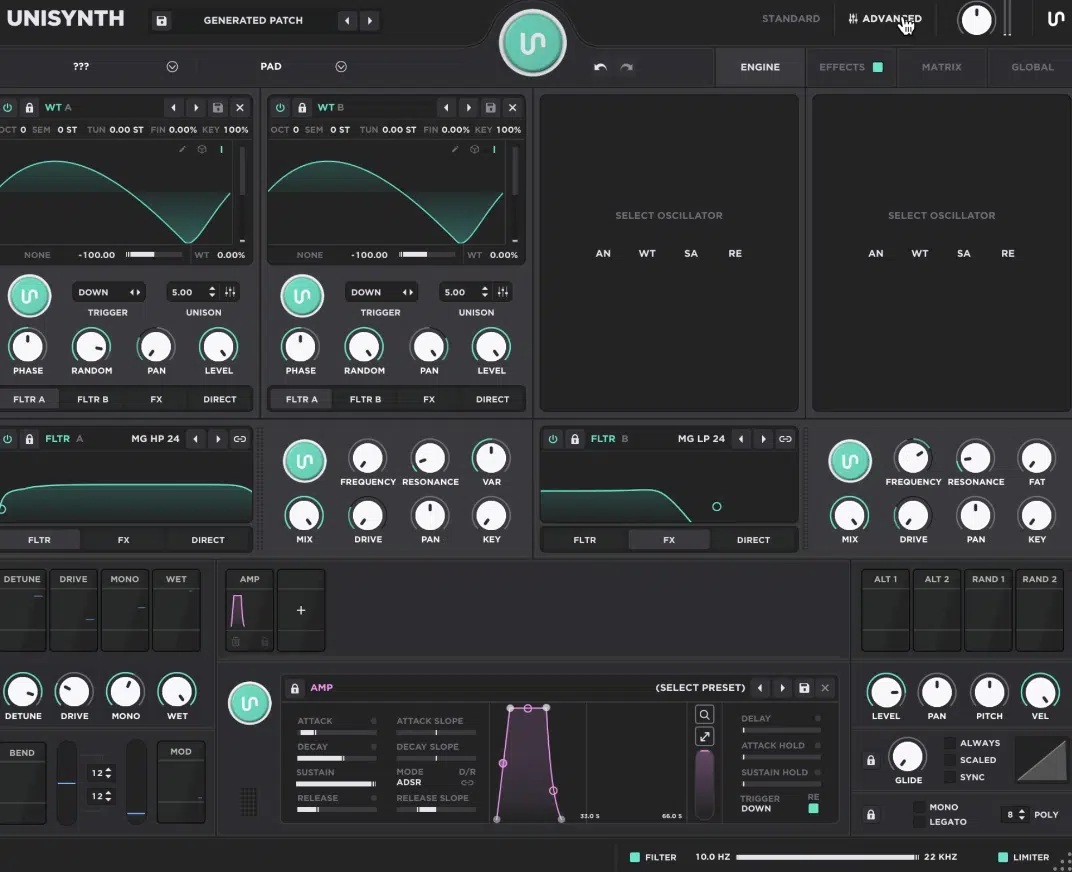
Unisynth is the world’s first and only AI-powered, genre-specific generative synth plugin in the world.
It doesn’t just toss you into a generic preset pile and give you no guidance on how to dig yourself out, or what direction to go in, no way.
You have 32 different (popular) genres and 6 sound types in which to choose from by pressing the Patch Generator button.
That alone is pretty wild if you ask me 一 meaning a Hip Hop bass, a Synthwave pad, and a Cinematic texture are not all being treated like the same sound-design problem with different labels slapped on top.
But don’t get it twisted, Unisynth isn’t some one-click wonder either, because under the hood you get 4 independent hybrid oscillators you can switch between:
- AN (analog-style synthesis)
- WT (wavetable synthesis)
- SA (sample-based playback)
- RE (physical-model-style resonator behavior)
From there, those oscillators can be shaped by 2 primary filters with 95 filter types each and pushed through as many as 24 high-quality FX units.
As well as animated with up to 48 simultaneous modulators, which is a seriously stacked architecture by any standard.
Then you have the 80 generators, and this is where it gets extra nasty…
They don’t just randomize whole sections, but can generate context-aware values across oscillators, filters, modulators, FX, and the individual parameters.
So, when it comes to the wavetable editor, it’s not just living inside some stripped-down gimmick synth.
Instead, it’s inside a flagship instrument that also brings 350+ wavetables, 1,250+ samples, advanced routing, deeper modulation, and full-on scratch-design abilities.
Standard View keeps things fast and inspiring, which is perfect when you want to move quickly, but Advanced View is where the real surgery/magic happens.
Side note, that’s where the wavetable editor lives, right alongside the deeper oscillator controls, matrix, and full FX page.
So before we even zoom into the wavetable side, the big picture is already clear: Unisynth is a deep, modern, genre-aware synth beast.
And trust me, that makes its wavetable editor way more exciting because you’re designing source material inside something that can actually take it somewhere crazy.
Wavetables 101: What They Are, How They Work, and Why They Matter
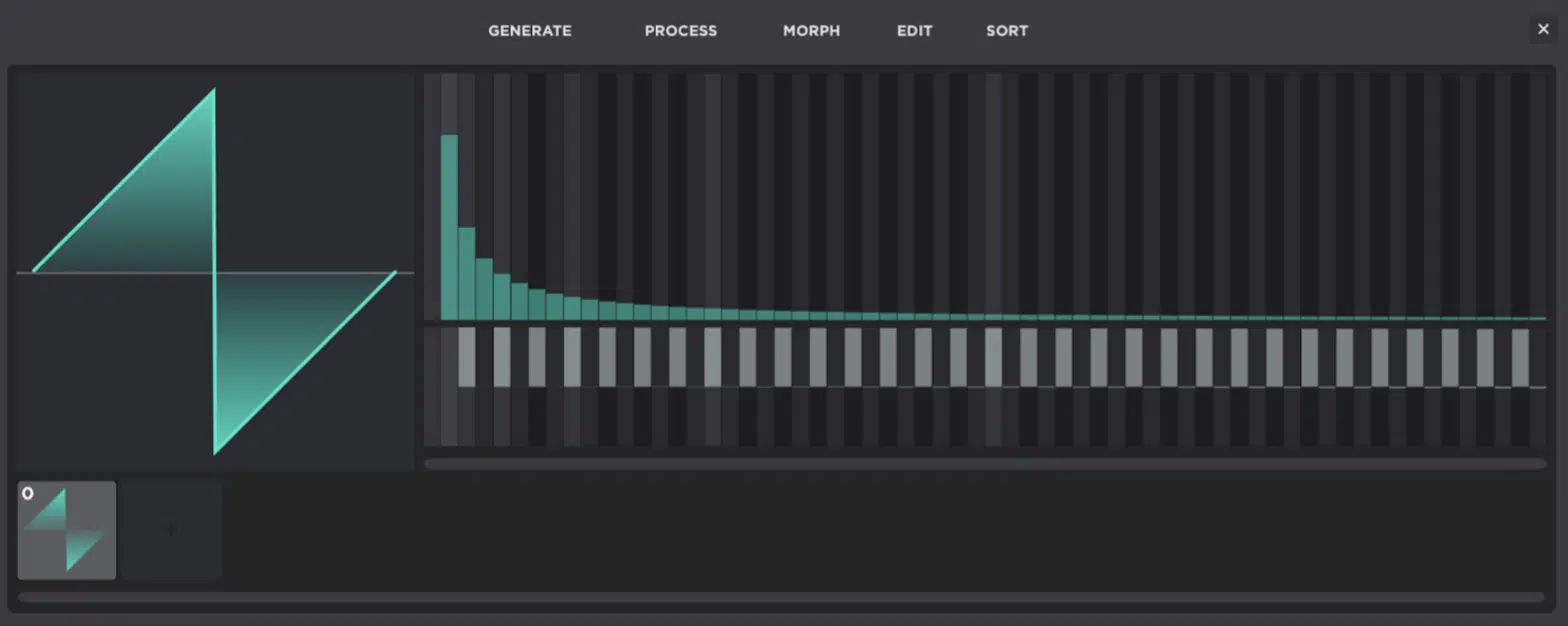
A wavetable is not just one oscillator shape frozen in place, but a collection of single-cycle waveforms (frames) arranged in one table so the synth can move through them while a note is being played, held, automated, or modulated.
That’s the real difference between a normal static waveform and a wavetable:
- A static waveform gives you one harmonic fingerprint and stays there
- A wavetable gives you a whole evolving harmonic sequence (basically strands of sonic DNA instead of one snapshot)
Each frame inside that table carries its own harmonic balance, so one frame might be smoother and darker and the next one might be brighter and buzzier.
And yet another one might lean nasal, hollow, glassy, or straight-up aggressive, depending on which partials are emphasized of course.
Because of that, WT Position (the control that scans through the table) does not just “change the tone” in a vague way, but actually moves the oscillator through different harmonic states frame by frame.
The smartest way is usually having the harmonic spectrum grow as the table advances.
For example, starting with a cleaner, lower-harmonic frame and gradually adding more upper content, more edge, and more density as you keep trucking along.
Of course, you can intentionally break that rule when you want the opposite — abrupt jumps, weird discontinuities, more robotic movement, glitchier aggression.
But even then, the key word is intentional, so always remember that.
NOTE: That is why good wavetable design is a science, not random knob-twisting, because frame order, harmonic density, odd-versus-even balance, phase relationships, and the distance from one frame to the next all decide whether a sweep feels smooth, musical, tense, nasty, broken, or just plain whack.
When you design your very own tables, you’ve got the sound design world at your fingertips and can seriously level up your tracks.
You’ll be able to build basses, leads, plucks, pads, formant-style tones, comb-like digital textures, FM source tables, or resonator excitation material that is 100% unique and one of a kind (since the source table itself is your own).
And if the wavetable is unique at the source, then the final sound is already carrying your fingerprint before filters, unison, macros, modulation, or FX even get involved.
That’s also why simply swapping the table inside a finished preset can completely change its identity, which is such a slick move when you like a patch’s structure but want to inject your own sonic DNA into it fast.
Bottom line, stop thinking of a wavetable like a random pile of wave shapes…
Instead, you should start thinking of it like a strategic tonal storyline, where every frame has a job and every transition has a specific reason to exist.
Unisynth’s Wavetable Oscillator: The Power Behind the Perfection
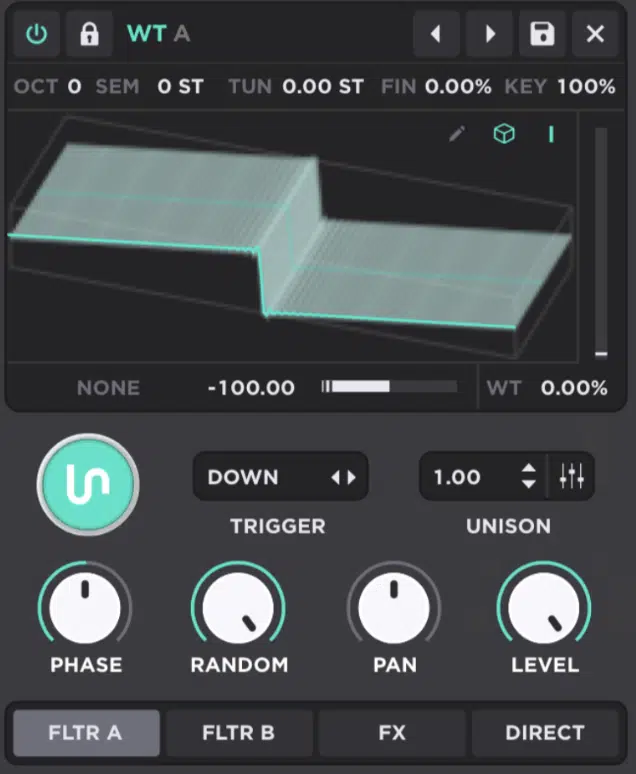
Unisynth’s WT Engine is one of the 4 full oscillator types available in each of the 4 oscillator slots, which already tells you it was meant to be used seriously.
The second you switch an oscillator into WT mode, you get direct access to the controls that actually matter:
- Table selection
- The dedicated Wavetable Editor button
- 2D or 3D display modes
- Interpolation
- Wavetable Position
- The shared oscillator distortion section
#1. Table selection is the first big choice, because that’s where you decide the raw harmonic personality that you’ll be feeding into the patch.
This could be smoother, denser, brighter, thinner, more hollow, more aggressive; whatever the sound needs.
#2. Wavetable Position is the real action control, since it scans through the slices of the table itself.
Meaning, one oscillator can move from a lean opening frame into a much brighter, nastier, or fuller later frame without ever changing pitch.
#3. Interpolation (the smoothing between frames) changes the feel of that motion in a big way too, because when it’s on the transitions blur together more fluidly.
However, when it’s off, WT Position steps through frames more directly without adding (essentially) crossfade between each frame, and can sound more rigid, digital, and staircase-like.
Keep in mind that the difference isn’t subtle by any means.
A soft evolving pad, glossy chord stack, or lush lead will usually feel more polished with interpolation on, while an abrasive bass, robotic arp, or edgy digital stab can sound way harder when the frame stepping is exposed.
#4. 2D and 3D view modes help from two different angles as well…
2D gives you a cleaner look at the active waveform shape you are hearing right now, while 3D lets you see the bigger depth/progression of the full table across its frames.
#5. WT also shares the oscillator distortion modes found in Analog mode, so before the signal even hits unison, filters, or FX, you can reshape it with different modes.
Specifically, modes like Sync, Quantize, Bend, Squeeze, PWM, Flip, Mirror, and even FM, PM, RM, or AM when another oscillator is acting as the source.
That is a huge advantage, because now the wavetable is not only evolving across its own frames, but the harmonic spectrum inside those frames can also be tweaked.
You can stretch them, fold them, throw on some phase distortion, or even cross-modulate first.
This makes the result even more complex, more alive, and a lot more unique before the rest of the patch starts piling on top.
All-in-all, Unisynth’s wavetable engine is not just about loading a table and sweeping it around for fun 一 absolutely not.
It gives you multiple ways to view, scan, and reshape the source itself so the motion feels intentional, the timbre stays custom, and the preset you end up with does not sound like a copy-paste version of somebody else’s in any way, shape, or form.
Inside Unisynth’s Wavetable Editor
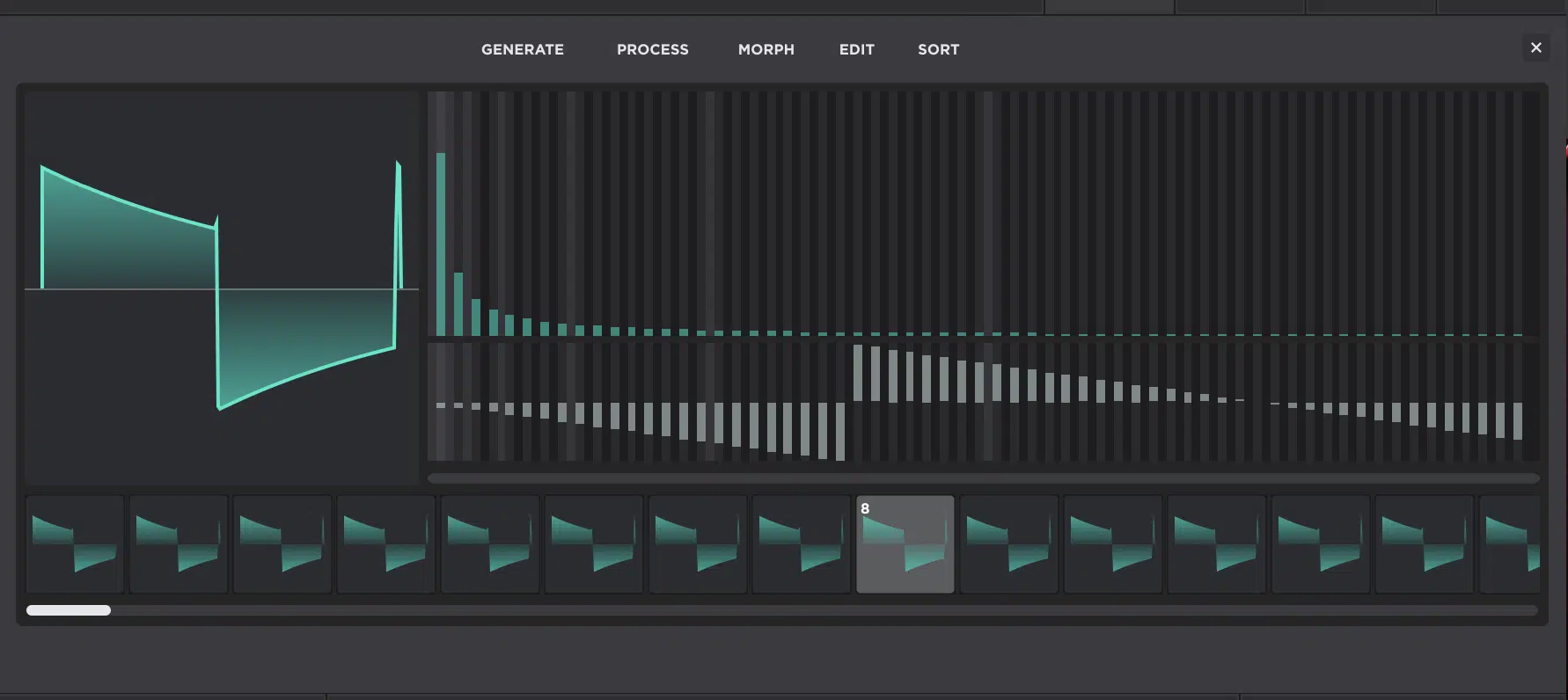
Inside Unisynth’s WT Editor is where things start getting juicy (and undeniably fun). You’re not just using a wavetable; you’re actually rewriting it completely. Once that clicks, your whole workflow will change and you’ll start thinking like the person building the source from the ground up (like a professional). So, before we get into the heavier moves, let’s map the editor out so every part of it feels simple, clear, and ready to abuse in the best way.
The Layout, Frame Strip, and FFT Editor
Unisynth’s wavetable editor is laid out in a super logical top-to-bottom way, and once you understand what each zone is doing, it’ll no longer be intimidating.
At the bottom, you have the frame strip, which is where the wavetable’s individual frames live.
Here, you’ll be able to add frames, click them to select them (SHIFT+CLICK to select multiple), and drag them around to change the order of the table.
Sitting above that is the FFT editor (Fast Fourier Transform editor) which is basically a view that lets you draw any or all individual partials, or “bins,” that make up the harmonic series to give you the highest level of control over designing custom timbres.
It works directly with the harmonic makeup and structure of the waveform itself.
This is where the selected frame gets edited through the process of additive synthesis, working with partials and the corresponding phases/amplitudes across what’s known as the harmonic series.
Those vertical bins run from left to right in ascending harmonic order.
The far-left bin starts at the fundamental, then the bins keep climbing upward through the overtone series 一 with octave multiples and powers of two highlighted visually to make the structure easier to read.
And yes, even if you didn’t understand fully, you can definitely still use the Editor and get the results you’re looking for without knowing this particular discipline.
- The top half of that FFT area controls amplitude (how loud each harmonic is)
- The bottom half controls phase (the timing and alignment of those harmonics inside the cycle)
So you’re shaping both the spectrum and the waveform behavior at the same time.
One little thing that is easy to miss is that, if you select multiple frames, only the first selected frame is edited directly in the FFT area…
This can definitely trip you up if you think the whole group is changing and it’s not.
So, once you see it clearly, the layout is actually super clean…
The bottom strip handles the progression of the table across time, and the FFT editor above it handles the process of synthesizing what each frame in that table harmonically consists of.
Selecting, Adding, Removing, and Rearranging Frames
Every frame in the strip is one single-cycle snapshot of the oscillator, so the second you change the order, you’re changing the exact route WT Position takes through the timbre (again, not in a vague way, but frame by frame).
In Unisynth, you can click a frame to select it, and that immediately sets WT Position to that frame.
This is super useful when you’re comparing (for instance), Frame 2 against Frame 5 and trying to figure out exactly where the sweep starts getting brighter, harsher, thinner, or just plain weird.
You’re also able to:
- Add frames with the plus icon or the Add command
- Remove selected frames that are not earning their keep
- Drag frames into a new order whenever the progression feels backward, too jumpy, or tonally confused
A really common example is building 4 frames where Frame 1 is mellow, Frame 2 is a little brighter, Frame 3 suddenly gets super brittle, and Frame 4 drops back into something hollow.
Each frame might sound cool by itself 一 but together that sweep is going to feel like it is tripping over its own feet.
If you reorder those same 4 frames so the harmonic density rises more naturally.
For example, mellow in Frame 1, fuller in Frame 2, brighter in Frame 3, and then most aggressive in Frame 4.
The motion will instantly feel more intentional, even though you didn’t redraw a single harmonic (super cool, right?).
It also helps to be disciplined when it comes to frame count as a lot of people think they need to fill every possible slot just because the editor gives you room.
This is absolutely untrue, so don’t be one of these people!
A more focused 4-frame or 6-frame table will typically sound way better than a bloated one with 12 half-related ideas jammed together (trust me on that one).
So if your goal is something specific, like clean to bright, soft to biting, hollow to nasal, or smooth to metallic, make sure to build exactly the number of checkpoints needed to tell that story, then stop there!
Remember, you’re not just managing little wave pictures…
You’re sequencing a tonal progression, and the more fluid/musical the sweep becomes once WT Position starts moving.
Editing Harmonic Amplitude and Phase with Purpose
Next up let’s talk about editing harmonic amplitude and phase, which is where the FFT (Fast Fourier Transform) Editor really shines.
Every vertical bin is one singular partial, with amplitude on the top half and phase on the bottom.
So before touching anything, you want to decide what kind of wave you are actually trying to build, since the harmonic recipe is the sound.
Not some separate technical layer sitting behind it.
A sine wave is the cleanest example, because it is basically just the first partial by itself, which is why it sounds pure, rounded, and almost completely free of buzz.
A saw wave has the opposite vibe, since it carries the harmonic ladder upward, making it sound bright, rich, and naturally aggressive even before any filter/distortion tweaks.
A square wave lands somewhere else again, because it leans on the odd harmonics while leaving the even ones out, so the tone comes out hollower, woodier, and more vocal-like than a saw even when both still cut through.
Once you hear the bins that way, amplitude editing stops feeling abstract, because boosting certain regions can add bite, weight, edge, hollowness, or presence.
On the flip side, pulling others back can smooth a frame out, tame harshness, or keep a bass from getting fizzy up top.
So, say you are shaping a lead and it feels a little too polite…
Pushing some upper-mid partials can give it that forward, speaking quality, whereas shaving off a few nasty high harmonics can keep the same frame from sounding brittle and cheap.
Phase is a different beast, though, because it controls the timing and alignment of those partials within the cycle.
And even though the waveform may look louder or more dramatic after phase changes, the actual frequency content has not changed.
What does change, however, is the shape those harmonics create together, which means phase can affect:
- Symmetry
- Perceived punch
- The sharpness of the cycle
- How clean the wave starts
- How naturally one frame hands off to the next when WT Position is moving
And if you’re going to master this section, you really have to be on point when it comes to your editing moves.
Click to set a bin, drag to paint across several, right-click for finer relative control, Shift-click to influence the bins above, Command-click to isolate one, and Option-click to draw a straight line.
They let you sculpt with intent instead of poking around blindly.
Put all of that together, and this section of Unisynth stops being “the place where you tweak bars” and turns into a legit additive-wave design environment.
It’s where you can decide (down to the partial) what kind of timbre the frame should have and how it should behave once the table starts moving.
Modifying Existing Wavetables Without Wrecking Them
A lot of the time, the best table is not one you build from zero, but one you reshape without killing the character that made you notice it in the first place. That is a different mindset, because now the job is not to start over; it’s to keep the sauce, cut the junk, and push the movement where you actually want it to go. So, for this next section, let’s talk about random experimentation, and more about controlled edits that keep a good table sounding on point (and help it to be more usable overall).
Using Generate and Process to Reshape a Frame Fast
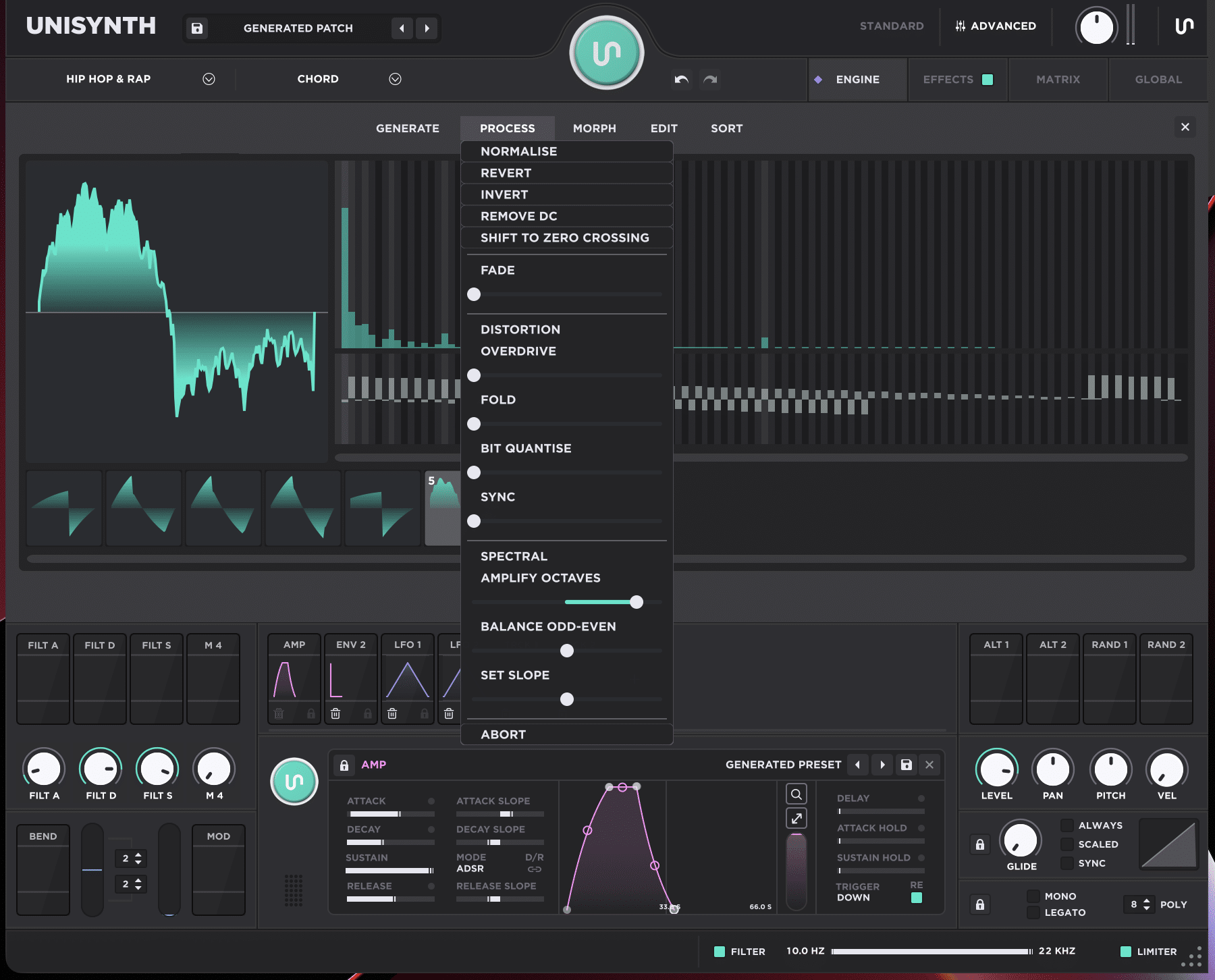
Generate is the fastest way to replace a frame that is not working, because it can instantly swap the selected frame to Clear, Sine, Saw, Square, Noise, Triangle, or Pulse
This is a way smarter way of doing things rather than spending 15 minutes trying to rescue a shape that was never that good to begin with.
Each one gives you a very different starting point too:
- Sine is nearly pure
- Triangle is smooth but a little richer
- Saw gives you that full-spectrum bright bite right away
- Square leans hollow and woody
- Pulse can sound narrower and more character-heavy
- Noise is basically controlled chaos you can sculpt afterward
Then the Process menu takes over 一 where Unisynth splits things nicely between cleanup moves and more obvious tone-shaping moves.
Normalize, Revert, Invert, Remove DC, Shift to Zero Crossing, and Fade are mostly about correcting or refining behavior.
On the other hand, Overdrive, Fold, Bit Quantize, and Sync are more about changing the attitude of the frame itself.
So, for example, if a frame has the right basic tone but feels offset or awkward at the start, Remove DC plus Shift to Zero Crossing can tighten it up fast.
And a tiny Fade can make the frame edges behave a little more cleanly.
If the frame feels too safe, on the flip side, Overdrive can harden the contour and Fold can introduce more twisted symmetry and edge.
Also, Bit Quantize can add that stepped digital grain, and Sync can force a more aggressive harmonic contour that feels sharper and more intense.
A good move would be dropping a Triangle into one weak middle frame of an otherwise solid table, normalizing it, and folding it just a little for extra bite.
Just don’t forget to shift it to zero crossing so it still sits nicely between the frames around it (that’s very important if you want things to sound professional).
Another one would be taking 3 selected frames that already sound close, applying a small cleanup pass across all 3, then listening again to see whether the sweep now feels tighter without losing the character that made those frames worth keeping.
That is the whole point of Generate and Process… It’s all about fast, deliberate reshaping, not random button punching.
This way, you successfully hold on to the vibe of the original table while fixing/perfecting the exact part that was dragging the entire thing down.
When Morphing Works Better Than Manual Editing
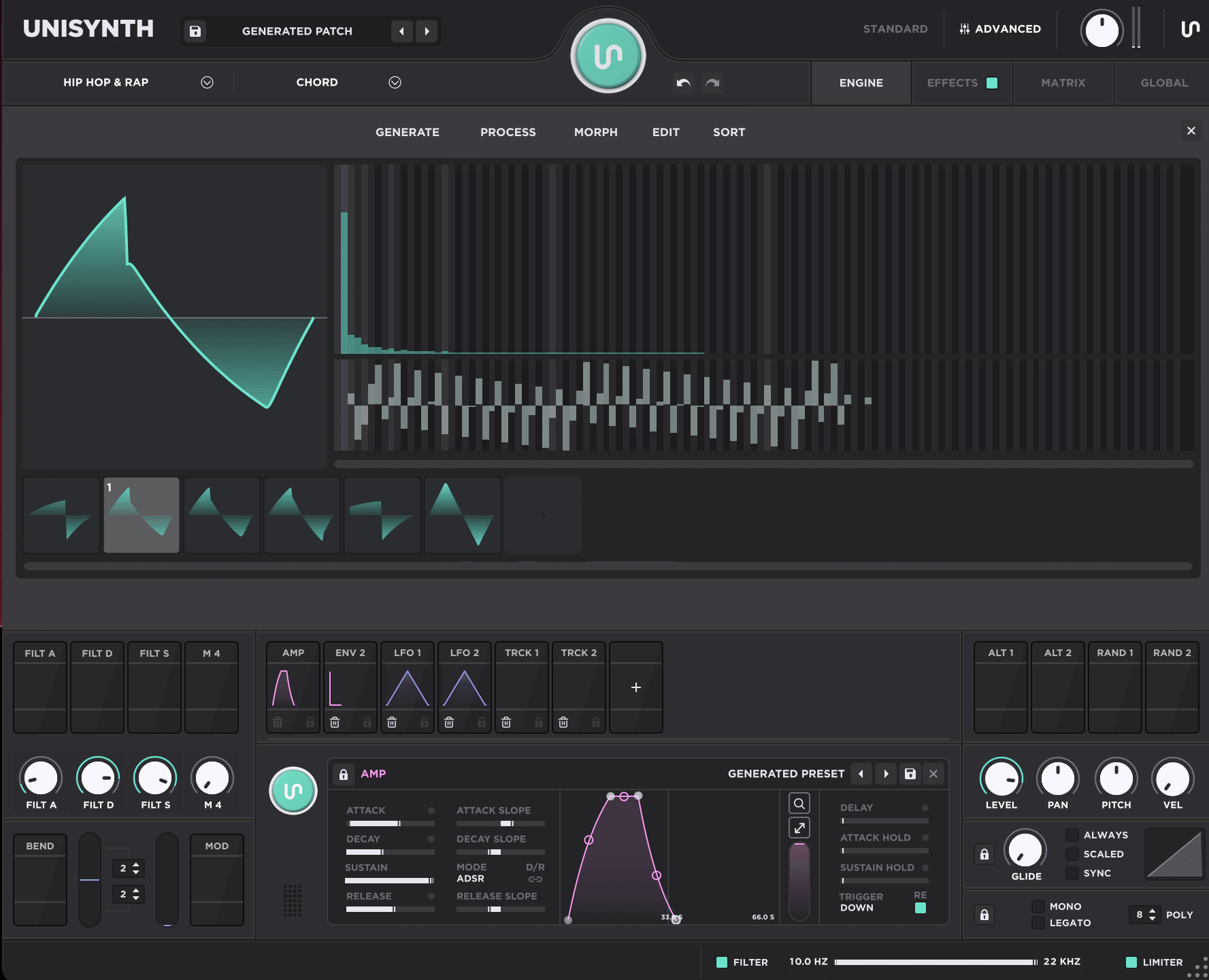
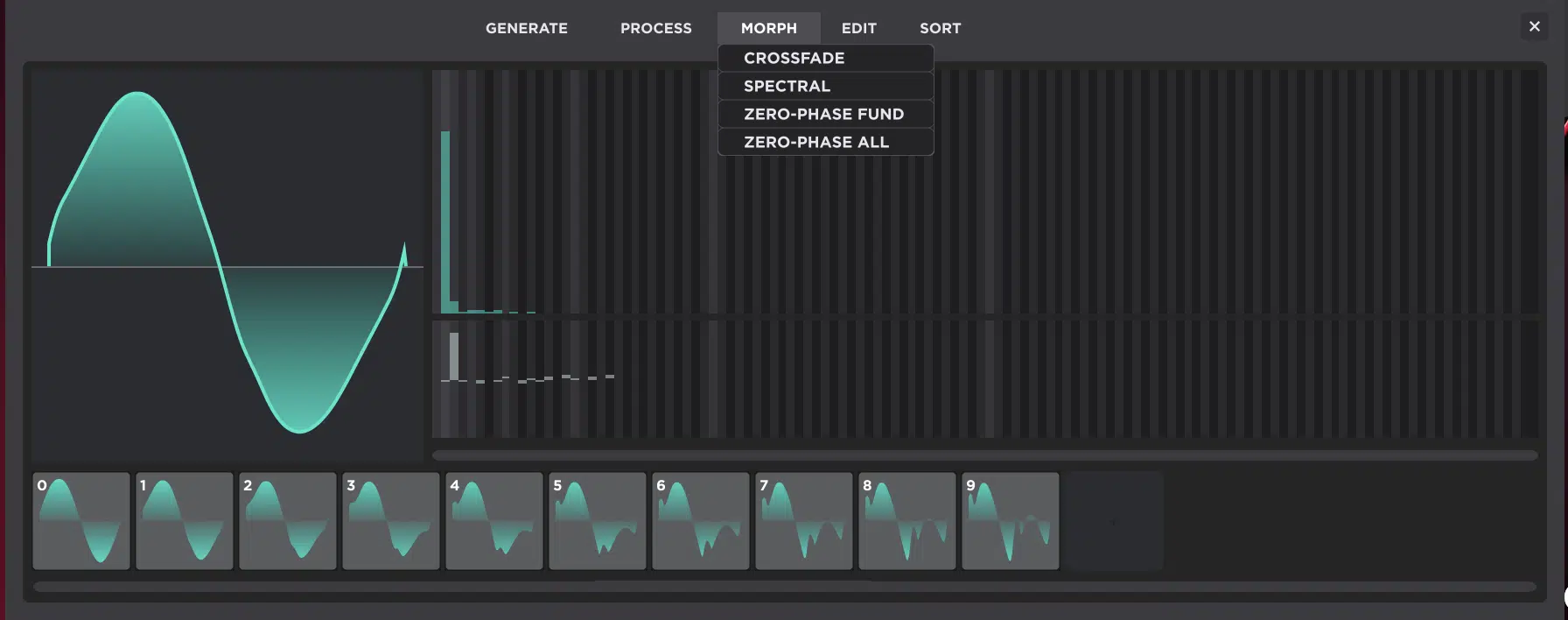
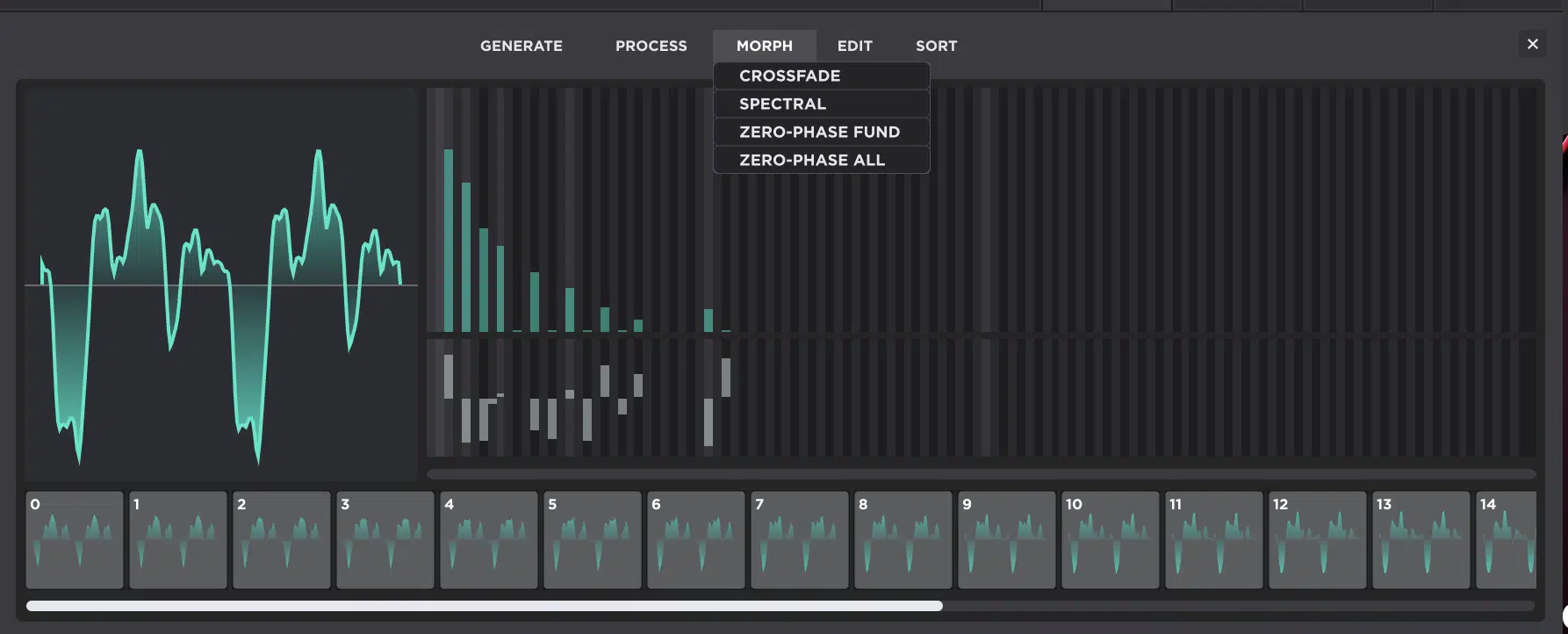
Morph is the better move when the problem is not one bad frame, but the travel between frames, because it works across a selected range and creates the in-between motion from the first selected frame to the last one.
So if Frame 1 feels right, Frame 5 feels right, but Frames 2 through 4 feel patched together, Morph can save you a ton of time.
It does so by building a smoother bridge instead of making you hand-draw every stop one by one (and will help if you’re already getting frustrated as well).
Unisynth gives you 4 morphing choices here:
- Crossfade
- Spectral
- Zero-Phase Fund
- Zero-Phase All
Each one is useful for a slightly different reason, which I’ll break down right now.
Crossfade is the simple one 一 perfect for when you want a straight blend from one frame to another without getting too deep into the harmonic internals.
Spectral typically makes more sense when the endpoints are pretty different.
This is because it pays more attention to the harmonic content itself and often gives you in-between frames that feel more coherent instead of just blurred together.
Zero-Phase Fund lines up the fundamental phase across the selected range.
Zero-Phase All lines up all harmonic phases, which can clean up a sweep that feels blurry, smeared, or unstable even when the harmonic content is close enough.
A really solid example would be a bass table where Frame 1 is dark and controlled, Frame 6 is snarling and bright, and you want Frames 2 through 5 to climb there evenly over the course of a 1-bar or 2-bar modulation.
Morph can do that much faster, and usually much more smoothly, than trying to draw 4 separate intermediate frames from scratch.
Same thing with pads or leads, where you want the sound to open over 2, 4, or even 8 bars without it feeling like a handful of unrelated waveforms got taped together and told to act natural.
So Morph is not really a “lazy shortcut” at all…
It’s more like a strategic table-building tool for when you already know your start point, already know your destination, and just need the travel between them to sound believable and professional.
Using Sort to Clean Up the Sweep
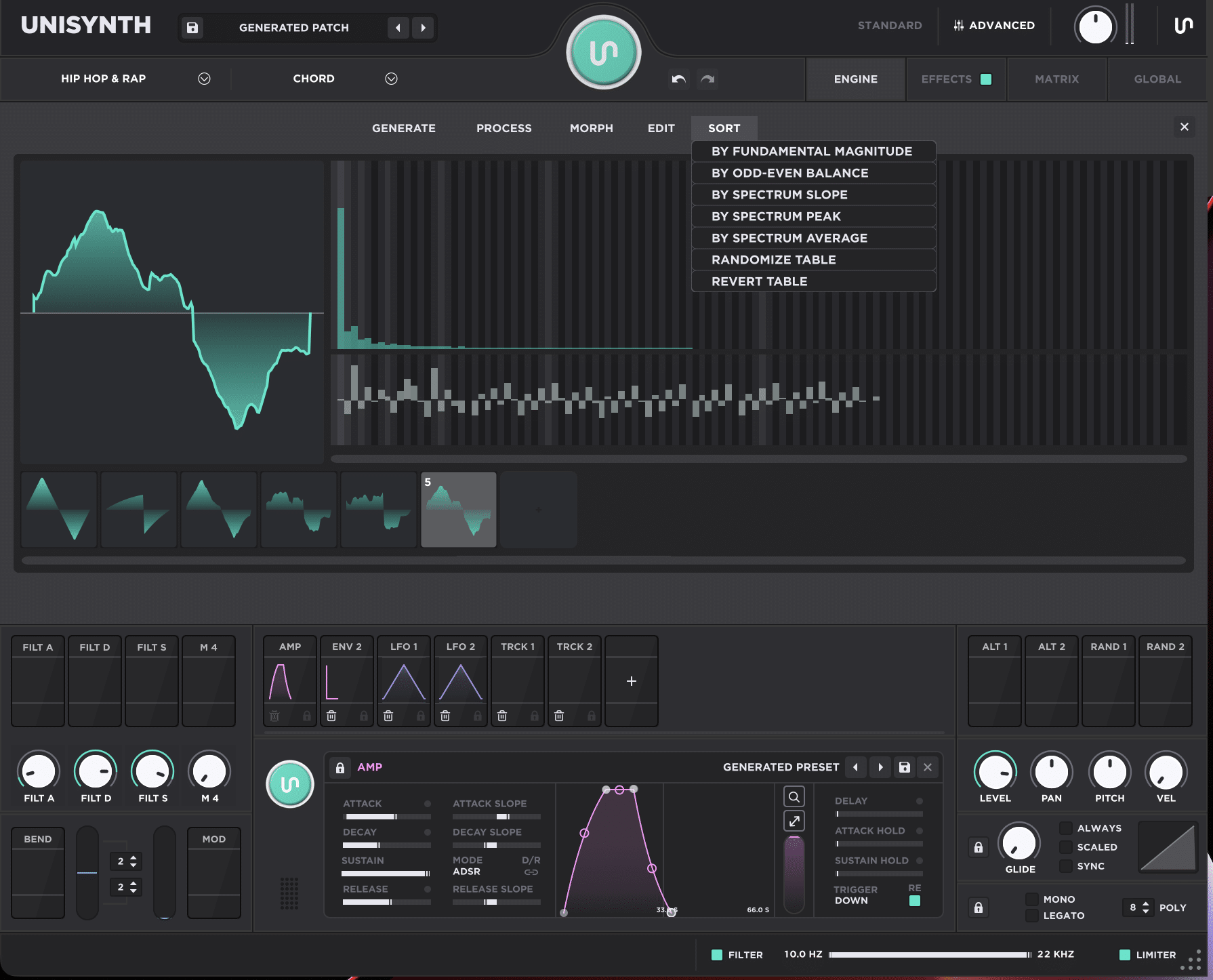
Sort is one of those features that seems almost too basic at first…
Then you use it on a messy table and realize it can completely change how musical Wavetable feels without touching one single partial by hand.
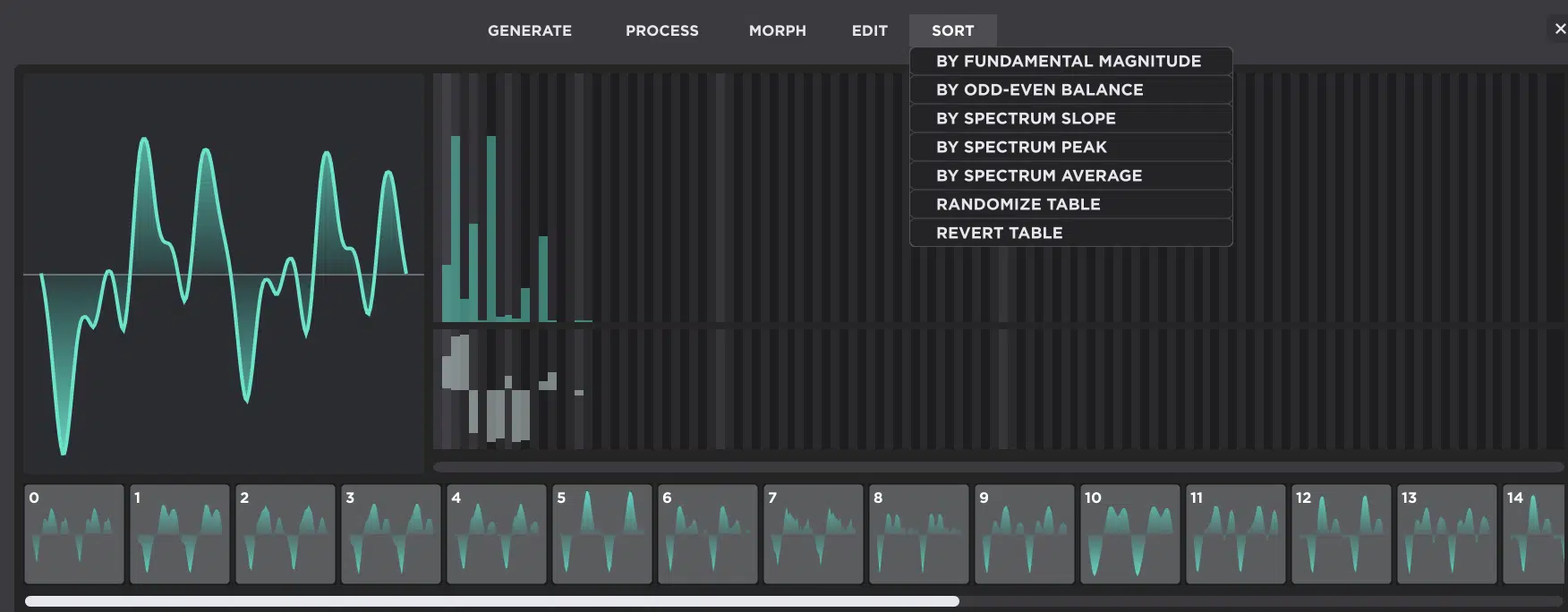
Unisynth gives you 7 sort-related options here:
- By fundamental magnitude
- By odd-even balance
- By spectrum slope
- By spectrum peak
- By spectrum average
- Randomize Table and Revert Table
Sorting by fundamental magnitude can line frames up by how dominant the root partial feels.
This is great for when some frames sound stronger, fuller, or more centered than others and you want that sense of weight to rise or fall more naturally.
Sorting by odd-even balance is more about tone flavor, because frames with stronger odd content usually feel hollower, woodier, or more reed-like.
On the flip side, frames with more even contribution tend to feel smoother, rounder, and a bit more symmetrical.
Spectrum slope is one of the most useful ones for actual movement.
This is because it can organize frames from less harmonic content to more — darker to brighter, cleaner to denser.
It’s exactly the kind of progression that works beautifully for a pad opening over 4 bars or a bass getting more hostile over one bar.
Then spectrum peak and spectrum average are perfect for when the table feels chaotic, because they can regroup frames by where the strongest harmonic emphasis sits, or by how dense the overall spectrum is…
That alone can turn a sweep from “why is it doing that?” into something that feels intentional and on point.
NOTE: Randomize Table can be super fun for glitchy accidents or more erratic digital behavior, but most of the time it will destroy the internal logic of the sweep, and Revert Table simply flips the direction of the story.
So, really, Sort is not about tidiness, it is about making the trip from Frame 1 to Frame 256 feel like it has a musical destination.
Building Your Own Wavetables from Scratch
Making your own table from scratch in Unisynth is where things start getting really fun in my opinion. There’s no borrowed logic, no factory movement, and no prebuilt story carrying the sound for you. At that point, every frame is your call, every transition is on you, and the whole sweep either works or fails based on the decisions you make. So, in this next section, I’ll help you build one the best way 一 clean at the start, controlled in the middle, and musical once it is actually moving.
Step #1: Start with a Clean First Frame
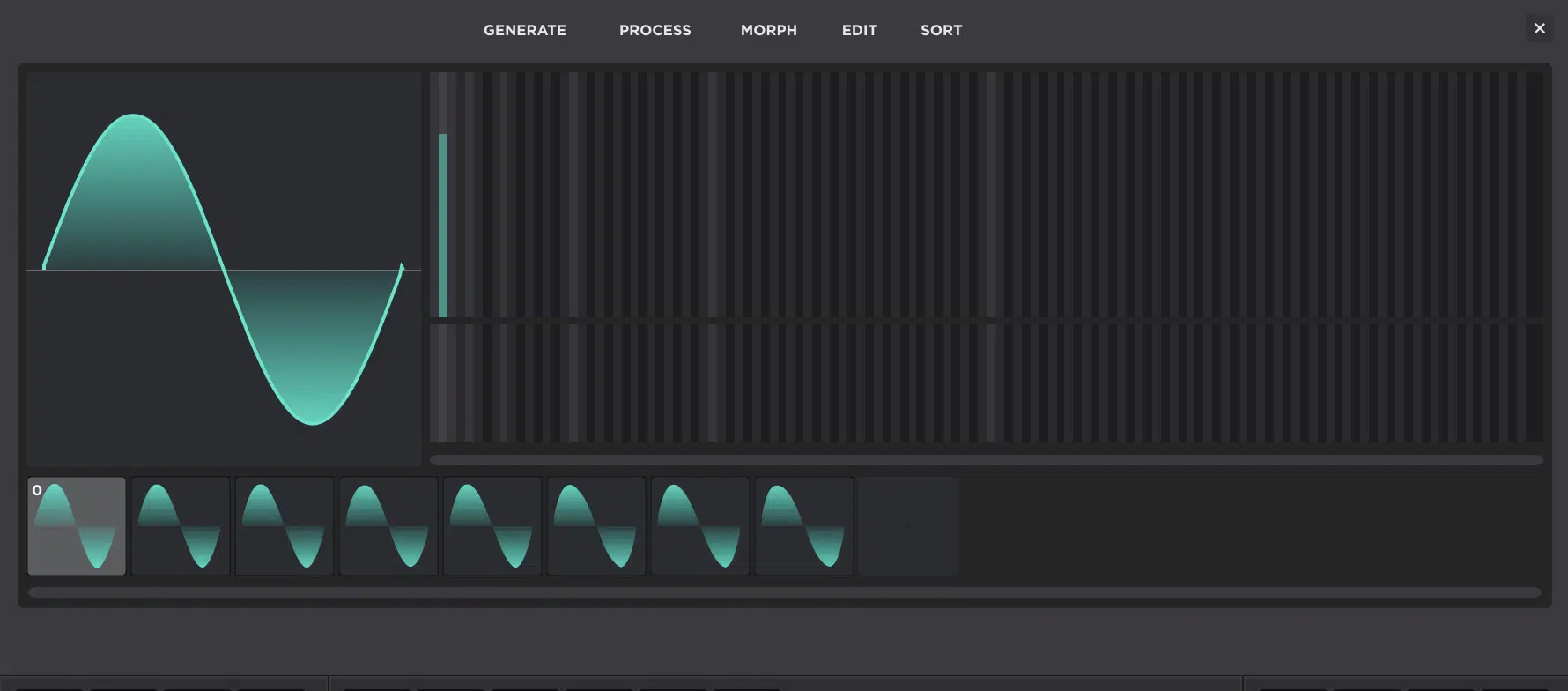
To kick things off, you’ll need to know that the first frame should usually be the cleanest, simplest, or least harmonically dense version of the idea.
It’s going to give the entire table a stable anchor, as opposed to dropping you into maximum intensity right off rip.
- A Sine is perfect when you want the opening frame almost pure
- A Triangle gives you a slightly richer but still smooth starting point
- A Square gives you more hollow bite
- A Saw gives you instant brightness
- A Pulse can be great when you already know you want a narrower, more character-heavy tone from the jump
Just keep in mind that a Pulse wave is simply a Square wave with what’s known as its “duty cycle” shifted by any set amount; whatever works in your case.
This is basically making the width of the shape bigger or smaller 一 changing the timbre of the sound completely.
A Square wave’s duty cycle is 50%, which is why its two halves are identical in width.
If the duty cycle is anything else, and the width of the top half and bottom half of the wave are not identical, it’s officially a Pulse wave at that point.
Modulating that position with an LFO is responsible for the sound of vintage string machines, because it’s just a Pulse wave with a very fast LFO modulating its duty cycle.
That opening choice is everything because if Frame 1 is already packed with upper harmonics, asymmetry, and attitude, the sweep has nowhere satisfying to grow…
It’s basically showing all its cards in the first second.
For a bass table, that might mean opening with a restrained Triangle or Square-based shape before introducing sharper upper harmonics later.
While for a pad, it might mean starting with something almost sine-like so the movement can gradually grow outward.
Even for harsher sounds, the first frame still benefits from some discipline.
A cleaner opening frame makes the later frames feel more dramatic when they finally bring in the extra buzz, edge, or density.
So you want the first frame to feel like chapter one, not the whole book.
Basically, enough identity to set the tone, but enough restraint that the rest of the table still has room to say something.
Step #2: Build Harmonic Content as the Frames Advance
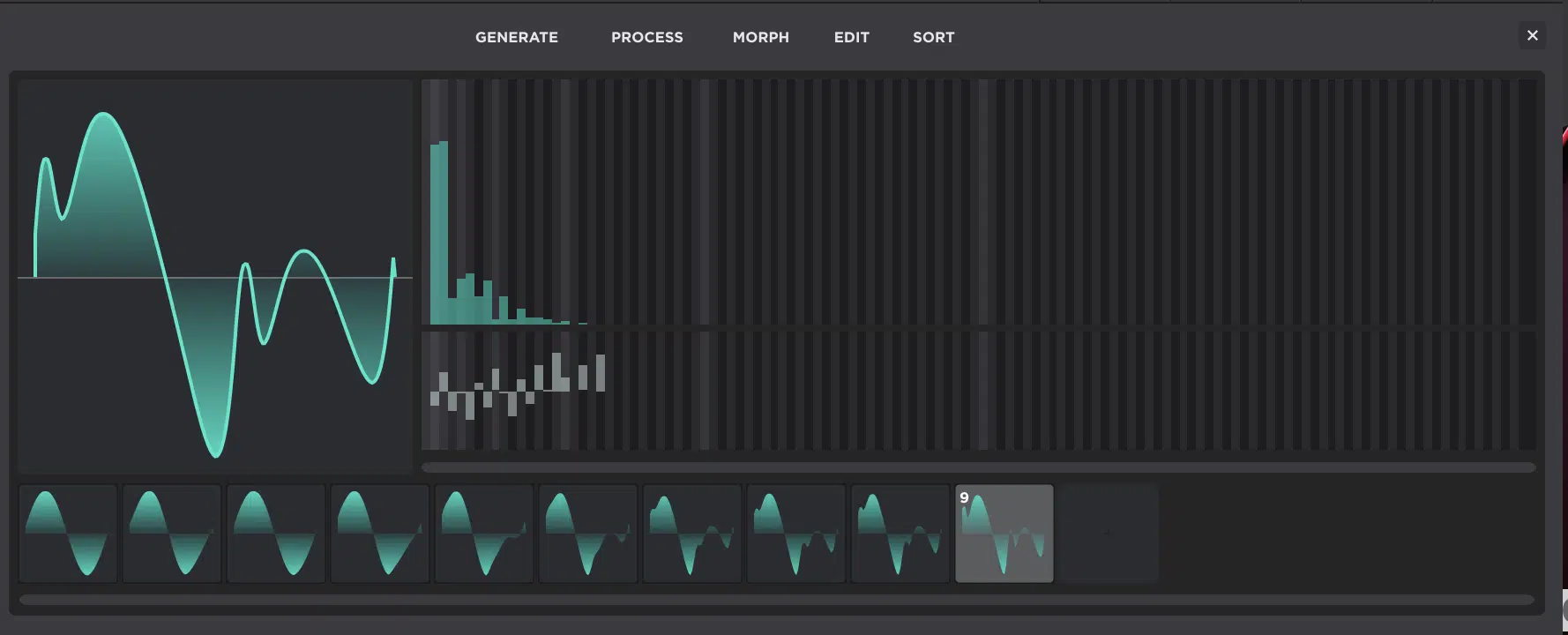
Once the first frame is locked down, the next step is to decide how the harmonic content is going to grow.
And the big thing to remember is that growth should usually feel controlled, not random, which might require you to:
- Add a few upper partials from one frame to the next
- Increase odd-harmonic emphasis for a more vocal or hollow tone
- Push the wave into more asymmetry
- Gradually introduce brighter, denser spectral weight as the table moves forward
Unisynth gives you a TON of ways to do that, which is why it’s so invaluable (and unmatched, even compared to Serum 2, Phase Plant, etc.).
You can draw new harmonics directly in the FFT editor and use Process functions on selected frames.
Plus alter wave behavior with shapes like Pulse, Morph between sparse and dense endpoints, and then Sort the result after if the progression needs tightening up.
The key is relationship 一 period.
Frame 2 does not need to be wildly different from Frame 1, and Frame 3 does not need to feel like a completely different synth…
Each frame just needs to move the sound somewhere meaningful.
For example, a subtle pad sweep may only need 4 to 6 frames with gentle upper-harmonic growth.
A digital bass table, on the other hand, might want a much steeper climb, where Frame 1 feels almost tame and Frame 6 is already snarling.
That is where the science part comes in, because you are not just adding more harmonics for the sake of it, you are deciding exactly how fast the brightness rises, how the texture hardens, and where the emotional tension of the sweep should peak.
Step #3: Shape the Sweep So It Sounds Good in Motion
A table is not finished just because the frames look good on screen, my friends.
The real test starts the second you sweep WT Position and actually listen to what happens over time.
So the move here is to hold a sustained note (or, better yet, loop a note for 4 to 8 bars) and slowly sweep through the table while carefully listening for:
- Harsh jumps
- Dead zones
- Strange volume dips
- Overly repetitive regions
- Frames that suddenly collapse into a tone that does not belong
A slow sweep is basically the equivalent of a first listen in a bounced mix, so do not just throw an LFO on the WT Position and call it a day…
Really go through it slowly a few times and scrub through it, actively listening to the way each unique frame has been fused to the next.
You must analyze and determine all aspects of the table, not just the harmonic content.
That’s what will ultimately determine whether your tables sound like the ones bundled in your favorite synths, or like an amateur threw something together real quick.
Wavetable design is an unsung art form, and it is one of the trade-secret ingredients that separates producers like Skrillex and FINNEAS from everyone else.
If the movement feels too stiff, interpolation may need to be turned on.
On the other hand, if it feels too smeared or too polite, turning interpolation off might reveal the motion in a more calculated way.
Sometimes the issue is not smoothing at all, either…
One frame just sits in the wrong place, sometimes the order is off, and sometimes the phase relationships between neighboring frames make the handoff feel messy even though the harmonics themselves are fine.
That is where reordering, Morph, or phase cleanup can save the sweep, so remember that.
The goal is not just to own a bunch of cool isolated shapes, but to make those shapes behave when WT Position is automated, tied to an LFO, mapped to a Macro, or pushed manually in real time.
NOTE: A good example would be building a custom table for a long lead, then sweeping it over a held 2-bar note until the sound opens gradually, tightens at the right point, and peaks with purpose instead of glitching out halfway through.
That is the moment where wavetable design stops being theory and becomes killer sound design — the table is not just interesting, it actually performs.
Drawing Custom Waves with a Clear Sonic Goal
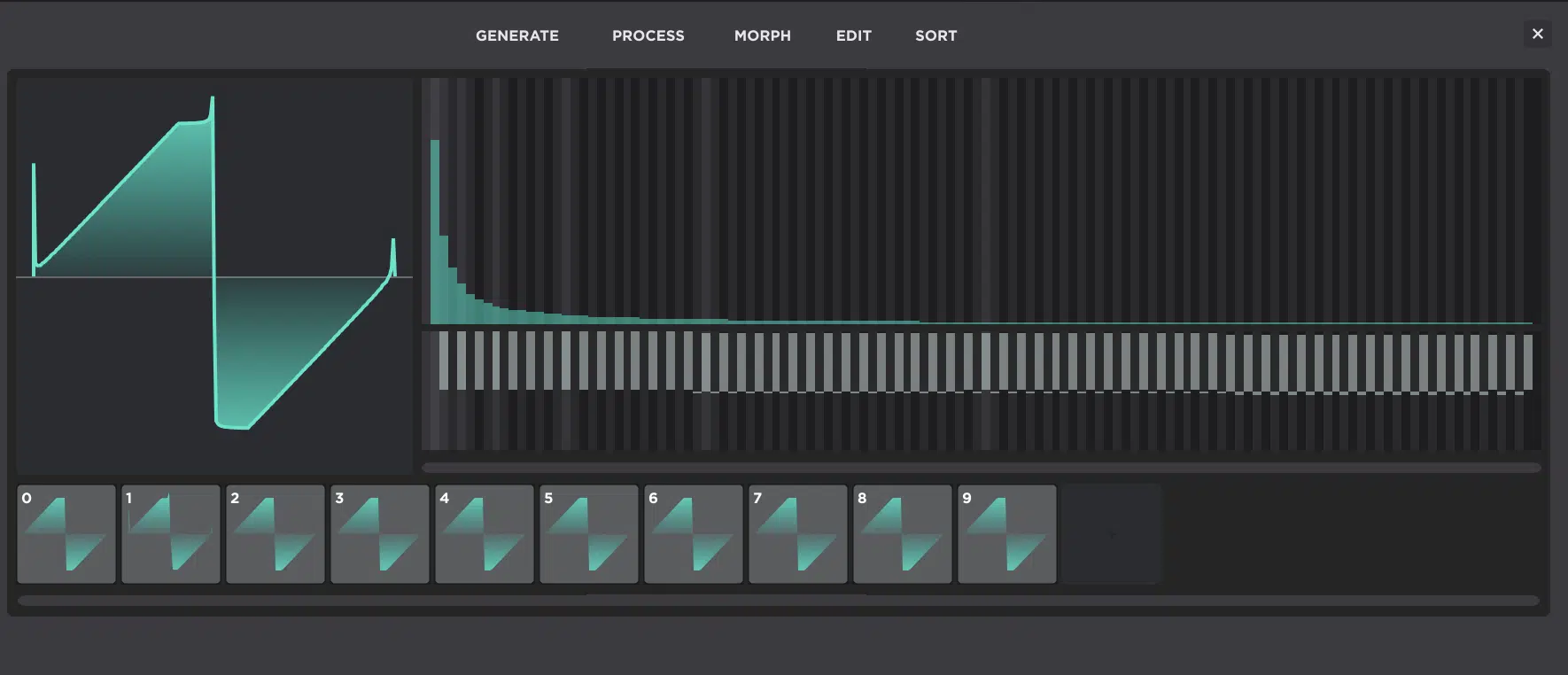
Once the table structure is doing what it should, the next layer is even more personal. Now you’re deciding what kind of personality each frame should actually have. That’s where custom drawing gets really addictive, because instead of settling for “close enough,” you can start shaping the exact tone you were hearing in your head in Unisynth.
Shaping the Base Waveform for the Timbre You Want
When you reshape a single-cycle waveform, you’re literally changing the pattern the oscillator repeats thousands of times per second.
Therefore, even tiny visual changes can cause very obvious tonal changes once the frame is played back.
That is why it helps to start with a concrete target first 一 smooth, buzzy, hollow, vocal-like, metallic, aggressive, nasal, woody, glassy.
This is because each unique one points you toward a completely different kind of shape and harmonic balance.
For example, a smoother tone usually comes from gentler slopes, rounder peaks, and fewer abrupt corners.
While a buzzy or more aggressive tone usually comes from sharper edges, stronger asymmetry, and more upper-harmonic tension packed into the cycle.
If you are aiming for hollow, woody, or reed-like, square-style behavior is often a great clue.
That kind of structure leans harder on odd harmonics and naturally pulls the sound away from the richer, fuller brightness of a saw.
If you want something more nasal or vocal-like, you usually want the waveform (and the harmonic emphasis behind it) to feel more focused and pinched.
Almost like certain frequency areas are being pushed forward while the rest of the spectrum hangs back a little; think about the way a formant filter looks.
You should always look at the waveform and FFT editor together because the drawn line shows the shape of the cycle itself.
The FFT bins show the harmonic reason that the shape sounds smooth, edgy, hollow, glassy, or straight-up nasty.
A few specific shape moves can go a long way here, like:
- Making one side of the wave rise faster than the other can add edge
- Flattening the top or bottom can change the weight and symmetry
- Tightening a peak can make the frame feel more pointed and energetic
Say you are building a pad and want it to open gently over 4 or 8 bars…
Starting with a rounder, more centered frame gives you a cleaner base than jumping straight into a jagged shape that is already screaming by Frame 1.
On the other hand, if you are building a digital bass, a little extra asymmetry and more aggressive contour early on can help the later frames hit harder.
Once you start stacking more harmonics on top, of course.
That is why the smartest way to draw custom waves is to treat the waveform like a tone blueprint, not a doodle.
Every single bend, corner, and imbalance should be there because it helps the frame feel more like the exact sound you are trying to make.
PRO TIP: A true secret that took way too long for me to realize is that all sound in the spectrum looks the same. So, think visually about audio.
When you’re working with something like filters, the way they shape sound corresponds to the way you create it through FFT (because even your audio analyzer uses FFT).
Drawing in Harmonics with the FFT Editor
The FFT editor is where you stop shaping the sound indirectly and start calling the shots partial by partial.
Every vertical bin is one harmonic, and every move you make there changes the recipe of the frame itself.
A really simple example is a sine wave, since that is basically just the first partial by itself, while a saw wave is much denser because it carries the full harmonic ladder upward, and a square wave gets its hollow, woody attitude by leaning on odd harmonics and leaving the even ones out.
Once that clicks, the bins stop looking like random bars and you will understand:
- Which harmonics are essential
- Which ones are adding bite
- Which ones are adding mud
- Which ones are just crowding the sound for no good reason
If you want stronger octave weight, pushing the octave-related harmonics can make the frame feel bigger and more grounded.
If you want a reedier, throatier, or hollower shape, leaning harder on odd harmonics can get you there much faster than broad waveform reshaping alone.
If a lead is not cutting through enough, you can build a more assertive upper-mid presence by nudging a cluster of higher partials instead of just turning the whole sound brighter and harsher.
If a bass frame feels cloudy, you can pull some low-mid harmonic buildup back (say, the area where the tone feels thick but undefined) and keep the same general body without that muddy, blurry center.
If you’re chasing something more vocal-like, you can shape groups of upper partials so the sound feels like it is speaking through a narrower spectral window, rather than spreading its energy evenly from the bottom all the way to the top.
This is also where you can control how a wave blooms across a table…
You might keep Frame 1 relatively restrained, then gradually add more upper harmonics through Frames 2, 3, 4, and 5.
This way, the sweep brightens in a controlled arc instead of jumping from soft to savage in one step, which sounds super unprofessional.
That kind of control is a big reason additive editing is so powerful.
2 frames can look kind of similar at a glance and still sound insanely different depending on which partials are carrying the weight.
So instead of asking, “How do I make this wave cooler?” the better question would be, “Which exact harmonics should be responsible for the color, the edge, the body, and the movement of this frame?”
It’ll help you look at the FFT editor less like a technical panel and more like a direct line into the actual DNA of the sound.
Using Phase, Shape, and Editor Tools Together
The best custom frames usually don’t come from just one move — not one shape edit, not one harmonic tweak, not one cleanup tool.
Instead, it comes from several smaller decisions, all stacked on top of each other in the same direction.
Phase is a big part of that, because it controls the timing and alignment of the partials inside the cycle.
And while it doesn’t change which frequencies are present, it absolutely changes how those frequencies combine into a waveform shape.
So even when the harmonic content stays the same, a phase adjustment can drastically change the:
- Perceived punch
- Sharpness
- Symmetry
- Edge
- How cleanly the frame starts & hands off to the next one in the table
That’s why a frame can sometimes have the “right” harmonics and still feel wrong, if you know what I’m saying.
Maybe the waveform starts weird, maybe the peak behavior feels messy, maybe the cycle looks lopsided in a bad way… Well, phase is usually part of that fix.
Then the editor gestures help you get razor-sharp precise without slowing to a crawl, because you can click to set a bin, drag across multiple bins and right-click for finer relative control.
Plus, Shift-click to affect bins above the selected one, Command-click to isolate a single bin, and Option-click to draw a line across values
That’ll give you a super nice workflow for targeted correction.
This could be like smoothing the upper partial ramp across 6 or 8 bins, isolating one problem harmonic that is poking out too hard, or drawing a cleaner descending shape into a group of highs so the frame feels less spiky.
After the harmonic and phase work is locked down and in a better spot, the Process tools will help you tighten everything up.
NOTE: Remove DC can correct offset, Shift to Zero Crossing can help the wave start at a cleaner point, Fade can soften the frame edges, and Normalize can bring the amplitude back into a stronger range after all your edits.
Then, once one frame feels solid, Morph can generate believable in-between frames, while Sort can reorganize the whole run of frames.
This way, WT Position actually travels in a way that feels professional instead of awkward or just… off.
For example, you can draw a slightly asymmetrical base wave for bite, push a handful of upper-mid partials for more cut and adjust phase so the cycle feels tighter.
Then you can clean the start with Shift to Zero Crossing and Morph it across 4 to 6 frames and Sort the result so the sweep brightens more naturally.
Bottom line, the strongest custom waves tend to feel intentional as opposed to random because they are.
They’re not coming from one lucky accident, but rather from shape, harmonic balance, phase, cleanup, and frame integration all working together like one system.
Pro Tip: The Editor Menus That Really Matter for Sound Design
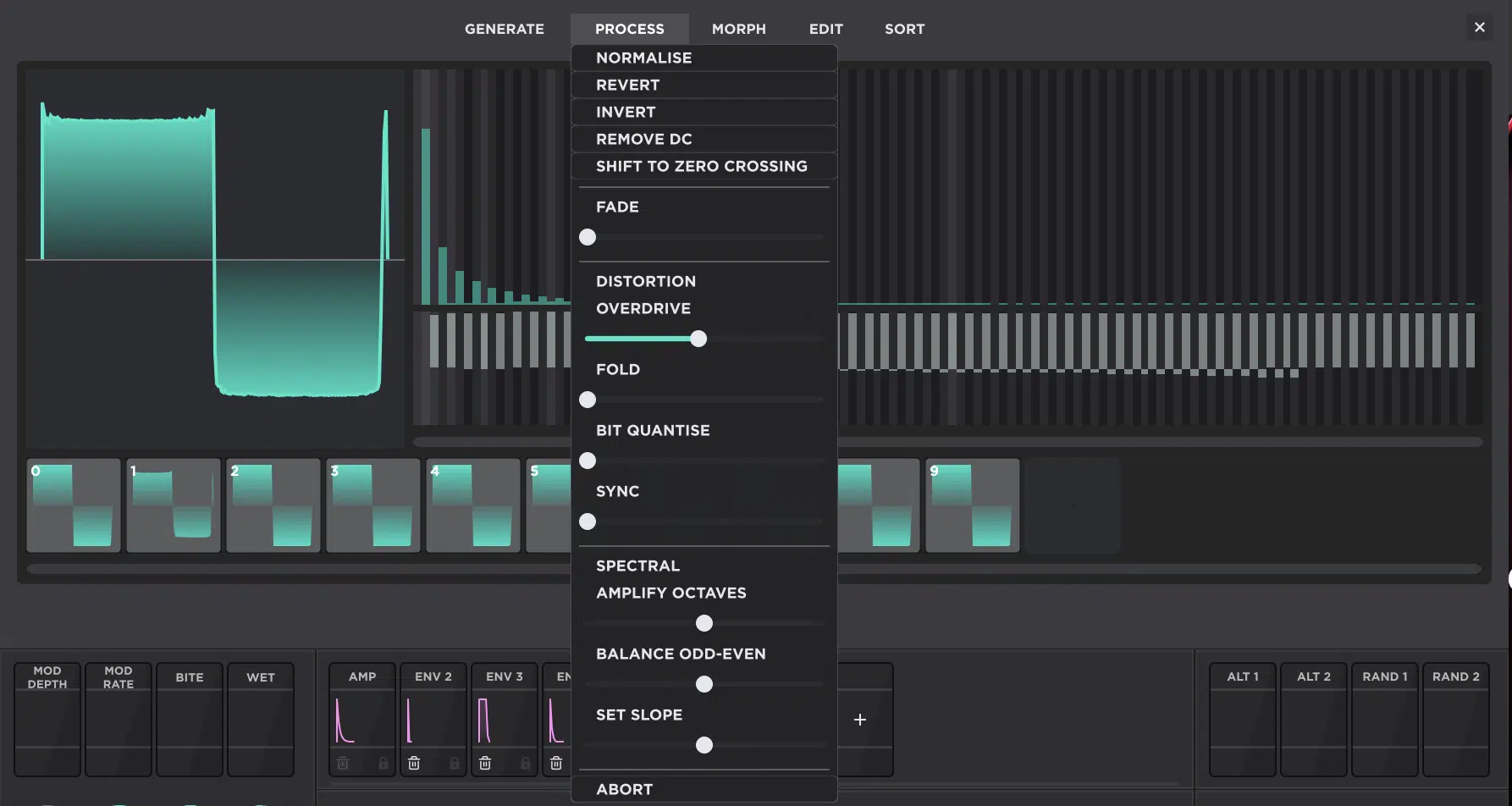
Now, if you’re going to be a Wavetable boss in Unisynth, you’ll need to know the Editor menus like the back of your hand (the ones that really matter).
The 5 menu areas that we’re talking about and you need to master are:
- Generate 一 For fast raw starting points
- Process 一 For cleanup or attitude
- Morph 一 For building believable travel between frames
- Add/Remove 一 For structure
- Sort 一 For reorganizing the sweep so WT Position moves through the table in a way that actually makes sense
The biggest identity-shifters are usually Noise, Pulse, Overdrive, Fold, Bit Quantize, Sync, Morph across 3 to 6 selected frames, and Randomize Table.
This is because those are the ones that can easily flip the character of a frame (or even the whole table) pretty fast and efficiently.
The more corrective moves are things like Normalize, Remove DC, Shift to Zero Crossing, Fade, Add Frame, Remove Frame, and Revert Table.
Those are usually all about fixing level, order, structure, or cycle behavior more than reinventing the overall tone itself.
The most professional workflow is combining them…
This could be like generating a Pulse, shaping the harmonics manually, cleaning it with Process, morphing it across 4 frames and then sorting it by spectrum slope.
Bonus: 7 Advanced Tips & Tricks (Unisynth Edition)
And now that you got all the essentials locked down, let’s get dangerous… in a good way. I mean, you already know how to build a table that works, so now it is time to push into the stuff that gives it more personality, movement, and your own custom vibe. So let’s get into some killer advanced tips and tricks — the ones that can take a wavetable from solid or ‘just okay’ to infinitely memorable.
#1. Going Off Script with Formant and Comb-Style Shapes
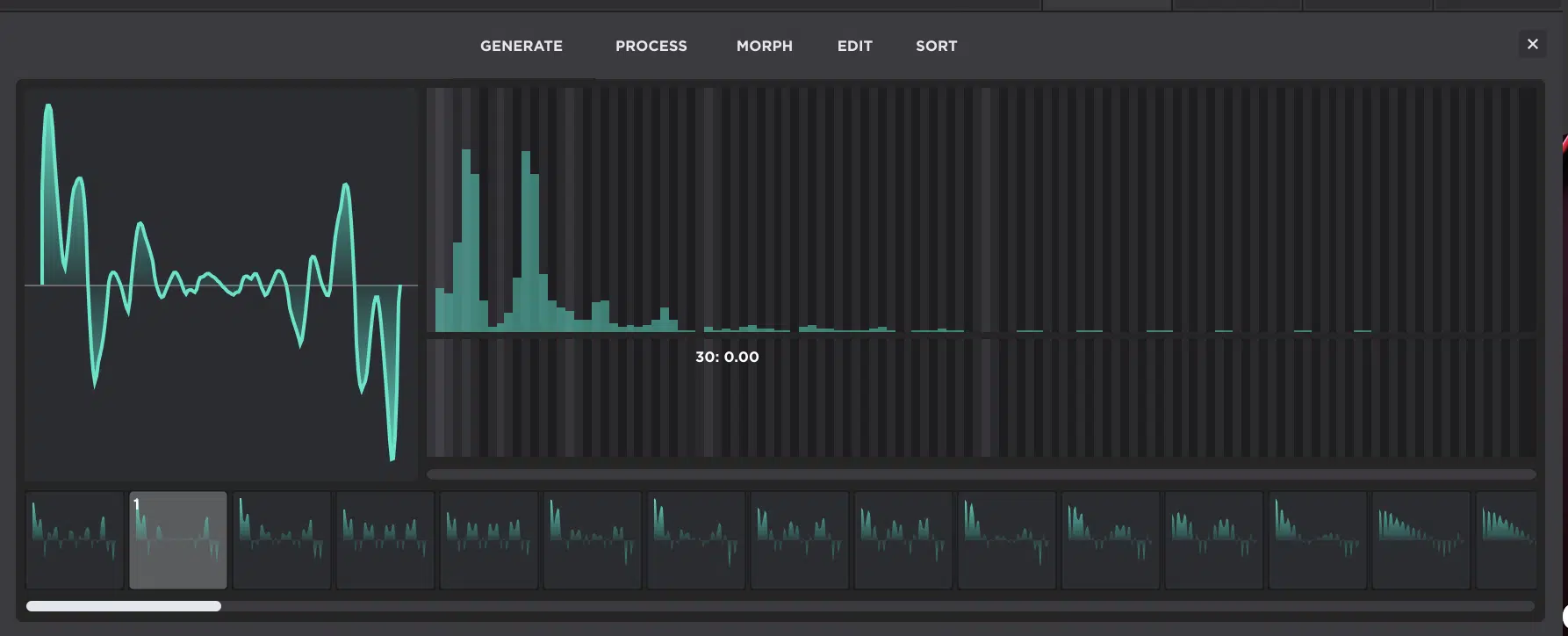
Once you move past the usual saw, square, and “make it brighter” mindset, wavetable design gets way more interesting (and exciting).
You can build shapes that feel vocal, phasey, nasal, hollow, or weirdly resonant before a filter even gets involved.
A formant-like frame usually comes from focused energy in narrower harmonic regions.
And I’m not talking just “more highs,” but specific clusters of partials that make the sound feel like it is speaking through a mouth or throat shape.
On the other hand, a comb-like frame usually comes from repeated spacing patterns, notchy cancellations, and a more artificial, almost metallic internal resonance.
No, it’s not as weird as it sounds when you think of your voice as an instrument, and your lips as your own morphable state-variable filter.
So, for a formant-style tone, you might keep the lower 1st through 4th partials fairly controlled, then emphasize a smaller band higher up…
Maybe a tight cluster around the upper mids. This way the frame feels more “ah,” “eh,” or “oh” than just bright.
For a comb-style tone, you can go the other direction and create more patterned spacing across the spectrum.
You can do this by using regularly spaced, sharp, narrow peaks and dips (named after resembling the teeth of a comb).
Certain areas will be emphasized, others thinned out, and the whole thing will start to feel hollow, phasey, and almost flanged even before motion is added.
Unisynth’s FFT editor is absolutely perfect for this, because you can draw those harmonic clusters in deliberately and tilt the spectral slope.
This way the frame does not get too brittle.
Then, simply mess with odd/even balance and phase until the shape starts sounding less like a normal synth wave and more like a personality.
That gets even crazier once you remember Unisynth’s filter section already includes comb and formant filter types.
Meaning, a custom formant-like table into a formant filter, or a comb-ish table into a comb filter, can stack those resonant traits (or let you modulate both the WT Position and the corresponding filter cutoff) in a way that feels seriously custom.
Bottom line, wavetable design doesn’t have to live on a simple darker-to-brighter axis.
Once you start thinking in terms of resonance shape, internal spacing, and vocal character, the table can carry a whole mood before the rest of the synth does anything at all.
#2. How to Make a Digital Wavetable Feel More Analog
Making a wavetable feel more analog is not about pretending it is not digital, because let’s be honest, that would be ridiculous.
It’s all about stripping away the stiff, overly perfect behavior, mathematically precise straight lines, and shapes that make digital movement feel cold and lifeless.
Instead, you must add those imperfections and non-linearity factors that give analog waveforms the sound they are known for.
At the table level, that usually includes:
- Avoiding huge frame-to-frame discontinuities
- Keeping the upper harmonic build-up more controlled
- Making sure the motion from Frame 1 to Frame 4, 6, or 8 rises in a way that feels smooth instead of mechanically stepped
So, instead of packing every later frame with tons of bright upper partials, you might let the first few frames stay fairly restrained.
Then, add just a little more bite or asymmetry per frame so the table opens gradually rather than snapping from clean to harsh in one jump.
Phase can help here too, because tiny phase irregularities (or simply avoiding overly rigid alignment everywhere) can make the cycle feel less sterile.
While still keeping the sound stable enough to sit in a real patch, of course.
Then, once the table is loaded, Unisynth gives you a bunch of extra analog-feeling help…
Unison settings with detune, spread, and blend curves; Chaos modulation (random movement at a chosen rate); and Global reset behavior that can make repeated notes feel less copy-pasted.
For example, a wavetable that feels a little too static on its own can suddenly feel way more alive with 4 or 5 unison voices, moderate detune and some spread.
Plus a tiny bit of Chaos on pitch or filter movement and one of the more analog-style filter models smoothing the top end afterward.
So the goal is not to “make it vintage” in some fake way, but to give the table a little less perfection, a little more movement, and just enough controlled instability that the sound breathes instead of standing there like a spreadsheet.
One thing you can do, even if you do not plan on creating or modulating the wavetable position at all, is take the perfect default saw wave, for example, and ever so slightly nudge the phases of the harmonics so they are not perfect.
Another thing you can do is use one of the drawing tools and round the corners or edges of the waveform.
If you want to get precise and model a certain synth’s classic waveshape, like the Moog saw wave, for example, simply look up the actual waveshape.
This is usually taken from an oscilloscope when the synth is in its initialized state 一 then go in and model or recreate the imperfections you see.
You will get it sounding much closer to the synth you are trying to emulate.
PRO TIP: Spend a day or so hunting down all your favorite analog synth waveshapes, from legendary to obscure and everything in between. Then, next time you’re looking for, let’s say, a vintage vibe, you’ll have a wide selection of tables to use.
And, instead of using them as morphing tables, you can just make 1 frame for every shape in the synth…
If you’re looking for a Juno vibe that day, simply call up the waveshape and minimize the analog modeling that would need to be carried out through other processes.
Then boom: the closest possible emulation from the source waveform!
#3. Designing Wavetables for FM, Warp, and Resonator Osc Source Signals
One of the most advanced moves is realizing a wavetable does not always need to be the finished sound… Sometimes it works better as raw material for another process.
In Unisynth, WT shares oscillator distortion and cross-mod options with AN mode, including FM, PM, RM, and AM.
Another oscillator can act as the modulation source.
Even if that other oscillator’s level is at 0, you don’t have to hear it for it to still be used as a source signal for another process.
If a table is going to be used for FM or PM, cleaner and more weighted harmonic structures usually work better than a messy, overbuilt frame.
This is because the modulator’s spectrum is already going to multiply the complexity once it hits the carrier.
So, for example, a simpler table built around the first few strong partials (instead of 20 different things screaming at once) can give you a more epic FM result.
The sidebands will feel sharp and rich instead of just random and ugly.
In fact, the closer and more similar you can make a particular shape to the signal you are using to modulate it with, the more harmonically pleasing it will sound.
However, if your goal is to generate something extremely dirty, somewhat unpleasant, or even something very noisy, this isn’t the technique for that.
Instead, try using the dirtiest, noisiest, and most harmonically rich waveforms you can find (you’ll get what you’re looking for that way).
The same idea applies to warp-style source material too…
A table with clearly defined spectral identities from frame to frame will usually respond more predictably than one where every frame is already overloaded with unrelated junk.
Then there’s the RE engine (the Resonator) 一 Unisynth’s physically modeled section that uses another oscillator as an excitation source).
This is where a wavetable can act more like a strike, scrape, or exciter than a “normal synth tone” because it takes that source signal, uses the very first impulse, and runs it as a feedback loop, so it essentially is an exciter.
That means a table for resonator duties might need stronger transient-like upper content and cleaner octave emphasis.
Or a few sharply different frames that act like different attack materials; almost more like designing what hits the instrument than designing the instrument itself.
So the mindset shift here is simple — some tables are hero tables meant to be heard directly, while others are tool tables meant to feed FM, warp, or resonator behavior.
Once you start designing for the job instead of defaulting to “finished sound,” a lot more doors open up.
And when you know the value of having a way to edit and modify your own wavetables, the possibilities will be truly endless, I promise you that.
#4. How to Make WT Position Modulation Sound More Musical
If WT Position is going to move (as it will more often than not), the table needs to be designed for motion; not just for one frozen sweet spot.
That starts with keeping the frame relationships coherent, so Frame 2 actually feels like it belongs after Frame 1, and Frame 5 doesn’t suddenly feel like it came from a completely different oscillator.
Think about modulation range…
If only Frames 1 through 6 sound great, there is no reason to sweep through all 8, 12, or however many major checkpoints you built.
Simply map your LFO, Macro, or Automation depth to the usable part.
For example, a pad might sound best when WT Position only travels through the first 40% to 60% of the table over 2 or 4 bars, while a bass growl might need a tighter, more dramatic sweep over a smaller range so the movement feels punchy instead of overexposed.
Interpolation plays a huge role here too, because smoothed movement will usually feel more playable/expressive for leads, chords, and longer textures.
Stepped movement, on the other hand, can work better when you want obvious frame articulation in arps, robotic plucks, or more digital basses.
You also want the spectral progression to make emotional sense.
Maybe a lead gets brighter and more urgent as the note holds, or a bass gets nastier in the second half of the bar.
Remember, musical motion is usually tied to tension, release, and timing 一 not just “something changed.”
The cleanest way to think about WT modulation is this:
- Choose the part of the table that actually sounds strong
- Decide how far it should travel
- Make sure the movement feels like expression
Also, make sure to spend a minute or two determining the best path for your modulator to travel, and which direction sounds the best.
Sometimes you may want WT Position to be modulated by a bipolar wave, so it moves smoothly and continuously back and forth from the start to the end, then reverses back toward the start again like a pendulum.
Other times, you may want a unipolar LFO if you want it to snap back to the start position once it reaches the end.
Don’t forget that WT Position is not limited to LFO modulation, either. In fact, sometimes using the amp envelope can give you better results.
For example, you may want the position to travel when you first trigger the sound, stay in place during the sustain phase, and then snap or travel back again during the release stage, which often sounds super professional.
It’s all about what you’re going for and what you think the vibe should be.
#5. How to Avoid Harsh Jumps Between Frames
Harsh jumps usually happen when one frame is carrying way more harmonic density, way more brightness, or way more attitude than the frames sitting on either side of it.
Let’s say Frame 3 is fairly smooth, Frame 4 is suddenly overloaded with upper harmonics/extreme phase weirdness, and Frame 5 drops back into something soft again…
WT Position is going to immediately expose that inconsistency.
The first fix is usually frame order, because sometimes the frames are individually fine but they’re just in the wrong sequence.
In this case, they need to be rearranged so the energy rises or falls more naturally.
If the endpoints are good but the travel between them is ugly, Morph is usually the better answer (especially Crossfade or Spectral).
This is because they can generate more believable in-between frames than drawing each stop manually from scratch.
Phase can be part of the problem too, of course, since inconsistent phase behavior between neighboring frames can make the handoff feel messy.
Yes, even when the harmonic content itself is not wildly different 一 This is where Zero-Phase Fund or Zero-Phase All can help clean things up.
Then there’s the simple fix nobody likes hearing: sometimes one frame is just bad.
So, instead of trying to rescue it for 20 minutes, the smarter move is to remove it, regenerate it, or replace it with something that actually belongs.
NOTE: A good sweep should feel like one evolving sound, not like 3 or 4 unrelated waves taking turns interrupting each other.
The more you smooth the spectral ramp, clean the order, and tame the outlier frames, the more musical the motion gets.
#6. How to Know When a Table Needs More Complexity — or Less
One of the easiest mistakes in wavetable design is assuming more is always better… More harmonics, more frames, more processes, more movement.
When in fact, a lot of the time that just makes the table unnecessarily harder to use.
A bass usually needs clarity, weight, and controlled aggression, so 4 to 6 strong, well-related frames can often do the job better than 12 frames all fighting for attention in different ways.
A lead often wants focus and cut, right?
So that means too much complexity can blur the tone and make the modulation feel unfocused 一 especially once unison, filters, and FX get layered on top.
Pads are where you can usually get away with a little more slow-burn evolution honestly, but even then, subtle development across a handful of meaningful frames often feels better than a giant table where half the movement is filler.
And if the table is meant to be used as modulation-source material (for FM, PM, resonator excitation, or other warp-style jobs), simpler is smarter.
The next process in the chain is already going to create extra complexity for you.
My advice would be to ask yourself if you mute every other part of the patch and sweep this table slowly, do you hear purposeful evolution, or just a bunch of unrelated cool sounds shoved next to each other?
If it feels crowded, flatten a few extremes, remove a few frames, or simplify the harmonic progression.
On the flip side, if it feels too static, add one or two stronger tonal checkpoints instead of immediately throwing the whole kitchen sink at it.
#7. How to Turn a Happy Accident into a Killer Custom Table
And last but not least, let’s talk about the fact that the very best custom tables come from accidents…
But only if you know how to catch them before they disappear into the session forever.
Usually the first clue is hearing one frame (or maybe 2 neighboring frames) suddenly do something sick that feels more alive than the rest of the table.
Maybe the tone opens perfectly, the resonance gets weird in a good way, or the motion suddenly feels like a real instrument instead of an experiment.
Once that happens, isolate the good part fast:
- Click the frame
- Listen to the few frames around it
- Decide whether the magic is in one exact shape or in the relationship between 2 or 3 of them
Then clean it up with Process tools if needed by removing DC if the wave is offset, Shifting to Zero Crossing if the start feels awkward, Normalizing if the frame loses too much level, or Fading if the edges feel a little too abrupt.
From there, you can build outward by morphing between the strong frame and a cleaner supporting frame.
Or, sort the surrounding material so the accidental sweet spot becomes part of a more flawless progression instead of staying a one-frame fluke.
Once the table is working, don’t forget to save the result inside a preset.
And if you’re making a few related ones, Unisynth’s preset naming and expansion-pack export system can help you organize them into your own custom pack.
You won’t have to leave them scattered around like forgotten sketches ever again!
That way, a lucky accident stops being “that cool thing I had for 10 minutes” and turns into a reusable piece of your own sound library…
This is honestly one of the most producer-minded habits you can build with a synth like this, so please don’t overlook it.
Final Thoughts: Why Unisynth’s Wavetable Editor Goes So Hard
Unisynth’s wavetable editor goes so hard because it’s not some afterthought bonus, but an actual sound designer’s dream.
You can control frames, harmonics, phase, progression, interpolation, and waveform generation in a way that actually changes the source.
It’s also, hands down, one of the most intentional/creative ways to create something that will be virtually unreproducible for the competition (take about advantages).
Remember, there’s no way they are going to be able to replicate a sound if they do not know what source wave to start with.
It’s actually the equivalent of an encryption algorithm for synth patches and sound design, if you think about it.
That already would have been solid on its own…
But the fact that it lives inside a synth with 4 hybrid oscillators, 95 filter types per primary filter, deep routing, 48 simultaneous modulators, and up to 24 FX units is what really pushes it over the top.
So, instead of recycling the same tired tables and nudging someone else’s preset a little bit left or right, you can build your own.
They’ll feel more personal, musical, and dialed into what your tracks really need.
That’s the real payoff here… not just having more controls, but having enough control to make the source itself unique before the rest of the patch even starts doing its thing.
And once you get comfortable with that workflow, Unisynth stops feeling like a synth that happens to have a wavetable editor, and starts feeling like a straight-up sound-design weapon.
Until next time…
Make Your Very Own Wavetables Now!




Leave a Reply
You must belogged in to post a comment.